Performance Evaluation
Part of the Anaya Care Handbook — the source of truth for how the product must behave. When the product needs to change, change this document first, then make the system match it.
Implementation status — this module is specified but not yet built. Every rule below is 🚧 Spec only until the feature ships and this page is audited against the code. Legend: ✅ In code · ⚠️ Partial · 🚧 Spec only (not yet built).
What this covers
This page governs the care provider performance evaluation: a per-care-provider record that care managers use to assess how a care provider is doing. It tracks performance signals from across the platform — shift completion, task adherence, documentation quality, Care Readiness Quiz scores (the PRD's "daily login quiz"), star ratings, and structured feedback — and turns them into individual performance reports. The record also supports Performance Improvement Plans for care providers who need them and recognition tools for high performers. Performance data feeds the care provider's Caregiver Level Badge on their ARMI Marketplace profile. The record is visible to the care provider themselves. It is distinct from peer-facing Skills, Ratings & Feature Requests, though the boundary between the two is still open (see Decisions needed).
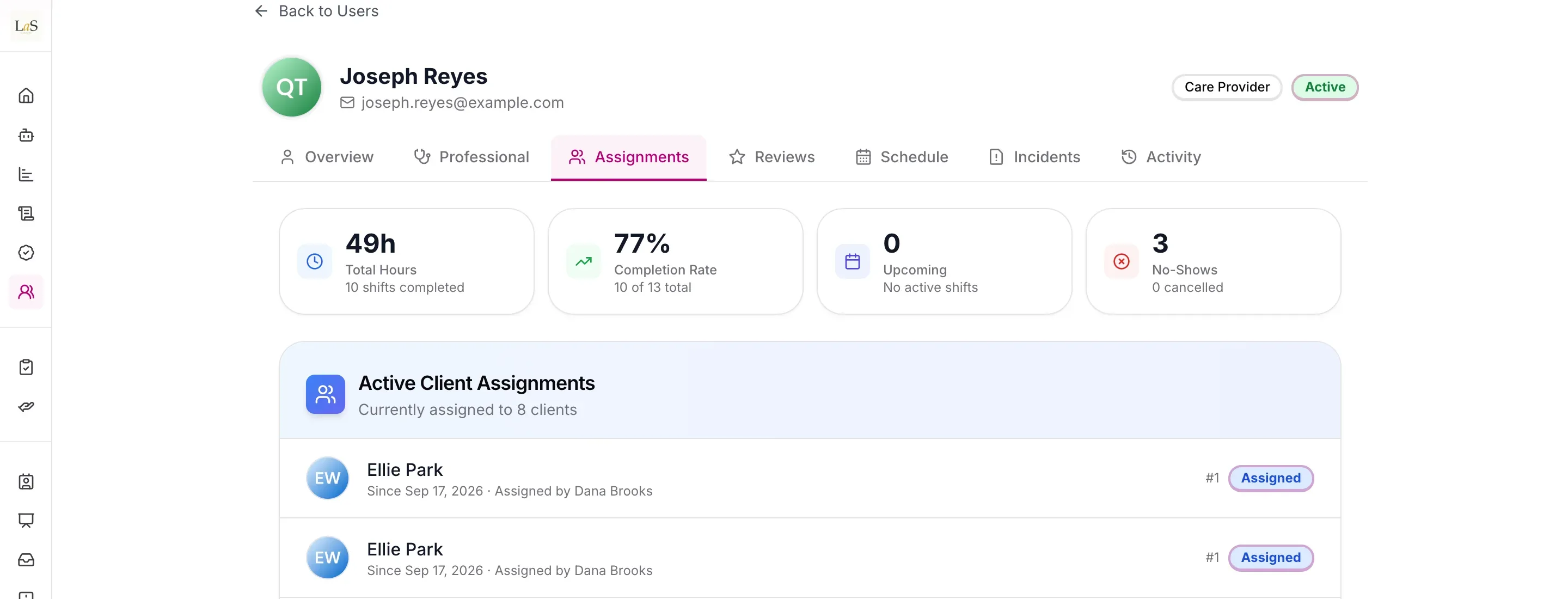
What exists today: a care provider's profile shows total hours, completion rate and no-shows, above their client assignments. Readiness-quiz scores, task adherence, documentation quality, reports and improvement plans aren't part of it yet.
Key terms
- Performance evaluation record — A per-care-provider record holding their performance assessment within an agency.
- Performance tracking — The performance signals the record collects from across the platform: shift completion, task adherence, and documentation quality.
- Care Readiness Quiz score — The score a care provider records when taking the pre-shift Care Readiness Quiz (the PRD's "daily login quiz", an alias); these scores feed the evaluation record.
- Star rating — A rating a representative or care manager gives a care provider; star ratings are a signal the evaluation record collects.
- Structured feedback — Feedback captured in a defined form (rather than free text alone) that contributes to the evaluation record.
- Individual performance report — A per-care-provider report summarising the evaluation record for the care provider and their care manager.
- Performance Improvement Plan (PIP) — A documented and tracked plan that a care manager sets up for a care provider who needs to improve.
- Recognition tool — A way for a care manager to acknowledge a high-performing care provider.
- Caregiver Level Badge — The Level 1–4 classification shown on the care provider's ARMI Marketplace profile; performance data feeds the level (see ARMI Marketplace and Skills, Ratings & Feature Requests).
- Care manager — A management user who creates, edits, and views evaluations for care providers in their agency.
How it works
Each care provider has one performance evaluation record within their agency. Care managers create and maintain the record; the care provider can open and read their own record but cannot change it. Representatives have no access to the evaluation record itself, but they can rate a care provider (those star ratings are one of the signals the record collects).
What feeds the record
The record is not filled in by hand alone. Signals from elsewhere on the platform flow into it. The record tracks shift completion, task adherence, and documentation quality; it collects star ratings from representatives and care managers and structured feedback; and it links the care provider's Care Readiness Quiz scores (the PRD's "daily login quiz"), which are recorded for each shift (see Scheduling & Shifts). What dimensions the evaluation ultimately scores, and the cadence it follows, are not yet settled (see Decisions needed).
Reports, improvement plans, and recognition
A care manager can produce an individual performance report from the record. For a care provider who needs to improve, the care manager can open a Performance Improvement Plan that is documented and tracked over time. For a high performer, the care manager can use recognition tools to acknowledge the work.
Caregiver Level integration
Performance data feeds the care provider's Caregiver Level Badge (Level 1–4) shown on their ARMI Marketplace profile. The level reflects tenure, certification, areas of expertise, and specialization as defined by the originating agency, with performance as one input (see ARMI Marketplace and Skills, Ratings & Feature Requests).
Rules
- EVAL-1 — Every care provider has exactly one performance evaluation record within their subscribing company, scoped to that company and never visible across companies. (🚧 Spec only)
- EVAL-2 — A care manager can create, edit, and view the performance evaluation records of care providers in their company. (🚧 Spec only)
- EVAL-3 — A care provider can view their own performance evaluation record but cannot create or edit it. (🚧 Spec only)
- EVAL-4 — Representatives have no access to any performance evaluation record. (🚧 Spec only)
- EVAL-5 — A care provider's Care Readiness Quiz scores (the PRD's "daily login quiz") must be linked to their performance evaluation record. (🚧 Spec only)
- EVAL-6 — Owners and admins can configure performance evaluation for their company; this configuration applies only within that company. (🚧 Spec only)
- EVAL-7 — The performance evaluation record must track the care provider's shift completion, task adherence, and documentation quality. (🚧 Spec only)
- EVAL-8 — A care manager can produce an individual performance report for a care provider from their evaluation record. (🚧 Spec only)
- EVAL-9 — A representative or a care manager can give a care provider a star rating, and those star ratings must be collected by the care provider's evaluation record. (🚧 Spec only)
- EVAL-10 — The evaluation record must capture structured feedback (not free text alone) for a care provider. (🚧 Spec only)
- EVAL-11 — A care manager can open a Performance Improvement Plan for a care provider, and the plan must be documented and tracked over time. (🚧 Spec only)
- EVAL-12 — A care manager can use recognition tools to acknowledge a high-performing care provider. (🚧 Spec only)
- EVAL-13 — A care provider's performance data must feed their Caregiver Level Badge (Level 1–4) shown on their ARMI Marketplace profile (see also Skills, Ratings & Feature Requests). (🚧 Spec only)
Who can do what
| Action | Roles |
|---|---|
| Configure performance evaluation | Owner, Admin |
| Create, edit, and view care provider evaluations | Care manager |
| Produce an individual performance report | Care manager |
| Open and track a Performance Improvement Plan | Care manager |
| Use recognition tools for high performers | Care manager |
| Give a care provider a star rating | Care manager, Representative |
| View their own evaluation | Care provider |
| Any access to the evaluation record | Not representatives |
Decisions needed
- Is performance evaluation distinct from skills and ratings, or the same thing? The platform already has Skills, Ratings & Feature Requests. Options: keep them separate (peer/agency-facing ratings vs. a manager-owned evaluation record); fold ratings into the evaluation record; treat ratings as one input among several.
- What dimensions does an evaluation score? v4.2 names shift completion, task adherence, documentation quality, star ratings, structured feedback, and Care Readiness Quiz scores as inputs (, , , ) but does not say how they roll up. Options: a single overall score; a fixed set of competencies; company-configurable dimensions. The PRD ships a Default Performance Evaluation Template that is configurable per agency — what fields it contains is not defined here.
- What cadence does an evaluation follow? Options: a continuously updated rolling record; fixed review periods (e.g. monthly or quarterly); on-demand reviews created by the care manager.
- How exactly does performance data feed the Caregiver Level Badge? requires performance to feed the Level 1–4 classification, but v4.2 also lists tenure, certification, expertise, and specialization as level inputs and leaves the weighting and recompute trigger open. Options: a defined formula combining the inputs; care-manager assignment informed by the data; agency-defined rules. (See ARMI Marketplace.)
- Who can give a star rating, and how is it tied to a shift? allows representatives and care managers to rate. Open: whether a rating is per-shift or standing, and whether the same rating that feeds the evaluation record also drives the ARMI Marketplace star rating.
- Should shift-reflection sentiment or incident history feed the evaluation? The platform already captures shift-reflection sentiment trends and incident history. Options: feed them in automatically alongside the tracked signals; surface them beside the record without scoring them; keep them out entirely.
How is this page?
Last updated on