Care Lifecycle (End-to-End)
How Anaya keeps each client's care plan matched to their real condition — the assess → deliver → observe → re-plan loop, what triggers a review, and the human-gated reassessment that closes it.
Part of the Anaya Care Handbook — the source of truth for how the product must behave. When the product needs to change, change this document first, then make the system match it.
Implementation status — audited against
apps/backend/src/reassessments,apps/backend/src/clients, and the web dashboard on 2026-07-10. Trigger contracts 1–8 fire in the backend; each leg below carries its own tag. Legend: ✅ In code · ⚠️ Partial · 🚧 Spec only (not yet built).
What this covers
This page is the spine of client care: it shows how the client-care modules form one continuous loop that keeps a client's matched to their real condition — and, just as important, what happens and who decides when the client changes.
The starting point is simple: a care plan is written from the client's , and a (shown in the app as Care Provider Tasks) turns that plan into the recurring tasks a care provider works from. The hard part is everything after — because in the real world the client changes. They are hospitalized, their condition declines, a care provider notices something new. When that happens the plan has to catch up, and the change has to ripple all the way down to the instructions a provider reads before a shift. This page owns the that make that ripple happen, and the one rule that governs all of them: the platform detects and drafts, but a person decides ().
See it in the app. The loop surfaces in three places: the queue in the sidebar (/dashboard/reassessments), where AI-drafted reviews wait for a decision; and, on each client, the Change of Conditions and tabs, where the two most common triggers start.
The modules this page connects:
- Care Assessments — the clinical picture the plan is built from.
- Care Plans & the Care Task List — the narrative plan and the recurring tasks.
- AI-Generated Task Instruction Steps — the per-task, client-specific instructions.
- Change of Conditions — how the agency learns the client changed.
- Reassessment & Care Plan Review Cycle — scheduled and event-driven re-evaluation.
- Transition of Care — hospital-to-home and other handoffs.
- Hospice Care Support — the comfort-care branch.
The client's overall state (Active, OnHold, Closed) is owned by Clients, rule ; this page shows where the care loop sits inside that status, and never re-defines it.
Key terms
- Care lifecycle — the continuous loop a managed client moves through: assess → plan → deliver → observe → re-evaluate → re-plan.
- Plan-currency — the property that the live and reflect the client's current condition. Plan-currency breaks the moment a triggering event occurs, and is restored only when a recorded reconciles it.
- Stale Care Task List — a published Care Task List built from a version older than the client's current one. A stale list is the concrete signal that plan-currency is broken.
- Trigger contract — a defined rule by which an event on one module causes an action on another. The contracts are listed in the connective-trigger matrix; each is owned as a numbered rule by the module that emits the event.
- Care-plan review — the single downstream action that a change of condition, a discharge, and a reassessment all converge on: a care manager reviews the client's assessments and care plan together and records the outcome. One action, many entry reasons — realized by a single record (see Reassessment).
- Care Operations workflow — the ordered setup path that turns a client's assessed need into staffed, prepared shifts: Schedule → Shift Generation → Care Plan → Care Team → Shift Assignment → the meal, engagement, and Care Task List steps.
- Workflow state — one of Locked, Ready, In progress, Complete, or Stale. A stale step was previously complete but one of its source records changed.
How it works
The initial Care Operations workflow
Before steady-state care begins, every client moves through one strict setup path:
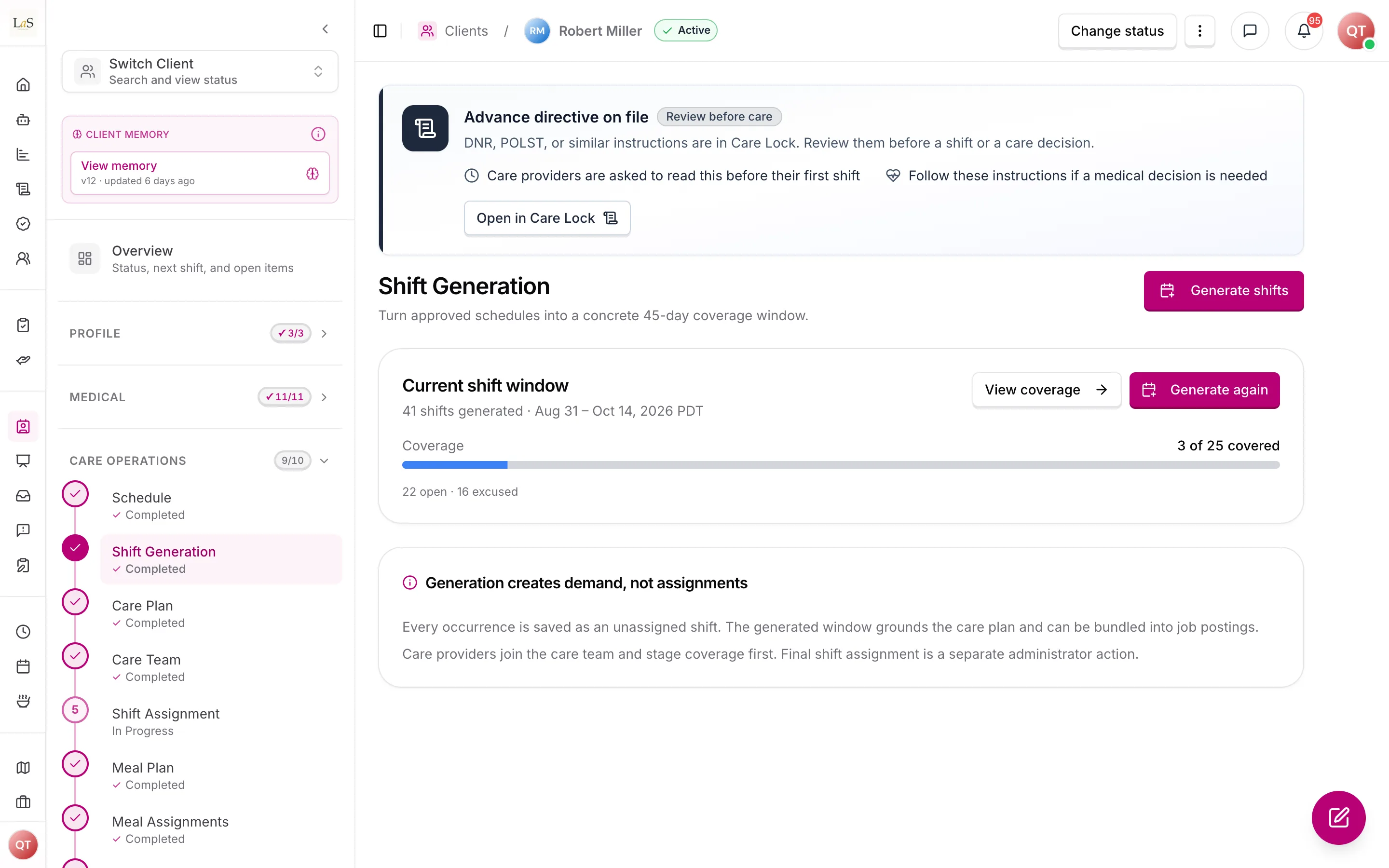
The next step is unlocked only when the current step's completion rule is satisfied. Staff can always review completed earlier steps, but cannot create downstream records by bypassing the sequence. The gate is enforced by the backend as well as the interface.
A step can become Stale when a source changes. For example, editing a schedule after shift generation makes the active generation batch and its grounded care plan stale. Existing accepted, in-progress, or completed shifts keep running; new downstream setup actions pause until staff regenerate and review the dependent work. The product explains what changed, what remains safe, and the single next action that restores currency.
| Step | Complete when |
|---|---|
| Schedule | At least one valid active schedule exists |
| Shift Generation | A successful current 45-day batch covers every active client schedule revision |
| Care Plan | The current plan records that batch and its schedule revisions |
| Care Team | At least one active provider is on the client team; recruitment may stage coverage for several providers |
| Shift Assignment | Every upcoming shift in the active generation batch has one committed provider |
| Later preparation steps | Their existing module-specific completion rules are met, in order |
The loop at a glance
Every managed client sits somewhere on one loop. Most of the time they cycle between deliver and observe — steady-state care. A triggering event pushes them into re-evaluate; only a material change loops back through plan.
The client's Active / OnHold / Closed status runs alongside this loop and is owned by Clients () — a hospitalization, for example, moves the client OnHold while they are away (see Journey A below). This page does not re-draw that status machine; it only wires the care loop that turns inside it.
What the platform does vs. what you decide
The loop is human-gated (). The platform watches for triggers and drafts a recommendation, but a care plan, Care Task List, or instruction step only changes when a care manager decides — the platform never changes them on its own.
| The platform does this, automatically | The care manager decides this |
|---|---|
| Detects a trigger (significant change, discharge, repeated step flag, routine interval due) and opens one reassessment | Whether the change is real, and what to do about it |
| Compares the client's current assessment scores against the baseline, scores materiality, and drafts per-field assessment suggestions () | Which suggested assessment changes to apply (), and whether to update the plan, note it and monitor, escalate, or dismiss |
| Drafts a recommendation into the queue | Records the outcome — the single action that lets any downstream change proceed |
| Once an outcome is recorded, flags the affected Care Task Lists and instruction steps stale for review | Reviews, approves, and republishes the updated plan, list, and steps |
This is why the Reassessments queue reads: "Care plans and task lists only change when you decide — the platform never changes them on its own."
The reconciliation loop
Every detour off steady-state care follows the same shape, whatever set it off:
- An event breaks plan-currency — a significant change of condition, a routine reassessment falling due, a discharge, or the same instruction step flagged repeatedly by care providers.
- A reassessment opens — the platform freezes the current scores, compares them to the baseline, and drafts a recommendation. It also proposes question-by-question assessment changes; the care manager applies the accepted ones — each written as a revision of the assessment it changes () — before recording the outcome. The care manager reviews the client's assessments and care plan together and records the outcome.
- A new care plan version is published — if the outcome is to update the plan, the care plan is never edited in place; the newest version becomes current.
- The Care Task List is flagged stale — the published list still points at the prior plan version, so it is flagged for the care manager to refresh and republish.
- Task instruction steps regenerate — the instructions that depend on the changed scores are flagged for regeneration and returned to the care manager for approval.
- Care providers are re-briefed — the next provider works from the updated plan, list, and instructions; a handover alert carries anything urgent.
At every step the platform prompts; it never rewrites care on its own ().
Canonical journey A — the hospitalization round-trip
This is the journey the rest of the platform is built to support: a client is hospitalized, comes home changed, and care resumes on a plan that matches the new reality. The client moves to OnHold while away (which hard-blocks shifts); on return, a discharge note opens a that holds the first shift home until the plan is brought up to date.
The discharge note opens the care-plan review (); the review runs as a reassessment (), which produces an updated plan and regenerated instructions; and the first post-discharge shift is hard-blocked until that updated plan and tasks are republished (, ). A care provider never arrives for the first shift home working from the pre-hospital plan — the gate is enforced both when the shift is created and again at clock-in.
In the app. Record the discharge on the client's tab; a banner shows shifts are held; the drafted review lands in the queue, with its generation progress in the dock.
Canonical journey B — the observed-decline path
Most change is quieter than a hospital stay: a care provider notices the client slipping, records it, and — if it is significant — that observation pulls the client into reassessment and ripples through to the daily instructions.
A change reviewed as Significant () opens a reassessment; the agent compares the current scores to the baseline and scores materiality (); the care manager records the outcome; and only a material change flags the plan and instruction steps for regeneration (). A change marked Routine is acknowledged and closes — no review.
In the app. Mark significance on the client's Change of Conditions tab (the review dialog asks "How significant is this change?" — Routine or Significant); a Significant mark opens the reassessment in the queue and flags the client's Care Task Lists for regeneration review.
The connective-trigger matrix
This is the heart of "making them connected." Each row is a : an event on one module (the emitter rule) causes an action on another (the receiver rule). Every row ends the same way — at a prompt or queue item a care manager acts on () — so that gate is not repeated per row. A reader (or an engineer) can follow the chain of linked IDs: COC-8 → RAC-4 → RAC-13 → STEP-17.
| # | When this happens | What the platform does (it drafts — you decide) | Contract | Status |
|---|---|---|---|---|
| 1 | A change of condition is reviewed and marked Significant | Opens a reassessment in the review queue | → | ✅ |
| 2 | A reassessment scores a materially different result | Flags the affected instruction steps for regeneration | → | ✅ |
| 3 | A new care plan version is published | Flags dependent Care Task Lists stale, recording the source version | ✅ | |
| 4 | A is added (hospital → home) | Opens a reassessment and hard-blocks the first post-discharge shift | → | ✅ |
| 5 | The same instruction step is flagged repeatedly across shifts | Raises a reassessment once the pattern threshold is met | → | ✅ |
| 6 | A hospitalization ends in a return with a discharge | Runs the Transition of Care round-trip → reassessment → plan + task regen → Active | → | ✅ |
| 7 | An RTI or assessment is completed, or a completed one changed | Flags the affected instruction steps for regeneration | → | ✅ |
| 8 | A care manager applies selected reassessment suggestions | Writes each accepted change as a revision of the assessment it changes, stamped with the reassessment, and recomputes materiality; the post-outcome plan draft records the assessment revisions that grounded it | → | ✅ |
Contracts 1–8 fire in the backend today; contract 8 took its present shape with template-driven intake on 2026-10-06. What remains is web polish on a few of the surfaces that display them — see Known gaps.
Rules
Implementation status — audited against
apps/backend/src/reassessmentsandapps/backend/src/clientson 2026-07-10. All eight lifecycle trigger contracts are in code; the remaining spec-only pieces live on the module pages (see Known gaps).
- LIFE-1 — The handbook recognizes a single, continuous — assess → plan → deliver → observe → re-evaluate → re-plan — and every client in Active care sits somewhere in it. (✅ In code)
- LIFE-2 — Plan-currency invariant. The live care plan and Care Task List must reflect the client's current condition. Any recognized triggering event (significant change of condition, routine or event reassessment, discharge, or repeated step flags) opens a , and that review must be recorded before the client returns to steady-state care. (✅ In code)
- LIFE-3 — Each connection in the lifecycle is owned as a numbered rule by the page that emits the event and received by a numbered rule on the page that acts on it; the lifecycle is the sum of these trigger contracts, not a separate engine. The authoritative list is the connective-trigger matrix. (reference)
- LIFE-4 — A care-plan review reached from a change of condition (), a discharge (), or a reassessment () converges on the same care-plan-review action and updates the same care plan document — one action, many entry reasons. This is realized by a single record: while one is open, a new trigger folds into it rather than opening a second (see ). (✅ In code)
- LIFE-5 — Cross-stage triggers surface to the care manager as a prompt or review-queue item for confirmation; the platform must never change a client's care plan, Care Task List, or instruction steps autonomously. This restates the platform principle "AI drafts, humans decide." (✅ In code)
- LIFE-6 — A client returning from a hospitalization that involved a discharge must pass through Transition of Care before the first post-discharge shift is released; the client moves OnHold → Active only once the updated plan is in place (see ). (✅ In code)
- LIFE-7 — Closed is terminal: the lifecycle never loops back from Closed, and re-admission begins a new client record and a new lifecycle. This matches the in-code client status machine. (✅ In code)
- LIFE-8 — Initial Care Operations must follow this order: Schedule → Shift Generation → Care Plan → Care Team → Shift Assignment → Meal Plan → Meal Assignments → Activities → Activity Assignments → Care Task List. Each content bank is immediately followed by the assignment step it feeds, and the care task list comes last because it is built from those assignments. Meal slots are derived from the client's routine meal times, so a client without them cannot reach Meal Assignments, and the Care Task List can be neither generated nor first published until they are set (unless the client is NPO). The one exception is meal times that fall outside every shift: no shift can carry a meal, so Meal Assignments reads Not applicable with that reason, counts as done, and the Care Task List can proceed. (✅ In code)
- LIFE-9 — Every Care Operations step has exactly one workflow state: Locked, Ready, In progress, Complete, or Stale, and the product must state the prerequisite or recovery action for any step that is not Ready or Complete. (⚠️ Partial — Locked, Ready, Complete, and Stale are derived and shown; long-running steps expose their own progress rather than the shared In progress state)
- LIFE-10 — A downstream Care Operations mutation must be refused until every prerequisite step is Complete; hiding a control in the interface is not sufficient enforcement. Publishing a Draft client's first Care Task List, which makes the client Active, is refused on the same grounds as generating one; republishing for a client who is already Active is not. (✅ In code)
- LIFE-11 — Staff may revisit completed earlier steps, but changing a source record must mark affected dependent steps Stale and pause new downstream setup actions until currency is restored. (⚠️ Partial — schedule revision invalidation and its downstream gates ship; broader invalidation for every later source remains to be completed)
- LIFE-12 — Existing accepted, in-progress, and completed shifts continue safely when a setup step becomes Stale; staleness blocks new setup work and never silently destroys work already underway. (✅ In code)
- LIFE-13 — Shift Assignment is Complete only when every upcoming shift in the active generation batch has exactly one committed care provider. (✅ In code)
- LIFE-14 — Care Operations progress must be derived from authoritative records and their revisions, not from a user-set completion checkbox. (✅ In code)
- LIFE-15 — The initial reset for this workflow removes schedules and all downstream Care Operations data while preserving clients, intake/profile information, medical records, assessments, users, businesses, permissions, and reusable global templates. (⚠️ Ready to run — migration 086 is dry-run by default and has not been executed)
Who can do what
| Action | Roles |
|---|---|
| Review a drafted reassessment and record its outcome | Care manager |
| Dismiss a reassessment, or confirm/defer a stale-list or step regeneration | Care manager |
| Configure trigger thresholds (significance, materiality, reassessment interval) | Owner, Admin |
| Request a reassessment or review | Representative; Care manager; Owner; Admin |
| Authorize a transition of care | Representative (responsible party), as defined on each module page |
| Observe and record a change of condition | Care provider (in the field) |
Permissions on each step are owned by the module that step belongs to; this table is the consolidated view.
Decisions needed
- Where does "on hospice" live? The hospice branch needs a way to mark a client as on hospice; this must reconcile with the client status machine on Clients. See Hospice Care Support Decisions.
- The threshold definitions for "significant" () and "materially different" () are owned by their pages; this page only requires that the link fires once the threshold is met.
- (Resolved — shipped.) One review object, many entry reasons. Change-of-condition, discharge, and reassessment converge on a single record (the entry reason is stored as the trigger type), so the paths cannot diverge in implementation (, ).
- (Resolved — shipped.) Triggers are human-gated (): every trigger surfaces as a prompt or queue item; nothing regenerates automatically. Per-agency opt-in automation for specific low-risk triggers is a possible future refinement, not the default.
How is this page?
Last updated on