Medications
Part of the Anaya Care Handbook — the source of truth for how the product must behave. When the product needs to change, change this document first, then make the system match it.
What this covers
This page governs everything about a client's medications: the medication list the agency keeps for each client, how medications are scheduled and grouped into med passes, the medication reminder tasks care providers see during shifts, the permanent log of every dose, and the stock tracking that warns the agency when a medication is running low. The story in one paragraph: agency staff build a medication list for each client, with schedules; during a shift, the schedules appear to the care provider as a single "med pass" task; the care provider records what happened to each medication (taken, skipped, or unavailable); the system writes a permanent log entry for each dose, reduces the stock count for every dose taken, and alerts the agency and the family when stock falls below the refill threshold.
Key terms
- Medication list — the set of medications kept on a client's record: prescriptions, over-the-counter drugs, topicals, and supplements.
- Med pass — a named group of a client's medications that are given together and therefore share one schedule.
- Medication schedule — the recurring times a medication is due, set in the client's timezone.
- Medication reminder task — the task a care provider sees during a shift when a scheduled dose falls inside that shift. It is generated from the schedule, not stored in the care plan.
- Medication checklist — the per-medication form inside a medication reminder task where the care provider marks each medication Taken, Skipped, or Unavailable.
- Medication log — the permanent record of one medication's outcome for one dose: who recorded it, when, with what status, reason, and notes.
- Stock — the remaining number of doses on hand for a medication.
- Refill reminder — an optional per-medication alert: when stock falls to or below a chosen threshold, the agency's management team and the client's representatives are notified.
- Medication guide — plain-language drug information (warnings, usage, side effects) automatically pulled from public drug databases and shown to care providers and families.
- Discontinue — marking a medication inactive so it stops generating tasks but stays visible in the client's history.
- Reminder-only scope — the operating model where the agency only reminds and records, never administers, medications. Many non-medical home care agencies operate under this scope; the platform reflects reminder behavior, not administration.
- Missed-dose window — the time after a scheduled dose within which it should be logged; once the window passes with nothing logged, the dose counts as missed.
- Side-effect note — a record that a client experienced a possible side effect of a medication, captured for follow-up and shared with Health Readings.
How it works
Building the medication list
Agency staff add medications on the client's Medications page on the web. As they type a name, the system suggests matches from public drug databases and offers the known strength/form options for the chosen drug. Staff record the type (prescription, OTC, topical, or supplement), dosage, frequency, purpose, instructions (from a preset list, or custom text), stock on hand, refill reminder settings, file attachments (such as a photo of the prescription), an optional med pass, and one or more schedule entries. Schedules are always expressed in the client's timezone.
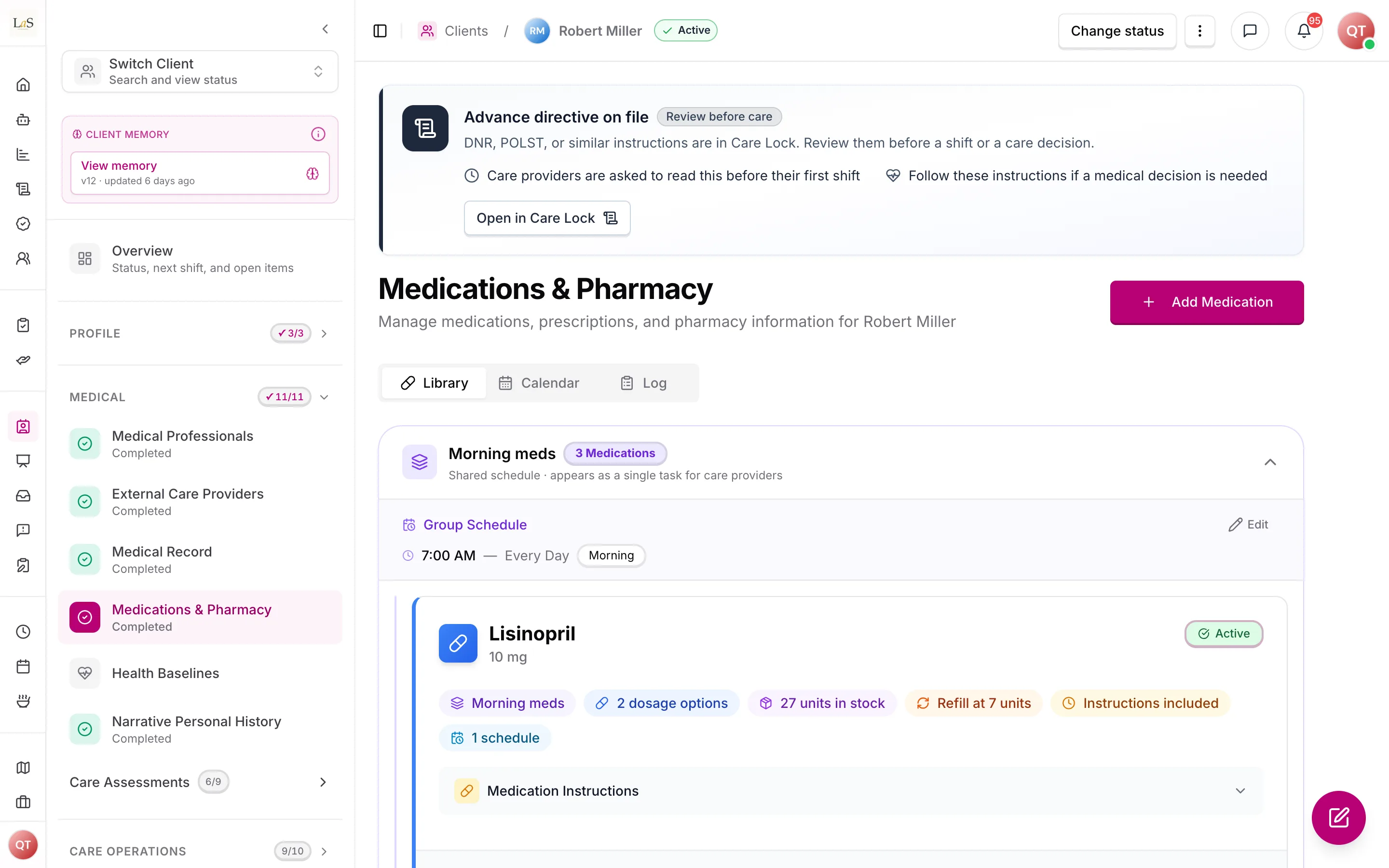
When a medication is added, the system also looks up the official drug information by name and attaches it as the medication guide. If no information is found, the medication is still saved — the guide is a bonus, never a requirement. The guide is refreshed when the medication is renamed, and staff can refresh it on demand.
Med passes (grouping)
Medications that are given together belong to one med pass. Staff can name a pass when adding or editing a medication; if the name matches an existing pass on the same client (ignoring capitalization), the medication joins that pass. Because a pass is given as one event, all medications in a pass share one schedule — editing the schedule of any member changes the schedule of the whole pass. A medication can be removed from a pass at any time, becoming standalone again. A pass with only one medication is shown as a plain medication.
Schedules become shift tasks
Medication reminder tasks are not written into the care plan. Whenever a care provider's shift tasks are assembled, the system looks at the client's active, scheduled medications and creates a task for every dose that falls inside the shift window. Medications in the same pass that are due at the same moment appear as one task covering the whole pass. Medication tasks are always required and carry the highest priority. Discontinued medications and medications without a schedule never produce tasks.
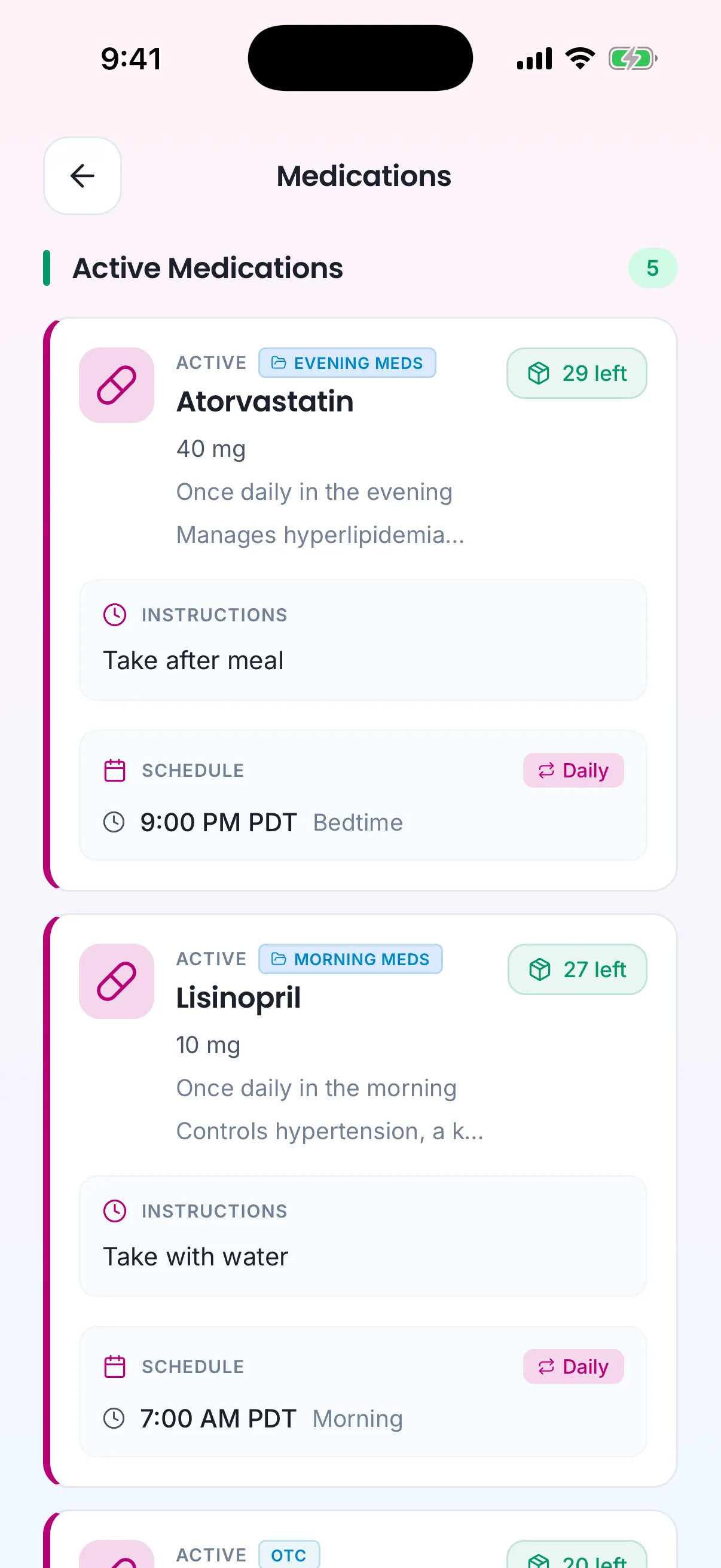
The medication list, with instructions and schedule, on the care provider's phone.
Recording a med pass
When the care provider starts a medication reminder task during a shift, the medication checklist opens. Every medication in the pass must be given an outcome before the task can be completed:
- Taken — the client took the dose. Stock is reduced by one.
- Skipped — the dose was deliberately not given. A reason is required: client refused, side effects, doctor advised, or other.
- Unavailable — the medication could not be given. A reason is required: out of stock, pharmacy delay, discontinued, or other.
The care provider can add a note to any item. Completing the task writes one medication log entry per medication in the pass. Once written, a log entry is permanent — it is never edited or deleted, and it survives even if the medication itself is later removed from the list.
Where the agency operates under a reminder-only scope, this checklist is a record of reminding and observing, never of medical administration. The wording shown to care providers and on client reports must keep that framing: the care provider reminded the client and recorded what happened, the care provider did not administer the dose.
Stock and refill alerts
Stock goes down by one for each dose logged as Taken, and never below zero. Refilling is a manual act: staff edit the medication and update the stock number. When a medication has its refill reminder turned on and a threshold set, every drop to or below that threshold notifies all management users in the business and the client's active representatives, with a link to the client's medications page.
Alerts: missed doses, low stock, and medication changes
Beyond low-stock refill alerts, the platform is meant to surface three more medication signals to the agency's management team and the client's representatives:
- Missed-dose alerts — when a scheduled dose is not logged within its missed-dose window, the system flags it as missed and notifies the management team so coverage can be checked.
- Refill alerts — the low-stock notification already described under Stock and refill alerts, raised when stock falls to or below the refill threshold.
- Medication-change notifications — when a medication is added, discontinued, or has its dosage or schedule changed, the relevant people (management team and the client's representatives) are notified that the medication list changed.
Side-effect tracking
When a care provider observes a possible side effect — at a med pass, or at any point during a shift — they can record a side-effect note against the medication. Side-effect notes are part of the client's health picture, so they flow into Health Readings for trend tracking and escalation rather than living only on the medication record.
Discontinuing and deleting
Discontinuing a medication marks it inactive: it stops generating shift tasks and stops being logged, but remains visible in the client's history (the "Past" view). Deleting a medication removes it and its file attachments entirely; its medication logs are kept, with the medication's name preserved on each log.
Who sees what
- Web (management) — the client's Medications page has the library (add/edit/view/delete, grouping), a calendar of upcoming doses, and a filterable administration log. Shift details include a per-shift medication summary. The client's pharmacy contacts are edited on the same page but are part of the client's care-provider contacts, not the medication list.
- Mobile (care providers) — medication tasks during shifts, plus a read-only view of the client's medication list with schedules, guides, and attachments.
- Mobile (representatives) — a dedicated read-only Medications tab for their linked client, with active/past filters, stock status, guides, and attachments. Representatives also receive low-stock alerts.
Rules
- MED-1 — Every medication belongs to exactly one client and one business, and is one of four types: prescription (the default), over-the-counter, topical, or supplement.
- MED-2 — Only management staff (owner, admin, care manager) can add, edit, delete, group, restock, or discontinue medications. Care providers and representatives have read-only access to the medication list.
- MED-3 — Medication name search must suggest real drugs from public drug databases, including the known strength and form options for the selected drug. Search requires at least two typed characters.
- MED-4 — When a medication is added or renamed, the system must attempt to attach the official drug-information guide by name. A failed lookup must never block saving the medication.
- MED-5 — All medications in the same med pass must share the same schedule. Giving one member a new schedule applies that schedule to every member of the pass.
- MED-6 — Naming a med pass the same as an existing pass on the same client (ignoring capitalization) joins that pass rather than creating a duplicate.
- MED-7 — Medication schedules are always interpreted in the client's timezone.
- MED-8 — Medication reminder tasks are generated from the medication list at the time shift tasks are viewed; they are never stored inside the care plan. Only active medications with at least one schedule generate tasks.
- MED-9 — Medications in the same pass that are due at the same moment must appear to the care provider as a single task covering the whole pass.
- MED-10 — Medication reminder tasks are always required and carry the highest task priority.
- MED-11 — To complete a medication task, the care provider must record an explicit outcome — Taken, Skipped, or Unavailable — for every medication in the pass.
- MED-12 — A Skipped or Unavailable outcome must include a reason. Skip reasons: client refused, side effects, doctor advised, other. Unavailable reasons: out of stock, pharmacy delay, discontinued, other. Notes are optional on any outcome.
- MED-13 — Completing a medication task writes exactly one medication log entry per medication in the pass, per dose occurrence. Repeating a submission must not create duplicate logs.
- MED-14 — A medication log entry is permanent. It can never be edited or deleted, and it outlives the medication it describes (the medication's name is preserved on the log).
- MED-15 — Each dose logged as Taken reduces that medication's stock by exactly one. Stock can never go below zero. Skipped and Unavailable doses never change stock.
- MED-16 — When a medication has its refill reminder enabled and a threshold set, any stock change that lands at or below the threshold must alert all active management users in the business and the client's active representatives.
- MED-17 — Restocking is a deliberate manual edit by management staff; the system never increases stock on its own.
- MED-18 — A discontinued (inactive) medication generates no tasks and no logs, but remains visible in the client's medication history.
- MED-19 — Deleting a medication also deletes its file attachments, but never its medication logs.
- MED-20 — Care providers provide medication reminders, not medical administration, and client reports must say so.
- MED-21 — Shift summaries and period reports must reflect the medication logs: per-medication counts of taken, skipped, and unavailable doses, refusal counts, and a compliance flag when compliance falls below 70%.
- MED-22 — Viewing a client's medication list is treated as access to protected health information and is recorded in the audit trail. Adding, editing, and deleting a medication must each leave an activity-log entry showing who did it and when.
- MED-23 — Where an agency operates under a reminder-only scope, every medication surface — the care provider checklist, shift summaries, and client reports — must describe the agency's role as reminding and recording, never as administering, doses. (🚧 Spec only)
- MED-24 — When a scheduled dose is not logged within its missed-dose window, the system must flag the dose as missed and alert the agency's management team. (🚧 Spec only)
- MED-25 — Adding, discontinuing, or changing the dosage or schedule of a medication must notify the agency's management team and the client's active representatives that the medication list changed. (🚧 Spec only)
- MED-26 — Care providers must be able to record a side-effect note against a medication, and those notes must flow into Health Readings so changes can be noticed and escalated. (🚧 Spec only)
Who can do what
| Action | Owner | Admin | Care Manager | Care Provider | Representative |
|---|---|---|---|---|---|
| Add / edit / delete a medication | Yes | Yes | Yes | No | No |
| Group medications into a med pass / remove from a pass | Yes | Yes | Yes | No | No |
| Update stock and refill settings | Yes | Yes | Yes | No | No |
| Discontinue / reactivate a medication | Yes | Yes | Yes | No | No |
| Refresh the drug-information guide | Yes | Yes | Yes | No | No |
| View a client's medication list and guides | Yes | Yes | Yes | Yes (read-only) | Yes (read-only, own client) |
| Complete a medication task and checklist during a shift | No | No | No | Yes (own shift) | No |
| Record a side-effect note against a medication | Yes | Yes | Yes | Yes (own shift) | No |
| View medication logs and shift medication summaries | Yes | Yes | Yes | No | No |
| Receive low-stock, missed-dose, and medication-change alerts | Yes | Yes | Yes | No | Yes (low-stock and medication-change) |
Decisions needed
- What time should a dose log carry? Today a log records the moment the care provider completed the task, not the scheduled dose time — late completions look like late doses, and compliance reporting reflects logging time. Options: keep actual completion time only; record both scheduled time and actual time; or record scheduled time as the primary timestamp.
- Should missed doses be recorded, and how long is the missed-dose window? A dose that falls in a shift but is never completed leaves no trace, so compliance percentages count only logged doses and a shift with nothing logged shows no medication section at all. Two things need a decision: (a) how to treat the dose — automatically log uncompleted doses as "missed" when the shift ends, surface missed doses in reports without logging them, or keep counting only what was logged; and (b) the length of the missed-dose window before a dose is flagged as missed under , and whether that window is fixed, per medication, or configurable per agency.
- How wide should medication-change notifications go ()? Decide which changes count as notable (added, discontinued, dosage change, schedule change, or also instruction or stock edits) and whether representatives receive every change or only a digest, to avoid over-notifying.
- What does pharmacy coordination cover? Today pharmacy contacts are stored as the client's care-provider contacts, not as part of the medication list. Decide whether pharmacy coordination stays as contact storage only or grows into refill ordering or pharmacy messaging.
Related pages
- Care Plans & Tasks — how shift tasks, including medication tasks, are assembled and completed.
- Scheduling & Shifts — the shift windows that determine which doses appear in a shift.
- Health Readings — where side-effect notes flow for trend tracking and escalation.
How is this page?
Last updated on