Clients
Part of the Anaya Care Handbook — the source of truth for how the product must behave. When the product needs to change, change this document first, then make the system match it.
What this covers
This page governs clients — the people receiving care. It defines what a client record contains, how a client moves through their lifecycle (Draft, Active, On Hold, Closed), how care providers are assigned to a client's care team, how family representatives and medical professionals are linked to a client, what the medical record holds, and what happens when a client is removed. Every client belongs to exactly one business (agency); nothing about a client is ever visible to another business.
Key terms
- Client — a person receiving care from the agency. Sometimes called a resident.
- Client profile — the client's personal details: name, date of birth, address, language, pets, health baselines, personal-history narrative, and care preferences.
- Client status — where the client is in their lifecycle: Draft, Active, On Hold, or Closed.
- Care team — the agency's own staff assigned to that one client: the client's accountable care managers plus the care providers assigned to them. Membership is always a per-client assignment, never a job title — an admin who holds no assignment on this client is not on their care team. This is the audience for a client's staff notifications. The Care Circle is deliberately excluded (see ).
- Care team assignment — the link between one client and one care provider, with its own status and a priority order.
- Care manager assignment — the link between one client and one accountable care manager, with its own status; eligibility is by permission (manage care reviews), not by role name.
- External care providers — outside organizations involved in the client's care (home-health agencies and pharmacies), stored as contact information only. Not the care team.
- Care Circle — everyone involved in a client's care other than the client themselves (family, existing caregivers, friends). It is captured once at intake and shared identically by the initial assessment, the care proposal, and the client record, so nothing is re-entered as the client moves through onboarding. The client is never a Care Circle member — their own profile represents them.
- Care Circle member — one person in the Care Circle: their name, phone, email, relationship to the client, one or more Care Circle roles, and notes.
- Care Circle role — a hat a member wears, chosen from a fixed multi-select grouped as Authority (Signs paperwork, Handles finances, Medical decisions, Legal authority), Everyday involvement (Day-to-day contact, Hands-on support, Lives with client, Provides rides), Coordination (Emergency contact, Coordinates care, Receives updates), and Limited involvement (Rarely involved). Replaces the old free-text "decision authorities".
- Representative — the family-facing portal login. A Representative is now a thin access grant tied to one Care Circle member — the person's relationship and roles live on the Care Circle, not on the login — and one is provisioned automatically for each member who has an email. Formerly called "Family".
- Responsible party — the one Care Circle member (or the client themselves) designated as the client's decision-maker of record. It is recorded as a pointer to a member (or to the client) that must be set explicitly and is resolved, never invented: an unset or stale pointer resolves to no one rather than defaulting to the first contact. The responsible party authorizes the care plan, is the default recipient of the emailed care proposal, and acts as the data and Anaya Wallet gatekeeper (granting access and approving spending). The client's other family contacts are simply the remaining Care Circle members.
- DNR & Advance-Directive alert — a non-dismissible banner shown at the top of the client profile and care plan when the client has a Do-Not-Resuscitate order or advance directive on file. Care providers must acknowledge it before their first shift.
- 30-day meal plan — a rolling four-week plan of the client's meals, grounded in their dietary preferences and Meal Assessment.
- Medical record — the client's medical history: allergies, diagnoses and conditions, hospitalizations, surgeries, and medical equipment.
- Service information — the type of care the client receives (In-Home Care, Hospice Care, Respite Care, or Placement) and its start/end dates.
- Client reference ID — a short identifier shown for and searchable on each client.
- Care assessments — the six evaluations on the client's record that ground the care plan: Anaya library instruments placed on every client, filled like any agency assessment; detailed on their own page.
- Client onboarding meeting — a live Zoom or Google Meet walkthrough where agency staff show a client or Care Circle member how the agency uses Anaya Care for that person. Distinct from the representative app invite, the guided family-onboarding flow (), telehealth, and the marketing-site Book a Demo.
How it works
The client record
Every client record holds the person's personal details, address, and language, plus three companion records created automatically with every client: service information, external care providers, and the medical record. The client's timezone is worked out from their address and is the basis for all of the client's scheduling (see Schedules & Shifts). An "advance directive on file" indicator is kept up to date automatically from the documents stored in the client's secure document vault.
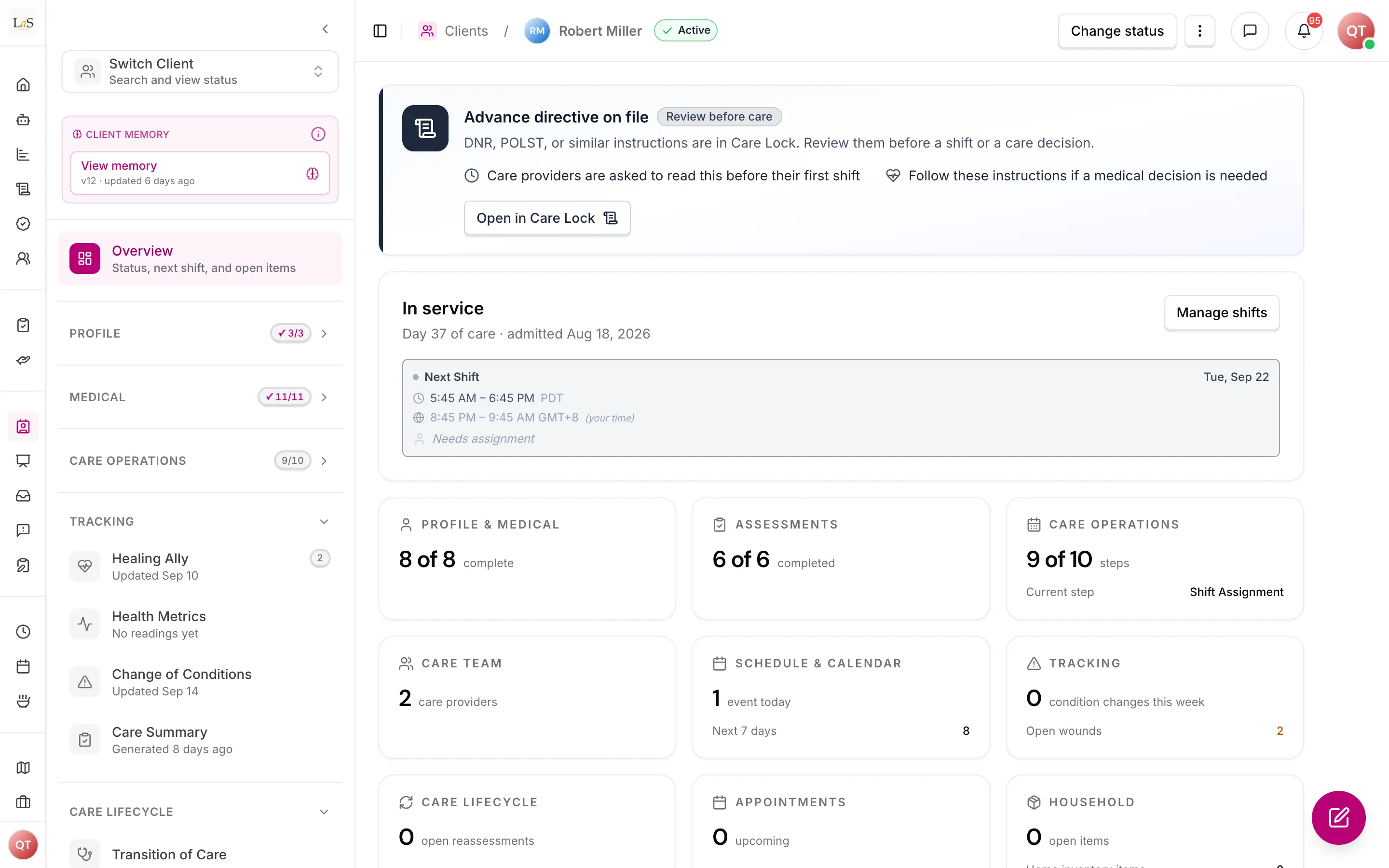
A client's Overview: status, the next shift, and a count for each part of the record.
The record also carries the six care assessments — Simplified Routine Task Inventory, Routine Task Inventory, Montessori Profile, Allen Cognitive Level, Home Safety, and Meal Assessment. They are the foundation of the client's care plan: who the client is, what they can do on their own, how their mind works, whether their home is safe, and how they eat. Each has its own status (Not Started, Draft, Completed) visible on the client's dashboard. Beside them sit the agency's own assessments made with the Assessment Builder, including Anaya's starters Caring Touch, Always Fresh and Care Bliss once the agency adopts them. The six are locked library instruments listed with the agency's own under , each shown as not started until someone fills it.
The full profile is organized into sections: personal information; health information (including the DNR & Advance-Directive alert described below); care and support information (including the 30-day meal plan); personal history and preferences; insurance and financial details; the care team; and document links.
DNR & Advance-Directive alert
When a client has a Do-Not-Resuscitate order or advance directive on file, a non-dismissible alert appears at the top of both the client profile and the care plan. The alert draws on the same advance-directive information surfaced in Health Readings, and is distinct from the automatic "advance directive on file" indicator that is kept in sync from the client's secure document vault.
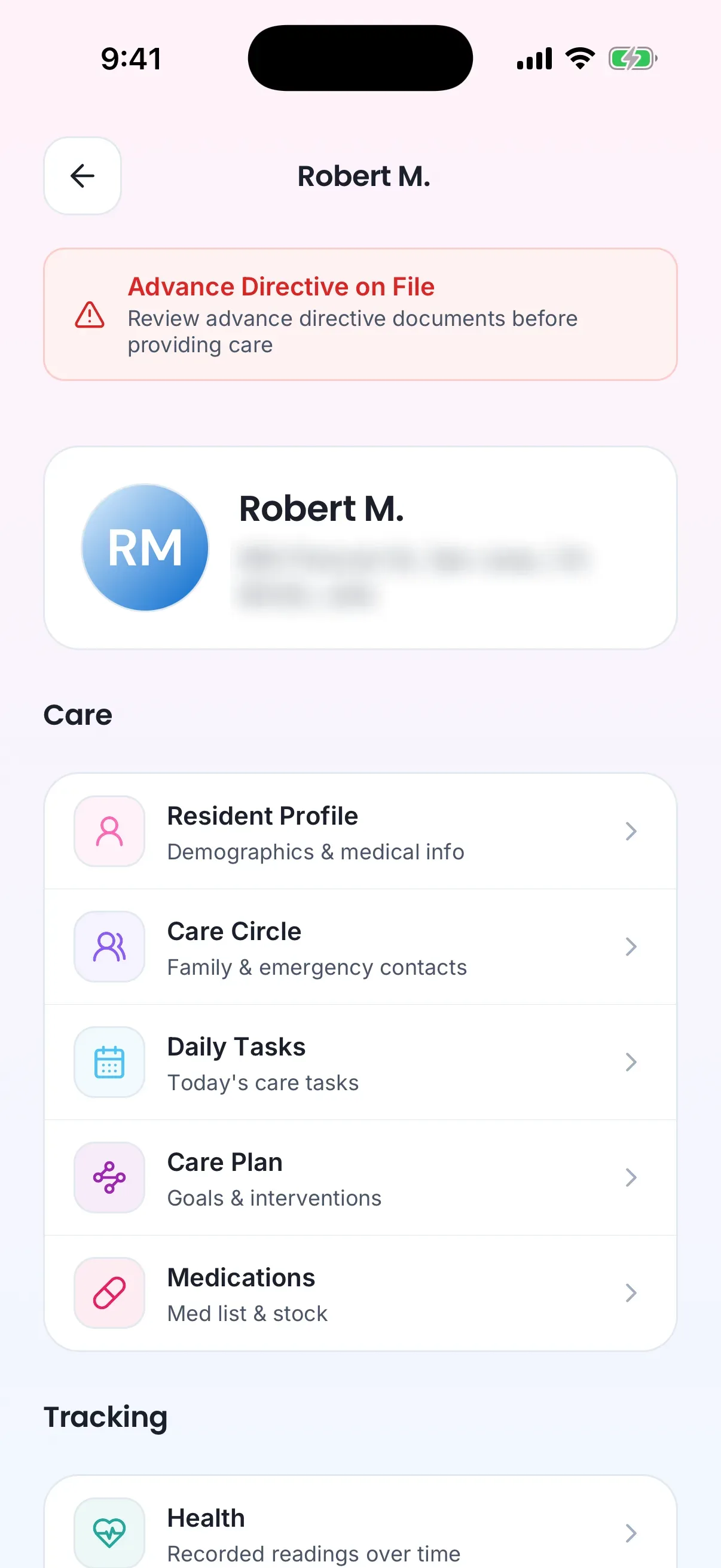
On the care provider's phone the same alert heads the client's page.
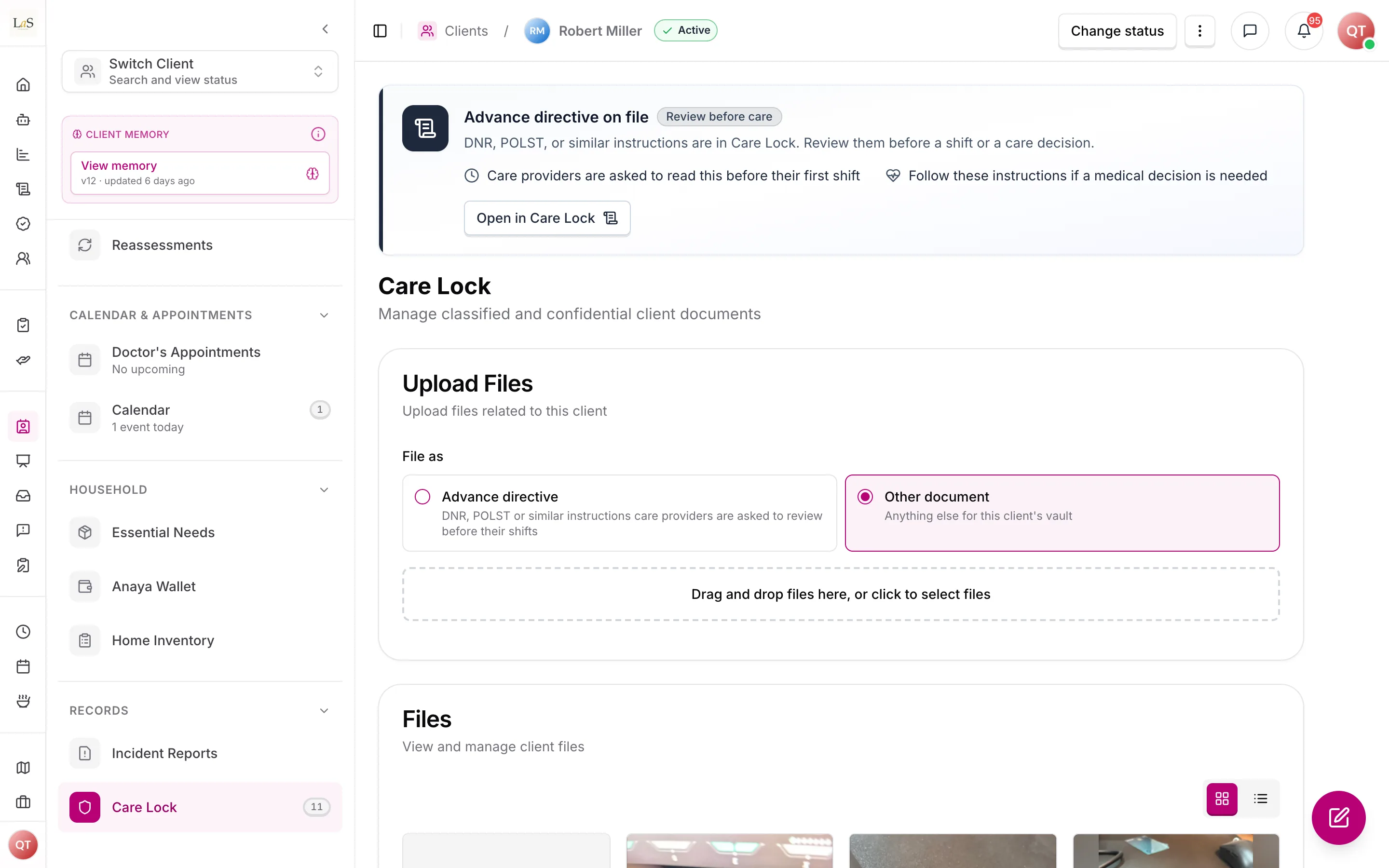
The banner sits at the top of every client page and links to Care Lock, where the directive is filed.
Care providers must acknowledge the alert before their first shift with the client. Acknowledging is an act of having read the directive, so the care provider is shown the document itself before they can acknowledge it — acknowledging something never put in front of them would record a fact that is not true. The acknowledgment is recorded once per client rather than per shift, and it goes stale if the directive document is later replaced: the provider is asked again, because what they read is no longer what is on file.
Whether an outstanding acknowledgment stops a shift starting is the agency's choice. Out of the box it does not — the care provider clocks in and the shift is flagged for the care manager, the same way an out-of-range clock-in is flagged (). An agency that wants the acknowledgment to be a hard requirement turns on enforcement, and clock-in is then refused until it is given. Care managers can see, per client, which of the assigned care providers have acknowledged and which are outstanding.
The 30-day meal plan
The client's care and support information includes a rolling 30-day meal plan — four weeks of planned meals grounded in the client's dietary preferences and Meal Assessment. The day-to-day meal experience itself lives in Meals.
Document links
The profile gathers links to the client's key documents in one place: the secure document vault (Care Lock), discharge notes, the client's assessment history, and the client's incident-report history. These are quick references into records that live elsewhere; the client record does not duplicate them.
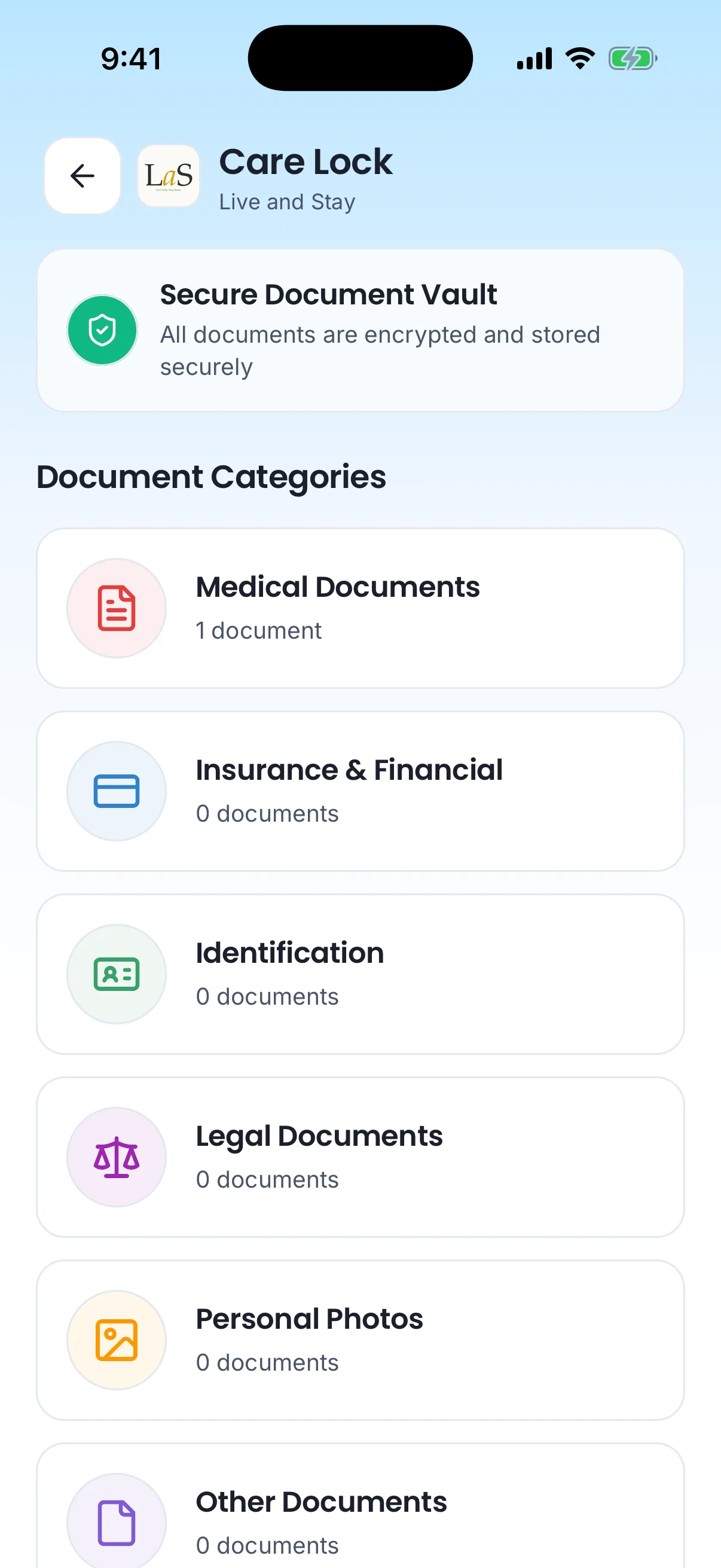
Care Lock on the care provider's phone.
Lifecycle
- Draft — the client is being set up. The care team, schedules, and assessments can all be prepared while in Draft.
- Active — care is underway. A client becomes Active automatically the first time a care plan is published for them; staff never set Active by hand.
- On Hold — care is paused. No new care team assignments, schedules, or shifts can be created.
- Closed — care has ended. This is final and keeps the client's history for the record. If the person returns, a new client record is created.
Owners and admins (and any role granted the "change client status" permission, typically care managers) make the manual moves. Every status change records who made it, when, and an optional note.
Creating a client
A client can be created three ways, and all three start in Draft:
- Manually — staff fill in the profile from scratch.
- From a care proposal — once a proposal is complete, it can be converted into a client. The client inherits the proposal's information — including its Care Circle, responsible party, and care-decision involvement, carried over without re-entry — and the client receives a copy of the proposal's assessment, Completed when the proposal's was, otherwise a Draft (ABLD-37). Every Care Circle member with an email is automatically provisioned portal access (a Representative). The proposal is marked "In Service" and linked to the new client (see Care Proposals). Before the client is created, the confirmation lists any existing client in the agency with the same name and date of birth, with a link to each, so staff can check it is not the same person; they can still go ahead ().
- By duplicating an existing client — copies the profile, companion records, assessments, and medications (without attached files) into a fresh record with its own reference ID. Assessments are copied as drafts, the six library instruments included (ABLD-32).
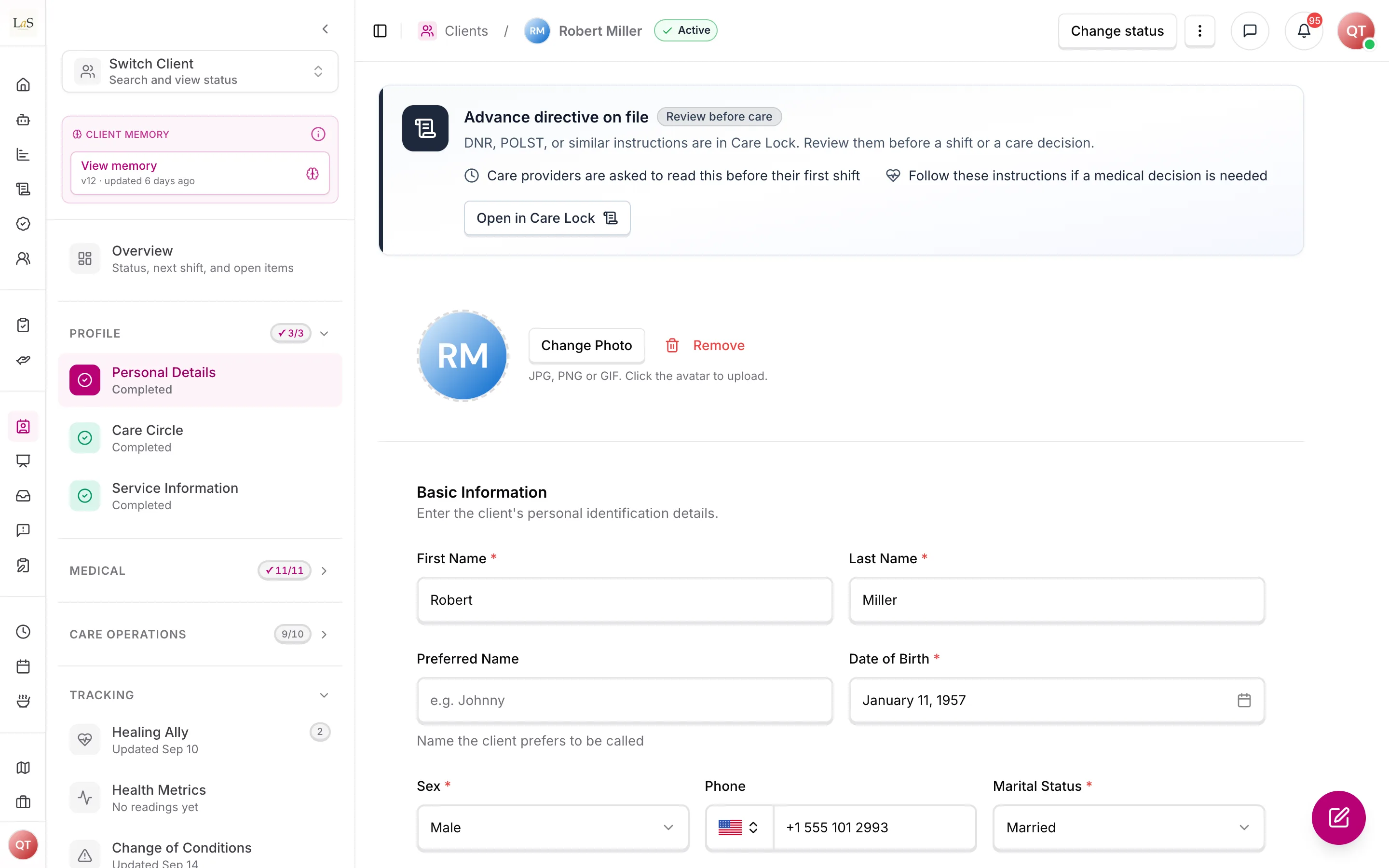
Personal Details, the first part of a client's Profile.
The care team
Staff add the agency's care providers to a client's care team either directly or by accepting a job application for that client (see Job Postings). Care-team membership and shift assignment are separate decisions: acceptance adds the provider to the team and nothing more, and assigning them shifts is a separate, later act by a care manager (). A matching view helps staff choose, ranking providers by distance, rating, skills, declared availability, and the shifts they already hold. Team members have a priority order that staff can rearrange. A care provider can only see and work with clients they are actively assigned to.
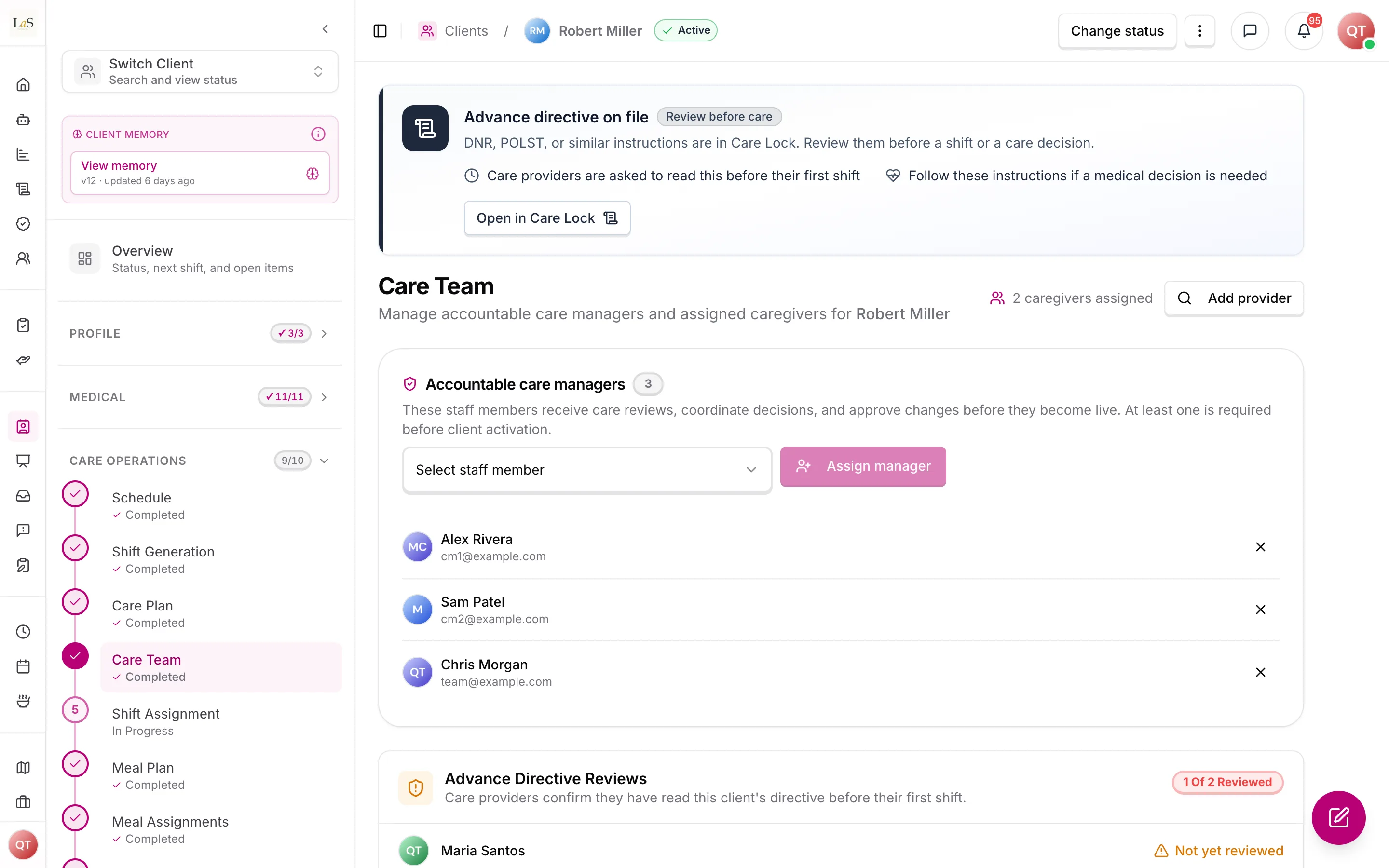
The Care Team page: accountable care managers, and which care providers have read the advance directive.
Beyond the agency's assigned care providers, the broader care team picture spans everyone involved in the client's care: the care manager, the assigned care providers, the primary care provider (PCP), specialists, home-health contacts, the pharmacy, the responsible party, and any additional family contacts. The agency's care providers are the working team described above; the others — PCP, specialists, home health, and pharmacy — are held as contact information (see external care providers and the Communication page), and the responsible party and family contacts are assembled as the client's .
The Care Circle, representatives, and medical professionals
A client's is the roster of everyone involved in their care other than the client — each member's name, contact details, relationship, and roles. Staff maintain it directly on the client record through the Care Circle editor. When a client is created from a care proposal, the Care Circle carries over from the proposal without re-entry.
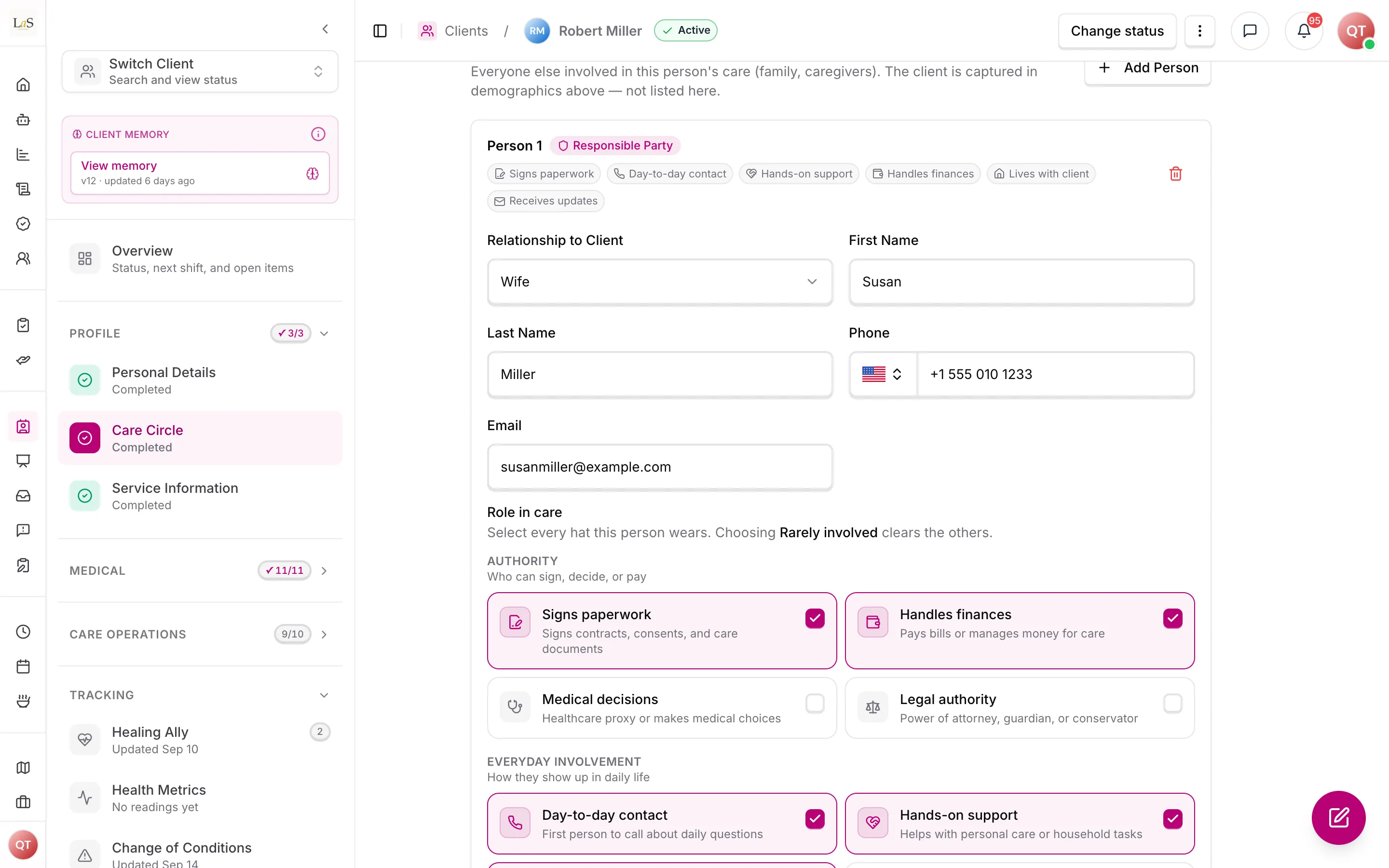
A Care Circle member: relationship, contact details, and the roles they hold.
Every Care Circle member who has an email address is automatically provisioned portal access — a Representative login tied to that member. The member's relationship and roles stay on the Care Circle; the Representative record is only the access grant. A representative can only see the clients they are actively linked to, and removing a representative deactivates that portal access while the Care Circle member (the person, their relationship, and roles) stays on the client record. Medical professionals are linked to the client the same admin-driven way, separately from the Care Circle.
Family onboarding
Staff can invite the client or Care Circle members to a — a live walkthrough of how the agency will use Anaya Care for that person — without granting portal access. The inviter either picks a date and time in the client's timezone, or sends a booking link so the guest picks a slot. The guest (or staff, when they pick the time) chooses Zoom or Google Meet from the platforms Anaya can actually create a room on; the room is created on Anaya's host account, on the same calendar as marketing-site demos, so a family walkthrough and a sales demo never occupy the same interval. Guests receive confirmation and reminders by email or SMS with a join link and a way to reschedule or cancel. Completing the meeting does not create an account; staff still send the representative app invite when the family is ready to use the portal.
Every invite for the agency also lives on Walkthroughs in Client Care, so staff do not have to open a client record to see what is booked. SuperAdmins keep a separate console list because Anaya hosts the rooms.
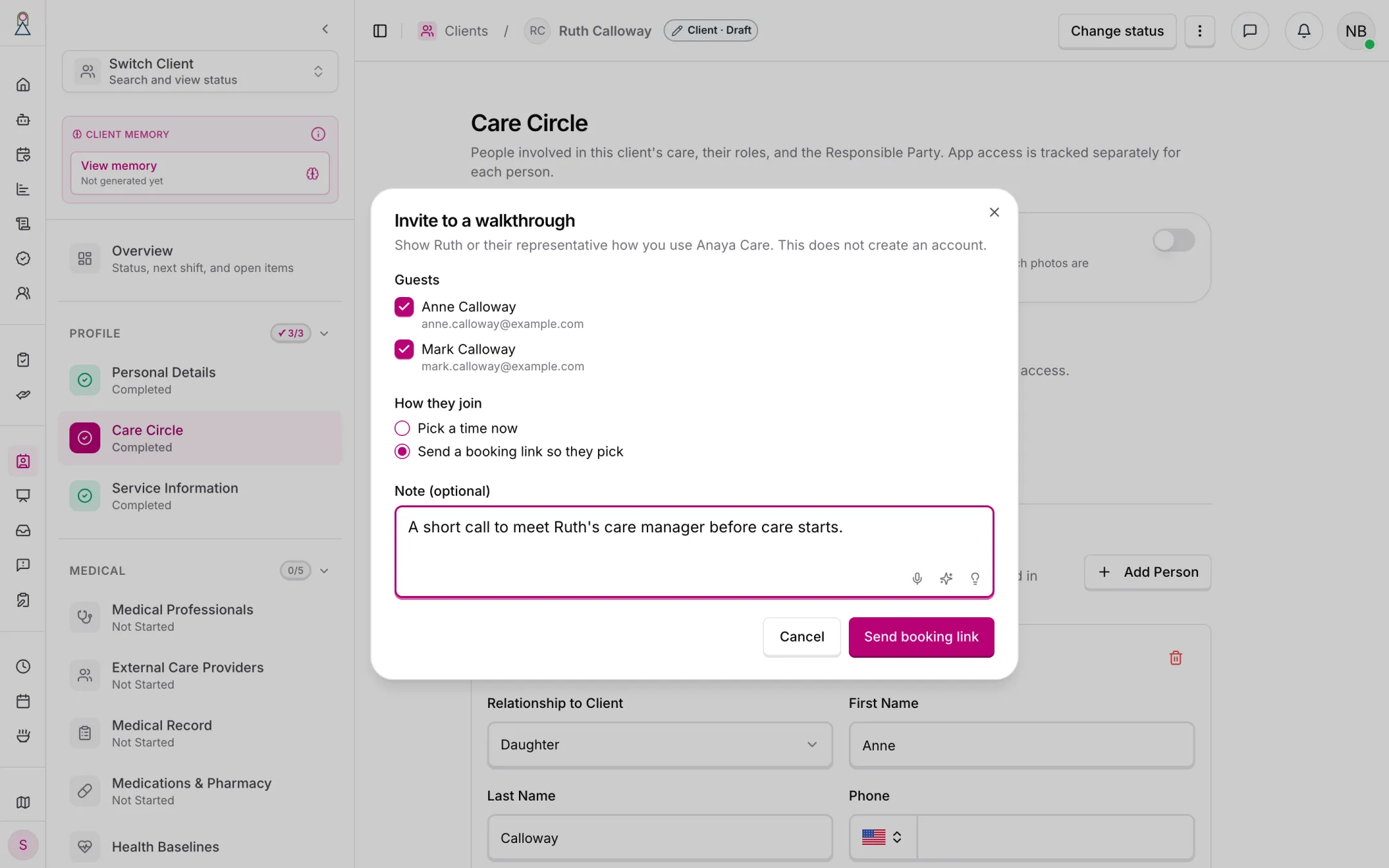
The invite, from the client's Care Circle. It does not create an account.
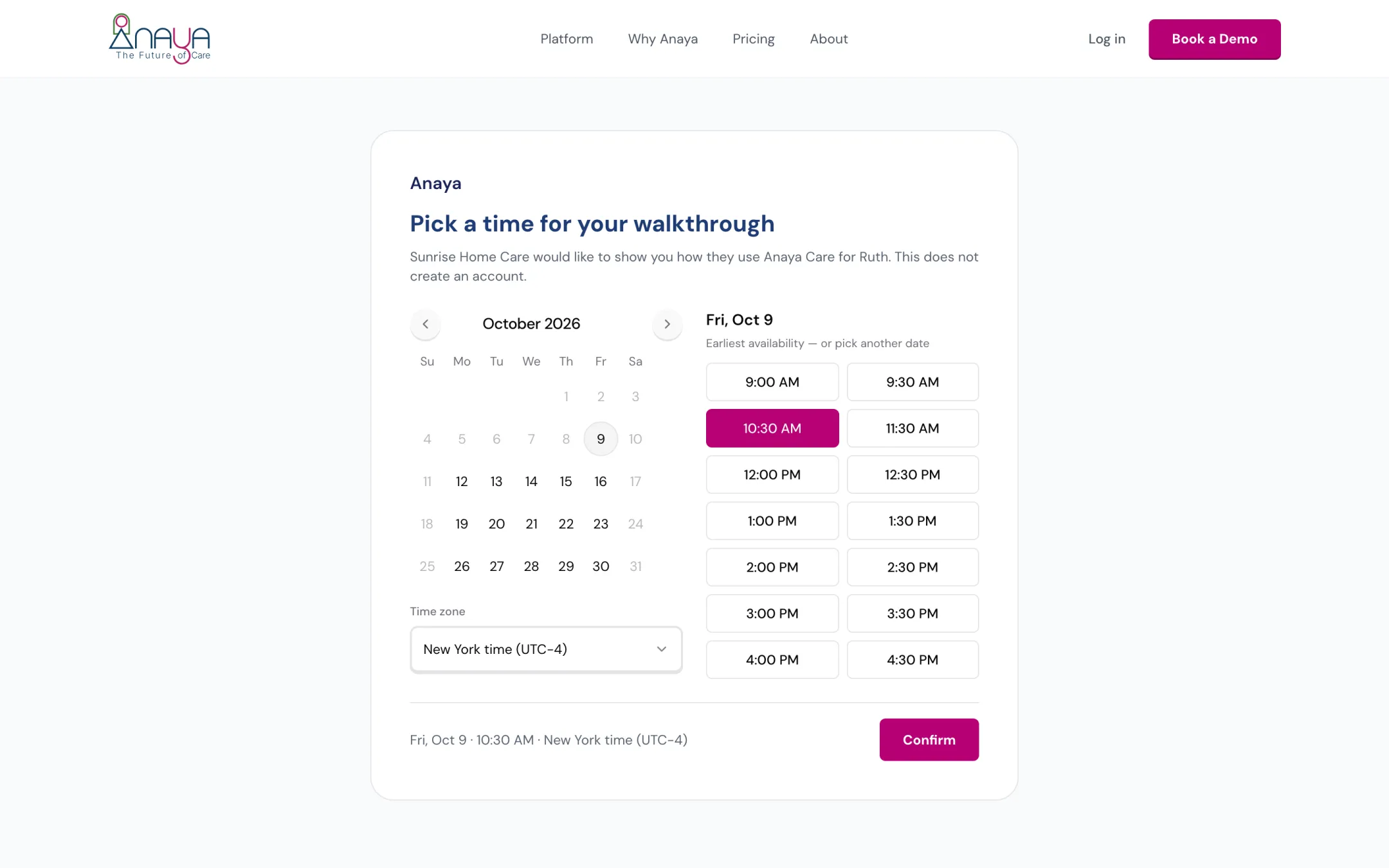
The family picks a time on the link.
When a representative is added, they are brought on board through a guided onboarding flow:
- Invitation — the representative receives an invitation by email or SMS containing a secure link.
- Account creation — they create an account with identity and relationship verification, and set up multi-factor authentication (MFA).
- Guided tutorial — a walkthrough of the portal, covering Care Connect, Care Feed, Care Lock, and Anaya Wallet.
- Preference settings — they set their notification preferences, their Care Feed face-photo permissions, and their language.
- Care-plan review and sign-off — they review the care plan and sign off with a digital signature; the care manager is notified.
- Care Lock setup — they upload initial critical documents to the secure vault.
- Anaya Wallet setup (future) — they configure a funding method and balance limits.
Removing a client
Removing a client is permanent. It deletes the client and everything connected to them — companion records, assessments, care plans, schedules, shifts, task history, medication logs, health records, reports, and the care team links. Staff can optionally delete the originating care proposal at the same time, or leave it and simply unlink it. Because Closed already preserves history, removal is reserved for genuine clean-up and requires its own permission.
Rules
Implementation status — audited against
apps/backend/src/clients,apps/backend/src/shifts,apps/backend/src/users/entities/representative-profile.entity.ts, andpackages/shared/src/utils/care-circle.tson 2026-09-10. ✅ In code · ⚠️ Partial (built, but doesn't fully match the rule) · 🚧 Spec only (not yet built).
- CL-1 — A client can be created in three ways: manually by agency staff, from a completed care proposal, or by duplicating an existing client. All three must start the client in Draft status. (✅ In code)
- CL-2 — Every client must belong to exactly one business. No information about a client may ever be visible to another business. (✅ In code — a global query plugin auto-scopes every client query to the requesting user's business)
- CL-3 — Every new client must automatically receive three companion records: service information (defaulting to In-Home Care when created manually), external care providers, and a medical record. (✅ In code — all three are created on every client; note a rare partial-failure path can still leave service information missing, see Known gaps)
- CL-4 — Every client must carry a short reference ID, and that ID must be unique within the business. (✅ In code — sparse unique index on
{ business, patientId }; create/duplicate retries on collision) - CL-43 — When staff create a client from a care proposal, the confirmation warns, before anything is created, if the agency already has a client with the same first name, last name and date of birth — names compared ignoring case and extra spaces, the date of birth as a calendar day. The warning lists each match with a link to it; staff may continue, creating the client as usual, or cancel. It never blocks the create and never offers to use the existing client instead. Draft and Active clients both match; clients of another agency, deleted clients, clients the person could not open, and the client this proposal already created never do. Adding a client by hand is not checked. (✅ In code)
- CL-5 — A client's status is always exactly one of Draft, Active, On Hold, or Closed, and every status change must record who made it, when, and any note. (✅ In code)
- CL-6 — A client can only become Active automatically, when their first care plan is published. Staff must never be able to set Active manually, and auto-activation only happens from Draft and only when a real person triggered the publish. (✅ In code — the transition map blocks manual Active, and auto-activation only fires from Draft on a user-triggered first publish)
- CL-7 — Manual status changes can only be made by owners, admins, or roles granted the "change client status" permission. Everyone else must be unable to change a client's status. (✅ In code)
- CL-8 — Closed is final. A closed client can never be reopened; re-admission requires a new client record. (✅ In code — Closed has no outgoing transitions in the state machine)
- CL-9 — While a client is On Hold or Closed, no new care team assignments, schedules, shifts, or care proposals can be created for them. Draft clients are exempt so the team can be set up during onboarding. (✅ In code — assignments/schedules/shifts already gated; duplicating a care proposal linked to an On Hold/Closed client is rejected)
- CL-10 — Only users with the Care Provider role can be placed on a care team, and a client can never have more than one assignment per care provider. (✅ In code — role is checked on assignment and a unique client+caregiver index prevents duplicates)
- CL-11 — Care team assignment status changes must be restricted to authorized staff and must follow the assignment lifecycle; arbitrary status edits are not allowed. (✅ In code — only
CLIENTS_MANAGEmay change status; onlyASSIGNED↔INACTIVEare allowed; care providers are assigned directly with no invite/accept flow) - CL-12 — A care provider can only access clients they hold an active care team assignment for. Agency admins can access all of the business's clients. (✅ In code — client list is scoped to
ASSIGNEDcaregiver assignments for Care Providers) - CL-13 — A representative can only access clients they hold an active representative link for, in every view (detail and lists alike). (✅ In code — client list is scoped to active representative links; detail already rejected unlinked reps)
- CL-14 — A Representative is portal access tied to one Care Circle member: an existing user can only be linked if they already hold the Representative role, and there can never be more than one active link per {client, Care Circle member} pair. (✅ In code — a uniqueness index on the active {client, care-circle member} link prevents double-linking)
- CL-15 — When staff create a new representative or medical professional account, the email and phone number must be unique across the whole platform. If the duplicate belongs to the same business, staff are pointed to "select existing" instead. (✅ In code — email and phone are checked platform-wide, with a "select existing" message for same-business duplicates)
- CL-16 — Removing a representative deactivates only their portal access, not the person: the Care Circle member (their relationship and roles) stays on the client record, and the deactivated link is preserved rather than erased. (✅ In code — removal sets the portal link to inactive; the Care Circle member is untouched)
- CL-17 — The client's timezone must always be derived from their address and must be recalculated whenever the address changes. (✅ In code — timezone is derived from the address on create and recomputed when the address changes)
- CL-18 — The "advance directive on file" indicator must always reflect whether advance-directive documents actually exist in the client's document vault; it is never set by hand. (✅ In code — a document-vault listener keeps
hasAdvanceDirectivein sync; the retiredhasDnrOrderfield has been removed) - CL-19 — Removing a client is a permanent deletion of the client and all connected records, including care team assignments and Representative portal links. It requires the dedicated client-removal permission. (✅ In code — hard-delete cascades include
representative_profiles) - CL-20 — Duplicating a client must copy the profile, companion records, assessments, and medications without attached files, and must produce a fresh reference ID in Draft status. (✅ In code — duplication copies the profile, companion records, assessments, and medications without files, with a new reference ID and Draft status)
- CL-21 — Two staff members changing the same client's status at the same time must never both succeed; the second change is rejected and must be retried. (✅ In code — status writes use the expected current status as an atomic precondition and reject the loser)
- CL-22 — Every view of a client's details or medical record must be recorded in the access audit log. (✅ In code — the detail, medical-record, and medication views carry a PHI-access audit decorator)
- CL-23 — When a client has a Do-Not-Resuscitate order or advance directive on file, a non-dismissible alert must appear at the top of both the client profile and the care plan. (✅ In code — the alert renders on both the web client profile and the mobile client hub and care plan, driven by the vault-synced indicator of )
- CL-24 — Each care provider must acknowledge the DNR & Advance-Directive alert before their first shift with the client, and that acknowledgment must be recorded. The acknowledgment is per client, not per shift, and must be renewed whenever the advance-directive document itself changes — a provider who acknowledged an older version has not acknowledged the current one. Only the care provider themselves may record their own acknowledgment, and only for a client they hold an active care-team assignment for. (✅ In code — the mobile banner links to the directive, the acknowledge control sits on the document screen itself, and
clockInForShiftconsults it;acknowledge()refuses a caregiver with no active assignment on the client) - CL-25 — The client's care and support information must include a rolling 30-day meal plan grounded in the client's dietary preferences and the answers of the Meal Assessment instrument — its named safety questions included (ABLD-15). (🚧 Spec only)
- CL-26 — The client profile must gather links to the client's Care Lock vault, discharge notes, assessment history, and incident-report history in one place, as references into records held elsewhere. (🚧 Spec only)
- CL-27 — A newly added representative must be onboarded through a guided flow: a secure invitation by email or SMS, account creation with identity and relationship verification and MFA, a tutorial, preference settings, care-plan review with a digital signature that notifies the care manager, and Care Lock setup. (🚧 Spec only)
- CL-28 — A client's is the roster of everyone involved in their care other than the client; the client is never a Care Circle member. Each member carries a name, contact details, a relationship, and one or more roles. (✅ In code — the Care Circle is normalized to strip any client row on every write)
- CL-29 — The is a pointer to one Care Circle member (or to the client themselves) that must be set explicitly and is resolved, never invented: an unset or stale pointer resolves to no one, and the platform must never default it to the first contact. The responsible party authorizes the care plan and is the default recipient of the emailed care proposal. (✅ In code)
- CL-30 — When a client is created from a care proposal, the Care Circle, responsible party, and care-decision involvement carry over from the proposal without re-entry, and every Care Circle member with an email is automatically provisioned portal access (a Representative). (✅ In code)
- CL-31 — Care Circle roles are a fixed multi-select per member, grouped as Authority (Signs paperwork, Handles finances, Medical decisions, Legal authority), Everyday involvement (Day-to-day contact, Hands-on support, Lives with client, Provides rides), Coordination (Emergency contact, Coordinates care, Receives updates), and Limited involvement (Rarely involved); they replace the former free-text decision authorities. (✅ In code)
- CL-32 — Care-team membership and shift assignment are separate records and workflow steps. Adding a provider to the team must not by itself assign any shift. (🚧 Spec only)
- CL-33 — Accepting a client-linked job application adds or activates the provider on the care team, and does nothing else; assigning them shifts is a separate later act governed by Scheduling & Shifts (). Returning a previously removed provider reactivates their existing membership rather than creating a second one. (✅ In code)
- CL-34 — A client's care team, wherever it is resolved as a notification audience, is exactly that client's actively-assigned care managers plus their assigned care providers. It is never widened to every management-tier user in the agency, and it never silently includes the Care Circle — representatives are a separate audience that each notification must choose deliberately. (✅ In code — single resolver in
CareTeamService, locked bycare-team.service.spec.ts) - CL-35 — Whether an outstanding advance-directive acknowledgment blocks clock-in is an agency setting, and it defaults to off. By default the care provider may clock in and the shift is flagged for the care manager; an agency that requires the acknowledgment can turn on hard enforcement, after which clock-in is refused until it is given (see ). A client whose advance-directive indicator is set but whose document cannot be found must never block clock-in — an indicator that has drifted out of step with the vault is a data problem, and it must not strand a care provider at a client's door. (✅ In code —
clockInAdvanceDirectiveEnforcedon the agency's shift settings, defaulting to off; a missing document is logged and skipped rather than blocking, locked byclock-in-geofence.spec.ts) - CL-36 — Staff with client-management permission can invite the client and/or Care Circle members to a : a live walkthrough of how the agency uses Anaya Care for that client. The meeting is an invitation to meet, not portal access, and is distinct from the representative app invite, the guided family-onboarding flow (), telehealth, and the marketing-site Book a Demo. (✅ In code)
- CL-37 — A client onboarding meeting belongs to exactly one agency and one client; staff of one agency can never see another's meetings. Guests do not need an Anaya account. Invitation copy names the agency and the client's first name only — never clinical detail. (✅ In code)
- CL-38 — Staff may either pick a date and time themselves (in the client's timezone) or send a booking link so a guest picks a slot. Guest-picked slots use the client's timezone, weekday daytime hours, and never the Anaya sales-demo Manila grid. (✅ In code)
- CL-39 — The guest (or staff, when they pick the time) chooses Zoom or Google Meet from the platforms Anaya can actually create a room on. The room is created on Anaya's host account. A meeting is never rejected because the provider's API failed; the join link may follow. (✅ In code)
- CL-40 — A confirmed client onboarding meeting and a confirmed sales demo must never occupy the same interval on Anaya's host calendar. Occupancy is compared as the half-open interval from start through start plus duration. (✅ In code)
- CL-41 — Guests receive confirmation and reminders by email or SMS with a join link and a way to reschedule or cancel. Completing a meeting does not grant portal access; staff still send the representative app invite when the family is ready. (✅ In code)
- CL-42 — SuperAdmins can see every client onboarding meeting (because Anaya hosts the rooms), cancel one, and paste a meeting URL if the provider failed. The guest manage token never appears in API JSON. (✅ In code)
Who can do what
| Action | Who |
|---|---|
| Create a client | Owner, Admin, Care Manager (staff with client-management permission) |
| Edit a client's profile and companion records | Owner, Admin, Care Manager |
| Change a client's status | Owner, Admin, and roles with the "change client status" permission |
| Duplicate a client | Staff with client-management permission |
| Remove (permanently delete) a client | Staff with the client-removal permission |
| Assign, remove, and reorder care team members | Owner, Admin, Care Manager |
| Maintain the Care Circle; link, edit, and remove representatives and medical professionals | Owner, Admin, Care Manager |
| Invite the client or Care Circle members to a client onboarding meeting | Owner, Admin, Care Manager (staff with client-management permission) |
| View or cancel this agency's client onboarding meetings | Owner, Admin, Care Manager (staff with client-management permission) |
| View, cancel, or paste a meeting URL for any client onboarding meeting | SuperAdmin |
| Acknowledge the DNR & Advance-Directive alert before first shift | The assigned Care Provider, for themselves only |
| See which care providers have acknowledged, and which are outstanding | Owner, Admin, Care Manager |
| Turn advance-directive enforcement on or off for the agency | Owner, Admin (agency shift settings) |
| Review and sign off on the care plan during onboarding | The invited Representative |
| View the full client list | Agency staff (owners, admins, care managers) |
| View a filtered "my clients" list | Assigned Care Providers; actively linked Representatives |
| View a specific client | Staff; assigned Care Providers; actively linked Representatives |
| View their own assignments | The Care Provider themselves |
Decisions needed
- Should permanent client removal remain available at all, given Closed is the history-preserving end state? Options: keep hard removal behind its permission, restrict it to platform administrators only, or replace it with Closed plus a data-retention policy.
- Where should the 30-day meal plan live and what generates it ()? Options: store it on the client record, derive it on demand from the Meal Assessment and dietary preferences, or manage it entirely within Meals and only link to it from the profile.
Follow-on (greenfield)
- Rolling 30-day meal plan on the client record ().
- Profile hub links to Care Lock, discharge notes, assessment history, and incidents ().
- Guided family onboarding ().
- Client Memory undo/hand-edit and care-feed → memory linking (see Client Memory).
How is this page?
Last updated on