Base Rates
Part of the Anaya Care Handbook — the source of truth for how the product must behave. When the product needs to change, change this document first, then make the system match it.
What this covers
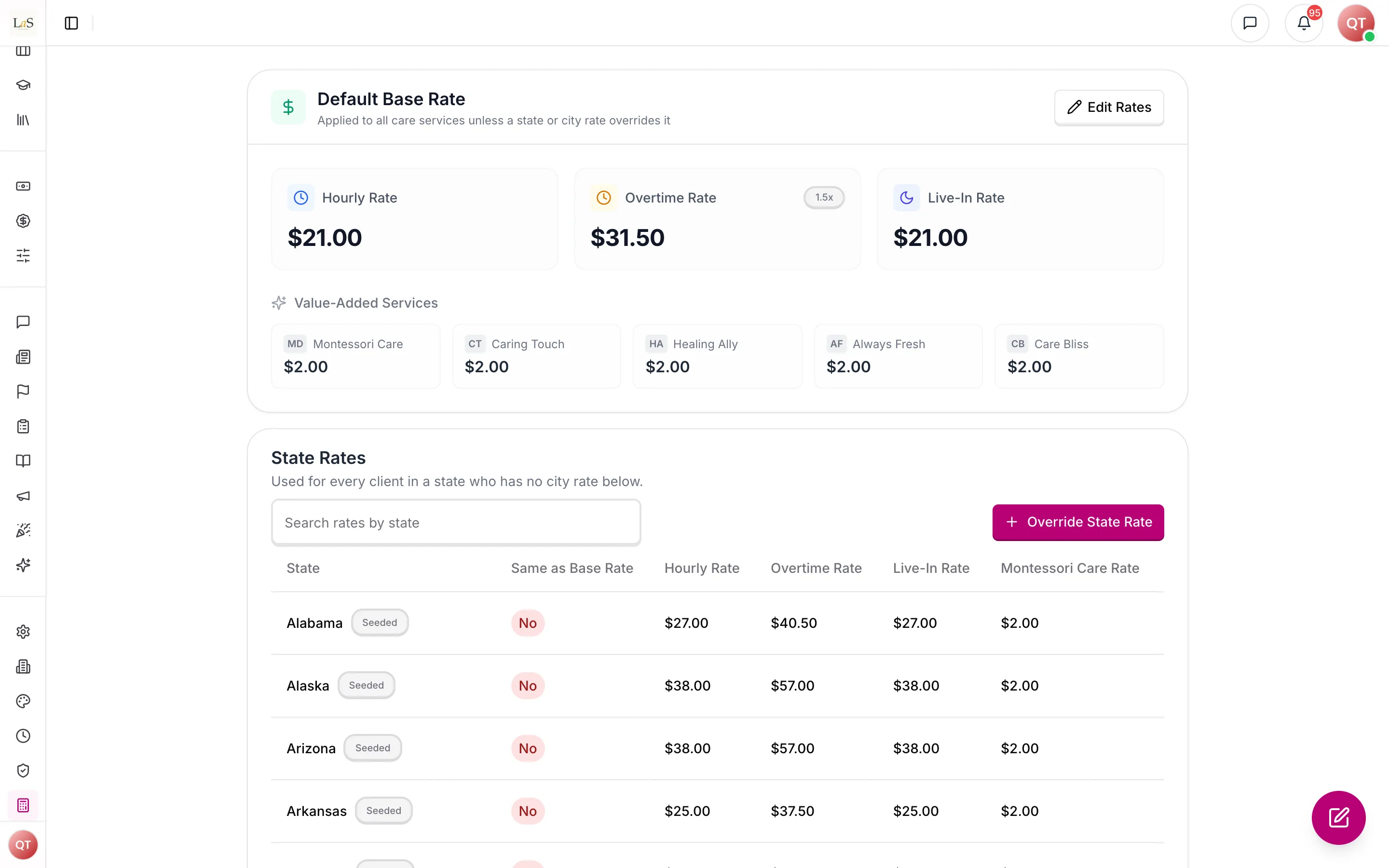
This page governs the pricing catalog behind every initial assessment's and care proposal's rate calculation: a single (the standard hourly, overtime, and live-in prices), per-state that override it for a whole state, and per-city that override both where local pricing differs. The only other thing that sets a price is the agency's own , each with an optional extra hourly price, which live with the Assessment Builder ().
Template-driven intake — decided 2026-10-01, live since 2026-10-06. Value-added services have left the catalog: rates carry hourly, overtime and live-in prices only, and each agency prices its own service add-ons. was rewritten and added for it.
Key terms
- Base rate — the single standard price list: hourly rate, overtime rate, and live-in rate.
- State rate — an override of the base rate for one whole state (or the District of Columbia), used when the client has no city rate.
- City rate — an override of the base rate for one state + city pair.
- Service add-on — a service an agency offers on top of care, defined by that agency with a name, a description and an optional extra price per hour, and chosen on the intake and the proposal (ABLD-38). It is not part of this catalog. It replaces the five value-added services (Montessori Care, Caring Touch, Healing Ally, Always Fresh and Care Bliss), which this catalog priced for every agency until 2026-10-06; the move to templates turned each agency's value-added services into its own add-ons at the prices each record carried. Care Mentor, a training programme that never changed a rate, went with them.
- Same as base rate — the flag on a state or city rate recording whether its prices currently match the base rate exactly.
- Seeded market rate — a state or city rate loaded from a published cost-of-care survey rather than typed in by staff. It carries a source marker naming the survey; a rate staff set or edit by hand carries none.
How it works
Staff with rate access maintain the base rate, a table of state rates, and a table of city rates on the web dashboard. When an initial assessment or a care proposal needs prices, the system looks up the rate for the client's state and city in order: the city rate if one exists, else the state rate if one exists, else the base rate — and it reports which of the three applied. The looked-up rate is then blended across the weekly hours, with any chosen add-on's extra hourly price added on — that computation lives with the proposal and is described on Care Proposals (); this page owns only the catalog. No assessment score adjusts it. Each state and city rate carries a "same as base rate" flag, and whenever the base rate is changed the system re-checks every state and city rate and updates that flag, so staff can see at a glance which places have genuinely local pricing.
Rules
Implementation status — audited against
apps/backend/src/base-rateson 2026-09-23; and re-audited on 2026-10-06. ✅ In code · ⚠️ Partial (built, but doesn't fully match the rule) · 🚧 Spec only (not yet built).
- RATE-1 — There is one base rate, defining the standard hourly, overtime, and live-in prices. (✅ In code — the service always reads and writes a single base-rate document)
- RATE-2 — A city rate overrides the base rate for exactly one state + city pair, and a state rate overrides it for one whole state. A rate lookup resolves in order: the client's city rate if one exists, else the client's state rate if one exists, else the base rate — and reports which tier applied. (✅ In code —
resolveRatesin the base-rates service is the single lookup every consumer uses; its result carriessource: city | state | base) - RATE-3 — Every state and city rate records whether it still matches the base rate, and changing the base rate must re-evaluate that flag for every state and city rate. (✅ In code — the re-evaluation runs after the new base rate is saved, over every state and city row)
- RATE-4 — Viewing rates requires the base-rates view permission; creating, overriding, or deleting state or city rates requires the manage permission. A proposal editor may additionally look up the single rate their proposal needs. (✅ In code — view/manage permissions gate every endpoint, and the single-client lookup also accepts the care-proposals edit permission)
- RATE-5 — Every change to the base rate, a state rate, or a city rate is recorded in the activity log: who changed it and when. (✅ In code —
BASE_RATE_UPDATED,STATE_RATE_UPDATED/STATE_RATE_DELETED, andCITY_RATE_UPDATED/CITY_RATE_DELETEDactivity-log events carry the acting user and timestamp) - RATE-6 — A state rate is a price list for exactly one US state or the District of Columbia, keyed by the state's full name, applied to every client in that state who has no city rate. A seeded market rate carries a source marker naming the survey it came from; a rate staff set or edit by hand carries none, and a re-seed replaces only seeded rates — never a hand-set one. (✅ In code —
sourceon state and city rates; saving from the dashboard clears it; the seed skips and lists rows without it) - RATE-7 — Base, state and city rates carry hourly, overtime and live-in prices only. No rate in this catalog prices a service on top of care, and nothing in it depends on a client's assessment: extra services are each agency's own service add-ons (ABLD-38), and the move to them never changes a price stored on an intake or proposal. (✅ In code)
Who can do what
| Action | Who |
|---|---|
| View the base rate, state rates, and city rates | Staff with the base-rates view permission |
| Set the base rate; create, override, or delete state or city rates | Staff with the base-rates manage permission |
| Look up one client's rate while editing a proposal | Staff with the care-proposals edit permission |
Seeded market rates
The catalog ships pre-filled from the CareScout (Genworth) Cost of Care Survey 2025 (rates collected July–November 2025): the median hourly cost a client pays for a non-medical in-home caregiver, published for the nation, every state and the District of Columbia, and each metropolitan area.
- Base rate — the national median ($35/hour in the 2025 survey), written only when no base rate exists yet; an existing base rate is never overwritten.
- State rates — the 50 state medians plus the District of Columbia.
- City rates — every principal city of a surveyed metropolitan area whose name the address picker spells the same way, at that metro's median.
- Derivation — the survey publishes one hourly figure. Overtime is seeded at 1.5× hourly and live-in at the hourly figure, the same defaults the dashboard applies when staff type an hourly rate (live-in is a per-hour price for shifts of 16 hours or more, not a daily fee). The seed writes only hourly, overtime and live-in prices.
- Outliers — survey medians are kept as published, even where a metro sits far from its state. The seed's dry run lists the cities furthest from their state median so they can be reviewed before anything is written.
- Refreshing — a newer survey is loaded by replacing the dataset (
apps/backend/src/base-rates/data/us-caregiver-market-rates.json) and re-running the seed (migration 146). Only rows still carrying the seed's source marker are replaced; hand-set rates are listed and left alone.
Decisions needed
- Should rates be per-agency? Today there is a single global rate table (see Known gaps). Options: keep one platform-wide price list that every agency shares; give each agency its own base rate and city rates; platform-wide defaults that each agency can override.
- Should a rate change reprice existing proposals? Today changing rates re-checks the "same as base rate" flags but does not touch proposal prices. Options: leave sent proposals untouched (price locked at creation); recalculate drafts only; prompt staff to review affected proposals.
How is this page?
Last updated on