Job Postings & Applications
Part of the Anaya Care Handbook — the source of truth for how the product must behave. When the product needs to change, change this document first, then make the system match it.
What this covers
This page governs the hiring marketplace. An agency publishes a job posting for one client stating the weekly schedule the role needs. A published posting is visible both to the agency's existing staff and to the ARMI Marketplace of vetted independent care providers. A care provider applies with a cover message; the hours they can work come from the availability they have already declared on their own record, so there is nothing to pick per posting. Agency staff review applications on the web dashboard and accept or reject the applicant. Acceptance is a hiring decision: it can bring an unaffiliated care provider into the agency and adds them to the client's care team. Assigning them shifts is a separate, later act by a care manager.
The ARMI Marketplace page owns the full marketplace spec — ARMI validation, profiles, availability calendars, booking flow, and labour-compliance controls. This page covers only how a job posting reaches that marketplace, how its availability filter reads ARMI calendars, and how a marketplace booking lines up with the application workflow. A shift marked not available returns to the care team for pickup, which is covered under Scheduling & Shifts — that is a different flow from the posting-and-application one described here.
Key terms
- Job posting — An agency's advertised care job for one client: title, description, required skills, location, pay range, urgency, and the weekly schedule the role needs.
- Shift pattern — the weekly schedule a posting needs, written as weekday plus clock times in one timezone — the same vocabulary a care provider declares availability in. Filled in from the client's own care schedule where there is one, owned and editable by staff, and required on every posting.
- Application — A care provider's response to a published posting, optionally with a cover message.
- Featured feed — The highlighted marketplace list: published postings that are flagged as featured or marked urgent.
- Job alerts opt-out — A care provider's setting that removes them from the marketplace entirely: no listings, no alerts, no applying.
- External email invite — Staff paste or import addresses onto a published posting and send a job summary outside Anaya Care. Recipients who are not on the platform are asked to download the app before they can view or apply; sharing never creates an account. An address that already belongs to a user cannot be invited this way.
- Reviewer notes — Free-text notes a reviewer attaches to an application; the applicant can see them.
- Availability indicator — The signal reviewers see next to each applicant showing how much of the posting's weekly schedule their declared availability covers, and which days it does not.
- ARMI availability filter — The real-time cross-reference between a posting's shift pattern and every ARMI's availability calendar, run when an agency creates or browses a posting; it decides which ARMIs appear and how they are flagged. Defined on the ARMI Marketplace page.
- Marketplace booking — Hiring an ARMI for a posting through the ARMI Marketplace flow (discover, contact in-platform, decide, both parties confirm), as opposed to the in-app application flow described here. The two overlap at discovery and at the resulting calendar entry.
- Separation of duties — Triaging applications and making the final accept/reject decision are two different permissions.
How it works
Posting lifecycle
A posting is always owned by one agency and moves through three statuses: Draft (being prepared, invisible to providers), Published (live on the marketplace), and Closed (hiring finished).
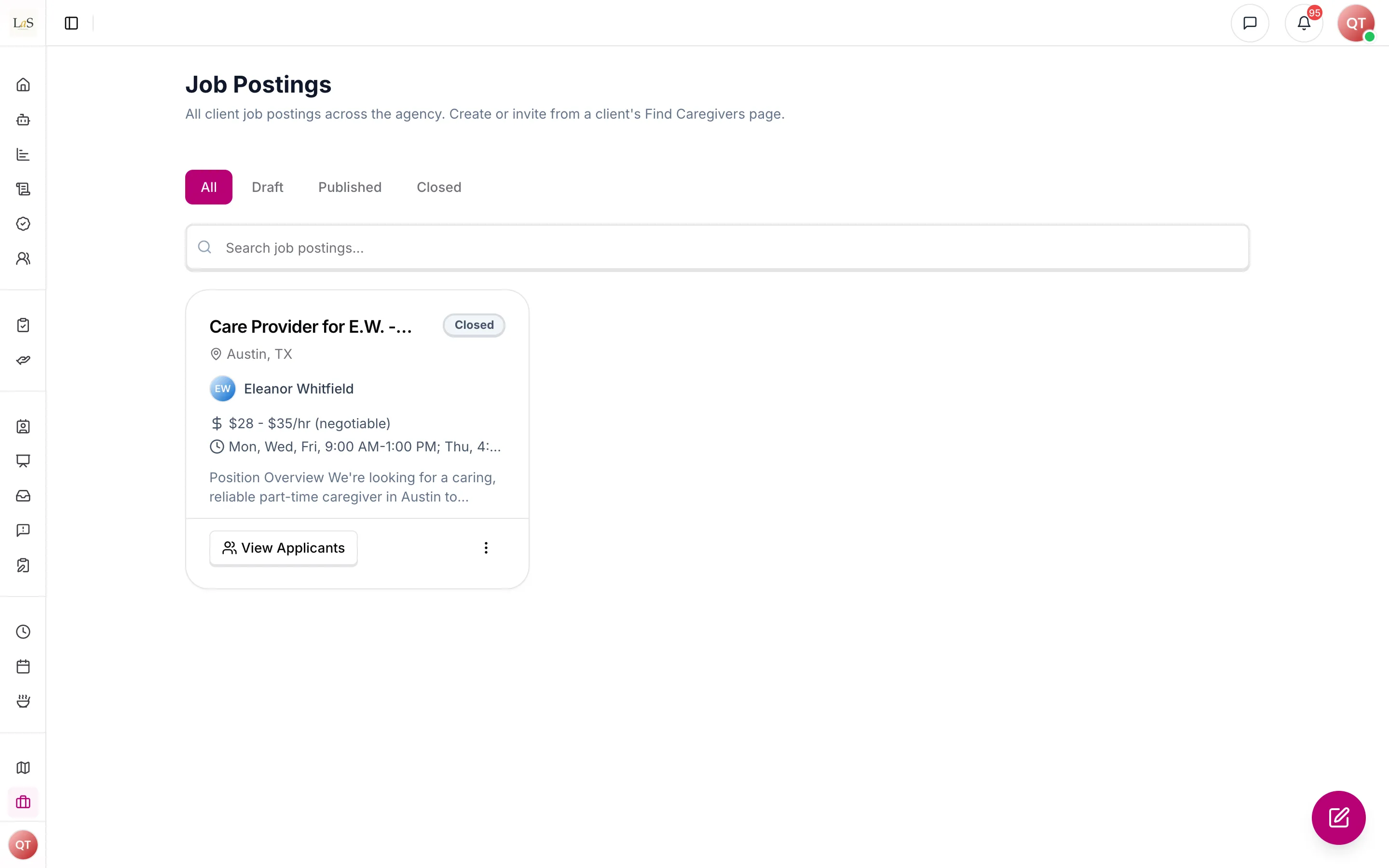
Agency staff create a posting from the client's Find Caregivers page, stating the weekday-and-hours pattern the role needs. The form starts from the client's own care schedule — the days and hours already on file, on the client's clock — so staff correct a schedule rather than retype one; a client with no schedule yet gets an empty editor and says so. The agency-wide Job Postings page is a view of every client's postings; it does not create a posting that names no client. Publishing puts the posting on the marketplace and, unless the publisher declines, alerts eligible care providers in the app, by push, and by email. Unpublishing pulls it back to Draft for editing. A posting stays open until staff close it — nothing closes it automatically, because a posting may hire more than one person. Closing additionally rejects every undecided application and notifies each applicant. A deleted posting disappears from every view, but the record is kept.
Staff can ask the AI for a draft before they save. That draft is short — one overview paragraph, a handful of care-need responsibilities from the client's care plan and functional assessment, the schedule, a few ideal-candidate bullets, and a What We Offer list taken from the agency knowledge base (core values and caregiver offer). The AI searches that library; it does not invent benefits. A human still reviews and saves the Draft — nothing is published by the generation.
Inviting people outside Anaya Care
A published posting can also be emailed to people who are not on Anaya Care. Staff paste addresses or upload a CSV on the posting. Each send is capped, validated, and recorded against that posting, and an address already emailed for it is skipped rather than contacted again.
Sharing never creates a user. Someone who does not have an Anaya account receives a job summary with no client identity — title, description, skills, pay, shift pattern, urgency, city and region, and the agency's name — plus a link that opens the app and store badges if they still need to install it. They download the app, sign up as a care provider, and apply like any other marketplace provider. Someone who already is a care provider and has not opted out of job alerts is pointed at the posting in the app instead of being asked to download it again. Someone who has opted out is skipped. An existing account that is not a care provider is not sent a job email.
There is no web apply. The email and the public landing page exist only to get the recipient into the app. Applying, reviewing, and accepting stay the in-platform flow, including the rule that acceptance onboards an unaffiliated provider to the agency.
Applying
Care providers browse published postings in a list, in the ARMI Marketplace, and in the featured feed. A posting shows its weekly schedule read against the provider's declared availability: whether it fits in full, in part, or not at all, naming the days and hours that do not line up. That reading is advice, never a gate — a partial fit is a hiring judgement for the agency to make, so a provider may apply whatever their fit. The one thing that does block applying is having declared no availability at all, and a provider in that position is directed to set it and then returned to the posting.
A posting advertises a recurring weekly pattern, not calendar dates, so nothing about applying reserves or clashes with a specific shift. Overlap and daily-hour checks belong to assignment (), which is the only moment they can refuse anything.
Reaching the ARMI Marketplace
Publishing a posting puts it in front of two audiences at once: the agency's existing staff and the ARMI Marketplace of vetted independent care providers. Because every posting states its shift pattern in the same weekday-and-clock-times vocabulary ARMIs declare availability in, the marketplace's availability filter cross-references every ARMI's availability calendar in real time — not a cached snapshot — and decides who appears:
- Confirmed available for the full window — appears in results.
- Available for only part of the window — appears, but flagged as partially available rather than hidden.
- Holds a conflicting committed shift — auto-excluded from results.
- Availability not kept up to date — appears, but flagged with a not-updated warning.
The same location, care-provider type, certification, star-rating, language, specialization, and Caregiver Level Badge filters from the marketplace apply alongside the availability filter.
Marketplace booking vs. applying
A posting can also lead to a marketplace booking, which overlaps with — but is not the same as — the in-app application flow. In a marketplace booking the agency discovers an ARMI by posting the job or browsing the filtered results, contacts them through secure in-platform messaging, and makes the hiring decision itself. That hiring decision — including any background checks — is the agency's responsibility, not Anaya's. When both parties confirm the booking, the slot is automatically blocked in the ARMI's availability calendar and a matching entry is created in the Anaya Calendar for the agency, the ARMI, and the assigned client. The full booking lifecycle lives on the ARMI Marketplace page.
Reviewing and deciding
When a provider applies, the posting agency's management staff are notified. Reviewers triage applications (mark them Reviewed, add notes, see the availability indicator); only staff with decision authority can accept or reject. The availability indicator reads the posting's weekly schedule against the applicant's declared hours — how much of it they cover and which days they do not — from the same evaluation the applicant saw, so the two can never disagree. The applicant is notified only of the final accept/reject outcome. Every status change records who acted and when.
What acceptance does
Acceptance is a hiring decision, and it is deliberately small. The contract is one operation with the following sequence:
- Check availability exists — the applicant must have declared weekly availability. How well it fits the posting's schedule is a judgement the decision-maker has already made; only a blank profile blocks.
- Agency onboarding — an unaffiliated provider joins the posting agency as an active care provider.
- Care-team membership — the provider is added to or reactivated on the client care team.
That is all of it. Acceptance never creates schedules, never creates shifts, and never puts the provider on one. Assigning them the client's shifts is a separate, explicit act by a care manager afterwards (), and that is where availability, overlap, and daily-hour checks actually bite ().
The sequence ships today, but its database writes are not yet wrapped in one transaction. retains atomic rollback as an explicit remaining requirement.
Changing the drafted posting by asking
Once Anaya has drafted the posting, a care manager can change it by typing what they want in plain words beside the draft — "make the description shorter and easier to skim", "rewrite it in a warmer, less corporate tone" — rather than rewriting it by hand. Each request revises the draft as it is on screen, so any edits the care manager has already made to the description, the pay, or the schedule are carried into the change rather than overwritten. Requests are answered one at a time, and every one is kept with the draft along with what it changed — including requests that failed or were cancelled. See AI-34 – AI-38.
Rules
- JOB-1 — A job posting belongs to exactly one agency and always names a client. Every posting states the weekly schedule the role needs. There is no second kind of posting. (✅ In code)
- JOB-2 — A posting is always in exactly one of three statuses: Draft, Published, or Closed. Only Published postings are visible to care providers and able to receive applications.
- JOB-3 — Every posting must have a title, a location, a list of required skills, a pay range, and a weekly schedule with at least one day-and-hours window. The minimum hourly rate can never exceed the maximum, and rates must stay between 0 and 1,000 per hour.
- JOB-4 — Retired. This rule defined what a coverage bundle contained: unassigned generated shifts from one client's active batch, ineligible ones shown with a reason rather than hidden, each shift in at most one open bundle. Coverage bundles are retired with — a posting advertises a weekly schedule, never a set of shifts. What survives of it: a posting is still never hidden from a care provider for being a poor fit (). The ID is kept because IDs are never reused.
- JOB-5 — Publishing a posting must alert exactly the care providers of that posting's own agency who are active, identity-verified, and have not opted out of job alerts. The alert reaches each of them in the app, as a push notification, and by email. Who receives it is decided by the posting's agency, never by who happened to press Publish, so a platform administrator publishing on an agency's behalf reaches that agency's providers and no one else. (✅ In code)
- JOB-6 — Once a posting is Closed, it must stay closed. Reopening hiring requires a new posting.
- JOB-7 — "Close & reject remaining" must close the posting, reject every application still in Submitted or Reviewed, and notify each rejected applicant.
- JOB-8 — Only care providers can apply to postings, and each provider can apply at most once per posting. A cover message is optional and limited to 2,000 characters.
- JOB-9 — A provider who has opted out of job alerts is fully outside the marketplace: no postings in their lists, no publish alerts, and any attempt to apply is refused.
- JOB-10 — A posting is never hidden from a care provider's list for being a poor fit, and a poor fit never blocks applying. A posting's weekly schedule must be read against the provider's declared availability and shown as a fit — full, partial, or none — naming the days and hours that do not line up. A partial fit is a hiring judgement for the agency, not a refusal. The one blocking condition is having declared no availability at all, and that must offer a direct path to setting it.
- JOB-11 — The marketplace must never schedule a care provider past the daily hour limit (currently 12 hours per day across all clients, with up to 24 hours per day allowed for a single client — see Decisions needed).
- JOB-12 — An unaffiliated care provider can browse and apply to published postings from every agency; agency staff only ever see their own agency's postings and applications.
- JOB-13 — The featured feed shows only published postings that are flagged as featured or marked urgent, with featured ones first.
- JOB-14 — When a new application arrives, only management staff of the posting's agency are notified. (✅ In code)
- JOB-15 — Staff with review permission can triage applications (mark Reviewed, write notes) but must not be able to accept or reject; the final decision requires the separate decide permission.
- JOB-16 — An application follows one path: Submitted → (optionally Reviewed) → Accepted or Rejected. Accepted and Rejected are final. Ending a hire is care-team removal, not a reversal of the application. (✅ In code)
- JOB-17 — Applications can only be accepted while their posting is open for hiring — never on a Closed posting. (✅ In code)
- JOB-18 — Every application status change records who made it and when. The applicant is notified only when the outcome is Accepted or Rejected. The Accepted notification is sent after agency onboarding and care-team membership are written, never before, so the app a provider opens from that notification already reflects their new client. (✅ In code)
- JOB-19 — Reviewer notes on an application are visible to the applicant, so staff must write them as applicant-facing.
- JOB-20 — Accepting an application requires only that the applicant has declared availability at all. A partial or absent match against the posting's schedule is a hiring judgement, never a block. Acceptance commits nothing about shifts, so there is nothing to re-check: availability, overlap, and daily-hour checks run at assignment (), the only moment they can refuse anything.
- JOB-21 — Accepting an applicant who belongs to no agency must add them to the posting's agency as an active care provider.
- JOB-22 — If the posting names a client, acceptance adds the provider to that client's care team — reactivating a previously removed membership rather than duplicating it. It does not assign any shifts. Acceptance must not be blocked by the Care Operations ordering gate that governs manual care-team additions, and a failure to establish membership must be surfaced rather than silently skipped. (✅ In code — a failed care-team add now notifies everyone in the agency holding the applications-decide permission)
- JOB-23 — Acceptance never creates schedules or shifts. A posting stays Published until staff close it deliberately ().
- JOB-24 — Reviewers must see how each applicant's declared availability sits against the posting's weekly schedule — which days and hours fit and which do not. These results must come from the same evaluation the applicant saw, so a reviewer's view and a provider's view can never disagree.
- JOB-25 — Publishing a posting must make it visible to both the agency's existing staff and the ARMI Marketplace of vetted independent care providers. (🚧 Spec only)
- JOB-26 — The ARMI availability filter must cross-reference a posting's shift pattern against every ARMI's availability calendar in real time (not a cached snapshot) and resolve each ARMI as: confirmed available for the whole pattern (appears), available for only part of it (appears, flagged partial), holding a conflicting committed shift (appears, flagged), or with availability not kept up to date (appears, flagged not-updated). Postings are never hidden for being a poor fit. (⚠️ Partial — fit is evaluated and shown per posting and per applicant; directory-wide ARMI search is still planned)
- JOB-27 — When a posting is filled through a marketplace booking, discovery happens via posting or browsing the filtered results and contact happens through secure in-platform messaging; the hiring decision — including any background checks — is the agency's own responsibility, and once both parties confirm, the slot must be auto-blocked in the ARMI's availability calendar and a matching entry created in the Anaya Calendar for the agency, the ARMI, and the assigned client. (🚧 Spec only)
- JOB-28 — Every posting states when the work is needed as a shift pattern: weekday plus clock times in one timezone, entered by staff. Where the client already has a care schedule, the product must offer it as the starting point — its days, its hours, and the client's timezone — because a posting written from scratch beside a schedule that already exists is how the two come to disagree. It is an offer and never a lock: staff may change every part of it, and a posting keeps the schedule it was saved with even if the client's schedule later changes. It is required — a posting with no schedule cannot be saved or published, because a care provider has no way to judge a role whose hours are unstated. (✅ In code)
- JOB-29 — Retired. This rule required a coverage application to name a non-empty, duplicate-free subset of the posting's eligible shift IDs. An application no longer carries shift IDs at all — a care provider applies to a schedule, and the hours they can work come from the availability on their own record (). The ID is kept because IDs are never reused.
- JOB-30 — Retired. This rule let a decision-maker approve a subset of an application's requested shifts. There is no subset to approve: acceptance is a yes or no about a person (), and which shifts they work is decided later at assignment (). The ID is kept because IDs are never reused.
- JOB-31 — Accepting an application, onboarding the provider, and adding care-team membership must be atomic. A failure leaves all records unchanged. (🚧 Spec only)
- JOB-32 — Retired. This rule allowed at most one active coverage reservation per shift, including under concurrent acceptance, enforced by a partial unique index. Retired with : acceptance claims no shift, so there is no reservation to make exclusive. What survives of it: a shift still has at most one care provider, enforced at assignment (). The ID is kept because IDs are never reused.
- JOB-33 — A posting may accept more than one applicant, with no condition attached. Nothing about acceptance is exclusive, because acceptance claims no shift — a schedule that needs two people is filled by hiring two people. (✅ In code)
- JOB-34 — Retired. This rule closed a coverage bundle automatically once every bundled shift was covered, rejecting undecided applications. Nothing triggers automatic closure any more: a posting has no fixed quantity of work to exhaust, and closing early would cut off a posting that could still hire. What survives of it: closing a posting and rejecting every undecided applicant with notification is , and remains a deliberate staff action. The ID is kept because IDs are never reused.
- JOB-35 — Retired. This rule defined a supervised release of accepted coverage that freed its reservations and reopened the posting. There is no staged coverage to release. Ending a hire is removing the care provider from the client's care team, which frees nothing on the posting because the posting never held anything. The ID is kept because IDs are never reused.
- JOB-36 — Application acceptance never commits a care provider to a shift. Assignment is a separate, explicit act by a care manager and is the only thing that puts a care provider on a shift, subject to the live checks in . (✅ In code)
- JOB-37 — Every application in the review list must carry its own screening summary, readable without opening the applicant's profile: which of the posting's required skills the applicant holds and which they lack, how far they live from the work, and how much of the posting's weekly schedule their declared availability covers — naming the first day that does not fit. Availability figures come from the same evaluation as the acceptance gate (), so a card and the fit detail can never disagree. The triage and decision actions must be directly visible on each application, not hidden behind a menu. (✅ In code)
- JOB-38 — Whoever publishes a posting decides whether it announces itself. Publishing offers a choice to alert care providers, set to alert by default, so the quiet path is always deliberate and never the accident of a forgotten setting. Declining suppresses the in-app, push, and email alert for that publish only — it changes nothing about the posting itself, which is published, visible, and open to applications either way. This choice is the agency's and sits on top of each provider's own opt-out (): a provider who has opted out is never alerted regardless, and choosing to alert can never override them. Re-publishing a posting that was previously unpublished makes the choice again. (✅ In code)
- JOB-39 — Staff with job-posting management access may email a Published posting to imported addresses. A Draft, Closed, or deleted posting cannot be shared this way. This is a separate action from the publish-time agency alert in . (✅ In code)
- JOB-40 — Sharing never creates a user. Recipients who are not on Anaya download the app, sign up as care providers, then apply. An address that already belongs to a user is skipped and is not emailed — including care providers, opted-out providers (), and accounts that are not care providers. Existing care providers reach the posting in the app, and the agency alert in , not through this invite. (✅ In code)
- JOB-41 — The email and the public landing page never include client identity. Location is city and region only. The content that may leave the platform is the title, description, required skills, pay range, shift pattern, urgency, and the agency's name. (✅ In code)
- JOB-42 — There is no web apply. The email's call to action and the public landing page send people to the app — a universal link if it is installed, store badges if it is not. Applying remains . (✅ In code)
- JOB-43 — Staff paste emails or upload a CSV. The platform validates addresses, removes duplicates in the batch, caps a send at 100 addresses, skips an address already emailed this posting, skips an address that already belongs to a user (), and records each outcome against the posting. Delivery of each sent email is updated from Resend webhooks (sent, delivered, delayed, bounced, complained, opened, clicked). (✅ In code)
- JOB-44 — Accepting an applicant is a hiring decision, not a schedule. The care manager must then assign that client's shifts to them, and the product must say so at the moment of acceptance rather than leaving the hire looking finished. Acceptance must offer a direct path from the accepted application to assignment with the provider already chosen. A client who has an accepted applicant and unassigned upcoming shifts is an open item, and must be surfaced as one — a hire that never became work is the failure this rule exists to catch. (✅ In code — accepting offers a direct path to bulk assignment with the provider preselected, and the care-team page carries a standing count of shifts still needing one)
Note: , , , , and are retired. Their IDs are kept and never reused.
Who can do what
| Action | Who |
|---|---|
| Create and edit postings | Owners, admins, and care managers of the agency, from the client's Find Caregivers page |
| Publish, unpublish, close, or delete a posting | Agency staff with the matching permission |
| Email a published posting to people outside Anaya Care | Agency staff with job-posting management access |
| Browse, search, and view published postings | Care providers (including providers not yet in any agency) and ARMIs in the ARMI Marketplace |
| Apply to a posting | Care providers only |
| Hire an ARMI for a posting through a marketplace booking | Agency staff with the matching permission (hiring decision and background checks are the agency's responsibility) |
| Triage applications and write reviewer notes | Agency staff with the review permission |
| Accept or reject an application | Agency staff with the decide permission |
| Close a posting and reject all remaining applicants | Agency staff with the bulk-reject permission |
| View and manage postings across all agencies | SuperAdmin (platform view) |
| Any job-posting access | Families and medical professionals: none |
Decisions needed
- What is the real daily hour cap? The stated requirement says a provider must not exceed 16 hours of scheduled care per day; the system enforces 12 hours across clients / 24 hours for the same client. Options: keep 12/24, switch to a flat 16, or make the cap configurable per agency.
- Should unassigned care providers receive new-posting alerts? They are the marketplace's main audience, but today's alerts may only reach providers already inside the agency. Options: alert all eligible providers platform-wide, alert only the agency's own providers, or let providers subscribe by location/filters.
- Should accepted or rejected decisions ever be reversible? keeps the decision final; ending a hire is care-team removal. Decide whether a reversed hire should notify the applicant with a dedicated explanation, and which roles may do it.
- How should a posting express a fixed-length engagement? A shift pattern says which weekdays and hours are needed, never which calendar dates — and since that is the only kind of posting there is. A three-month contract or a covering-someone's-leave role currently has nowhere to state its end date. Options: add an optional end date to the pattern, add a separate engagement-length field, or keep it in the description as prose.
How is this page?
Last updated on