Identity, Access & the Business
Part of the Anaya Care Handbook — the source of truth for how the product must behave. When the product needs to change, change this document first, then make the system match it.
What this covers
This page governs who can use Anaya Care, how they prove who they are, and what they are allowed to see and do. It covers user accounts and sign-in, the role hierarchy, the permission system, onboarding, profile setup and agency setup, and the business (the care agency) itself. It also states the platform's foundational access principle, which every other page relies on: every piece of data belongs to exactly one business, and people only ever see their own business's data.
Key terms
- Business — a care agency on the platform. Each business is its own sealed world: its people, clients, schedules, and records are invisible to every other business.
- SuperAdmin — a platform operator who works for Anaya Care itself, belongs to no business, and can view any business when needed.
- Owner — the person who created and owns a business. Owners always have every permission within their business.
- Admin — a senior staff member of a business with broad day-to-day management permissions.
- Custom role — a role a business defines itself (for example "Care Manager"), with a hand-picked set of permissions.
- Care Provider — a caregiver who delivers care in the field; works from the mobile app.
- Representative — the family contact for a client; works from the mobile app and is linked to one or more specific clients.
- Medical Professional — a clinician (doctor, nurse, etc.) associated with the business.
- Permission — a single allowed capability, such as "view clients" or "manage schedules". Every permission is named feature : verb, optionally with a scope.
- Permission verb — the action part of a permission. The platform uses view, manage, and a short closed list of workflow verbs (). The PRD's eight verbs (View, Create, Edit, Delete, Approve, Assign, Configure, Export) map onto these: Create, Edit, and Delete fold into manage, and the remainder are workflow verbs.
- Manage — the broad write capability for a feature: creating, editing, deleting, duplicating, and AI-generating its records. A feature has at most one manage permission ().
- Workflow verb — a named action kept separate from manage because a different kind of person performs it (submit, sign, respond, execute, apply, comment), because a shipped role deliberately holds manage without it (approve, review, rates, settings, monitor, assign, close, decide), or because the action is external or irreversible (send, and delete where it is separated).
- Role-inherent permission — a responsibility that defines a base role and can never be unchecked — for example, a Representative responding to care proposals ().
- Permission scope — how far a permission reaches: Own (only things tied to me), Assigned (things I'm assigned to), or All (everything in the business).
- Platform-level role — a role Anaya itself controls: SuperAdmin (the Anaya operator) and the Company Admin account Anaya creates for each agency at onboarding. A Company Admin can never reach another agency's account.
- Company-configured role — a role an agency defines for its own staff within the permission framework (for example Care manager, Care provider, Regional Supervisor, Care Coordinator, RN/LPN/HHA, Guardian, DPOA, or Representative). In this handbook these map to the role terms above.
- Invitation — how a business brings a new person onto the platform: a time-limited link sent by email or text.
- Verification — the steps a new account completes (email, phone, government ID, admin review) before it becomes fully active.
- Personal onboarding — the short step every new account completes once, whatever its role, straight after verification: confirm your name and choose a profile photo (). Distinct from both of the things below.
- Business onboarding survey — the questions about the agency itself (care types, size, scheduling habits, goals) that only an Owner answers, once, when the business is created ().
- Profile setup — the further, role-specific details a Care Provider or Medical Professional records before they count as set up (). No other role has one.
- Agency setup — the one-time choices that make a business ready to take on clients: a published and , and its defined, where "we offer none" counts (Assessment Builder, , ). It belongs to the business, not to any account. Until it is done, the business's staff wait at the ().
- Employment status — a worker's standing with the business: Pending, Active, Suspended, Terminated, or Resigned.
How it works
One account, one business
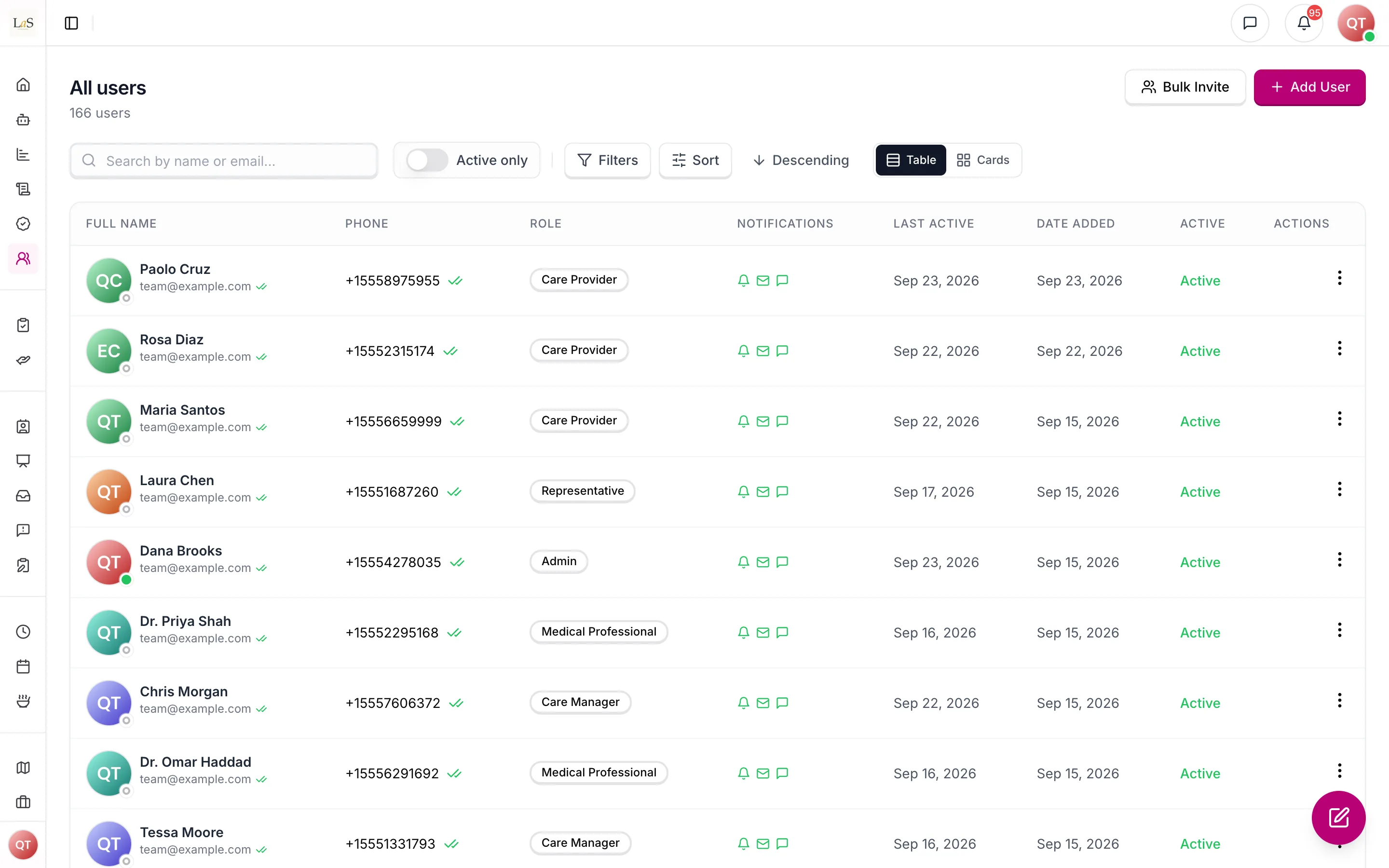
Each person has a single account identified by a unique email address, username, or phone number. The account carries one role and belongs to at most one business. SuperAdmins belong to no business; self-signed-up Care Providers start independent (no business) and join a business only when hired through Job Postings. Everything a business creates — clients, schedules, shifts, proposals, messages — belongs to that business alone.
Signing in and staying signed in
People can sign in five ways: password (with email or username), a one-time code texted to their phone, an emailed magic link, Google, or Apple. A session stays alive for up to 30 days of regular use; signing out ends it immediately on that device. Permission and role changes apply to a person immediately — they never have to sign out and back in for an access change to take effect, and losing access cuts them off right away.
Joining the platform
There are three doors in:
- Owner signup — anyone can create a business. This creates the business and its Owner account together, then walks the Owner through an onboarding survey about the agency (care types, size, scheduling habits, goals). The Owner cannot use the dashboard until onboarding is complete.
- Invitation — staff with the invite permission add people by email or phone. The invitee receives a link valid for 7 days, accepts it, and chooses their own password.
- Self-signup — Care Providers (and Representatives) can sign up on their own and then complete verification.
Verification lifecycle
New accounts prove who they are before becoming fully active. Care Providers face the strictest path: phone verification is required, a government ID must be submitted, and a business admin reviews and approves it. Representatives only need to verify their email.
Personal onboarding
Once an account is verified — and, for someone who was invited, once they have chosen their own password — everyone passes through the same short personal onboarding before they reach the dashboard or the app. It asks two things: confirm your name, and choose a profile photo, either by uploading one or by generating one from your name. It happens once, and it is the same for every role: Owners and Admins see it just as Care Providers do.
Two other things in this handbook are easy to confuse with it, and neither is the same step:
- The business onboarding survey asks about the agency, not the person, and only an Owner ever answers it (). An Owner creating a business therefore does both — the survey about the agency, then the personal onboarding about themselves.
- Profile setup, below, is extra role-specific detail that only Care Providers and Medical Professionals record ().
Profile setup
After personal onboarding, some roles record further role-specific detail before they are considered ready to work:
- must fill in their "about" section and skills; education, work experience, and licenses are optional extras.
- must record their professional role, specialty, and credentials.
- have no setup steps — the agency links them to their client.
- Owners, Admins, and custom-role staff have no profile setup. They still complete the personal onboarding above, which every role does — having no profile setup does not mean going straight to the dashboard.
Agency setup
Before a business can take on clients it chooses the published template its initial assessments run on and the one its care proposals run on, and lists the service add-ons it offers — or says it offers none (Assessment Builder). Only someone who may publish assessment templates can do it (owner and admin by default). Until it is done, the business's staff are held at the ():
- Owners, Admins and custom-role staff on the web dashboard are taken to the agency setup page, which has three panels: the intake template, the proposal template ("Same as intake" is offered), and the service add-ons. Each template can be picked, added from Anaya's library, or built in the template library, which stays open during setup. When setup is complete they go straight to the dashboard. Someone without the publish permission sees a page saying the agency is finishing its setup, with Sign out.
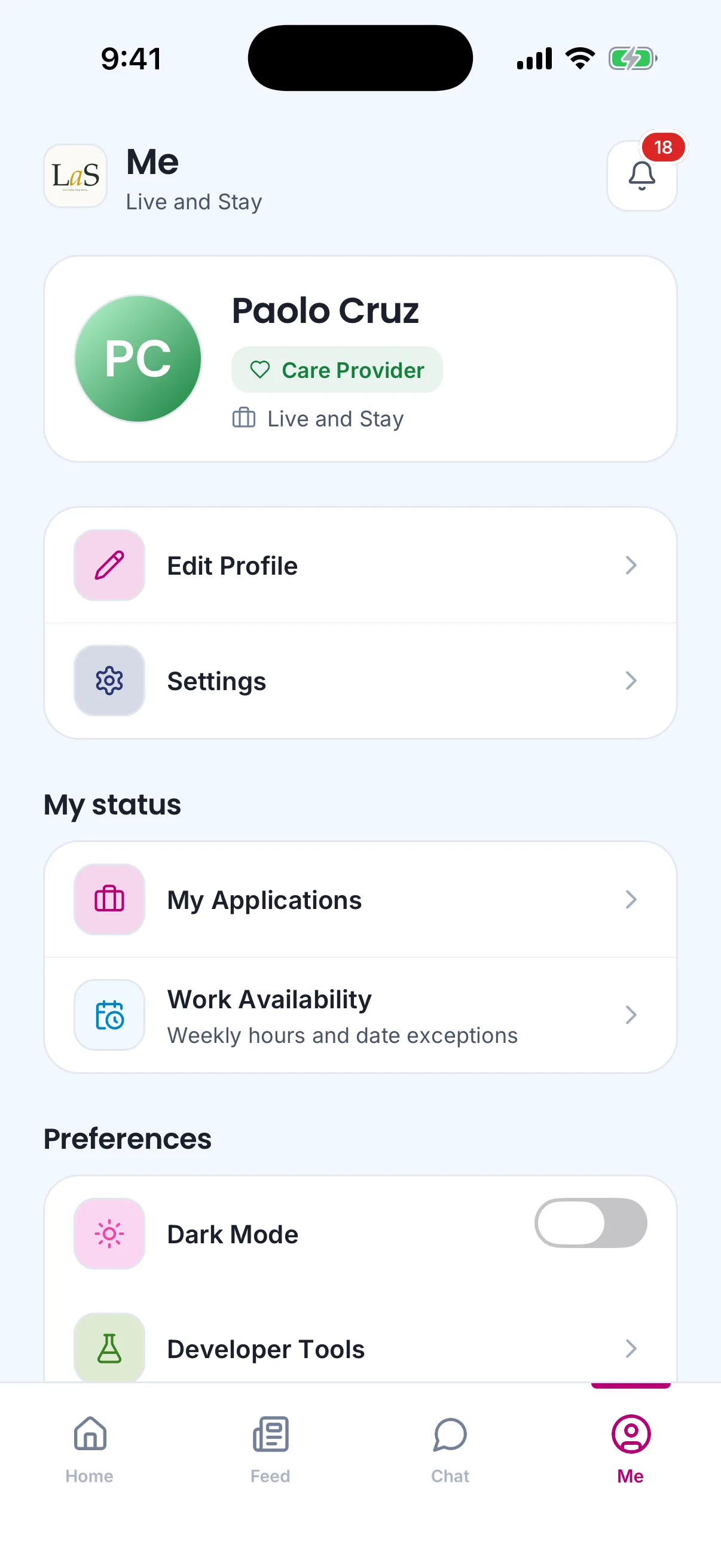
- of the business — only those whose assignment to it is active — see a hold screen in the mobile app: "Your agency is finishing its setup on the web. You can come back as soon as it's done.", with Check again and Sign out. It reaches phones as an over-the-air app update; a phone that has not fetched it yet shows no hold screen until its next launch, and the server still refuses the actions that need setup.
- Representatives, Medical Professionals and the Other role are never held, and neither are SuperAdmins or independent Care Providers who belong to no business.
The gate comes after verification, personal onboarding and profile setup, and is worked out afresh each time a person's session is refreshed, so it lifts as soon as setup is done. If working it out fails, the person is let through; the server itself still refuses to create an initial assessment, create a care proposal or convert one into the other until setup is done (AS-37, CP-40). The templates chosen at setup can't be retired or deleted while they are chosen, so retiring or deleting one never pushes a set-up agency back behind the gate.
Employment status and leaving
A worker's standing with the business follows its own track, separate from verification: Pending (invited, not yet accepted) → Active → Suspended, Terminated, or Resigned. A separation is scheduled with a future effective date and can be reversed any time before that date. Once terminated or resigned, the person can no longer sign in. Account deletion is different again: the person requests it, and an admin either executes or cancels the request.
Permissions
Access inside a business is controlled by a capability catalogue: for each feature area there is a view permission (scoped where visibility genuinely differs by relationship — Own / Assigned / All — and flat where it doesn't), at most one manage permission covering all routine writes (create, edit, delete, duplicate, AI-generate), and a small number of workflow verbs for actions that deserve their own switch — approving a proposal, signing a home inventory, executing a shift, sending a document outside the business. A wider view scope always includes the narrower ones. Each base role ships with sensible defaults, a business can adjust those defaults for its configurable roles, and a business can also create custom roles with any permission set it likes. SuperAdmins and Owners bypass the system entirely — they always hold every permission and cannot be restricted.
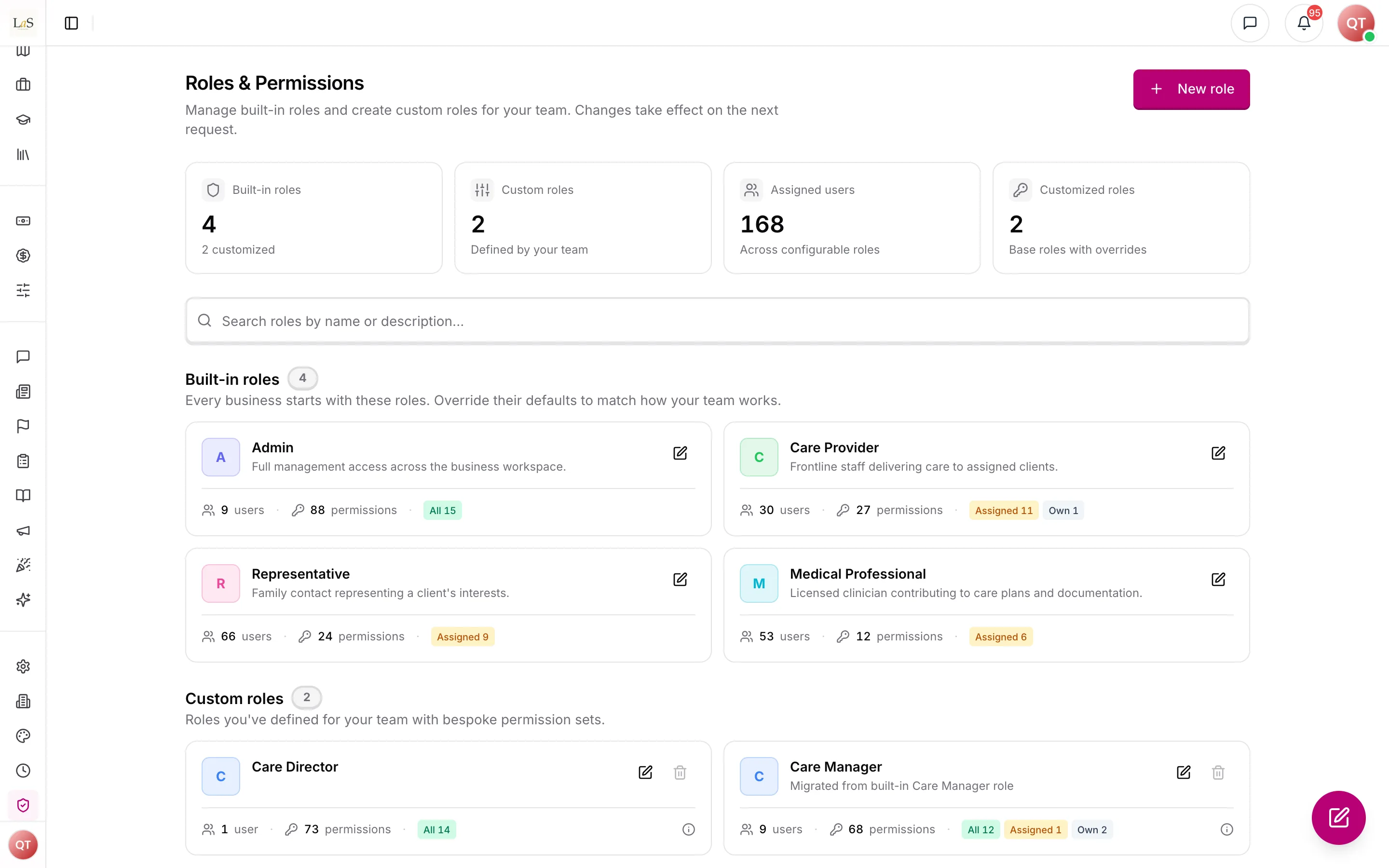
Two guardrails keep the catalogue honest. First, every permission must gate something real: permissions for features that have not shipped yet do not appear in the catalogue (they are added together with the feature). Second, responsibilities that define a role are role-inherent: a Representative can always respond to care proposals, sign home inventories, approve meal and engagement plans, and approve fund requests — the role editor shows these as locked, and no configuration can remove them (). They remain grantable to other roles where a business wants that.
The PRD frames the same access control as a per-feature grid of eight verbs — View, Create, Edit, Delete, Approve, Assign, Configure, and Export. The catalogue is that grid, folded: Create/Edit/Delete are manage, and Approve, Assign, Configure, and Export survive as workflow verbs exactly where a distinct actor performs them. The full mapping from the previous catalogue to the current one is recorded in the appendix at the end of this page.
Who sees which clients
Beyond feature permissions, access is bounded by which clients a person is tied to. A care provider sees only the clients they are assigned to; a care manager sees every client in their agency; a representative sees only their own client. No one ever sees another agency's clients. This is the same boundary as the Own / Assigned / All scopes, expressed in terms of clients.
Rules
- ACCESS-1 — Every piece of business data belongs to exactly one business. A person can only ever see and change data belonging to their own business.
- ACCESS-2 — An email address, username, or phone number can identify only one account across the entire platform — never one account per business.
- ACCESS-3 — Every account has exactly one role: SuperAdmin, Owner, Admin, Care Provider, Representative, Medical Professional, or a custom role defined by the business.
- ACCESS-4 — SuperAdmins belong to no business. Every other role belongs to exactly one business, except self-signed-up Care Providers, who remain independent until hired by a business.
- ACCESS-5 — A SuperAdmin can view any business, and every cross-business view by a SuperAdmin must be recorded in an audit trail.
- ACCESS-6 — A person can sign in by password, one-time phone code, emailed magic link, Google, or Apple.
- ACCESS-7 — Anything in the product that is not explicitly public must require sign-in.
- ACCESS-8 — Every action a signed-in person attempts must be checked against their permissions before it runs.
- ACCESS-9 — Role and permission changes take effect immediately — a person who loses access is cut off on their very next action, without waiting for them to sign out.
- ACCESS-10 — A web dashboard session left idle for 15 minutes must be signed out automatically. Only keyboard, mouse or touch input counts as activity; the dashboard refreshing itself in the background does not. A warning appears one minute before, with a way to stay signed in, and the sign-in page then says the person was signed out for inactivity. Platform operators are exempt.
- ACCESS-11 — People belonging to an inactive or suspended business must not be able to use the platform while the business is in that state.
- ACCESS-12 — Creating a business through owner signup always creates the business and its Owner account together, and the Owner must complete the business onboarding survey before using the dashboard. Agency setup, which makes the business ready to take on clients, follows it ().
- ACCESS-13 — An invitation link is valid for 7 days. An invited person cannot sign in with a password until they accept the invitation and choose their own password.
- ACCESS-14 — If an invitation message cannot be delivered, the invitation must be cancelled so it can be cleanly re-sent — no half-created accounts.
- ACCESS-15 — Care Providers and Representatives are mobile-app roles: their invitations open in the mobile app, and the web dashboard redirects them to download the app.
- ACCESS-16 — A self-signed-up Care Provider must verify their phone, submit a government ID, and be approved by an admin before their account becomes active. A rejected ID can be resubmitted.
- ACCESS-17 — A Representative must verify their email address before their account becomes active; phone and ID verification are optional for them.
- ACCESS-18 — A Care Provider is not considered set up until their "about" section and skills are complete. A Medical Professional is not set up until their professional role, specialty, and credentials are recorded.
- ACCESS-19 — A Representative is always linked to specific clients; the link records the relationship and decision-making authority, and there can be only one active link per representative-client pair.
- ACCESS-20 — A worker's employment status moves Pending → Active, and from Active to Suspended, Terminated, or Resigned. A scheduled separation can be reversed any time before its effective date; after it takes effect, the person can never sign in again under that status.
- ACCESS-21 — Account deletion is a two-step process: the person requests it, and an admin either executes or cancels the request.
- ACCESS-22 — Scoped permissions follow a strict hierarchy: All includes Assigned, which includes Own. Holding a wider scope always satisfies a narrower requirement.
- ACCESS-23 — Default permissions per role are: Admin — everything at All scope; Care Provider — Own/Assigned scope for their own work; Representative — Assigned scope for their linked clients' records, plus their role-inherent responsibilities (); Medical Professional — Assigned clinical scope. A business can change these defaults only for these four roles.
- ACCESS-24 — SuperAdmins and Owners always hold every permission; their access can never be reduced by configuration.
- ACCESS-25 — A person with a custom role holds exactly the permissions of that role — no more, no less. Custom role names must be unique within a business.
- ACCESS-26 — A person who belongs to no business holds no business permissions.
- ACCESS-27 — A password reset link is valid for 1 hour. Five failed reset attempts lock the account for 30 minutes; an admin can unlock it sooner.
- ACCESS-28 — Email verification codes expire after 10 minutes, allow at most 5 attempts and 3 resends, with a 60-second wait between resends.
- ACCESS-29 — Every account must complete multi-factor authentication (MFA) at sign-in. (🚧 Spec only)
- ACCESS-30 — An account must be locked after a configurable number of failed sign-in attempts in a row, separately from the password-reset lockout in . (🚧 Spec only)
- ACCESS-31 — Every permission is named feature : verb or feature : verb : scope. The only verbs are view, manage, and the closed workflow-verb list; introducing a new workflow verb requires a design review recorded in this handbook.
- ACCESS-32 — A feature's view permission is scoped (Own / Assigned / All) only where visibility genuinely differs by the person's relationship to the record. A feature with only one meaningful audience uses a flat, unscoped view.
- ACCESS-33 — A feature has at most one manage permission, and it covers all routine writes: create, edit, delete, duplicate, and AI-generate. How far manage reaches is bounded by the holder's view scope on the same feature — you can only manage what you can see. Manage never grants a workflow-verb action.
- ACCESS-34 — A workflow verb exists only with a recorded justification: a shipped role deliberately holds manage without it (separation of duties), a distinct kind of person performs it in a personal capacity (submit, sign, respond, execute, apply, top_up, comment), or the action is external or irreversible (send, close, separated delete). top_up qualifies on both counts: a family member pays with their own card in a personal capacity, and the charge is an external movement of money. It is deliberately not part of manage wallet money, which also covers crediting a wallet and correcting the ledger — the person paying must never be able to grant themselves the amount they are being asked to pay ().
appointments:submitis the same personal-capacity clause ascare_tasks:submit: the care provider who attended the visit records the outcome; approving and completing stay onclients:manage(). - ACCESS-35 — Responsibilities that define a base role are role-inherent and cannot be removed by any role or permission configuration: a always holds respond to care proposals, sign home inventories, approve meal plans, approve engagement plans, approve fund requests, view the wallet (), and pay a top-up (). The role editor shows inherent permissions as locked and always on. Inherent permissions remain grantable to other roles.
- ACCESS-36 — Delete is part of manage except where a shipped role must manage without deleting; only , , , and users carry a separate delete permission.
- ACCESS-37 — Every permission in the catalogue must gate at least one live action in the product. Permissions for planned features enter the catalogue together with the feature, not before.
- ACCESS-38 — Every account, whatever its role, completes a one-time personal onboarding — confirm the person's name, choose a profile photo — once verification is complete and any password setup is done, and before it reaches the dashboard or the app. This is separate from the Owner's business onboarding survey (), which asks about the agency, and from the role-specific profile setup in , which only Care Providers and Medical Professionals have. Having no profile setup never means skipping personal onboarding.
- ACCESS-39 — A person's profile opens for that person, for platform staff, and for anyone in the same business. Across businesses it opens only where the platform itself brings two parties together, the one exception to for people: someone who belongs to no business (an independent Care Provider, or a SuperAdmin) can be seen by anyone signed in, because the marketplace shows independent Care Providers to every agency; and a Care Provider who has applied to one of a business's job postings can be seen by that business, whatever became of the application. To anyone else the person does not exist.
- ACCESS-40 — Until a business's is done — a published intake template and proposal template chosen, each belonging to the business, active and feeding Anaya's plans, and its service add-ons defined or declared none — its Owners, Admins and custom-role staff, and its Care Providers whose assignment to it is active, are held at the : on the web they are taken to agency setup, or to a hold page if they may not publish templates, and in the mobile app to a hold screen. Representatives, Medical Professionals, the Other role, SuperAdmins, System users and Care Providers who belong to no business are never held. The gate follows verification, personal onboarding () and profile setup (), and lifts as soon as setup is done. If the check fails the person is let through, but creating an initial assessment, creating a care proposal and converting one into the other are refused on the server until setup is done (AS-37, CP-40). The mobile hold screen ships as an over-the-air app update; the server refusals cover a phone that hasn't fetched it. See also AS-26, CP-3 and ABLD-35. (✅ In code)
Who can do what
| Action | Who is allowed |
|---|---|
| Create a new business (owner signup) | Anyone |
| Edit a business's profile and onboarding | The business's Owner (own business only); SuperAdmin (any business) |
| Invite people to the business | Owner, and any staff granted the invite permission |
| Invite a new SuperAdmin | SuperAdmin only |
| Approve or reject a government ID | Business admins |
| Create custom roles and adjust role permissions | Owner, and any staff granted the role-configuration permission |
| Suspend, terminate, schedule, or reverse a worker's separation | Owner, and any staff granted the deactivation permission |
| Execute or cancel an account-deletion request | Staff granted the deletion permission |
| Unlock a locked account | Business admins |
| View and manage platform pricing rates | Staff granted the rate permissions |
| View pay periods, pay and bill rates, and the finance exports | Staff granted the finance view permission |
| Set pay and bill rates; close pay periods | Staff granted the finance rates and close permissions |
| Correct or add a timesheet | Staff granted the timesheet-correction permission |
| View any business / use the platform console | SuperAdmin only |
| Complete agency setup: choose the intake and proposal templates, define the service add-ons () | Staff granted the publish-templates permission (Owner and Admin by default) |
Decisions needed
- Where should public self-signups land? Today a Representative or Medical Professional who signs up on their own is attached to an arbitrary existing business. Options: make these roles invitation-only; give each business its own signup link; or let the person pick (or be matched to) a business during signup.
- Should pricing rates be per-business? Base and city rates are currently shared by the whole platform — every agency sees and edits the same rates. Options: keep rates as platform-wide pricing managed centrally, or give each business its own rate card.
- Should businesses created by platform staff skip onboarding? A business created by a SuperAdmin skips the onboarding survey, while owner-created businesses must complete it. Options: require onboarding for every business, or keep the skip as a deliberate platform-staff shortcut.
- How are the four subscriber tiers modelled, and how does each one onboard? The PRD defines four kinds of subscriber: Tier 1 — B2B in-home care organisations; Tier 2 — B2C families or individuals subscribing directly; Tier 3 — B2B marketplace participants (caregivers, service providers, healthcare providers); Tier 4 — B2B institutional subscribers (insurance, IHSS, hospitals). Today the platform recognises only the business-and-Owner shape () plus independent self-signed-up Care Providers (). Options: treat the tier as a property of the business, give each tier its own subscriber-onboarding flow, or model Tier 2 and Tier 4 as new account or business kinds entirely.
- Should subscribing companies define their own role names and permission sets? The PRD requires each subscriber to configure its own roles within the RBAC framework, with permission changes taking effect immediately and being captured in a tamper-proof audit trail. Today a business can only rename and re-scope four base roles and add custom roles from the platform's fixed permission catalogue (, ), changes apply immediately (), but only SuperAdmin cross-business views are audited (). Options: keep the fixed catalogue, or open it up to fully company-configurable roles and permission sets backed by the audit trail described in Security & Compliance.
- Should Tier 4 institutional subscribers get read-only authorised access only? The PRD frames institutional subscribers (insurance, IHSS, hospitals) as authorised viewers rather than operators. Options: define a read-only institutional role with no write permissions, or grant institutional staff scoped write access where their workflow needs it.
- Where should the Company Admin account come from — Anaya or owner signup? The PRD says Anaya creates a Company Admin account for each agency during subscriber onboarding, and that account cannot reach any other agency. Today an agency is created together with its Owner account through owner signup (). Options: keep owner signup as the only path, add an Anaya-provisioned Company Admin path for onboarded subscribers, or treat the PRD's "Company Admin" as the existing Owner/Admin roles under a different name.
- Should families be split into hiring (Tier 1) and view-only (Tier 2) marketplace tiers? The PRD lets Tier 1 subscribers hire from the ARMI Marketplace while Tier 2 family subscribers can view the marketplace but cannot hire directly. This distinction is not yet a property the platform records. Options: model it as a marketplace capability flag on the subscriber/representative, fold it into the broader four-tier modelling decision (Decision 4), or gate hiring purely on permissions without a tier marker. (Recorded here without forcing a rename of the handbook's existing four-tier model.)
- Should the idle sign-out window be fixed or agency-configurable? fixes automatic sign-out at 15 minutes of inactivity, while the PRD calls for a configurable session timeout per subscriber. Options: keep the fixed 15-minute window, or let each agency set its own timeout within platform-defined limits. See Security & Compliance.
Appendix — permission catalogue redesign (July 2026)
This table is the authoritative contract for the catalogue redesign ( – ): every permission in the previous catalogue (147 entries) and what becomes of it. Dispositions:
- Unchanged — same permission, same meaning.
- → permission — folded into or renamed to that permission. Anyone who held the old one holds the new one after migration.
- Inherent (Representative) — still a real permission (and still grantable to other roles per ), but always on and locked for Representatives; it disappears from stored role configurations and is supplied by the role itself.
- Removed — gated nothing (the feature never shipped or the action was gated by another permission); dropped from the catalogue and from stored roles. It returns with the feature ().
Of the 147: 79 unchanged, 42 folded or renamed, 4 inherent, 22 removed — a catalogue of ~93 permissions.
Clients
| Previous | Disposition |
|---|---|
clients:view:own | → clients:view:assigned (the tiers were identical in practice) |
clients:view:assigned / clients:view:all | Unchanged |
clients:manage | Unchanged |
clients:change_status | Unchanged — absorbs archiving |
clients:archive | → clients:change_status |
clients:assessments | Removed (never enforced, not even selectable) |
clients:medications | Unchanged — becomes the enforced gate for medication actions |
clients:medical_records | Unchanged — the clinical write gate; reading records rides on clients:view:assigned |
Care plans & tasks
| Previous | Disposition |
|---|---|
care_tasks:view:own | → care_tasks:view:assigned |
care_tasks:view:assigned / care_tasks:view:all | Unchanged |
care_tasks:create / :edit / :publish / :delete / :generate | → care_tasks:manage |
care_tasks:submit | Unchanged (caregiver workflow verb) |
task_comments:create | → care_tasks:comment |
task_concerns:manage | → care_tasks:manage |
Initial assessments
| Previous | Disposition |
|---|---|
initial_assessments:view:own / :view:all | Unchanged |
initial_assessments:create / :edit / :complete / :archive / :convert | → initial_assessments:manage |
initial_assessments:delete | Unchanged (separated delete — ) |
Care proposals
| Previous | Disposition |
|---|---|
care_proposals:view:own / :view:all | Unchanged |
care_proposals:create / :edit / :duplicate / :generate | → care_proposals:manage |
care_proposals:rates | Unchanged (financial authority — separation of duties) |
care_proposals:review | Unchanged (reviewer-pool membership) |
care_proposals:approve | Unchanged (final sign-off) |
care_proposals:send | Unchanged (external, irreversible) |
care_proposals:delete | Unchanged — absorbs authorship transfer () |
care_proposals:transfer_authorship | → care_proposals:delete |
care_proposals:respond | Inherent (Representative) |
Scheduling & shifts
| Previous | Disposition |
|---|---|
shifts:view:own / :view:assigned / :view:all | Unchanged (genuine three-tier visibility) |
shifts:manage / :execute / :monitor / :settings | Unchanged (all justified under ) |
client_schedules:view:all | Unchanged (deliberately admin-only visibility) |
client_schedules:create / :edit / :delete / :propagate | → client_schedules:manage |
timesheets:manage | Added (2026-09-23) — correct a timesheet's clock-in or clock-out, or add a missing timesheet to a past shift, always with a reason (Finance, ). A feature of its own rather than part of shifts:manage, because a distinct person does it — whoever reviews hours for payroll — and holding shift management must not carry the power to change the hours a care provider is paid for. It sits in this group rather than Finance so a scheduler can hold it without seeing any rate, and it works whether or not the Finance module is released |
Appointments
View, create, cancel, reschedule, and delete still ride on client visibility and clients:manage. The caregiver-on-site action now has its own verb ().
| Previous | Disposition |
|---|---|
appointments:view:own / :view:assigned / :view:all / :manage:assigned / :manage:all / :approve / :configure | Removed (×7 — view/manage stay on client permissions) |
appointments:submit | Added — assigned care provider submits visit notes for manager review (, ) |
Meals, engagements, home inventory, essential needs
| Previous | Disposition |
|---|---|
meals:view:assigned / :view:all / :manage | Unchanged |
meals:approve | Inherent (Representative) |
engagements:view:assigned / :view:all / :manage | Unchanged |
engagements:approve | Inherent (Representative) |
home_inventory:view:assigned / :view:all / :manage / :approve | Unchanged |
home_inventory:sign | Inherent (Representative) |
essential_needs:view:assigned / :view:all / :manage | Unchanged |
Health
| Previous | Disposition |
|---|---|
health_metrics:view:assigned / :view:all / :manage | Unchanged |
wound_care:view:assigned / :view:all / :manage | Unchanged |
incident_reports:view:own | → incident_reports:view:assigned (there is no authored-by-me tier in the product) |
incident_reports:view:assigned / :view:all / :manage | Unchanged |
Trainings & users
| Previous | Disposition |
|---|---|
trainings:view / trainings:assign | Unchanged |
trainings:manage | Unchanged — absorbs the catalog |
trainings:catalog | → trainings:manage |
users:view | Unchanged |
users:edit / users:invite / users:deactivate | → users:manage |
users:delete | Unchanged (separated delete — ) |
users:change_role | Unchanged (privilege administration) |
Job postings
| Previous | Disposition |
|---|---|
job_postings:view:all | → job_postings:view (flat — only one tier ever existed) |
job_postings:create / :edit / :duplicate / :publish / :generate / :convert | → job_postings:manage |
job_postings:close | Unchanged — absorbs bulk-reject (closing auto-rejects remaining applicants) |
job_postings:applications_bulk_reject | → job_postings:close |
job_postings:delete | Unchanged (separated delete — ) |
job_postings:apply | Unchanged (caregiver workflow verb) |
job_postings:applications_review / :applications_decide | Unchanged (separation of duties: review without deciding) |
Communication & feed
| Previous | Disposition |
|---|---|
chat:access | → communication:access |
calls:initiate | → communication:access (one capability: chat and calls) |
announcements:view / announcements:manage | Unchanged |
posts:view:assigned / :view:all / :manage | Unchanged |
posts:flag | → posts:view:assigned (flagging is feed participation) |
posts:moderate | → posts:manage |
posts:configure | Removed (never enforced) |
Requests, analytics, administration
| Previous | Disposition |
|---|---|
requests:view / requests:manage | Unchanged |
statistics:view:own | Removed (no personal-statistics feature exists) |
statistics:view:all | → statistics:view (flat) |
platform_logs:view | Unchanged |
business:settings | Unchanged — meaning defined: save the own business's profile, branding, and operational configuration. Document look (header, footer, colour) is visible to every dashboard user; saving it still requires this permission. Ownership transfer and business deletion stay Owner/platform-only |
base_rates:view / base_rates:manage | Unchanged (financial read/write separation) |
roles:configure | Unchanged (Owner-only by default) |
ai:features / knowledge_base:view / knowledge_base:manage / calendar:view | Unchanged |
lock_care:view:assigned / :view:all / :manage | Unchanged |
Finance
A new group, added with Finance on 2026-09-23. Like base_rates, it keeps reading money apart from changing it — and here from finalising it too: seeing what everyone is paid, setting rates, and closing a pay period are three different trusts. Admin holds all three by default and a custom role holds none until granted (); agencies whose Admin role carries stored overrides receive them through migration 084.
| Previous | Disposition |
|---|---|
finance:view | Added — see pay periods, hours, pay, bill, margin, flags, rates, the inline rate fields, and the exports. Flat, because it has one audience: whoever may see every care provider's pay |
finance:rates | Added — set and remove care providers' pay rates and clients' bill rates (, ). Workflow verb rates, as on care proposals: financial authority kept separate from viewing |
finance:close | Added — pay-period settings, pay line items, flag reviews, and closing a period (, , , ). Workflow verb close: closing is irreversible, because a closed period never reopens |
Emergency response & audit (features not shipped — permissions return with them)
| Previous | Disposition |
|---|---|
emergency_alerts:view:assigned / :view:all / :trigger / :acknowledge / :configure | Removed (×5 — triggering an alert is part of executing a shift, shifts:execute) |
emergency_contacts:view:assigned / :view:all / :manage:assigned / :manage:all | Removed (×4 — no emergency-contact endpoints exist) |
audit_log:view:own / :view:all / :export | Removed (×3 — no audit-log surface exists; see Security & Compliance) |
How is this page?
Last updated on