AI-Generated Task Instruction Steps
Part of the Anaya Care Handbook — the source of truth for how the product must behave. When the product needs to change, change this document first, then make the system match it.
Implementation status — this module is partly built. Basic AI generation of a task's instruction steps already exists in code (the generation service writes the
instructionStepsa care provider sees on a task). The surrounding lifecycle on this page — the review-and-approval gate, the versioned audit store, care-provider step-flagging, and pattern analysis — is 🚧 Spec only. Each rule below carries its own tag; do not assume the whole page is unbuilt. Legend: ✅ In code · ⚠️ Partial · 🚧 Spec only (not yet built).
What this covers
This page governs : for each care task on a client's plan, the platform writes step-by-step instructions tailored to that client's current functional and cognitive ability. The goal is that every instruction matches the client in front of the care provider — not a generic how-to. The instructions are built from the client's assessment profile and from the agency's own care methodology rules, so two agencies can produce different instructions for the same task while the platform's generation engine stays methodology-neutral.
Instructions are written when a care plan is finalized, a care manager reviews and approves them before any care provider can see them, and they are kept as versioned records for audit. Care providers read them as preparation — not as a real-time checklist — and reading them is required: a task cannot be started until its steps have been ticked off, and starting it closes them again. Care providers can flag any step that did not work as written so the care manager can fix it. The assessment inputs come from Care Assessments, the methodology rules live in Agency Memory, and changes to the client's scores feed back through Reassessment.
The instruction steps are the output end of the care lifecycle: they are written from the same assessment scores the care plan is built from, so when those scores change they must be regenerated. Basic generation of a task's instructionSteps already runs today; the review, versioning, flagging, and pattern-analysis loop around it is what remains to build.
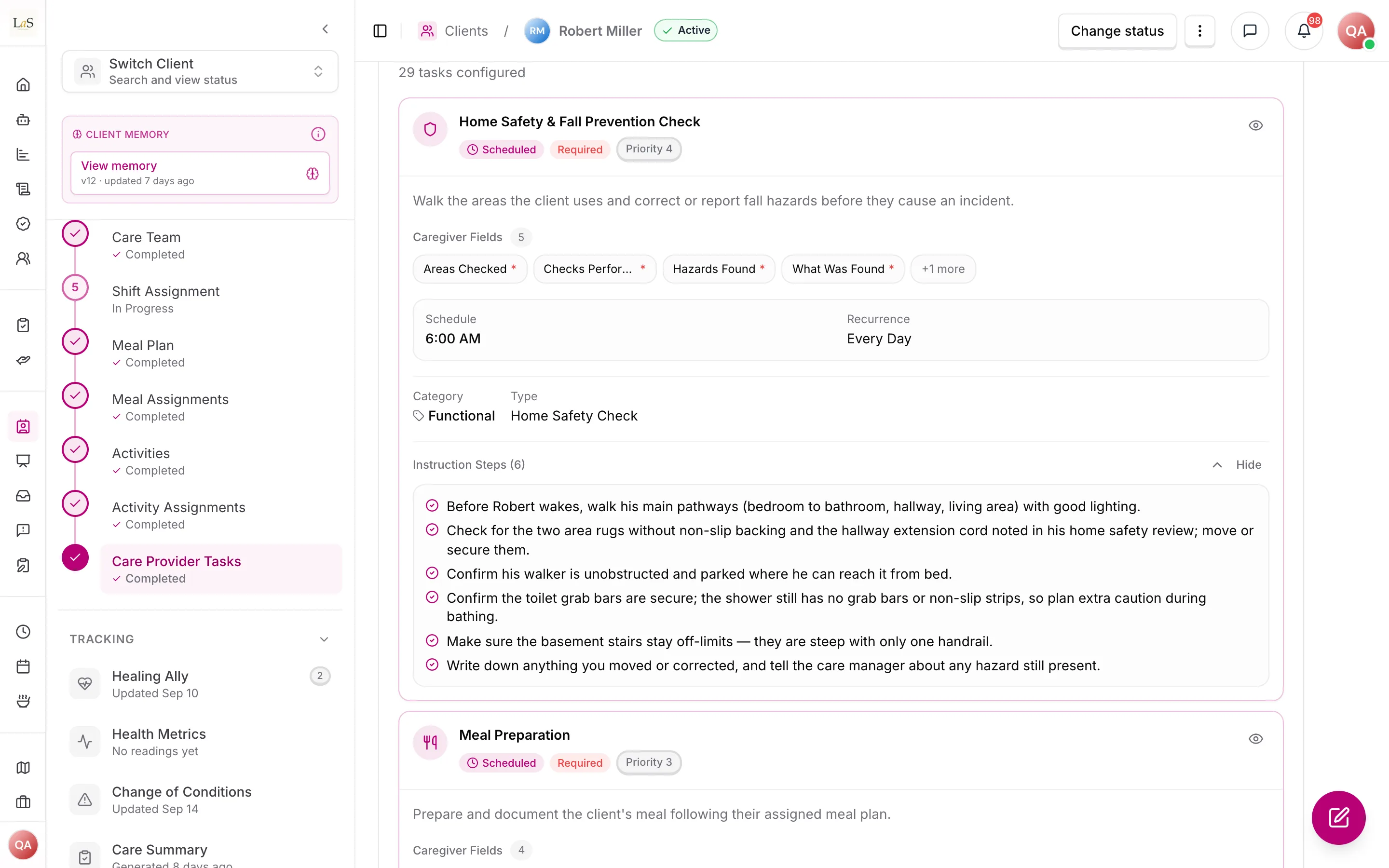
What exists today: every task on a published care provider task list carries instruction steps written for the client, here the six steps of a home safety check. No care manager reviews or versions them, and they are not rewritten when the client's assessment scores change.
Key terms
- Task instruction steps — the AI-written, client-specific instructions for performing one care task, covering everything from materials to completion indicators.
- Assistance level — how much help the client needs for a specific task — Independent, Set-up, Partial, or Full — set on the care plan from the care manager's assessment.
- Assessment inputs — the data the AI reads to write instructions: the task's assistance level, functional task performance (the Routine Task Inventory instrument's answers — RTI-E — or the agency equivalent), cognitive level (the Allen Cognitive Level instrument's chosen mode — ACL/ACLS-5 — and ADM when applicable), and the client's profile.
- Methodology rules — the agency's configured care principles, written as a structured rule set in Agency Memory, that govern how assessment inputs become step structure, language, and sequencing.
- Methodology principle — the specific rule a single step reflects; every generated step is tagged with one so the reasoning is traceable.
- Generation — the act of the AI writing or rewriting a task's instruction steps from the current inputs.
- Approval — the care manager's sign-off that makes a set of instructions visible to care providers; nothing reaches a care provider unapproved.
- Step flag — a care provider's report that a step did not work as written for this client, routed to the care manager's review queue.
- Review queue — the care manager's list of flagged steps, pending approvals, and deferred regenerations awaiting action.
- Pattern analysis — the platform's detection of the same step being flagged repeatedly across shifts, which raises a reassessment prompt.
How it works
What the AI reads
For each task on the care plan, the platform assembles the client's full picture before writing a single step:
- the assistance level set for that specific task on the care plan (Independent / Set-up / Partial / Full);
- functional task performance results — the Routine Task Inventory instrument's answers (RTI-E), with each ability's level read by its fixed rule (ABLD-13), or the agency's configured equivalent;
- cognitive level results — the Allen Cognitive Level instrument's chosen mode and level (ACL/ACLS-5) and ADM — when applicable;
- the — preferences, routines, sensory considerations, mobility, and communication style;
- the agency's methodology rules from Agency Memory.
The generation engine itself is platform-level and methodology-neutral: it does not promote any one approach. The agency's configured rules decide how the inputs translate into instructions. The instruction structure is the same whether the client is bed-bound or ambulatory; what changes is the assessment-driven content.
What a set of instructions contains
Every generated task carries a fixed structure so care providers always know where to look:
- task name and a purpose statement explaining why the task matters for this client;
- materials needed and preparation before starting;
- an ordered step sequence to follow;
- care-provider prompts — the words or cues to use with the client;
- safety notes;
- completion indicators — how to know the task is done well.
Each step is tagged with the methodology principle it reflects, and adaptations are noted inline for predictable variations (for example, the client declines, or the client shows confusion).
Generation and approval lifecycle
Instructions are generated when the care plan is finalized. From there they move through review before any care provider sees them, and they are regenerated automatically whenever the inputs change — on care-plan update, when reassessment changes the scores, or on transition of care. A care manager can edit a step, add or remove steps, or override the whole set, and can request a fresh regeneration with a note. Every approved version is retained for audit.
When an input change triggers a regeneration, the new draft returns to the care manager for review; the previously approved version stays in the audit history. A care manager who is not ready to act on a triggered regeneration can defer it, and it waits in the review queue rather than reaching care providers.
The care provider's experience
Care providers reach a task's instructions in one tap from their daily task list. The instructions are reading material to internalize before the shift — not a real-time checklist to tick off during the task. Once cached, they are available offline (see Offline Mode). If a step did not work as written for this client, the care provider can it, and the flag routes to the care manager.
The care manager's experience
The care manager's dashboard shows, per task, which instructions have been generated, reviewed, and approved, and which are still pending. Flagged steps surface in the review queue. Pattern analysis watches for the same step being flagged repeatedly across care providers; when it finds one, it raises a reassessment prompt, because a step that keeps failing usually means the client's ability has drifted from what the assessment recorded. The care manager confirms or defers each prompt.
The regeneration cascade
Instruction steps sit at the end of a chain that starts with a reassessment. When a reassessment changes the client's scores materially, the change flows down to the care plan, the Care Task List, and finally these instructions — each step returning to the care manager for review before anything reaches a care provider.
Rules
- STEP-1 — Task instruction steps are generated per task from the client's assessment inputs: the task's assistance level (Independent / Set-up / Partial / Full), functional task performance (the Routine Task Inventory instrument's answers, RTI-E, or the agency equivalent), cognitive level (the Allen Cognitive Level instrument's mode, ACL/ACLS-5, and ADM when applicable), the client profile, and the agency's methodology rules. The instruments' answers are read as ABLD-19 allows care provider tasks: drafts and completed ones. (⚠️ Partial — per-task instruction-step generation exists in code; whether it reads the full set of inputs above, especially per-task assistance level and ACL/ADM, must be audited.)
- STEP-2 — The generation engine is platform-level and methodology-neutral; the agency's methodology rules, configured in Agency Memory, govern how inputs become step structure, language, and sequencing. (⚠️ Partial — agency rules are applied to instruction-step generation; whether they fully determine structure, language, and sequencing is unaudited.)
- STEP-3 — The instruction structure is identical regardless of the client's mobility status; only the assessment-driven content differs. (🚧 Spec only)
- STEP-4 — Each task's instructions are generated when the care plan is finalized. (🚧 Spec only)
- STEP-5 — Instructions are regenerated automatically when the care plan is updated, when reassessment changes the inputs, or on transition of care. The emitting rules are (a Routine Task Inventory or Allen Cognitive Level completed, or a completed one changed), (a material change in the levels read from those two), and the transition-of-care flow. (🚧 Spec only)
- STEP-6 — A care manager must review and approve a set of instructions before any care provider can see it; nothing unapproved is ever visible to a care provider. (🚧 Spec only)
- STEP-7 — A care manager can edit any step, add a step, remove a step, override the entire instruction set, or request a regeneration with a note. (🚧 Spec only)
- STEP-8 — Every approved version of a task's instructions is retained for audit; prior versions are never overwritten. (🚧 Spec only)
- STEP-9 — Each set of instructions includes task name, purpose statement, materials needed, preparation, an ordered step sequence, care-provider prompts, safety notes, and completion indicators. (🚧 Spec only)
- STEP-10 — Every step is tagged with the methodology principle it reflects, and adaptations for predictable variations are noted inline. (🚧 Spec only)
- STEP-11 — Care providers reach a task's instructions in one tap from the daily task list. (🚧 Spec only)
- STEP-12 — Instructions are presented as pre-shift reading material to internalize, not as a real-time checklist used during the task. (🚧 Spec only)
- STEP-13 — Instructions remain available offline once cached. (🚧 Spec only)
- STEP-14 — A care provider can flag any step that did not work as written; the flag routes to the care manager's review queue. (🚧 Spec only)
- STEP-15 — The care manager dashboard shows, per task, which instructions are generated, reviewed, approved, and pending. (🚧 Spec only)
- STEP-16 — Pattern analysis detects when care providers frequently flag the same step and triggers a reassessment prompt for the affected task — that is, it creates a Triggered reassessment (the receiving rule is ), because a step that keeps failing usually means the client's ability has drifted from what the assessment recorded. (🚧 Spec only)
- STEP-17 — When reassessment produces materially different scores, the platform flags the affected task instructions for regeneration; the care manager confirms or defers, and deferred regenerations remain in the review queue. This is the receiving side of . (🚧 Spec only)
- STEP-18 — Triggered regenerations return to the care manager for review before reaching care providers; the previously approved version stays in the audit history until a new version is approved. (🚧 Spec only)
- STEP-19 — A care provider cannot start a scheduled task until they have ticked off every one of its instruction steps. The control that starts the task refuses while any step is unticked and says which — an unexplained dead button reads as a fault, not a rule. A step marked optional never gates, because a step the care provider may legitimately skip for this client must not be something they are made to affirm; a task carrying no instruction steps, or only optional ones, starts freely. This is the enforcement point for 's intent while no pre-shift reading surface exists: the steps are read at the last moment they can still change what happens, rather than reconstructed from memory afterwards. (✅ In code)
- STEP-20 — Starting the task closes the instruction steps. From that point they are a reference the care provider reopens at will, and the gate is spent: documentation is never blocked by an unticked step, because a care provider who worked from memory must still be able to record what they did. Withholding the record punishes the wrong thing — it loses the account of the care instead of improving the reading of the instructions. (✅ In code)
Who can do what
| Action | Roles |
|---|---|
| Configure the agency's methodology rules | Owner, Admin |
| Trigger generation by finalizing the care plan | Care manager |
| Review, approve, edit, add, remove, or override instruction steps | Care manager |
| Request a regeneration with a note | Care manager |
| Confirm or defer a reassessment-triggered regeneration | Care manager |
| Read a task's instructions (one tap from the task list) | Care provider |
| Acknowledge a task's instruction steps to unlock starting it | Care provider |
| Flag a step that did not work as written | Care provider |
Decisions needed
- Should anyone other than the original care manager be able to approve instructions? The rules name the care manager throughout. Options: allow Owner/Admin to approve as well; keep approval a care-manager responsibility with management able to step in only as a fallback.
- What happens to in-flight shifts when instructions are regenerated mid-day? If a care provider has already read this morning's version and a reassessment regenerates the task this afternoon, which version governs the rest of today. Options: pin the version a care provider read at clock-in for the duration of the shift; always show the latest approved version; notify the care provider that the instructions changed.
- How long must old versions be retained, and who can see them? requires retention but does not set a horizon or an audience. Options: retain for the client's full record lifetime per Data Ownership & Retention; cap at a fixed number of versions; restrict version history to management only.
- How many repeat flags trigger a reassessment prompt, and over what window? leaves the threshold unspecified. Options: a fixed count per task; a count-within-time-window; an agency-configurable threshold.
- Should regeneration ever be fully automatic, with no review? and require review before visibility. Options: keep review mandatory for every version; allow an agency to opt into auto-approval for low-risk tasks; auto-approve only cosmetic regenerations.
- Can a care provider see why a step exists? Steps are tagged with a methodology principle (). Options: surface the principle tag to care providers as context; keep the tag internal to management and audit.
How is this page?
Last updated on