Assessment Builder
Part of the Anaya Care Handbook — the source of truth for how the product must behave. When the product needs to change, change this document first, then make the system match it.
Implementation status — the Assessment Builder is released to customers on the web dashboard: the template library with Anaya's starters, the General Care Assessment and the six library instruments, all four ways to start a template (library, Describe it, Snap a paper form, Blank), the builder, publishing editions, agency setup, filling an assessment on the client record, the initial assessment and the care proposal, and Fill with Anaya from the visit conversation. Caring Touch, Always Fresh and Care Bliss are Anaya starters an agency adopts from the library and fills under the client's Agency assessments. Five rules are ⚠️ Partial (, , , , ), each with the missing half named on it, and the largest gaps are listed under Known gaps. Last audited against the code on 2026-09-30; the rules template-driven intake added or changed were audited on 2026-10-06, when it shipped. Legend: ✅ In code · ⚠️ Partial · 🚧 Spec only (not yet built).
Template-driven intake — decided 2026-10-01, live since 2026-10-06. The six care assessments are locked Anaya ; the initial assessment and the care proposal each run on a published template the agency chooses; each agency defines its own in place of value-added services; and no assessment score changes a price any more. It added – and rewrote , , , – , and ; and are retired.
What this covers
This page governs the : how an agency makes its own assessments from templates, uses Anaya's library — which holds the six care assessments as locked library instruments — and fills them in, with Anaya's help, on the client record, on the initial assessment and on the care proposal. The agency chooses which published template its intakes run on and which its proposals run on, and lists the service add-ons it offers; until it has, its staff wait at the setup gate (ACCESS-40). The agency's own templates answer the questions the six don't ask: a franchise's home walk-through, a quarterly supervisory visit, comfort and companionship wishes, dignity-first continence support, or a score a doctor recorded.
It covers the template library and its instruments, the four ways to start a template, the builder, publishing editions, choosing the intake and proposal templates, service add-ons, filling an assessment during a home visit, what Anaya may draft or fill, how answers reach Anaya's plans, how templates that come from someone else are licensed, and how the old records move across. The research behind these choices — what agencies are required to record, how other platforms do it, what the design has to protect inside Anaya, and the rollout plan — is on Assessment Builder Research.
The screens pictured below are the product itself, filled with fictional sample data: an agency, its Home Visit Check template, and a client, Eleanor Vance, whose visit conversation Anaya reads.
Key terms
- Assessment template — an agency's own assessment form: its sections, questions, answers, show-when rules and optional points. A template belongs to one business.
- Edition — a published, unchangeable snapshot of a template ("Published · edition 3"). Editing a published template works on a draft of the next edition. Templates have editions; an assessment has , one for every save (CA-15). The two words never stand in for one another. (A client-wide "generation" across the six care assessments is retired with .)
- Agency assessment — one filled-in copy of a template, pinned for life to the edition it was started on: a client's, or the one an initial assessment or a care proposal carries. Its statuses are Not Started, Draft and Completed.
- Anaya library — the templates Anaya offers every agency: Anaya starters (written by Anaya, copied into the agency to use or change), the General Care Assessment, the six , and the type. Using a library template gives the agency its own copy.
- Library instrument — one of the six care assessments (Simplified Routine Task Inventory, Routine Task Inventory, Allen Cognitive Level, Meal Assessment, Montessori Profile and Home Safety) as a template in the Anaya library. An agency adopts it locked: its questions, answers and credit line can't be changed, the agency has one copy of it, and it is placed on every client ().
- / — the published template the agency chooses for its initial assessments, and the one for its care proposals. They may be the same template ().
- Agency setup — the one-time step in which someone who may publish templates chooses the intake and proposal templates and lists the agency's service add-ons, or says it offers none. Until it is done, the agency's staff wait at the (ACCESS-40).
- Service add-on — a service the agency offers on top of care: a name, a description, an optional extra price per hour, and its place in the list. Chosen on the intake and the proposal, each of which keeps a copy (). It replaces the fixed value-added services.
- Outside result — a template type that records a score someone else measured (for example a memory screen at the doctor's): the name of the check, the score, the date, who gave it, and an optional scan. Anaya stores the result, never the check's questions.
- What this captures — one plain sentence on a question saying what the answer means. The care manager sees it as the question's help; Anaya reads it to understand the answer.
- Care topic — an optional label on a question naming a meaning Anaya already understands (for example Bathing or Night-time waking). Today it labels the question and nothing more: it does not yet send the answer to a particular part of the care plan, which comes later in the rollout. Safety topics are not offered: they belong to named questions of the Meal Assessment and Simplified Routine Task Inventory instruments ().
- Carry the last answer forward — a question's setting, on by default, that starts each new assessment of the template with the answer from the last completed one, labelled with its date. Turned off, the question is asked fresh every time, as a visit date or who visited should be, and Fill with Anaya never sets its answer against last time's. A signature is never carried.
- Anaya may fill this — each question's AI setting: Suggest (Anaya may propose an answer), Quote only (Anaya shows what was said, but the care manager chooses) or Never.
- Support state — how an answer Anaya suggests is backed by the conversation: Said directly, Inferred · please check, Conflicts (with another answer, or with the last completed assessment for a question that carries its answer forward) or Not discussed. Always words, never a percentage.
- Retire — take a question out of new fills while keeping every answer already given to it.
- Visit mode — the filling layout for a tablet in the client's home: larger text and targets, and the next step within reach of a thumb. On by default on touch screens.
How it works
The template library
Owners and admins find the library under , in the Business part of the sidebar beside Settings. It has two tabs: Your agency (the agency's own templates, with their state: Draft, Published · edition N, Unpublished changes, Retired, or Locked for a library instrument) and the Anaya library. Search and category filters work across both. A card shows the template's purpose, how many questions it has, roughly how long it takes on a visit, how many clients use it, whether it feeds Anaya's plans, whether it is a locked instrument, and — for library templates — its licence.
Opening a card shows the template exactly as the care manager will see it, with its sections and any attribution. Use template copies a library template into the agency; a starter's copy can be changed freely and Anaya's original stays as it is. A library instrument is different: only someone who may publish templates can add it, it is published at once and locked — the builder opens it read-only, with its credit line — and the agency holds one copy of each (). When Anaya publishes a new edition of a starter, the agency's copy is never overwritten: the card says "Anaya updated Always Fresh" and offers to review the changes into the agency's draft.
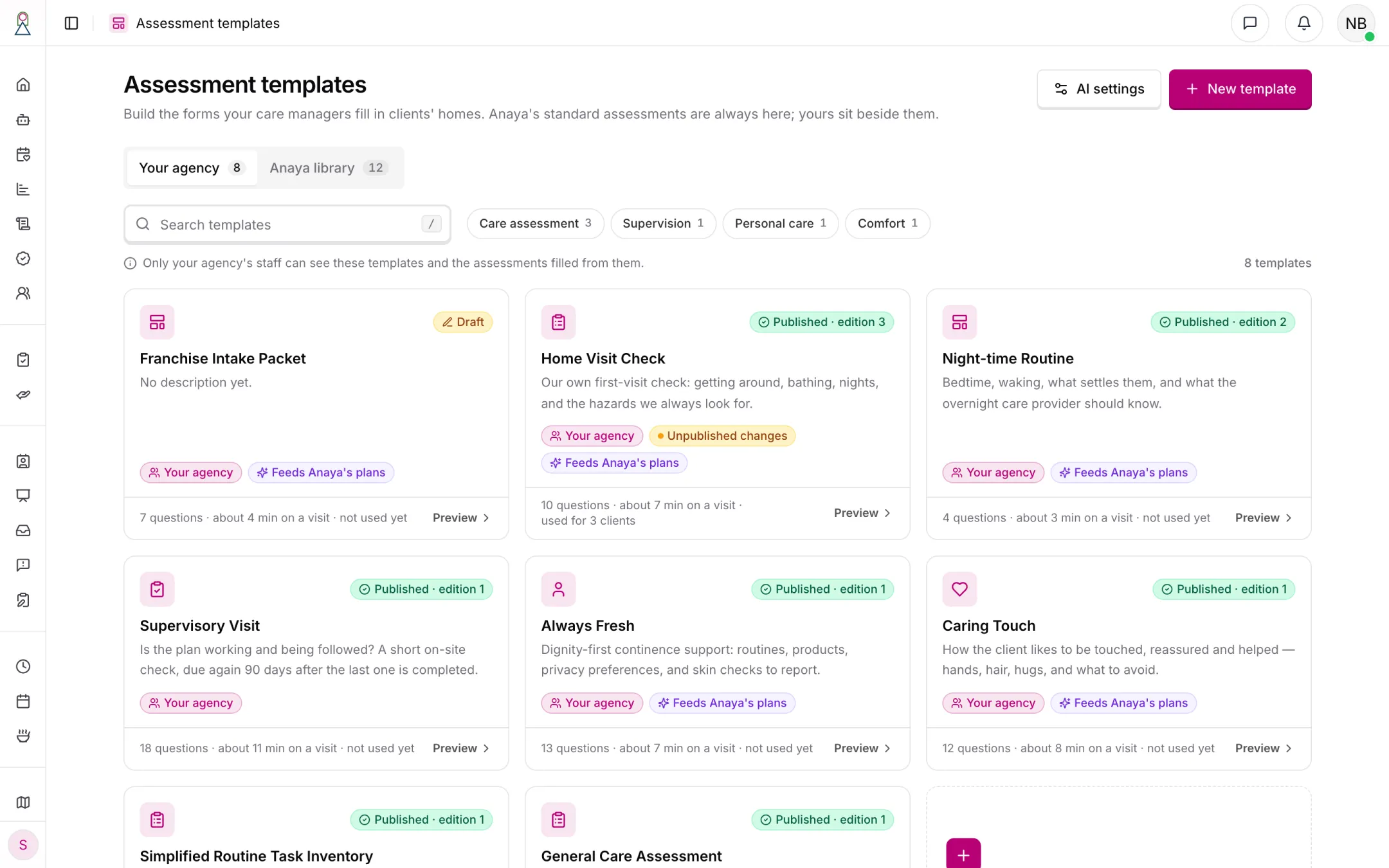
The template library. Home Visit Check is live on edition 3 and has unpublished changes; Night-time Routine is on edition 2; the franchise intake packet Anaya read from a photo is still a draft.
The library holds five Anaya starters — Caring Touch, Always Fresh, Care Bliss, Supervisory Visit and Record an outside result, all written by Anaya — and the General Care Assessment and the six library instruments (see the research for which other tools wait, and why). Always Fresh and Care Bliss are added when needed rather than to every client. Supervisory Visit is due again 90 days after the last one is completed. It and Record an outside result ask every question fresh each time, because each records one visit or one result; the other three carry their answers forward, apart from Always Fresh's two checklists about the day itself and, in Caring Touch and Care Bliss, who helped answer. Public-domain checks, such as the CDC's Stay Independent fall check, follow once the library can show their required credit lines.
The General Care Assessment is a short Anaya-written check that an agency can change like any starter: who answered, how the person lives, what matters to them, daily living and household tasks as task grids, memory, hearing, vision and speech, home safety and falls, the morning routine and interests, and goals — twelve questions, about 12 minutes. It is added when needed, one per client, and it qualifies as an intake or proposal template (). The six are the care assessments every client has always had, with the content of the fixed forms they replaced — apart from the changes Care Assessments names under each, such as the Meal Assessment dropping the MNA-SF and Home Safety's three states — and their owners' credit lines. They are added locked and placed on every client: each shows on the client's record as not started until someone fills it, and no empty assessment is created for it.
Starting a template
New template offers four doors, each ending in the same editable draft that nobody else sees until it is published:
- Start from Anaya's library — pick a starter and change what you like.
- Describe it — tell Anaya what you want to learn about the client ("a 10-minute continence-support check for the first visit"), who fills it in, and how long it should take. If the description is thin, Anaya asks up to three quick questions first. Anaya proposes an outline, section by section; the author keeps the sections they want, and the draft opens in the builder with each question Anaya wrote marked Added by Anaya until the author confirms it. Sections outside non-medical care — diagnosis, prognosis, medication doses — are proposed unticked with the reason, so the agency decides.
- Snap a paper form — upload a PDF, Word file or photos of the form the agency uses today. The author is asked to cover any client details first; Anaya only needs the questions. Anaya reads the form and shows the original page beside the questions it found, each quoting its source and marked Read clearly or Check this; the author keeps, fixes or drops each one.
- Blank — an empty template with one section.
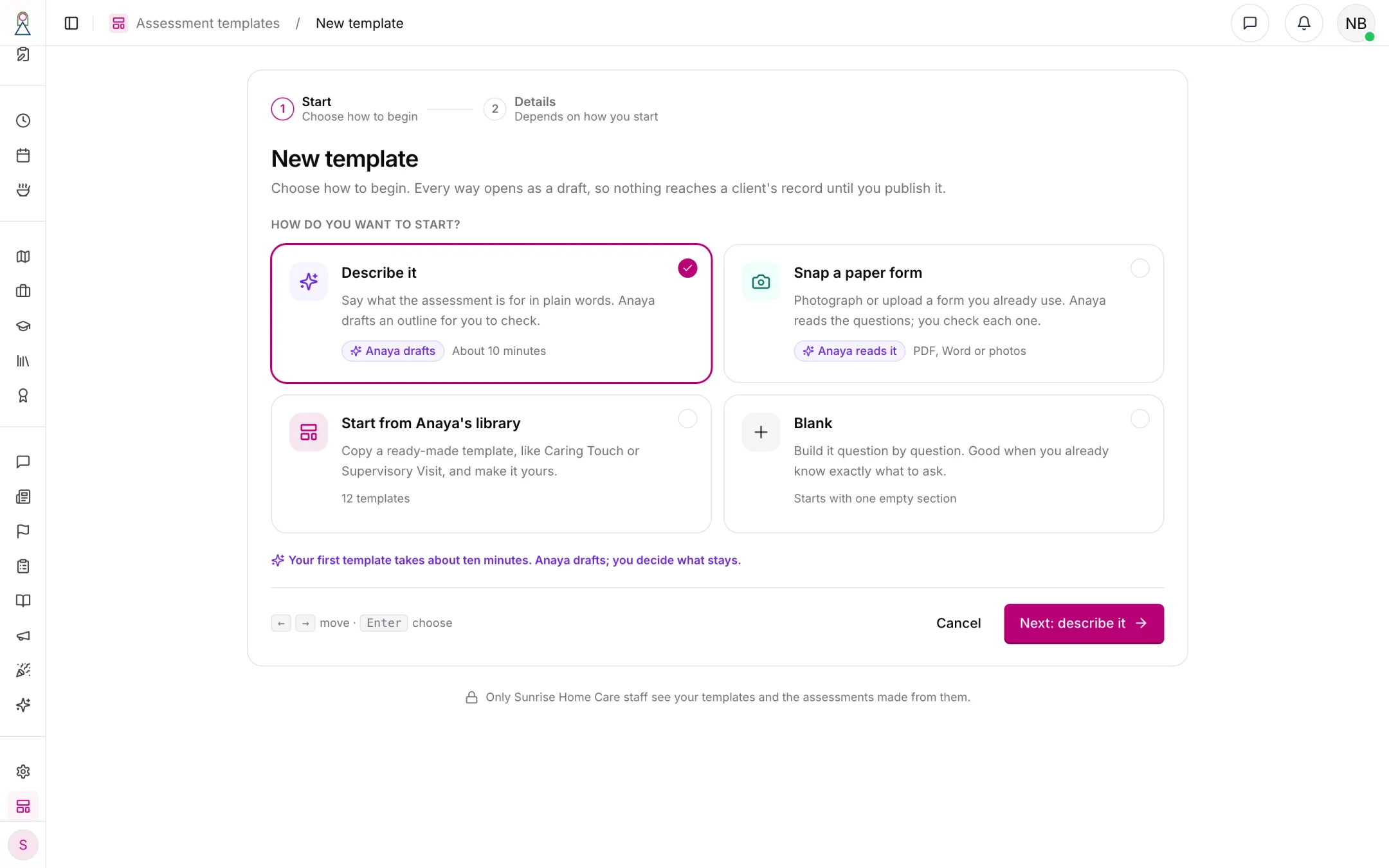
The four ways to start. Every way opens as a draft, and nothing reaches a client's record until it is published.
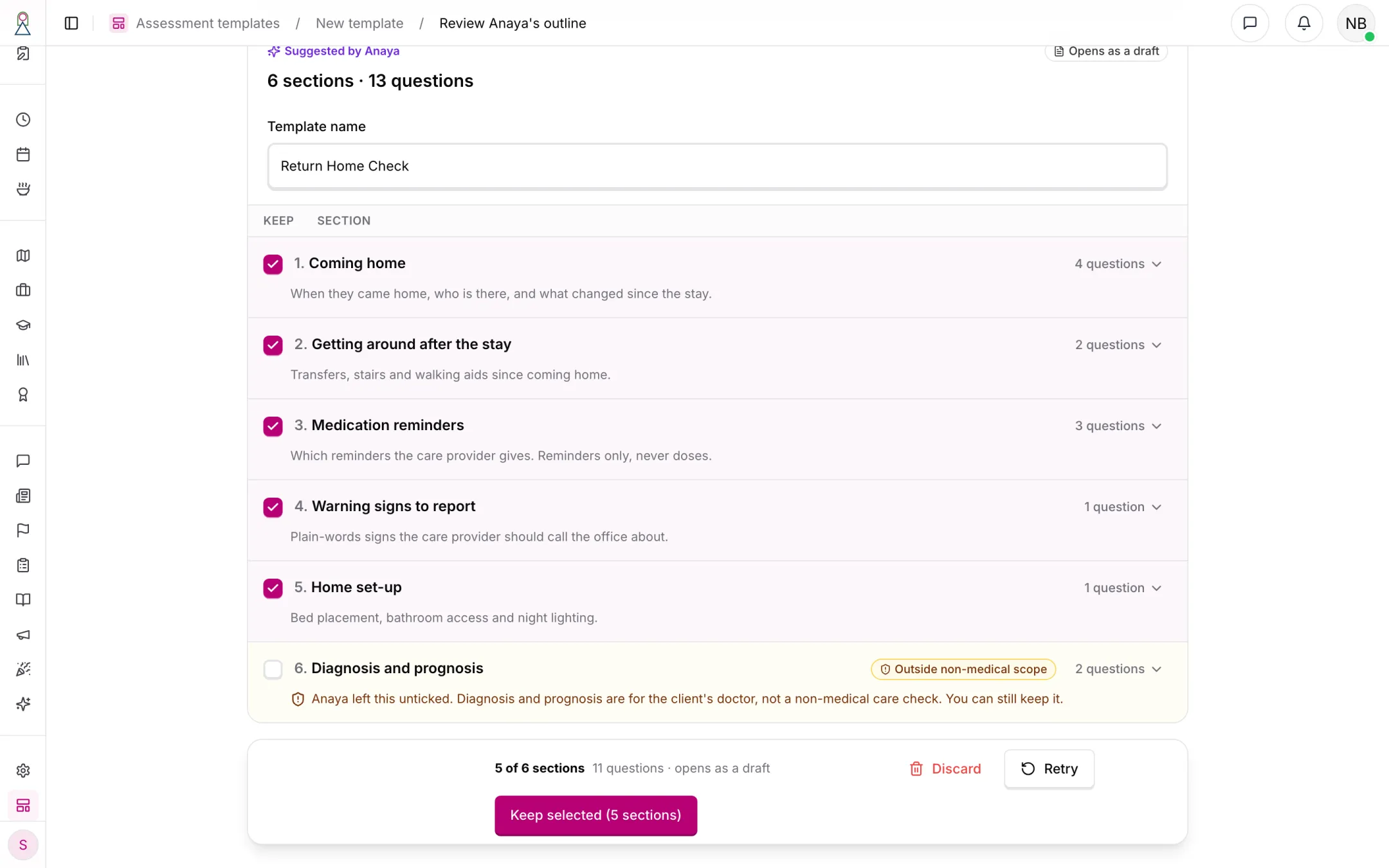
Describe it: Anaya's outline for a return-home check after a hospital stay. The author keeps sections, not a finished form; the diagnosis section is outside non-medical care and starts unticked.
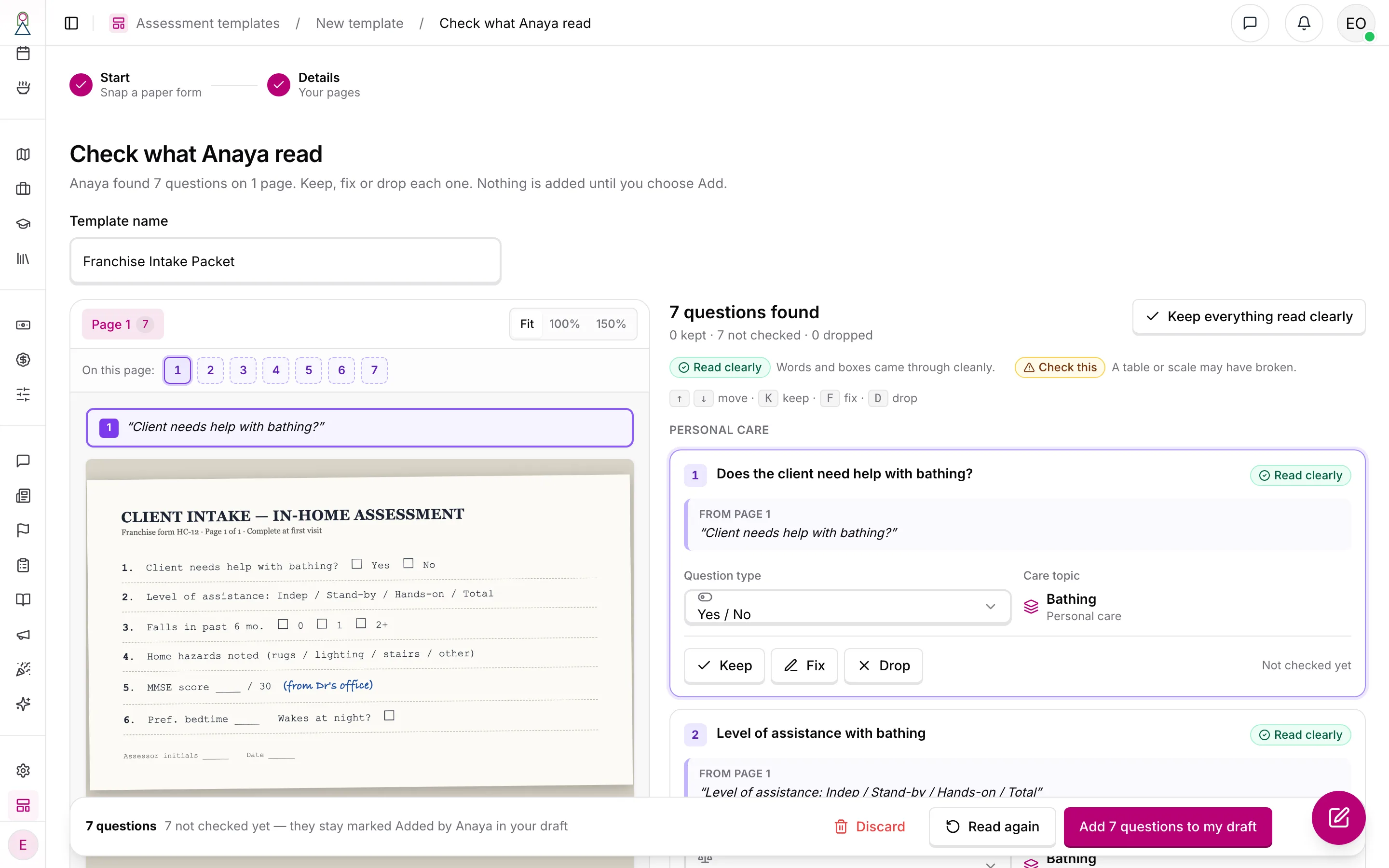
Snap a paper form: the photographed franchise intake form beside what Anaya read, each question quoting the page and marked Read clearly or Check this. The licensed memory screen on the page (MMSE) is added as an outside result — the score and date only.
The builder
The builder has three parts: an of sections and questions on the left, the canvas in the middle showing each question exactly as the care manager will see it, and the settings for the selected question on the right. Question text, help and answer labels are edited in place. A + between questions — or typing / in an empty question — opens the list of question types, grouped as care staff think about them: task grids (tasks by Capacity, Support now and Risk), checklists (where the author says whether a tick means in place or a concern), scored choices, totals with bands, yes/no with a follow-up, pick-any, narrative, short answer, number, date, photo and signature. Enter starts the next question; every move can be made by menu or keyboard as well as by dragging.
The settings panel has three tabs: Answer (the options and their points, whether Not applicable and Not evaluated are offered, whether the answer is needed to complete, and whether the last answer carries into the next assessment — locked off for a signature), Show when (rules written as sentences: "Show What happened? when Any falls in the last 6 months? is Yes"), and Meaning (What this captures, phrases people might say, the care topic, whether Anaya may fill it, and whether it feeds Anaya's plans). A Logic tab beside the outline lists every rule in one place.
With no question selected, the panel shows the template's own settings: its purpose, whether a client can have more than one, where it appears, its category, whether it feeds Anaya's plans, and Review due after — 3 months, 6 months, a year, or no review date. The review date is counted from the last completed assessment and shows on the client's record, under Agency assessments; nobody is reminded of it yet.
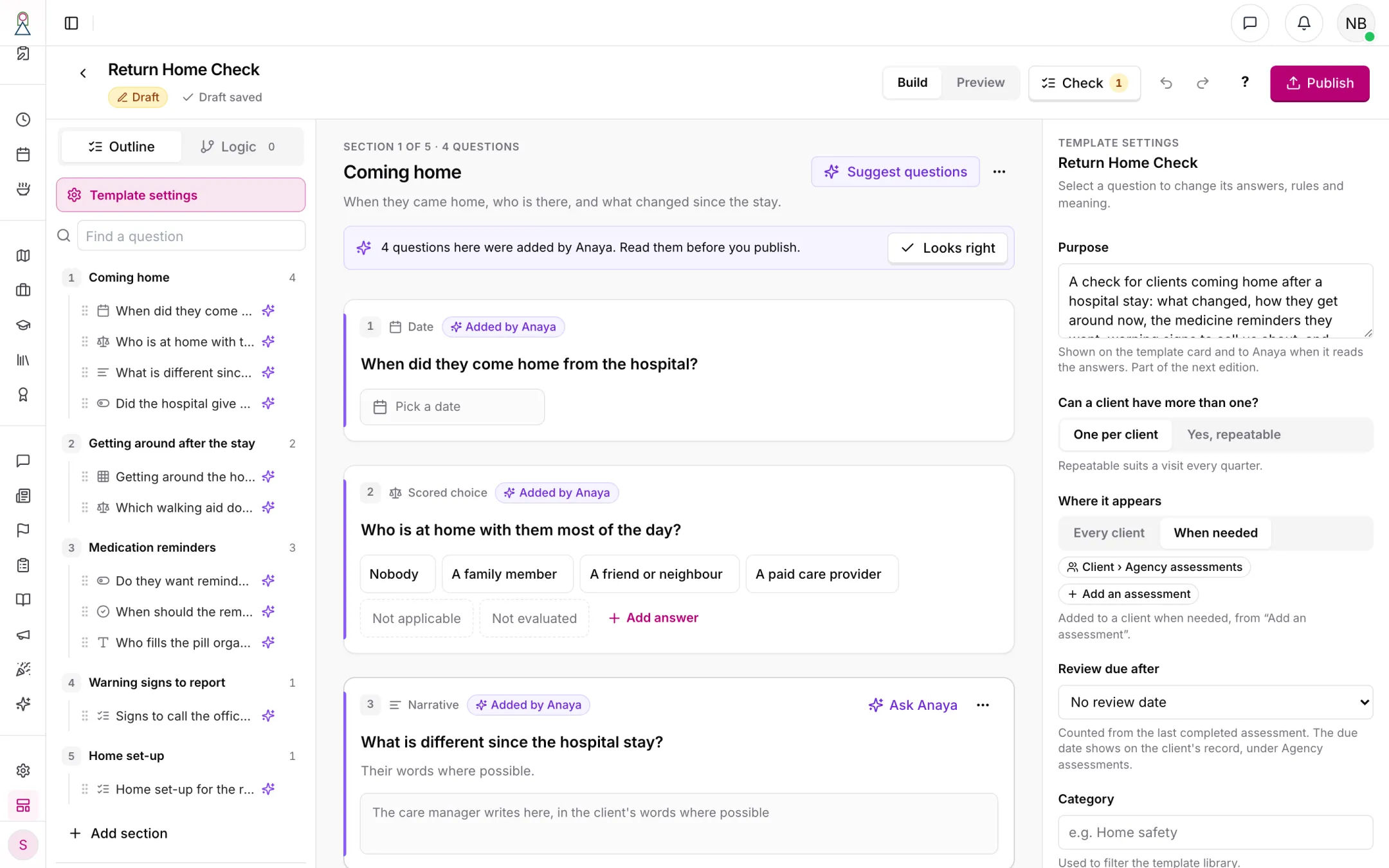
The builder, on a new Return Home Check: the outline, the questions as the care manager will see them, and, with no question selected, the template's own settings. The questions Anaya wrote stay marked Added by Anaya until someone reads them.
When a question looks like a safety detail — an allergy, swallowing or choking, food texture (pureed or minced food, IDDSI levels), drink thickness or thickened drinks, "nothing by mouth" or NPO, tube feeding, or dementia and Alzheimer's — the builder says so on the question: those belong in the Meal Assessment — and confirmed dementia in the Simplified Routine Task Inventory — whose named questions keep unsafe foods out of meals and activities (), and answers here won't do that. The author can open the Meal Assessment or keep the question anyway. A library instrument never shows the warning: its questions are the ones the safety checks read.
Anaya can help on the canvas as well: Rewrite in plain words on one question, or Suggest questions for a section, each arriving as a card the author keeps or discards. A whole batch of Anaya's changes is one undo step. Check lists anything worth fixing before publishing.
Publishing editions
Drafts save as the author works; nothing a care manager sees changes until someone publishes. Publish opens a review with three parts:
- Check — blockers that stop publishing (a rule pointing at a deleted question, overlapping bands, a checklist that doesn't say what a tick means, a licensed instrument's questions) and warnings that don't (questions that don't say what they capture, a very long template, words like "patient" or "diagnosis", questions still marked Added by Anaya).
- What changed since the last edition — added questions, wording-only changes (safe), and breaking changes (a removed question, changed answer options or points, a changed type or band), each with how many assessments in progress and completed use the old edition. A removed question can be retired instead of deleted.
- What changed, in one line for the edition history, which Anaya can draft.
Publish edition N makes the edition live for new assessments. Completed assessments keep their edition exactly as answered; assessments in progress stay on their edition until their care manager chooses to move them. The edition history can preview, compare and restore an edition into the draft — restoring never publishes.
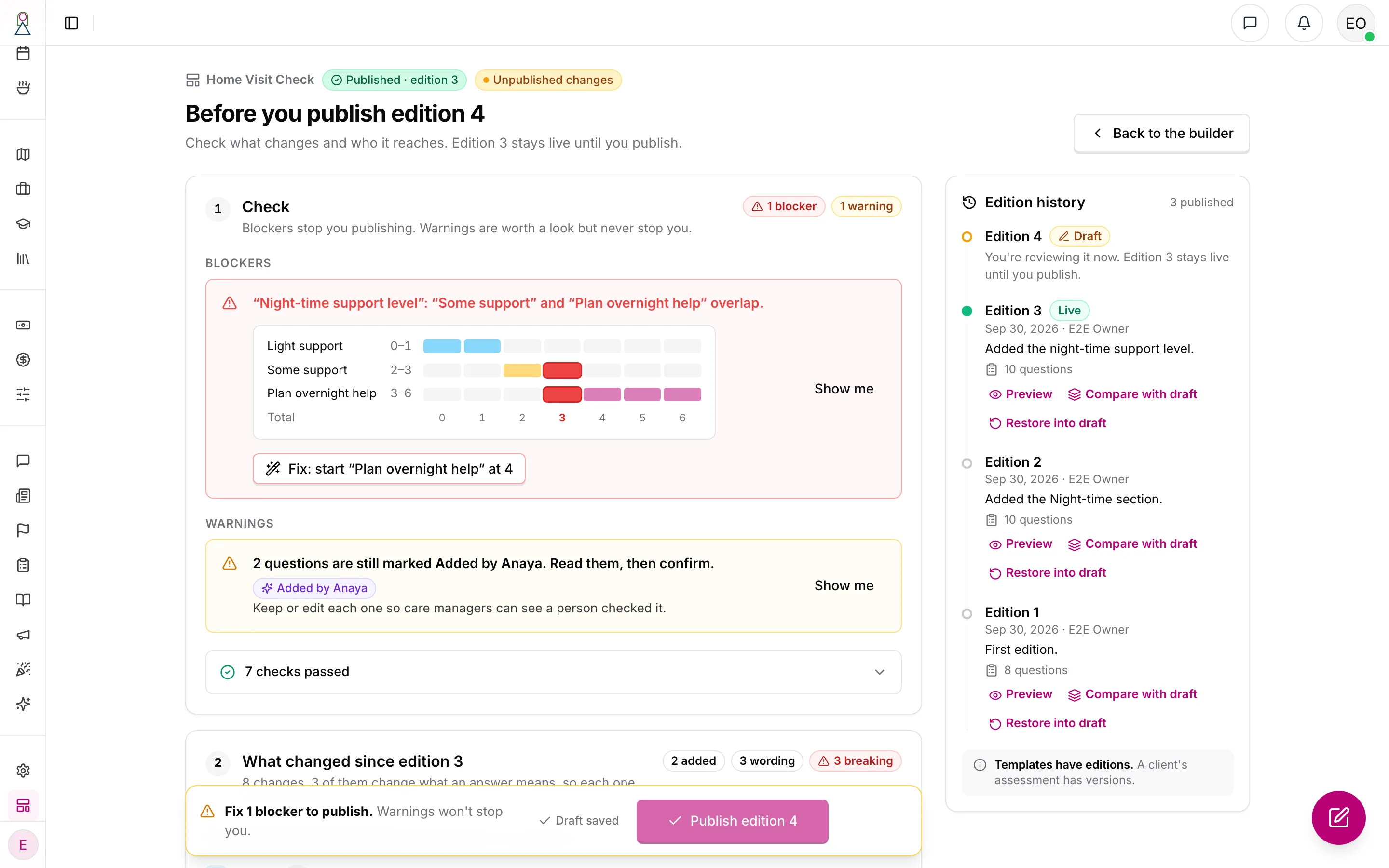
Before you publish edition 4. Two bands overlap, which blocks publishing until it's fixed; warnings never do. The changes since edition 3 are listed with the assessments they reach, and every earlier edition can be previewed, compared or restored into the draft. Edition 3 stays live meanwhile.
The intake and proposal templates
An agency runs its initial assessments and care proposals on templates it chooses at : an and a . They may be the same template. Someone who may publish templates chooses them, and can change them later under Settings › Assessments; a change applies to intakes and proposals created afterwards. A template qualifies when it belongs to the agency, is active, has a published edition and feeds Anaya's plans; the General Care Assessment and the Simplified Routine Task Inventory instrument are ready choices, and an agency can build its own. While a template is chosen for either, it can't be retired or deleted ().
Every new intake starts its own assessment on the intake template's live edition, and every new proposal on the proposal template's. They are filled on the intake and the proposal with the same page, autosave and Fill with Anaya as a client's assessment. Marking an intake complete also completes its assessment, so it is refused while a needed question is unanswered or a suggestion from Anaya waits for review (AS-2); a proposal moves forward only once its assessment is Completed (CP-6).
Converting an intake into a proposal (). When the proposal template is the intake's own, the intake's answers are copied across without loss, as a Draft that staff review and complete — nothing arrives Completed by copying. The intake's signature is the one exception: it attests the intake, so the proposal's assessment is signed by whoever completes it (). When the two differ, Anaya reads the intake's answers and suggests answers for the proposal's questions, each reviewed like any Fill with Anaya suggestion; answers to questions the intake keeps out of Anaya aren't sent to it, and the convert dialog names those questions so staff can copy them by hand. If Anaya can't start, the conversion still goes through and the proposal offers Fill from intake to try again, beside entry by hand.
Creating the client (). A client created from an accepted proposal receives a copy of the proposal's assessment, on the same template and edition: Completed when the proposal's was, otherwise a Draft. The intake's assessment is not copied. The intake's and the proposal's own assessments are never read into the client's plans.
Service add-ons
An agency lists the services it offers on top of care as — each with a name, a description (one line per bullet), an optional extra price per hour, and its place in the list. Someone who may publish templates edits the list at agency setup or under Settings › Assessments; an add-on is archived, never deleted, and an agency that offers none says so. Staff choose add-ons on the intake's Service step and in the proposal's Add-ons section; the intake or proposal keeps a copy of each as it was then, so later edits to the list never change one already chosen. A chosen add-on's extra price is added to every hourly rate row, and no answer or score changes a price. The proposal's Word document lists the chosen add-ons under Services (, CP-31, CP-34).
Moving the old records across
The move ran on staging on 2026-10-03 and on production on 2026-10-06 (). It replaced the six fixed forms, the intake's and proposal's built-in inventory, the value-added services and the score uplift in one move, in an announced window with the platform stopped. A dry run first listed, per agency, everything it would convert and anything it couldn't, with why and where to fix it; the move started only when nothing was refused. Every value it removed or replaced was kept first in a write-only archive, and old fields were removed only after the converted records were checked against the dry run. The old records' collections were dropped on both on 2026-10-06.
- Every agency with clients, intakes or proposals got the six library instruments, locked, and each client's old assessments became that client's instrument answers, their saved history kept as revisions.
- Each intake and proposal got its own assessment on the Simplified Routine Task Inventory instrument, holding the inventory it carried. Its stored rates were not recalculated.
- Value-added services an agency used became its service add-ons, priced as they were for each record. Care Mentor, which was never priced or printed, was not carried. Live and Stay also got its five service pillars as unpriced add-ons, and its intake and proposal templates were set to its Simplified Routine Task Inventory copy.
- Every other agency's staff meet the setup gate at their next sign-in, until someone who may publish chooses the templates and add-ons (ACCESS-40).
- Generation runs in progress when the window started were stopped, and say so.
Filling an agency assessment
On the client record's overview, the six library instruments are listed first, each shown as not started until someone fills it, and the agency's own assessments follow. + Add an assessment lists every published template the client can start. The assessment is created by its first answer, never by opening it.
The form is one long page of sections, not one question per screen: care managers fill these again and again and need the overview. A section rail shows each section's state (Not started, In progress with "3 of 5 answered", Complete, Needs attention). Every change saves on its own; unsent changes are kept on the device first and sent when the connection returns, and the header always says honestly whether everything is saved. This is a safety net for a patchy connection, not offline mode: the page needs a connection to open, and offline mode stays a care provider capability. If two people change the same question, the second is asked which answer to keep; changes to different questions simply merge. Visit mode, on by default on tablets, makes the text and targets larger and keeps Next section and Mark as completed within reach of a thumb.
A new assessment starts from the last completed one. Each question set to carry its last answer forward starts with that answer, labelled with its date, and each section offers Confirm all unchanged; the care manager can also start blank instead. A question asked fresh each time — the visit date, who visited — starts empty; for a yes/no, choice, number or date question, last time's answer is shown beside it for reference only. A signature is never carried. Not applicable and Not evaluated are real answers that score nothing, so nobody has to pick a false value to move on. Totals appear at the end of their section in plain support language ("Night-time support level: 4 · Plan overnight help").
Mark as completed checks only then what is needed to complete: a summary at the top links to each gap. A final Review & complete page shows every answer, totals and bands, and any credit lines. A completed assessment opens read-only; Edit returns it to Draft.
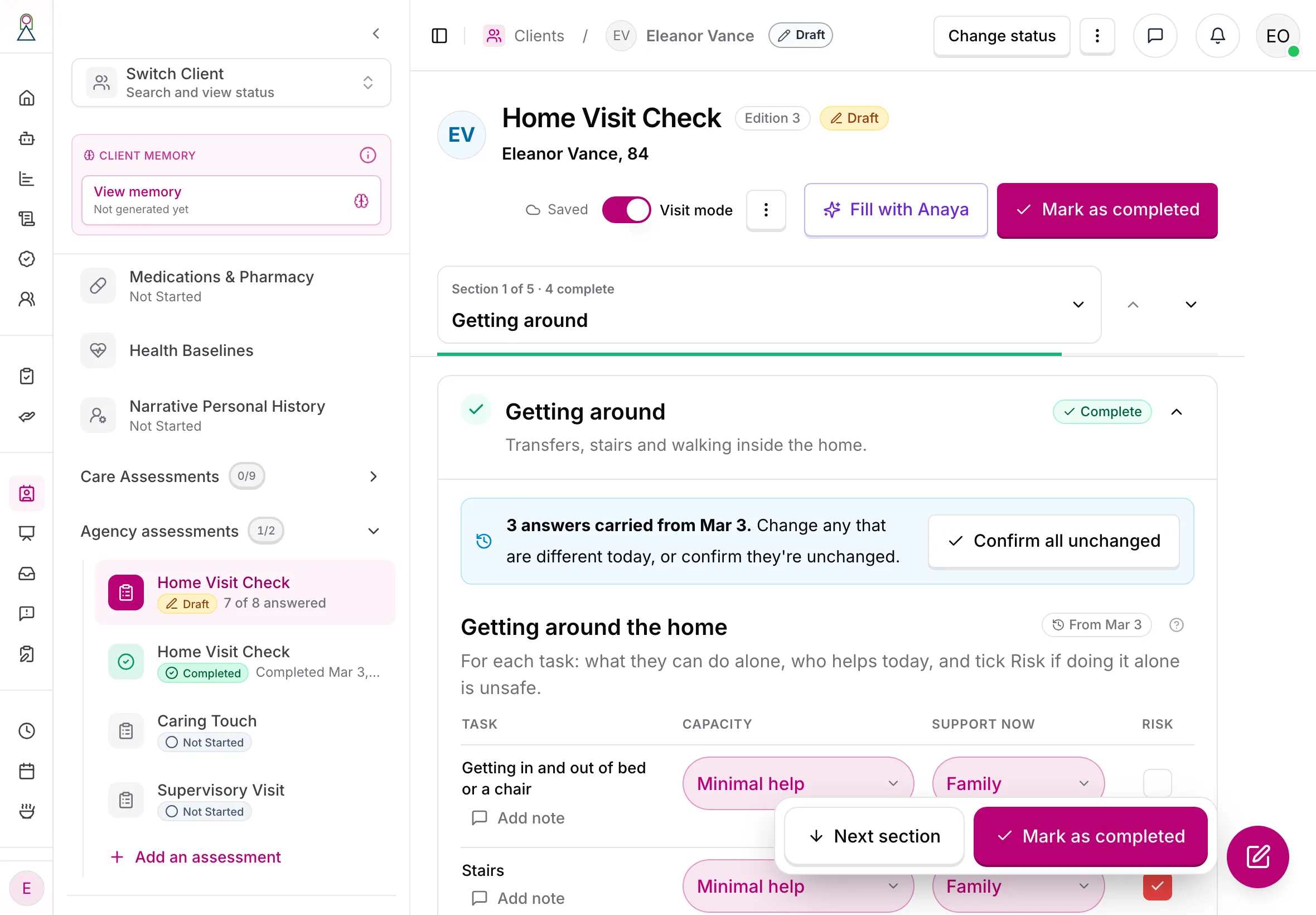
Filling Eleanor's next visit on a tablet, in visit mode: the answers carried from her March visit wait to be confirmed, the save status is always on show, and the next step stays within reach of a thumb.
Filling with Anaya from the visit conversation
Fill with Anaya reads the visit conversation — a recording made with everyone's agreement and uploaded, or notes pasted in — and puts suggestions into the form, never straight into a completed record. The product doesn't record: the care manager uploads a recording made outside Anaya, and confirms on screen that everyone in it agreed, before it started, to being recorded and to Anaya using it. Only agency staff can read what Anaya heard; the recording itself can't be played back in the product. Each suggestion shows the quote it came from (tap it to open the conversation at that moment) and its support state. Questions set to Quote only — falls, hazards, wandering — show what was said with no answer chosen; answering the question on the form settles them. What nobody mentioned stays blank as Not discussed, and Ask the missing questions lists just those questions in plain words, so the care manager can ask them; the answers come back as suggestions too. A To review list puts conflicts and inferences first. The assessment cannot be completed while any suggestion is unreviewed.
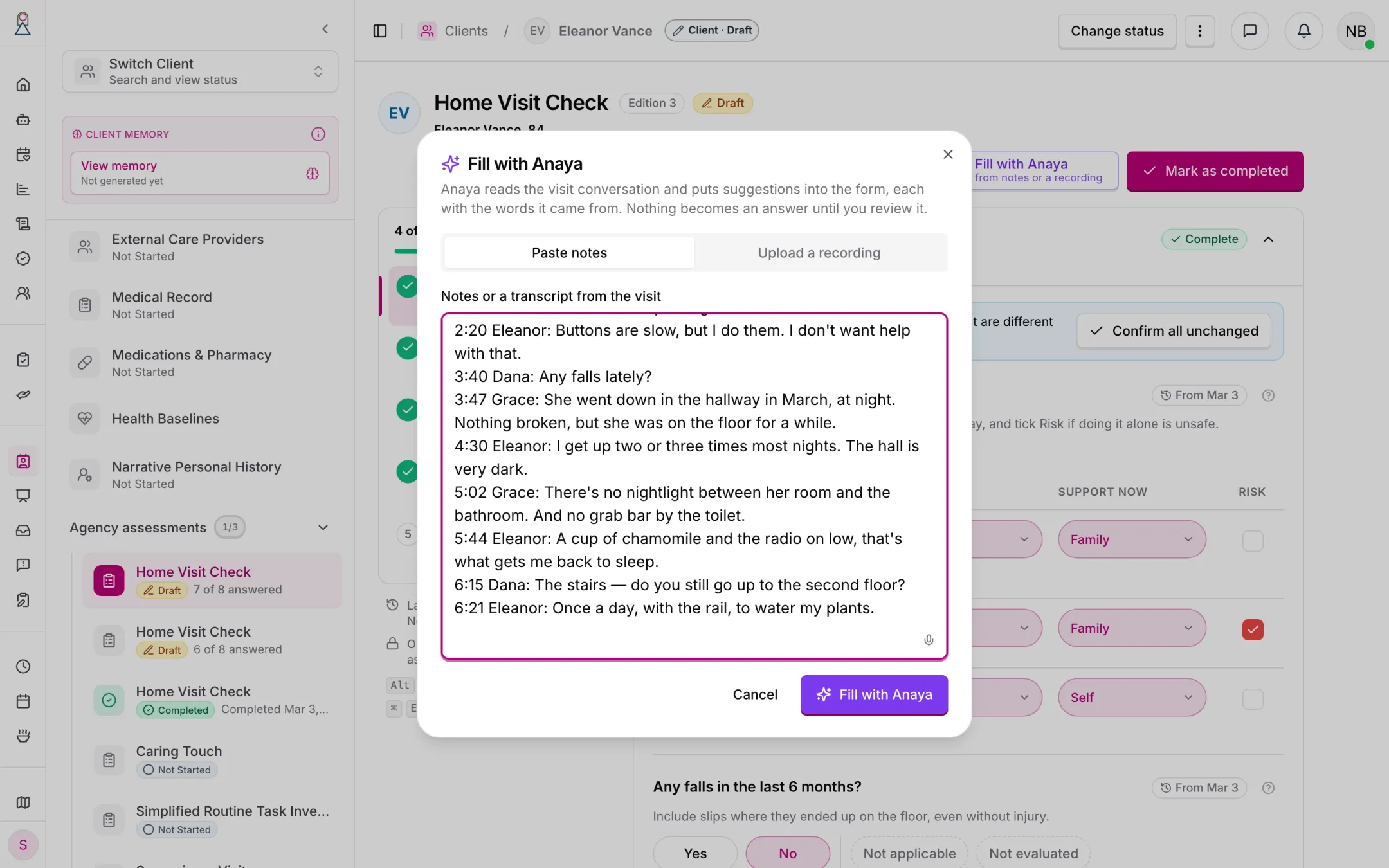
Notes from the visit, pasted in. A recording made outside Anaya can be uploaded instead.
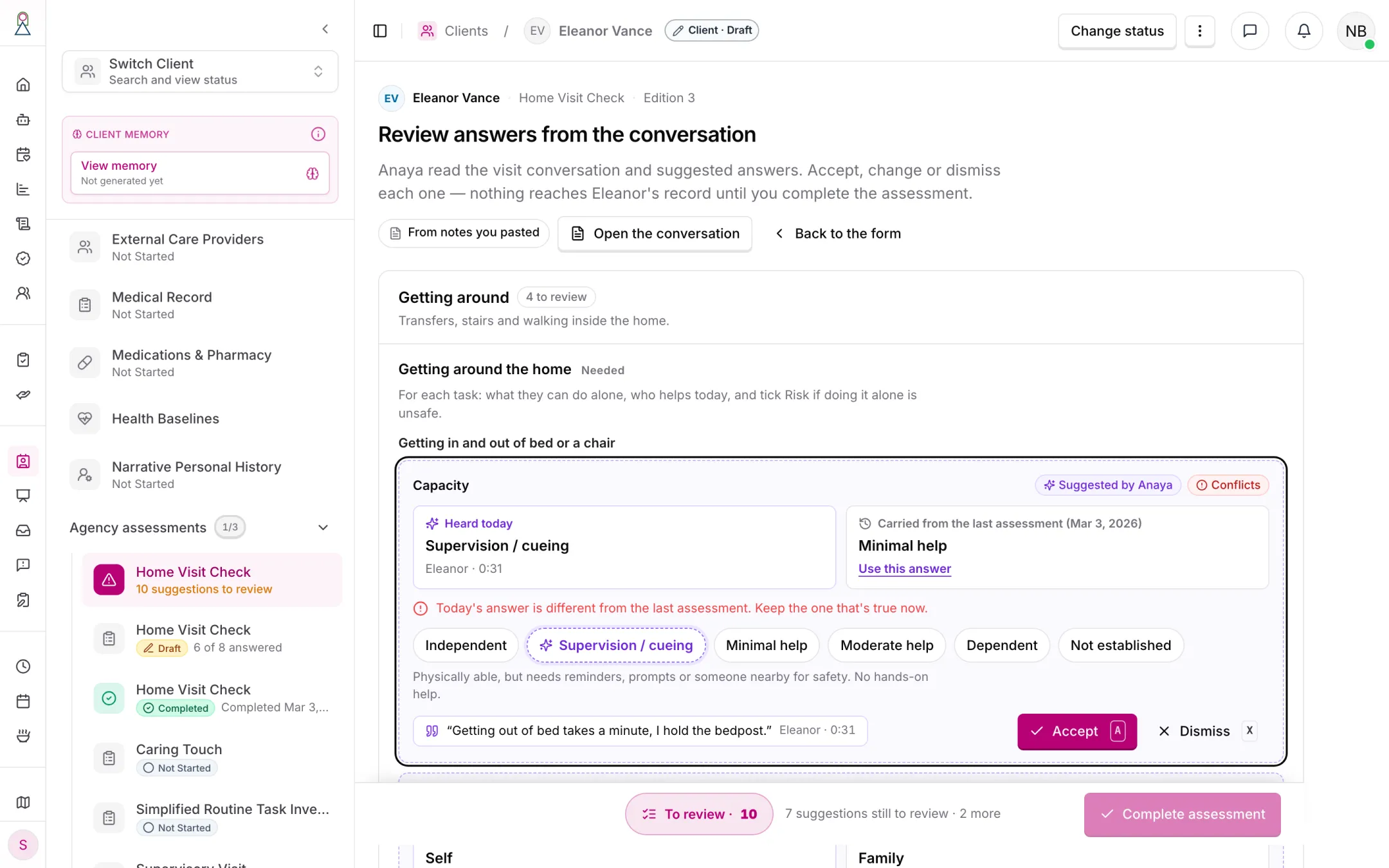
Reviewing what Anaya heard in the visit conversation. Each answer shows the words it came from, who said them and when, and — where they differ — today's answer beside the last assessment's. Completing waits until every suggestion is reviewed.
The intake's Guided Narrative ends in this same flow: once the interview is done, Anaya suggests answers for the intake template from it, and staff review them on the intake before it can be completed (AS-27, AMODE-11).
How answers reach Anaya's plans
Anaya reads assessments as labelled context — template, section, question, answer, and what the question captures; a library instrument also carries its credit line and each chosen answer's description. Which assessments each of Anaya's plans reads is set per plan, and moving the six care assessments onto templates changes only where Anaya reads them from, not which plans read them ():
| Anaya's plan | Reads assessments that are | The six library instruments | The agency's own templates |
|---|---|---|---|
| Care plan | Completed | Yes | Yes |
| Questions Anaya asks while drafting a care plan | Draft or Completed | Yes | Yes |
| Reassessment | Draft or Completed | Yes | Yes |
| Care provider tasks, job postings, activity sheets and activity fit | Draft or Completed | Yes | No |
| Meal plan, client memory, readiness quiz, narrative report and the client summary | Completed | Yes | No |
Only templates set to feed Anaya's plans are read, and each question can be left out. The intake's and the proposal's own assessments never reach a client's plans; the proposal's draft reads the proposal's own answers (CP-30). Client memory does not read the agency's own templates: care providers, representatives and medical professionals linked to the client can read a client's memory (decided 2026-09-30). The meal plan and care provider tasks don't read them either, until they have been checked against clients who take nothing by mouth. No answer changes the care plan's structure or a proposal's price, and only the named questions of the Meal Assessment and Simplified Routine Task Inventory instruments feed a safety rule ().
Assessment answers themselves are shown only to agency staff — an agency template's, a library instrument's, and the intake's and proposal's. Care providers, representatives and medical professionals never open them, on the assessment screens or through the client summary. What Anaya writes from the six for those roles — the care plan, tasks, meals, the readiness quiz, a job posting — may reflect them, as it always has; an agency template's answers reach none of those but the care plan ().
Templates that come from someone else
Many assessment tools are owned by someone. Some are public domain and may be shown only with their credit line; some may not be changed at all; some may not be put into software without a licence Anaya would have to hold. So every library template carries its licence — who holds it, what is allowed, the credit line and when it was last checked — and an entry whose licence isn't confirmed cannot be used. Credit lines appear on screen — in the library and on the assessment's review — and, once agency assessments can be printed, on every printout.
The six library instruments carry these licences, settled by Anaya's owner on 2026-10-01:
| Instrument | Held by | What is allowed | Credit line |
|---|---|---|---|
| Simplified Routine Task Inventory | Anaya Care | Used as published; the questions are fixed | — |
| Routine Task Inventory | Noomi Katz (Routine Task Inventory–Expanded) | Used unchanged with the author's permission; its criteria may not be reworded | "Routine Task Inventory–Expanded (RTI-E), N. Katz. Used with permission." |
| Allen Cognitive Level | Allen Cognitive Network | Levels and modes used with permission | "Allen Cognitive Levels and modes of performance © Allen Cognitive Network. Used with permission." |
| Meal Assessment | Anaya Care | Anaya's own general version: no MNA-SF nutrition screen and no IDDSI framework content or level numbers — textures are named in plain words | — |
| Montessori Profile | Anaya Care | Anaya's own | — |
| Home Safety | Rebuilding Together | Checklist adapted with permission | "Adapted from the Rebuilding Together Safe at Home Checklist. Used with permission." |
Anaya never reproduces any other licensed check's questions: when a description or an imported form matches one, it offers the outside-result type, a library instrument, or original questions instead. The instrument-by-instrument findings are in the research.
Rules that vary by state and payer
What an agency must record depends on its state licence, its payers (Medicaid waivers, long-term-care insurers, the VA) and sometimes its franchise, which is the main reason the builder exists. Later in the rollout, a will describe one rule set as data — the elements it needs, who signs, and how often the plan is reviewed — and the builder will show whether a template covers it, dated and linked to its source with a reminder to confirm with the licensing agency. Signatures and copies the client or their representative must receive belong on the service plan or care proposal, never on the raw assessment, which stays staff-only.
Rules
- ABLD-1 — Every assessment on a client, an initial assessment or a care proposal is filled from a template. The six care assessments are Anaya (), and the agency's own assessments sit beside them on the client record; the initial assessment and the care proposal each run on a published template the agency chooses (, ). (✅ In code)
- ABLD-2 — Every agency assessment is filled from a published edition of a template and stays on that edition for life. (✅ In code)
- ABLD-3 — A template belongs to one business and is never visible to another. Using an Anaya library template gives the agency its own copy; later Anaya editions never overwrite it and are offered for review instead. (⚠️ Partial — a template is never visible to another business, and a copy is never overwritten. Each section, question, answer option and row of an adopted copy now records the starter element it came from, so a later Anaya edition can be matched to it; offering that edition for review into the draft is not built. Every starter is still on edition 1, so nothing needs offering yet)
- ABLD-4 — Retired 2026-10-01. This rule said the six care assessments appear in the library as built in to every client and cannot be edited in the builder. They become locked library instruments an agency adopts (). Must not be reused.
- ABLD-5 — A published edition never changes. Editing works on a draft of the next edition, and publishing is a deliberate action by someone allowed to publish. (✅ In code)
- ABLD-6 — Before publishing, the builder lists every change since the last edition, marks breaking changes (a removed question, changed answer options or points, a changed type or band) with how many assessments in progress and completed use the old edition, and offers to retire a removed question instead of deleting it. (✅ In code)
- ABLD-7 — Restoring an earlier edition puts it into the draft; it never publishes. (✅ In code)
- ABLD-8 — A completed agency assessment keeps its edition forever. A draft on an older edition moves to the newest only when its care manager chooses; answers that no longer fit are kept and shown, never dropped. (✅ In code)
- ABLD-9 — Each template says whether a client may have one assessment from it (one per client) or many (repeatable, such as supervisory visits). (✅ In code)
- ABLD-10 — Every question keeps one identity across editions and it is never reused, so answers, history and later reassessment suggestions always point at the right question. (✅ In code)
- ABLD-11 — What is needed to complete is checked against the assessment's own edition, and only when the care manager marks it completed; saving a draft never shows required-field errors. (✅ In code)
- ABLD-12 — Choice and scored questions may offer Not applicable and Not evaluated. Neither scores, and both stay distinct from a blank answer. (✅ In code)
- ABLD-13 — Totals are computed by the system from the chosen answers, never typed by hand, and are labelled in support language, not medical labels — as the agency's own score, or on a library instrument as its score. No score and no answer affects a proposal's price: only service add-ons carry a price (). The Routine Task Inventory's and Allen Cognitive Level's levels are read by fixed rules — for each ability, the highest level among the criteria ticked; for the Allen level, the whole number of the chosen mode — and reassessment materiality comes from those levels (RAC-13), never from an agency score. (✅ In code)
- ABLD-14 — Show-when rules are written as sentences and work the same on screen and when completing. Answers to hidden questions are kept, but don't count toward completion and don't reach Anaya. (✅ In code)
- ABLD-15 — Food allergies, intolerances and restrictions, taking nothing by mouth, food texture and drink thickness are answered in named questions of the Meal Assessment instrument, and confirmed dementia in the Simplified Routine Task Inventory instrument's Confirmed dementia; only those questions feed Anaya's safety checks. An unanswered question, or an instrument the client doesn't have, is read as not known — never as "No". Another template may ask about the same things, but its answers never satisfy a safety check, and the builder warns the author and points to the Meal Assessment. (⚠️ Partial — the warning is in code and also catches the usual other ways of asking: NPO or nil by mouth, thickened drinks, IDDSI levels, pureed or minced food, tube feeding and Alzheimer's, and the safety checks read only the named instrument questions; but an unrecorded nothing by mouth is still read as No — see Known gaps)
- ABLD-16 — Everything that can be dragged in the builder can also be moved by menu and by keyboard, and moves are announced to screen readers. (✅ In code)
- ABLD-17 — An agency assessment is one long page of sections. Every change saves on its own; unsent changes are kept on the device before sending and sent when the connection returns; the screen always shows honestly whether changes are saved. Two people changing the same question are asked which answer to keep; changes to different questions merge. (✅ In code)
- ABLD-18 — Marking an agency assessment completed is a deliberate sign-off after reviewing every answer. A completed assessment opens read-only, and Edit returns it to Draft. (✅ In code)
- ABLD-19 — Which assessments each of Anaya's plans reads is set per plan, and moving the six onto templates changes where it reads them from, not which plans read them. The care plan reads completed library instruments and completed agency templates; the questions Anaya asks while drafting a care plan, and reassessment, read draft and completed ones of both; care provider tasks, job postings, activity sheets and activity fit read draft and completed library instruments only; the meal plan, client memory, the readiness quiz, the narrative report and the client summary read completed library instruments only. Only templates set to feed Anaya's plans are read, each question can be left out, and the intake's and proposal's own assessments never reach a client's plans. Client memory does not read agency templates, because care providers, representatives and medical professionals linked to the client can read it (decided 2026-09-30); the meal plan and care provider tasks don't until they are checked against clients who take nothing by mouth. (✅ In code)
- ABLD-20 — Assessment answers — an agency template's, a library instrument's, and the intake's and proposal's — are shown only to agency staff. Care providers, representatives and medical professionals never open them, on the assessment screens or through the client summary. What Anaya writes from the six library instruments for those roles — the care plan, tasks, meals, the readiness quiz, a job posting — may reflect them; an agency template's answers reach no summary, report, readiness quiz or job posting those roles can see (). (⚠️ Partial — see Known gaps)
- ABLD-21 — Anaya reads assessment answers as labelled context, and they may shape the wording of the plans opens to them — never the care plan's structure, a proposal's price, or a safety rule beyond the named instrument questions (). Only service add-ons carry a price (). (✅ In code)
- ABLD-22 — A template Anaya drafts, from a description or a paper form, opens as a draft, kept section by section by the author, with every question Anaya wrote marked Added by Anaya until the author confirms it; Anaya never writes into a draft while the author is editing it, and nothing it wrote is live until a person publishes. (✅ In code)
- ABLD-23 — Anaya never reproduces a licensed instrument's questions. When a description or an imported form matches one, it offers the outside-result type, a library instrument, or original questions instead. (✅ In code)
- ABLD-24 — An imported paper form is used only to draft the template. The author is asked to cover client details before uploading. (✅ In code)
- ABLD-25 — When Anaya fills an agency assessment from a conversation, each suggestion appears in the form with the quote it came from and a support state in words, never a percentage. Quote only questions show the quotes with no answer chosen, and a person's own answer to the question on the form settles them: that answer is the choice the quotes left to them. Never questions get no help, and what nobody mentioned stays blank as Not discussed. The assessment cannot be completed while any suggestion is unreviewed. (✅ In code)
- ABLD-26 — Anaya uses a recording of a visit only when everyone in it agreed, before it started, to being recorded and to Anaya using it, and the care manager confirms that on screen before the recording is sent to Anaya. The product doesn't record visits: recordings are made outside Anaya and uploaded. (✅ In code)
- ABLD-27 — Every Anaya library template carries its licence: the holder, what is allowed, the credit line and when it was last checked. An entry whose licence isn't confirmed cannot be used, and its credit line appears on screen and on every printout. The six library instruments carry the licences in Templates that come from someone else, settled on 2026-10-01; one whose owner forbids rewording is used word for word. (⚠️ Partial — every library template carries its licence and credit line, shown on screen in the library and on the assessment's review, and one whose licence isn't confirmed can't be used (every licence in the library is confirmed); agency assessments have no printout yet)
- ABLD-28 — An outside result records the check's name, the score, the date and who gave it. Anaya reads it as "an outside professional recorded…" and never turns a score into a condition. (✅ In code)
- ABLD-29 — A signature on an agency assessment is a staff attestation for that assessment only: it is never carried into the next assessment or copied to a duplicated client, and neither is any answer to a question its template asks fresh each time. Signatures and copies for the client or their representative belong on the service plan or care proposal. (✅ In code)
- ABLD-30 — Building, publishing, viewing and filling agency assessments are agency-staff permissions, separate from one another. The Anaya library ships with the product and changes only with an Anaya release; nobody edits it from the console. (✅ In code)
- ABLD-31 — An agency can switch Anaya's help on or off separately for building templates and for filling assessments. (✅ In code)
- ABLD-32 — Deleting a client deletes their agency assessments, their history and their visit recordings with them. Duplicating a client copies them on the same editions as drafts — the six library instruments among them — without signatures or answers to questions asked fresh each time; an assessment with nothing left to copy is not copied (the retired ). (✅ In code)
- ABLD-33 — Retired 2026-10-01. This rule said Always Fresh and Care Bliss are suggested first for a client whose proposal includes the matching value-added service. Value-added services give way to each agency's own service add-ons (), which point at no template; both starters stay in the library, added when needed. Must not be reused.
- ABLD-34 — The six care assessments are : the Simplified Routine Task Inventory, the Routine Task Inventory, the Allen Cognitive Level, the Meal Assessment, the Montessori Profile and Home Safety. Only someone who may publish templates adds one, and it is added locked: published at once, and never edited, republished, restored, duplicated or retired. An agency holds at most one copy of each. A locked copy is placed on every client, one per client, and can be deleted only while no assessment uses it and it isn't chosen at agency setup. (✅ In code)
- ABLD-35 — An agency's initial assessments and care proposals each run on a template it chooses at agency setup — the and the , which may be the same. Either must belong to the agency, be active, have a published edition and feed Anaya's plans. Choosing or changing them needs the publish permission, and a change applies to intakes and proposals created afterwards — duplicates included: a duplicate of one made on the old template starts its assessment Not Started on the current one. A template chosen for either can't be retired or deleted while it is chosen. (✅ In code)
- ABLD-36 — Converting an intake into a proposal carries its answers across for staff to finish. When the proposal template is the intake's own, the answers are copied without loss onto the proposal's assessment as a Draft for staff to review and complete — all but a signature, which attests the intake only (). When the templates differ, Anaya suggests answers for the proposal's questions from the intake's answers, for staff to review as in ; answers to questions the intake keeps out of Anaya aren't sent to it, and the convert dialog names those questions so staff can copy them by hand. Nothing lands Completed by copying, and the proposal can't move forward until its assessment is completed. If Anaya can't start, the conversion still succeeds, and the proposal offers Fill from intake and entry by hand. (✅ In code)
- ABLD-37 — A client created from a care proposal receives a copy of the proposal's assessment, on the same template and edition: Completed when the proposal's was, otherwise a Draft. The intake's assessment is not copied, and neither the intake's nor the proposal's own assessment is read into the client's plans (). (✅ In code)
- ABLD-38 — An agency defines its own , each with a name, a description, an optional extra price per hour and a place in the list; only someone who may publish templates edits them, and an add-on is archived, never deleted. Staff choose add-ons on the intake and the proposal, each of which keeps a copy of what was chosen as it was then; changing or archiving an add-on never changes a copy. A chosen add-on's extra price is added to every hourly rate of that intake or proposal. An agency that offers none says so at agency setup. (✅ In code)
- ABLD-39 — The move from the six fixed forms, the fixed intake and value-added services to templates runs once, in an announced window with the platform stopped. A dry run lists everything it will convert and every value it can't, with the reason and where to fix it, and the move doesn't start while anything is refused. Every value it removes or replaces is first kept in a write-only archive, matched against the dry run; old fields are removed only after the converted records are verified, and the old collections are dropped only after a further check at least a day later. Stored rates are never recalculated. An archive entry is kept until its client, intake or proposal is deleted, and is deleted with it; the copies taken before the move are kept for 30 days in secured storage. Generation runs in progress when the window starts are stopped and say so. (⚠️ Partial — the move ran on staging on 2026-10-03 and on production on 2026-10-06, and the old collections were dropped on both on 2026-10-06: on production the same day as the move, not a day later)
Who can do what
| Action | Who is allowed |
|---|---|
| Browse the template library and preview templates | Agency staff who may build, publish or view agency assessments (owner, admin and care manager by default) |
| Build and edit templates, use library templates | Agency staff with the manage-templates permission (owner, admin and care manager by default) |
| Publish an edition, restore an edition into the draft, retire a template | Agency staff with the publish-templates permission (owner and admin by default). Someone who may build but not publish adds a library starter as a draft |
| Add a library instrument () | Agency staff with the publish-templates permission; someone who may only build cannot add one |
| Choose the intake and proposal templates, and edit the service add-ons (, ) | Agency staff with the publish-templates permission, at agency setup and under Settings › Assessments |
| See a client's agency assessments | Agency staff with the view or fill permission (owner, admin and care manager by default) |
| Start, fill and complete an agency assessment | Agency staff with the fill permission (owner, admin and care manager by default) |
| Fill and complete the assessment on an initial assessment or a care proposal | Agency staff who may edit that initial assessment or proposal (initial-assessment or care-proposal manage); viewing it follows the same record's view permission |
| Use Anaya to draft a template or fill an assessment | The same staff, when the agency has switched that help on |
| Switch Anaya's help on or off, separately for building and for filling | Agency staff with the AI features permission, from AI settings on the Assessment templates page |
| Change the Anaya library | Nobody in the product: the library ships with Anaya and changes with a release () |
| Care providers, representatives, medical professionals | No access to templates or to any assessment's answers () |
Decisions needed
- (Resolved 2026-10-01 by template-driven intake: the intake and the proposal each run on a template the agency chooses ().) Should the intake ever take agency additions? This page kept the initial assessment fixed (, ).
- (Resolved 2026-10-01: the six care assessments, as locked instruments with the licences their owners confirmed (, ).) Standard instruments the library carries. Which published instruments the Anaya library should offer as locked templates, and on what licence terms Anaya holds them.
- Do agency answers feed Anaya's plans by default? On by default per template, or off until an owner switches it on.
- Who may publish? The same people who build, or a separate approval (for example, an admin approves what a care manager drafted).
- Recordings and imported forms — how long they are kept, and whether the agency's consent note can be edited.
- (Resolved 2026-10-01 by template-driven intake: the synchronized generation is retired with , and reassessment reads draft and completed agency assessments and suggests changes question by question (, RAC-16).) Do agency assessments join reassessment? Whether they take part in the synchronized generation () and in per-question reassessment suggestions ().
- Packaging — whether the builder, and Anaya's help within it, are part of every plan.
- Requirement packs — who keeps state and payer packs current, and how the product says they are guidance rather than a compliance guarantee.
- Photos on a new visit. Authors now choose, question by question, whether the last answer carries into the next assessment, and a signature never does. A photo question carries by default, so the last visit's pictures stay in view unless its author turns that off. Whether photo questions should start switched off instead, so photos are retaken each visit, is open.
How is this page?
Last updated on