Client Memory
Part of the Anaya Care Handbook — the source of truth for how the product must behave. When the product needs to change, change this document first, then make the system match it.
What this covers
This page governs : a single, evolving plain-language narrative that the AI keeps for each client and revises over time as new information arrives. It is the client's living profile in words — what a caregiver or the AI should know about this person right now: who they are, their conditions and medications, how they communicate, what keeps them safe, their routines and preferences, and what has recently changed.
Client memory replaces the earlier "client profile summary" — a one-shot blurb that was regenerated from scratch and immediately went stale. Memory instead carries information forward: it keeps what is still true, updates what changed, adds what is new, and drops what is obsolete. It is maintained by a background AI job (the same durable AI generation framework used for care plans, tasks, meals, and activities), and it becomes a first-class source the AI draws on when it drafts anything for the client.
Client memory is distinct from the Knowledge Base (an agency's document library) and from the AI Chat Assistant, which has no memory between conversations. Where those are agency-wide or session-bound, client memory is scoped to one client and persists.
Key terms
- Client memory — a single, evolving plain-language narrative about one client, maintained by the AI and kept on the client record.
- Memory update — one run of the AI job that revises the memory: it reads the current memory plus new information and produces the next version.
- Signal — a piece of new information that can prompt a memory update: a shift note or daily observation, a change-of-condition report, an incident, or a newly published care plan.
- Reflect / refresh — a staff action that manually asks the AI to update a client's memory now.
- Memory version — a numbered, retained snapshot of the memory after an update; earlier versions are kept so a change can be reviewed or undone.
- What changed — a short note the AI records with each update, summarizing how the memory changed that run.
How it works
What client memory is
Each client has at most one active memory: one document, written in plain, non-clinical language, organized into familiar sections (personal details, conditions, medications, communication, mobility and safety, routines and preferences, and recent changes). The AI does not rebuild it from zero each time. On every update it revises in place — carrying forward what is still accurate, correcting what changed, adding new observations, and removing what no longer applies — so the memory accumulates an honest, current picture of the client instead of a fresh snapshot that loses history.
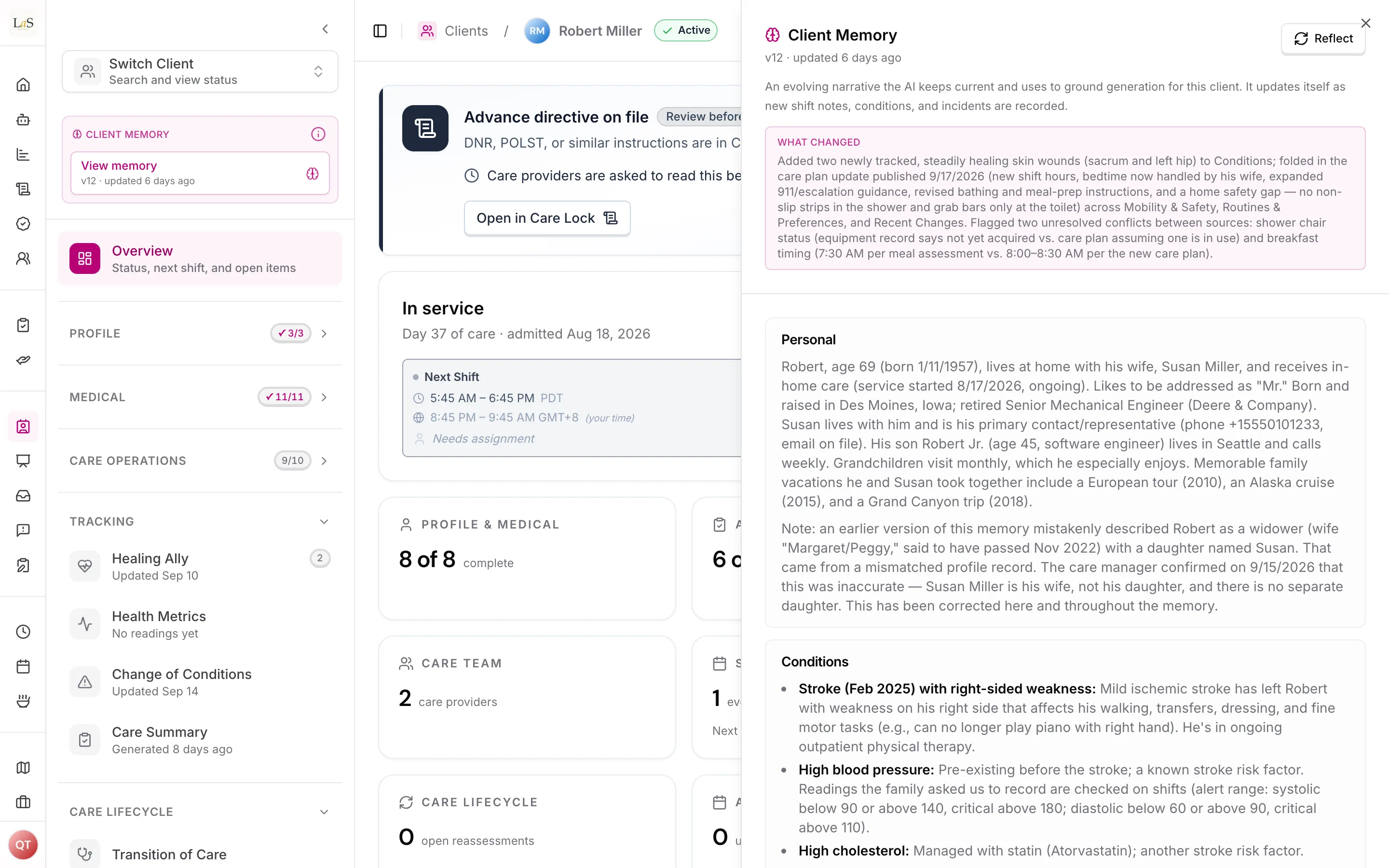
The memory opens beside the record, with what changed in the latest version at the top.
How an update runs
A memory update runs in the background as a durable job, with live progress shown the same way other AI generations are — in the generation dock. Only one update runs per client at a time; asking again while one is running simply shows the one already in progress. When a manual update needs a person to settle conflicting information, it may pause and ask a short clarifying question. Automatic updates never pause for a human — they resolve on their own.
What triggers an update
- Manually — an authorized staff member asks the AI to reflect/refresh the client's memory.
- Automatically — when a new signal is recorded for the client: a shift note or daily observation, a change-of-condition report, an incident, or a newly published care plan. Automatic updates are debounced: a burst of signals produces at most one queued update, and each update picks up everything new since the last one.
What the memory draws on
Every update reads the client's static profile (details, medications, assessments) and the client's ongoing record — shift notes and daily observations, change-of-condition reports, and incidents. This is what lets the memory reflect what is actually happening with the client over time, not just the intake profile. All of it is the client's own information, never another client's.
Grounding other AI
Client memory is a source the AI reads when it drafts anything for the client — care plans, tasks, and the guided question-and-answer flows that help staff fill in forms. It replaces the retired client profile summary in that role. Like all AI output, whatever the AI drafts from the memory is still a draft a qualified person reviews (see AI Features, ).
Versioning
Every update is versioned. The previous version is retained, the "what changed" note is kept with it, and a change can be reviewed or undone. The memory is assistive context that people can correct — it is never, on its own, a directive about anyone's care.
Rules
- MEM-1 — Every client has at most one active client memory: a single evolving plain-language narrative, maintained by the AI, kept on the client record and scoped to the client's business. (🚧 Spec only)
- MEM-2 — The memory must be revised in place, never blindly overwritten: each update carries forward still-valid information, updates what changed, adds new observations, and drops what is obsolete. (🚧 Spec only)
- MEM-3 — Every memory update must draw on the client's static profile (details, medications, assessments) and the client's ongoing record (shift notes and daily observations, change-of-condition reports, incidents) — and only that client's information. (🚧 Spec only)
- MEM-4 — Memory updates run in the background as durable jobs with live progress, and only one update may run per client at a time; a duplicate request must surface the one already in progress rather than start a second. (🚧 Spec only)
- MEM-5 — Memory updates must be triggerable both manually (a staff reflect/refresh action) and automatically when a new client signal is recorded; automatic updates must be debounced so a burst of signals produces at most one queued update, and an update must process everything new since the last one. (🚧 Spec only)
- MEM-6 — Every memory update must be versioned; prior versions are retained and each change is auditable and undoable. Client memory is assistive, correctable context — never, on its own, a directive about anyone's care. (🚧 Spec only)
- MEM-7 — Client memory is a first-class grounding source for the platform's other AI generation (care plans, tasks, guided flows), replacing the retired client profile summary; whatever the AI drafts from it remains a draft a qualified person reviews. (🚧 Spec only)
- MEM-8 — A client's memory is isolated to its business. One business's client memory must never appear in another business's data or in another business's AI results. (🚧 Spec only)
- MEM-9 — A manual memory update may pause to ask a clarifying question when it needs a human to resolve conflicting information; automatic (background) updates must never block on a human — they resolve autonomously. (🚧 Spec only)
Who can do what
| Action | Who is allowed |
|---|---|
| Manually reflect/refresh a client's memory | Owner, Admin, Care Manager (with the AI tools permission) |
| View a client's memory and its version history | Staff who can view the client record |
| Cancel a running memory update | The person who requested it |
| Correct or undo a memory update | Owner, Admin, Care Manager (with the AI tools permission) |
| Trigger an automatic update (by recording a signal) | Any staff member whose action records an observation, change of condition, incident, or care-plan publish |
Decisions needed
- Should staff be able to hand-edit the memory narrative, or only correct it through the AI? Direct edits give full control but can be overwritten by the next AI update; AI-only correction keeps the memory internally consistent but slower. The line between the two is not yet decided.
- How far back should an automatic update look, and how aggressively should updates be debounced? A tighter window keeps updates cheap but may lag; a wider window is thorough but costlier. The exact cursor/debounce policy is undecided.
- Should representatives (family) ever see any part of a client's memory? Today it is staff-facing. If any family-facing view is added later, it would need the same audience filtering as shift summaries (see AI Features, ).
- Should care-feed activity feed the memory? Care-feed posts are currently agency-wide and not linked to a specific client, so they cannot feed one client's memory today (see Known gaps). Whether to add a client link to posts to enable this is open.
How is this page?
Last updated on