Essential Needs
Part of the Anaya Care Handbook — the source of truth for how the product must behave. When the product needs to change, change this document first, then make the system match it.
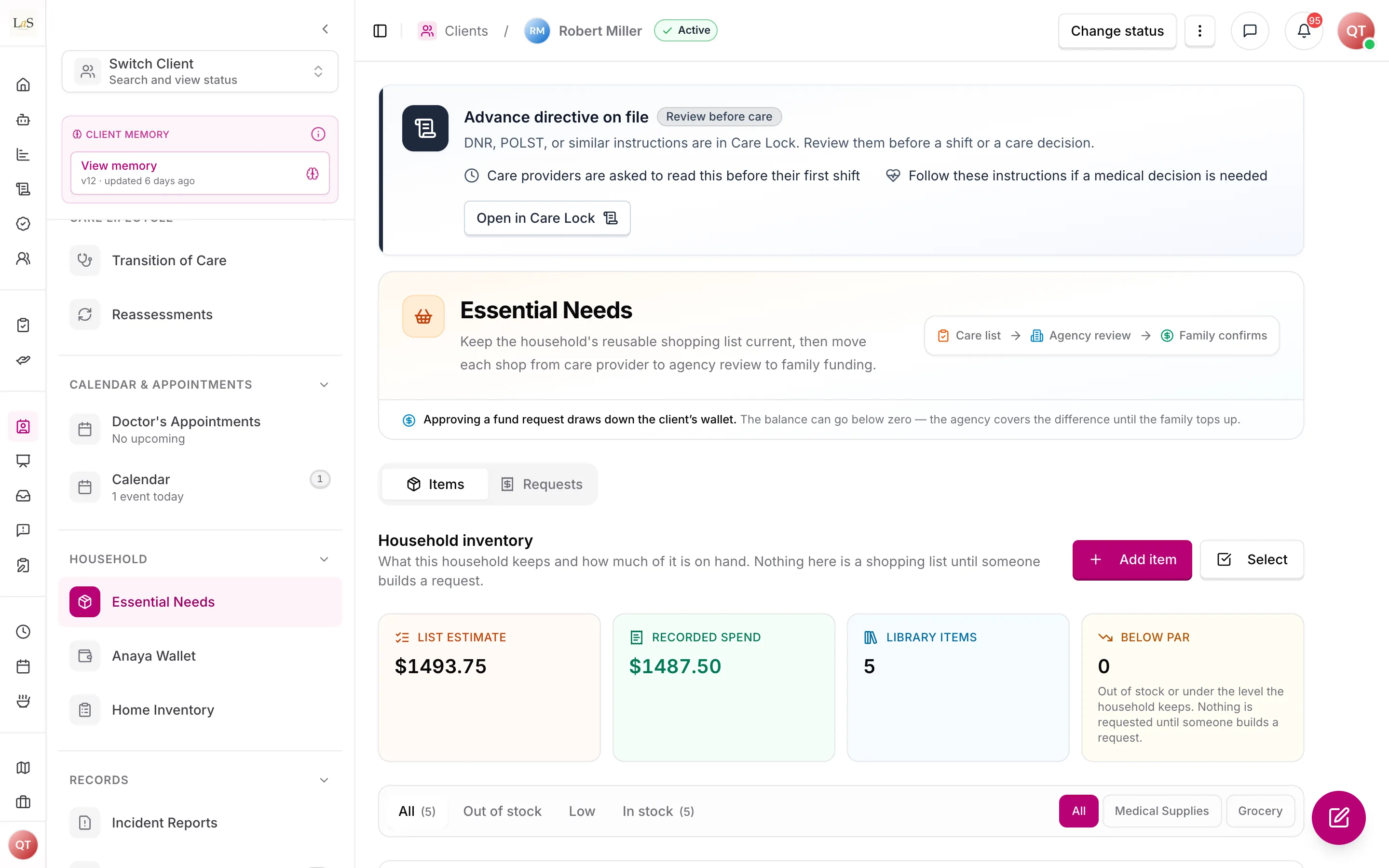
Implementation status — Essential Needs is built on the web dashboard and the mobile app: the inventory with on-hand counts, par levels and a permanent stock ledger; live retailer search priced from a store near the client; the care provider → agency → family request chain, paid through Anaya Wallet; and the responsible party's funding inbox across households. It runs on staging but is not yet released to customers — production shows it as coming soon. Two rules are not built (shopping lists, , and logging supplies used on a shift, ) and ten are ⚠️ Partial; the largest gaps are listed under Known gaps. Last audited against the code on 2026-09-23. Legend: ✅ In code · ⚠️ Partial · 🚧 Spec only (not yet built).
What this covers
This page governs : the household's inventory of the consumable items a client requires — groceries, personal-care supplies, medications, and everyday household items — each carrying a count of what is on hand and, optionally, the level the household wants to keep. Beyond a simple shopping list, this is real inventory: it tracks what is on hand, warns when stock runs low, captures spending, watches for waste, and builds shopping lists and purchase history. Adding an item to the library records that the household uses it; it does not, by itself, ask anyone to buy anything. Because the care provider in the home is the person who knows what the household is out of, this page also governs how that knowledge becomes money well spent: items are added by searching a retailer live so they carry a real photo and a real price, bundled into an to the agency, and funded by the client's responsible party through a before anyone shops. It sits alongside the client's everyday-life support documented in Meals, Engagement Activities, and Home Inventory.
Essential Needs is distinct from Home Inventory: Essential Needs manages consumable supplies that get used up and re-bought, while Home Inventory documents valuables and equipment — items of personal or financial significance that stay in the home.
Key terms
- Essential need — a single consumable item the client's household requires — a grocery, a personal-care supply, a medication, or a household item — carrying an on-hand count and an optional par level.
- On-hand count — how many purchase units of an item the household currently has. It is the item's stock, kept as a number rather than inferred from whether it was last bought.
- Par level — the on-hand count the household wants to keep for an item. Optional. Falling below it is what makes an item Low, and the gap between the two is what the platform suggests buying.
- Stock ledger — the permanent, append-only record of every change to an item's on-hand count: how much it moved, what it became, why, and who moved it.
- Inventory — the household's running count of consumable items on hand, used to know what is stocked and what needs re-buying.
- Low-stock alert — a notification raised when an item's on-hand count falls below its par level, so it can be re-bought before it runs out.
- Meal-based grocery tracking — grocery items pulled automatically from the client's 30-day meal plan so the ingredients each meal needs flow into the essential-needs list without manual re-entry.
- Shopping list — an auto-generated, grouped list of the items a care provider is going to the store for, drawn from a funded request.
- Waste-reduction monitoring — tracking items that expired or went unused so the household can adjust how much it buys.
- Standing library — a client's essential-needs list, which persists: an item bought last month is the same item the household runs out of this month, so it is re-requested rather than re-entered.
- Retailer lookup — a live search of a retail feed at the moment someone adds an item. Nothing is stored as a catalog; only a snapshot of the chosen product is kept on the client's item.
- Product snapshot — what the retailer said about a product when it was attached: name, brand, size, photo, shelf price, the store that quoted it, and when. Provenance, never rewritten.
- Reference store — the shop a client's prices are quoted from, resolved from that client's own address. The care provider shops near the client's home, so the prices should be from there.
- Stock adjustment — a correction to an item's on-hand count made by hand: supplies consumed, spoiled, donated, or simply miscounted. Every adjustment is a ledger entry.
- Purchase history — the permanent, append-only record of every purchase of an item: who bought it, when, how many, at what cost, and against which request.
- Essential-needs request — a bundle of items a care provider submits to the agency for funding, each line carrying the quantity to buy and its own estimate. It behaves as a purchase order: a line is received when the goods arrive, which is what raises the item's on-hand count.
- Received quantity — how many units of a request line have actually been bought and brought home. A line can be received in part; a request closes only when every line is fully received or removed.
- Fund request — an approved essential-needs request forwarded to the client's responsible party: the same itemized, priced list, which they explicitly approve or decline before any shopping happens.
- Budget estimate — the sum of quantity × estimated cost across a request's items, shown with the itemized list and labelled as an estimate everywhere it appears.
- Responsible party — defined under Clients. Here, the person who approves or declines fund requests.
How it works
Each client has a library of the consumables their household uses — groceries, personal-care supplies, medications, or everyday household items — each with a category, priority, estimated cost, an on-hand count, and optionally a par level. Adding an item says "this household uses this"; it does not put it on anyone's shopping list. What puts an item on a shopping list is a person deciding to buy some, on a request.
An item's on-hand count is the single source of truth for whether the household has it, and it moves in exactly three ways: receiving a purchase raises it, a care provider logging use during a shift lowers it, and a hand adjustment corrects it for anything else. Every movement is a ledger entry naming who, when, and why.
In stock, Low, and Out of stock are read off the numbers rather than set by hand: an item is Out of stock at zero, Low below its par level, and In stock otherwise. An item with no par level set is never Low — it is simply in stock or out.
Adding an item from the retailer
Typing item names by hand makes every estimated cost a guess. So when someone adds an essential need they search a retail feed live, see the product's photo, size and shelf price, and pick it — and the item's name, photo and estimated cost fill themselves in. Nothing is kept as a catalog: only a is stored on that client's item, recording what the retailer said and when. Anything the feed does not carry can still be typed by hand; it simply has no photo and a hand-entered estimate.
The classification is always ours. A retailer supplies a product; it does not know whether that product is a grocery or a medical supply in an eldercare sense, so whoever adds the item chooses the item type, category and unit.
Prices are quoted from a store near the client, resolved from the client's own address and remembered, because the care provider shops near the client's home rather than near the office. Two consequences are deliberate. The same product can be priced differently for two clients, which is correct rather than a bug. And where no store can be resolved — an address the retailer does not reach, or no address at all — the search still returns photos but no prices, says so plainly, and asks for an estimate instead of showing $0.
A shelf price is an estimate, never a quote, and the price taken is never a promotional one: a promotion expires, and a budget approved against one would understate the real shop a week later. The item keeps the estimated cost it was added with, so a later price change never rewrites a request a family has already approved.
The list is a standing library
A household's essential needs repeat. What it ran out of last month it runs out of again, so the list persists: an item stays on it after being bought, its on-hand count rising and falling as the household buys and uses it, rather than being searched for and re-entered. That is what makes the list worth curating.
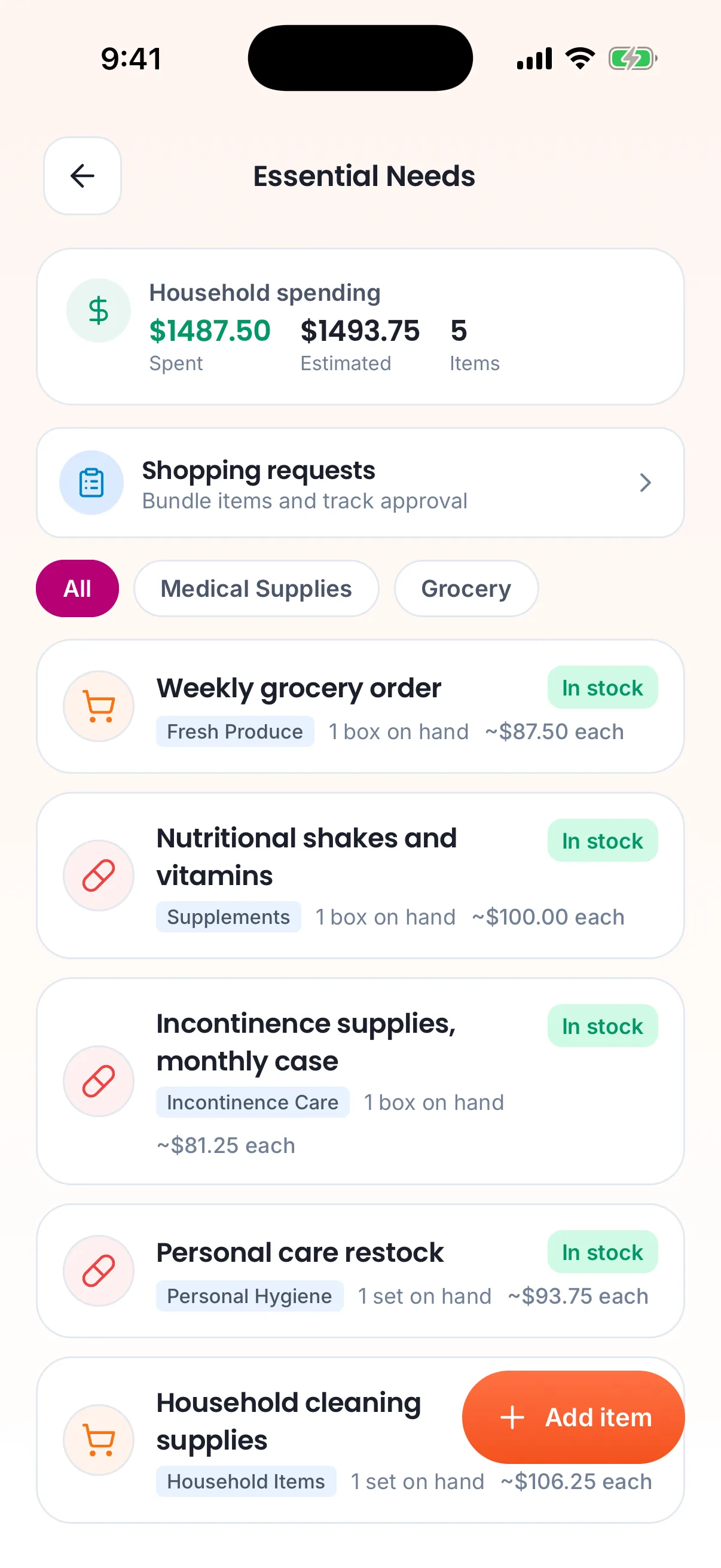
The household's list on the care provider's phone.
Because the same item is bought many times, a purchase is no longer a single set of fields that the next purchase overwrites. Every purchase is appended to the item's own purchase history: who bought it, when, how many, at what cost, and against which request. A recorded purchase is permanent; nothing that happens to the count afterwards edits one.
Requesting funds from the responsible party
The care provider in the home knows what the household is out of — but they should never have to spend their own money or chase the family for it. The money conversation is a two-step chain: the provider asks the agency, and the agency asks the family.
The provider — typically on the mobile app, on site — bundles items into an , choosing how many of each to buy. Anything below its par level is offered first, with the gap already filled in as the suggested quantity, but the provider is free to add an item that is not low, or to buy more or fewer than suggested: the platform suggests, the person decides. Because each item carries an estimated cost, the request carries an itemized budget estimate — pictures, quantities, prices, and a total — before it is ever sent. The agency reviews the bundle, adjusting quantities or removing items where needed, and approves or declines it. Approval turns it into a to the client's responsible party: the same itemized, priced list, which they explicitly approve or decline. Those asks collect in the responsible party's funding inbox — one list spanning every household they are responsible for, so somebody caring for two parents answers both in one place instead of remembering to open each household's shopping screen (). Once funded, the provider shops and records what they actually came home with, line by line, with receipts and actual costs. Receiving a line raises that item's on-hand count, and the request closes showing estimated versus actual spend side by side.
Anaya Wallet now sits underneath this flow as its payment rail, without changing a step of it. Approving a fund request draws the approved total from the client's wallet, and the family tops that wallet up in advance — so the money is with the agency before anyone shops, instead of the agency fronting the cost and the family reimbursing it afterwards (). Where the balance does not cover the request the approval still goes through and the balance goes negative, recorded as money the agency has fronted rather than lost in somebody's inbox. A family that would rather not use the platform's payment rail at all is still served: the agency records what it received off-platform, and the fund request remains the record of the ask, the sign-off, and the reconciliation. Individual after-the-fact purchases stay possible for small buys that never needed a fund request.
Inventory and low-stock alerts
Every item carries a count of how many purchase units the household has on hand, and may carry a — the count the household wants to keep. When the on-hand count falls below par the item is flagged Low and the platform raises a low-stock alert, so it can be re-bought before it runs out.
Being low is a signal, not an order. The platform never puts an item on a shopping list on its own: it offers the low items first when someone builds a request, with the gap between on-hand and par pre-filled as the suggested quantity. A person still chooses what to buy and how much. An item with no par level set is never flagged Low — it is simply in stock or out of stock — which is the escape hatch for anything a household stocks irregularly and does not want nagging about.
The count moves in three ways, and every movement writes a entry recording the change, the resulting balance, the reason, and who made it:
- Receiving a purchase raises it, by however many units actually came home.
- A care provider logging use during a shift lowers it, because the person who opens the last pack is the person who knows.
- A hand adjustment corrects it for everything else — spoilage, waste, donations, a miscount, or the household's own count at the moment the item was first added.
The ledger is append-only. A wrong count is fixed by recording a correction, never by editing history, so "we thought we had four" stays visible next to "we actually had one" — which is the record that tells an agency whether an item is being over-bought or quietly walking out of the house.
Meal-based grocery tracking
Groceries do not all have to be entered by hand. The client's 30-day meal plan (see Meals) lists the ingredients each meal needs, and those grocery items flow automatically into the essential-needs list. As the meal plan is approved or changed, the grocery side of the list follows it.
Shopping lists and purchase history
The lines of a funded request are assembled into an auto-generated shopping list, grouped so a care provider can shop efficiently. Every purchase is kept in a permanent purchase history — what was bought, by whom, when, and at what cost — feeding the spend totals and the waste-reduction view.
Expense and waste-reduction monitoring
The list tracks estimated versus actual spend so the household can see where money goes. Waste-reduction monitoring watches for items that expired or went unused, so future quantities can be adjusted down and over-buying reduced.
Rules
- NEED-1 — An essential-need item is always either a medical supply or a grocery, always has a category and a priority, and always carries an on-hand count, which starts at whatever the household reports and defaults to zero. Adding an item records that the household uses it and never, on its own, asks anyone to buy it: an item reaches a shopping list only when a person puts it on a request. (✅ In code)
- NEED-2 — An item can be edited or deleted whenever it is not bundled into an open request. A request that is declined, or that expires unanswered (), releases its items immediately — a household's list must not stay frozen because nobody replied. A recorded purchase is permanent and can never be edited or deleted; the on-hand count changes only by the movements in , and correcting it never alters a recorded purchase. (✅ In code)
- NEED-3 — Recording a purchase must record who bought it, when, how many units were received, the actual cost if known, and any receipt photos — and, optionally, who paid for it: the agency's card, the care provider's own money, or ordered online. A purchase recorded without an answer, including every purchase from an older app build, records who paid as not recorded. A care provider who paid with their own money is repaid through Finance (). (⚠️ Partial — nobody is asked how many units came home: every purchase records the item's usual purchase quantity)
- NEED-4 — Superseded by and . This rule required an item marked recurring to automatically reappear among suggested-buy items at a calendar interval, regardless of its on-hand count. Suggested-buy is now derived from on-hand versus par; calendar restocking was never built and is retired. The ID is kept because IDs are never reused.
- NEED-5 — Essential-need lists are visible only to logged-in users whose role permits it, and never cross agency boundaries. (✅ In code)
- NEED-6 — Every item must carry an on-hand count of purchase units, and may carry a — the count the household wants to keep. The count is never negative. An item is Out of stock at zero, Low when it is below its par level, and In stock otherwise; an item with no par level set is never Low. These three states are always derived from the numbers and are never set by hand. (✅ In code)
- NEED-7 — When an item's on-hand count falls below its par level, the platform must flag it Low and raise a low-stock alert. Being low must never, on its own, place an item on a request: it surfaces the item first when someone builds one, with the gap between on-hand and par pre-filled as a suggested quantity that the person building the request can change. (⚠️ Partial — items are flagged Low and offered first with the gap pre-filled, but no low-stock alert is ever sent)
- NEED-8 — Grocery items from the client's approved 30-day meal plan must flow automatically into the essential-needs list, and must follow the meal plan as it is approved or changed. (⚠️ Partial — on the dashboard a person can turn the approved meal plan's ingredients into items and a draft request when they choose to, but nothing flows in automatically, nothing follows plan changes, and the phone has no version of it)
- NEED-9 — A funded request's lines must be assembled into an auto-generated, grouped shopping list a care provider can shop from. (🚧 Spec only — a funded request lists its lines with received counts, but nothing assembles or groups them into a shopping list)
- NEED-10 — Every purchase must be kept in a permanent, append-only purchase history on the item, recording who bought it, when, how many, the actual cost, and the request it was made against. Buying the same item again adds an entry; it never overwrites one. (✅ In code)
- NEED-11 — The list must track waste — items that expired or went unused — so future quantities can be adjusted to reduce over-buying. Waste is recorded as a stock adjustment carrying that reason, so it is both a correction to the count and a countable event. (⚠️ Partial — waste can be recorded as a stock adjustment with its own reason on web and mobile, but nothing counts or reports on it)
- NEED-12 — An approved fund request must be paid through Anaya Wallet: approving it draws the request's total from the client's wallet, which the responsible party has funded in advance, so the money is with the agency before any shopping begins and neither the agency nor the care provider fronts the cost. (⚠️ Partial — approval draws the wallet down and receipts reconcile it, but nothing yet gives the care provider a way to pay at the till, so a care provider can still end up fronting the cost. When they do, the purchase now records it () and Finance refunds it with their wages, provided there is a receipt (). See .)
- NEED-13 — Adding an essential need must offer a live retailer search, and an item added that way must store a product snapshot — the retailer, its product reference, the name, photo, size, price, the store that quoted it, and when it was taken. Nothing is stored as a shared catalog. The retailer supplies the product; the item type, category, and unit are always chosen by the person adding it, because no retailer knows this product's eldercare classification. (✅ In code)
- NEED-14 — Prices must be quoted from a store resolved from the client's own address, not from a single platform-wide or agency-wide setting, and that store must be recorded so a price can be traced to it. Where no store can be resolved, the search must return products without prices and say so, and must never present an unpriced item as costing nothing. (✅ In code)
- NEED-15 — Picking a searched product must pre-fill the essential need — name, photo, and estimated cost — and the search must always show the photo and the price. A value the person adding the item supplies always wins over the retailer's. Free-typed items remain allowed for anything the retailer does not carry. (✅ In code)
- NEED-16 — An item keeps the estimated cost it was added with, and its product snapshot is never rewritten: a later price change at the retailer must never alter an existing item or a request that contains it. The price a family is asked to approve must be read at the moment of adding, on the server, never taken from whatever the browser last saw. (✅ In code)
- NEED-17 — A reference price is an estimate, never a quote. Every budget estimate must be labelled as an estimate wherever it appears, and actual spend comes only from receipts. (✅ In code)
- NEED-18 — A care provider must be able to bundle any items from the client's library into an essential-needs request, choosing the quantity to buy for each line, whose itemized budget estimate — quantity × estimated cost per line, with a total — is shown before it is submitted. Low items must be offered first with their suggested quantity pre-filled (), but an item that is not low must never be excluded from a request, and the suggested quantity is always editable. Each line must record the item's on-hand count at the moment it was bundled, so a reviewer can see what the household already had. A client's representative may raise a request the same way, for their own household only: asking is not approving, and the request still passes agency review () before it returns to them as a fund request. Raising a request is a grantable permission, not an inherent one — an agency that wants requests to originate only with its own staff can revoke it from representatives. (⚠️ Partial — each line stores the on-hand count it was bundled with and the phone shows it, but the dashboard, where management reviews, never displays it)
- NEED-19 — Only agency management (owner, admin, or staff allowed to manage essential needs) may approve, adjust, or decline a submitted essential-needs request. Declining requires a reason, and every adjustment made during review is recorded on the request. (⚠️ Partial — approving and declining with a reason are built, but management cannot change quantities or remove a line during review)
- NEED-20 — Approving a request must send a fund request — the itemized, priced list — to the client's responsible party, who must explicitly approve or decline it. When the responsible party gives their answer off-platform, agency management may record it on their behalf; such a decision must be clearly marked as recorded-on-behalf and name who recorded it. Recording an off-platform approval must also require an account of how the answer was obtained — who gave it and how they were reached — because marking a request funded commits money the family was never shown a screen to approve, and a name and a timestamp do not assert that anybody was asked. Recording an off-platform decline requires no such account: it commits nothing and returns the items to the list. No purchase is recorded against a request before it is funded. (⚠️ Partial — the account of how an off-platform approval was obtained is required only by the web and mobile forms; the API records an on-behalf approval without one)
- NEED-21 — A funded request closes only when every one of its lines is fully received (with receipt, per ) or removed, and must present estimated versus actual spend side by side. A line may be received in part; the shortfall stays open so the request reflects what was actually bought rather than what was asked for. A request has three terminal states: Completed, Declined, and — for one that reached the family and got no answer — Expired (). (⚠️ Partial — a line cannot be removed from a funded request and a purchase cannot say how many units came home, so a request with a dropped or short-bought line cannot close)
- NEED-22 — Every submission, approval, adjustment, decline, funding, and completion of a request must notify the other parties to it and be recorded in the platform activity log. (⚠️ Partial — every step is in the activity log, but only agency approval and expiry notify anyone; the care provider is never told a request was declined, funded or completed, and the agency is never told one was submitted)
- NEED-23 — Superseded by . This rule described the interim in which no money moved through the platform and the fund request was only a record of the ask. Anaya Wallet has since shipped and become the payment rail beneath this flow, exactly as this rule anticipated — the steps of the request are unchanged, and approval now moves money. What survives of it: an agency and family who settle up outside the platform are still supported, through recorded off-platform deposits.
- NEED-24 — Superseded by , and . This rule required a purchased item to be "restocked" back to Needed, because an item's cycle status was the only record of whether the household had it. Items now carry a real on-hand count, so running out is a count reaching zero rather than a status being flipped, and the restock verb is retired. What survives of it: a recorded purchase is still permanent (), and an item bundled into an in-flight request is still locked against edits and deletion or that request could never close.
- NEED-25 — An essential need added from a retailer must keep a permanent reference to that retailer's product — which retailer, its product id, and when the snapshot was taken — so any price on the list can be traced back to what was quoted and by whom. (✅ In code)
- NEED-26 — Every change to an item's on-hand count must append an entry to that item's recording how much it moved, the resulting balance, the reason, who made it, and when — plus the request it was received against or the shift it was consumed on, where there is one. The ledger is append-only: a wrong count is fixed by recording a correction, never by editing or deleting an entry, so the count a household believed it had stays legible beside what it actually had. (✅ In code)
- NEED-27 — An item's on-hand count changes in exactly three ways: receiving a request line raises it by the units received, a care provider logging use during a shift lowers it, and a hand adjustment — spoilage, waste, a donation, a miscount, or the household's opening count — moves it either way. Nothing else may write the count, and it may never go below zero. (✅ In code)
- NEED-28 — A care provider must be able to record the supplies they used during a shift from that shift, without leaving it, and that record must lower the client's on-hand counts. The person who opens the last pack is the only person who knows it was the last pack. (🚧 Spec only — the stock ledger has a shift field and the stock service accepts a shift, but no route or shift screen records use)
- NEED-29 — A responsible party must have one place that lists every fund request awaiting their decision across all the households they are responsible for, reachable without first choosing a client, and it must show each request's estimated total and the resulting wallet balance beside it. Whether a given person may answer a given request is decided by the platform and told to the app, never worked out by the app: the responsible-party designation lives on the client record, so an app that decides for itself can be wrong — and a wrong answer here hides the approval button rather than showing a refusal, which reads as a broken feature instead of a denied one. Approving from this list must still show the itemized, priced lines first (): a summary is enough to triage, never enough to commit money. (✅ In code)
- NEED-30 — The person who raised an essential-needs request — or agency management acting on their behalf — must be able to edit or disregard it while it is still awaiting agency review (Submitted). Editing pulls the request back to Draft so the bundle can be changed and sent again; the items stay locked to that draft. Disregarding deletes the request and releases the items back to the list. Once a fund request has gone to the family, neither action is allowed: the ask is no longer only the requester's. (✅ In code)
Note: This page's rules were retired from the old Daily Living page: DAILY-15 – DAILY-18 → – . is superseded by and , and is superseded by , and ; both IDs are kept in place because IDs are never reused.
Who can do what
| Action | Roles allowed |
|---|---|
| Add, edit, and purchase essential-need items | Owner, Admin, Care Manager, Care Provider |
| Adjust an item's on-hand count or set its par level | Owner, Admin, Care Manager, Care Provider |
| Log supplies used during a shift | The care provider working that shift; Owner, Admin, Care Manager |
| Search the retailer while adding an item | Owner, Admin, Care Manager, Care Provider |
| Create and submit an essential-needs request | Owner, Admin, Care Manager, Care Provider, Representative (their linked clients only) |
| Edit or disregard a still-pending request | The person who raised it; Owner, Admin, Care Manager |
| Review, adjust, approve, or decline a submitted request | Owner, Admin, Care Manager |
| Approve or decline a fund request | Representative (responsible party); agency management may record their off-platform answer on their behalf |
| See the cross-client funding inbox | Representative (responsible party), for the households that designated them; agency management, for their agency |
| View a request's status and history | Agency staff above within their agency; the representative for their linked clients |
Decisions needed
- Which essential-need purchases should require a funded Anaya Wallet request versus being recorded after the fact () — for example, a cost threshold or item type above which sign-off and funding are mandatory.
How low-stock thresholds are set per item (, )— decided: a single optional per-item , set by anyone who may manage essential needs, with no category defaults. Category defaults were rejected because a par level is a property of one household's consumption, not of a product class: two clients using the same incontinence product weekly and hourly want different pars, and a default would be wrong for both while looking authoritative. Representatives cannot set it today; whether they should is open.- Retailer feed details () — one feed, not two: the Kroger Public Products API (official, free, 10,000 calls/day; prices require a store id, which is why the store is resolved from the client's address). The second commercial feed, planned for medical supplies, is no longer needed — a live check returned real photos and shelf prices for incontinence underwear, gauze pads, nitrile exam gloves, disposable bed pads and even cane tips, so one free feed covers both halves of the list. Amazon's PA-API was ruled out separately (deprecated May 2026; its successor requires sustained affiliate sales). Still open: whether the feed operator's terms permit storing its data and hotlinking product images, and whether a live search on every keystroke stays inside the daily call budget as the platform grows.
- Prices are store-local to the client. Which currency a household prices in, and what should happen for a client the feed reaches no store near at all, remain open.
- A reference store is not always the obvious brand. The feed's operator runs many store banners, and in several states none carry the parent brand's name — a California client resolves to Ralphs, Food 4 Less or Foods Co, all valid. Anywhere the store is shown or chosen must present the banner the feed actually returned rather than a single brand name, or someone will conclude there is no coverage near their client.
- Whether a client's resolved store should be changeable by hand — a household that shops somewhere other than the nearest store — is undecided. Today it is resolved automatically and re-resolved only if the client's address changes.
- Whether a cost threshold lets a small essential-needs request skip the responsible-party step and be funded by the agency directly (the same threshold question as ).
- Whether an unanswered fund request gets reminders and an expiry, mirroring the Wallet's .
How is this page?
Last updated on