Client Requests
Part of the Anaya Care Handbook — the source of truth for how the product must behave. When the product needs to change, change this document first, then make the system match it.
What this covers
This page governs Client Requests — formal, trackable service tickets about a specific client, exchanged between the client's family representative and the agency's management team. They are the structured alternative to chat for anything that needs an auditable trail: schedule adjustments, care plan changes, caregiver changes, billing questions, complaints, and similar concerns. A client request is raised about one client, moves through a simple lifecycle (pending → acknowledged → resolved or cancelled), and carries a comment thread so both sides can discuss it in one place. Within this page, "request" is shorthand for a client request.
Client Requests are not the same as platform (product feedback about Anaya Care itself, on Skills, Ratings & Feature Requests) or account-deletion requests (on Identity & Access) — those are separate features.
Key terms
- Client request (often just request) — a trackable service ticket about one client, raised by either a representative or agency staff, with a subject, description, type, priority, and status.
- Direction — which way the request flows: from a representative to the agency, or from the agency to a representative. Set automatically by who creates it; never chosen by hand.
- Request type — the category of the request: Schedule Adjustment, Care Plan Change, Caregiver Change, Service Request, Billing Inquiry, General Inquiry, Complaint, or Other (with a free-text label).
- Priority — how urgent the request is: Low, Normal, High, or Urgent. Defaults to Normal.
- Comment thread — the flat, chronological conversation attached to a request.
- System comment — an automatic note added to the thread whenever the request's status changes, recording who changed it and any notes given.
- Representative — the family-side contact linked to one or more clients (sometimes called the "Family" role elsewhere).
How it works
Creating a request
Anyone allowed to participate in requests can raise one about a client. The creator picks the client, a type, a subject, a description, and optionally a priority. If the type is "Other", they describe it in their own words.
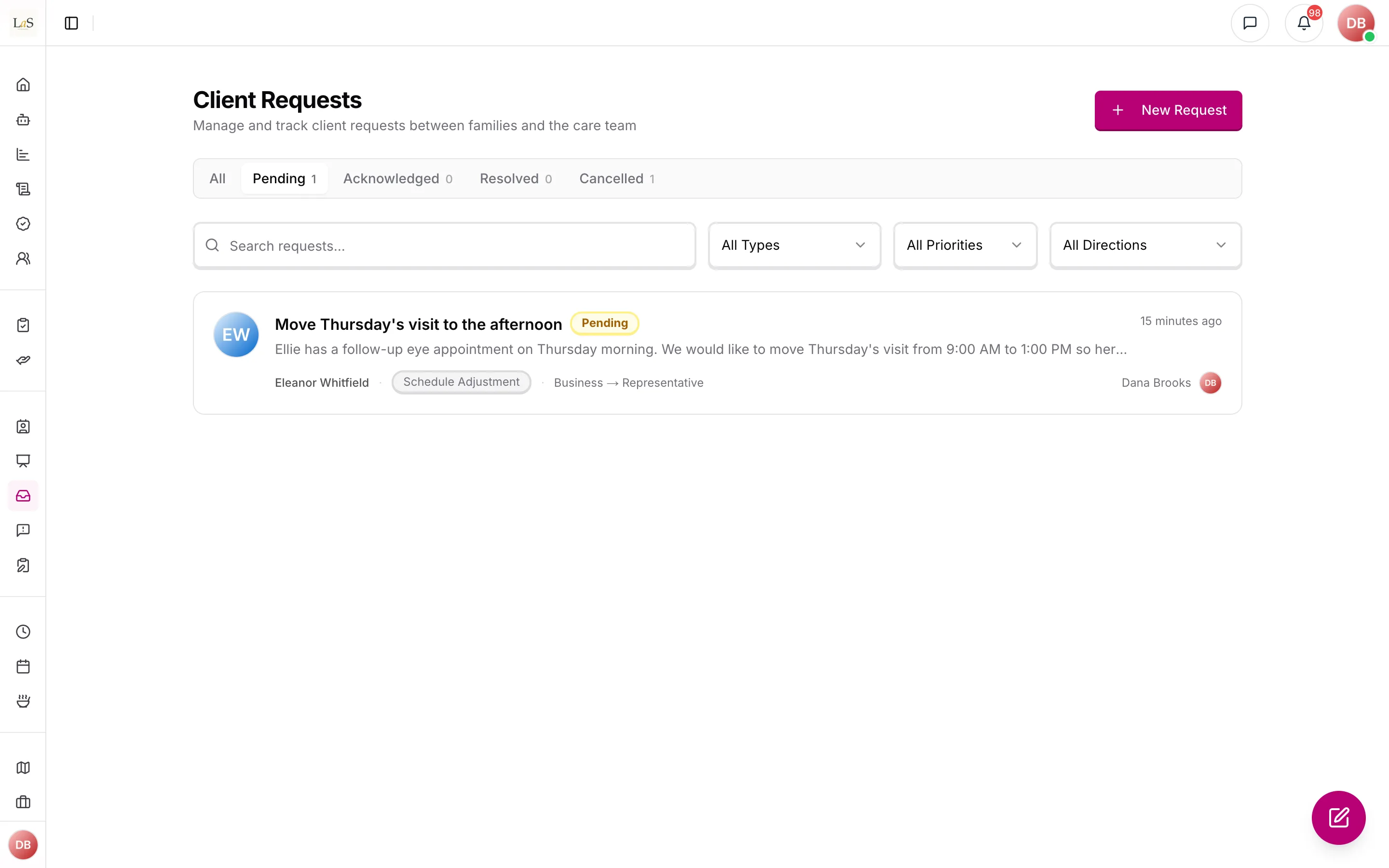
The system sets the automatically: a request created by a representative flows to the agency; a request created by anyone else flows to the representative side. Representatives can only raise requests about clients they are actively linked to. Once created, a request cannot be edited or deleted — corrections happen in the comment thread, or by cancelling and raising a new request.
The request lifecycle
- Pending — newly created, awaiting attention. Every request starts here.
- Acknowledged — the agency has confirmed it is being handled. Can be moved back to Pending if acknowledged by mistake.
- Resolved — the agency has dealt with it, optionally recording resolution notes. Final.
- Cancelled — withdrawn or closed without resolution, optionally with a reason. Final.
Agency management (owner, admin, and staff with the manage-requests permission) drives the lifecycle. The only lifecycle action a representative has is withdrawing their own still-pending request.
The conversation
Every request carries one flat, chronological comment thread. Comments cannot be edited, deleted, or nested. Every status change automatically adds a system comment to the thread ("Status changed from X to Y", plus any notes), so the thread is a complete history of the request.
Notifications and audit trail
- When a representative raises a request, all of the agency's management users are notified. When agency staff raise one, all active representatives of that client are notified.
- When a request's status changes or a comment is added, both sides are notified — all management users plus all active representatives of the client — except the person who acted. Moving a request back to Pending sends no notification.
- Every creation, status change, and comment is recorded in the platform activity log.
Rules
- CREQ-1 — Every request must be about exactly one client and must record who created it. A request can never exist without a client.
- CREQ-2 — The direction of a request is always set by the system from the creator's role: representatives create representative-to-agency requests; everyone else creates agency-to-representative requests. The creator can never choose the direction.
- CREQ-3 — Every request must have a type from the fixed list. A request of type "Other" must include a free-text label describing it; a free-text label supplied with any other type is ignored.
- CREQ-4 — Every request must have a subject and a description. Priority is optional and defaults to Normal.
- CREQ-5 — Every new request starts in Pending status.
- CREQ-6 — Only agency management (owner, admin, or staff holding the manage-requests permission) can acknowledge a request, move it back to Pending, resolve it, or cancel it — regardless of whether they hold a built-in or a custom role.
- CREQ-7 — A representative can only cancel a request they created themselves, and only while it is still Pending. They can never change a request's status in any other way.
- CREQ-8 — Resolved and Cancelled are final. A closed request can never be reopened; if the matter resurfaces, a new request must be created.
- CREQ-9 — Every status change must record who made it and when. Resolving can include resolution notes; cancelling can include a cancellation reason.
- CREQ-10 — Every status change must automatically add a system comment to the request's thread so the conversation is a complete history.
- CREQ-11 — Comments are a single flat, time-ordered thread. Comments can never be edited or deleted.
- CREQ-12 — A request's subject, description, type, and priority can never be changed after creation, and a request can never be deleted.
- CREQ-13 — A representative can only create, see, or comment on requests about clients they are actively linked to. This applies everywhere: lists, counts, details, and comment threads.
- CREQ-14 — Requests and their comments are always confined to one agency. Users of one agency can never see another agency's requests.
- CREQ-15 — A new representative-raised request must notify all of the agency's management users; a new agency-raised request must notify all active representatives of the client. Status changes and new comments must notify both sides, excluding the person who acted; moving a request back to Pending sends no notification.
- CREQ-16 — Every request creation, status change, and comment must be recorded in the platform activity log.
- CREQ-17 — Searching requests matches the subject, description, and "Other" label. Request lists are shown newest first, with counts per status.
Who can do what
| Action | Who is allowed |
|---|---|
| Create a request | Representatives (for their linked clients only); owners, admins, and staff with the manage-requests permission (for any client in the agency) |
| View requests and their threads | Anyone with the view-requests permission; representatives see only requests about their linked clients |
| Comment on a request | Anyone allowed to participate in requests; representatives only on requests about their linked clients |
| Acknowledge / un-acknowledge a request | Owners, admins, and staff with the manage-requests permission |
| Resolve or cancel any request | Owners, admins, and staff with the manage-requests permission |
| Cancel their own pending request | The representative who created it |
| Edit or delete a request | No one — requests are permanent records |
| Any access to requests | Care providers and medical professionals have none |
By default, admins, care managers, and representatives can both view and participate in requests.
Decisions needed
- Should "view" be enough to participate? Today, creating a request and commenting both require the manage permission — someone granted only "view requests" can read threads but cannot reply. Options: keep manage-only participation; let viewers create and comment while reserving status changes for managers; or add a separate "participate" permission.
- Should notifications be targeted? Every status change and comment notifies all management users plus all of the client's representatives, which may be noisy for large teams. Options: keep broad fan-out; notify only the requester and the staff member handling it; or make it configurable per agency.
- Should the comment badge count system messages? The unread/comment count on request cards includes automatic status-change notes, so it overstates the human conversation. Options: count everything, or count only human comments.
How is this page?
Last updated on