Report Generation & Audience Management
Part of the Anaya Care Handbook — the source of truth for how the product must behave. When the product needs to change, change this document first, then make the system match it.
Implementation status — the assembly half of this module is built and shipping as the care summary (see Care Coordination & Provider Integration): audiences, templates, content blocks, and audience-specific rendering all work. The authorization half — sign-off before delivery, escalation, and the immutable authorization log — is not built at all; today a report is generated by someone who holds the permission and downloaded immediately, with no gate in between.
Audited against
packages/shared/src/types/shift-summary-export.ts(audiences, content matrix),packages/shared/src/types/report-schemas.ts(templates and section order),apps/backend/src/clients/services/shift-summary.service.ts(generation, AI narrative, care-episode clamp),shift-summary-content-filter.service.tsandreport-data-enricher.service.ts(redaction and enrichment),apps/backend/src/docx/docx-layout/care-summary.docx.ts(rendering), andapps/backend/src/health-metrics(the Comparative Period Report) on 2026-08-12. Legend: ✅ In code · ⚠️ Partial · 🚧 Spec only (not yet built).
What this covers
This page governs : the engine that turns the data already captured across the platform into a finished, audience-specific report. The same underlying records — vital-sign readings, medication reminders, incidents, care-plan adherence, care-provider observations — are reshaped into different reports depending on who will read them. A doctor, a court-appointed conservator, a family representative, and a care manager each receive a report built from the same source data but filtered, worded, and authorized differently.
The engine has four responsibilities: aggregate the data for the reporting period, decide which content blocks belong in this audience's report, render each block in the right tone and format, and deliver the finished report only after the authorization that audience requires has been recorded. The first three are built. The fourth is not.
Two documents hold the rest of the detail: the Report Audience Taxonomy (relationship, authority, tone, content, legal considerations, and delivery frequency for each audience) and the Report Generation Engine Spec (aggregation, block evaluation, rendering, delivery, and authorization).
Key terms
- Report engine — the system that produces a finished report through four steps: data aggregation, block evaluation, content rendering, and delivery with required authorization.
- Audience — the specific recipient type a report is built for. There are 11 across 5 categories (see below); each one has its own tone, content rules, and authorization requirements.
- Template — the report shape chosen for one or more audiences. Five are built: Health Snapshot, Formal Care & Welfare Report, Family Summary, Care Manager Dashboard, and Transition of Care Summary. A sixth shape, the , exists but is not audience-driven and lives with Health Readings.
- Content block — one section of a report (for example, vital-sign trends or incident summary). Each block is active, conditional, or excluded for a given audience based on the template configuration.
- Content matrix — the table that decides, for each of the 42 content items and each of the 11 audiences, whether the item is included, considered, or excluded. It is a fixed product rule, not an AI judgement, and it is applied twice: once when the narrative is written, and again before the report is rendered.
- AI narrative — the written section a report carries, drafted by Anaya AI from the aggregated period data and the audience's content rules. One narrative per report, in sections chosen by the template.
- Prior-period comparison — the same metrics computed for the period immediately before the report period, of equal length, so a report can tell new observations apart from ongoing patterns.
- Trajectory indicator — a single one-word read on the period overall: improving, stable, mixed, or declining.
- Authorization — the recorded sign-off a report needs before it can be delivered. Depending on the audience this is dual (two authorizers), single (one), optional, or not required.
- Health Snapshot — the health-data handoff template for medical recipients. (The PRD calls this the "Clinical Snapshot"; it is renamed here for the handbook's non-clinical voice, and still carries the original name in code.) The voice is not only the handbook's: the medical reader still receives the exact readings, trends, and dates, but in plain words, never clinical labels (Anaya — the AI Persona ).
- Provider-contact boundary — the rule that the agency never reaches out to an outside party (doctor, APS office, legal representative) on its own; report generation never triggers external contact automatically.
How it works
When someone requests a report, they pick an audience and a date range. The audience determines the template, the template determines which content blocks are active and in what order, and the audience also determines what authorization the finished report would need before it could leave the platform.
The four steps
- Data aggregation — the engine collects and computes every relevant metric for the reporting period from platform records (see Health Readings and Incident Reports). (✅ In code)
- Block evaluation — for the chosen audience, the engine decides which content blocks are active, which are conditional, and which are excluded. (✅ In code)
- Content rendering — each active block is written in the tone and format that audience requires. A doctor's Health Snapshot reads differently from a family member's Family Summary, even when both draw on the same readings. (✅ In code)
- Delivery — the finished report is routed to the recipient, but only after the required authorization has been recorded. (🚧 Spec only — a report is downloaded directly today)
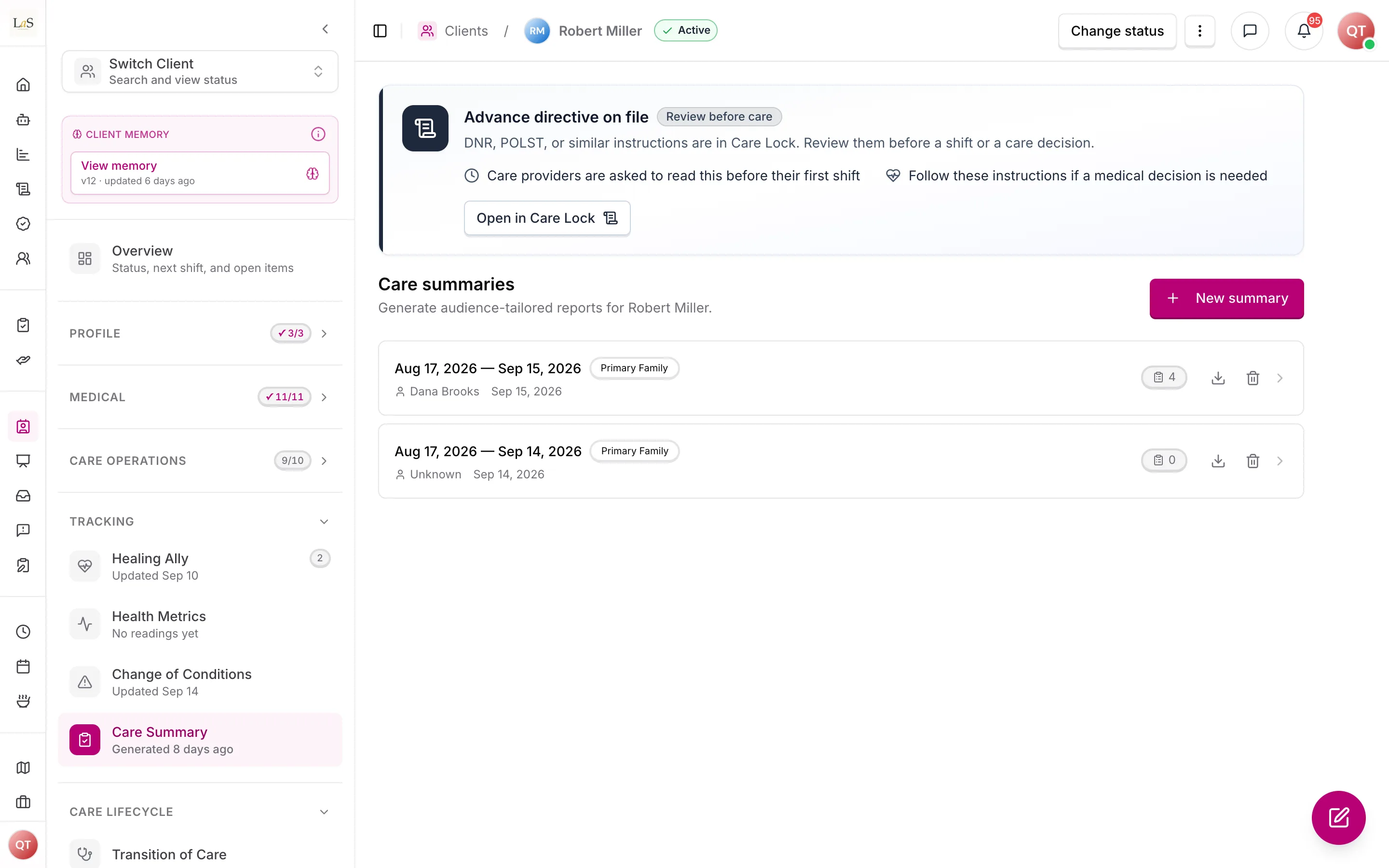
The reporting period is clamped to the client's care episode: a request reaching before care began or past the last reportable day is trimmed, and the report discloses the trim rather than silently reporting on days nobody was there.
The 11 audiences, by category
- Clinical & Medical — Primary Care Physician (PCP); Medical Specialist; Home Health Nurse/Therapist.
- Legal & Protective Authority — APS Deputy/Social Worker; Legal Decision-Maker.
- Family & Personal Network — Primary Family (Responsible Party); Secondary Family (view-only).
- Internal Care Operations — Care Manager; Company Administrator.
- Transition & Coordination — Hospital/Discharge Team; Hospice/Palliative Care Team.
DPOA and Conservator are one audience. They were specified separately, but their content columns differed in exactly one of 42 items and the Formal Care & Welfare template never branched on which of the two it was. They are merged as Legal Decision-Maker; the "Prepared for" line no longer distinguishes the two appointment routes. If that precision is ever needed, it should be a free-text override at generation time rather than a re-split of the audience list.
The templates
| Template | Audiences served | Purpose |
|---|---|---|
| Health Snapshot | PCP, Specialist, Home Health Nurse/Therapist | Health-data handoff |
| Formal Care & Welfare Report | APS/SW, Legal Decision-Maker | Welfare evidence and professional position |
| Family Summary | Primary Family, Secondary Family | Plain-language wellbeing update |
| Care Manager Dashboard | Care Manager, Company Administrator | Full operational data |
| Transition of Care Summary | Hospital/Discharge Team, Hospice/Palliative Care Team | Pre- and post-transition handoff (see Transition of Care) |
The is a different animal and is documented with Health Readings instead. It is not chosen by audience and carries no audience filtering: it compares two periods of a client's vitals, behavioural counts, and care delivery side by side, for reassessment and hours justification. It is the only report on the platform that computes a prior period.
Every care document carries the agency's branding (). In Document look, staff choose a header and footer layout (Classic, Modern, Minimal or Signature), an accent colour and a paper colour, with a live preview.
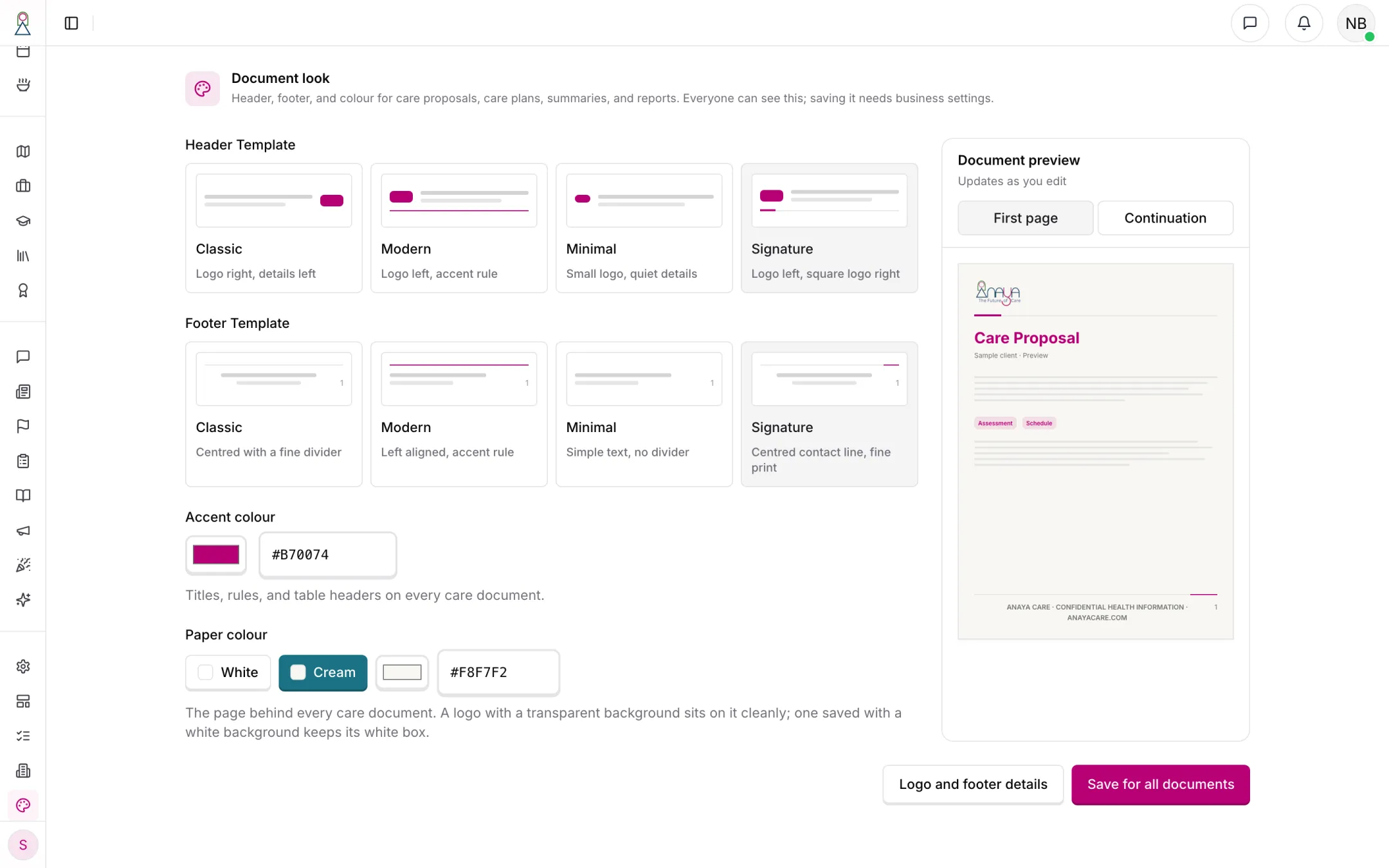
The Signature layout on cream paper. Staff without the business-settings permission can open Document look and try a layout; saving needs that permission.
Content blocks
Reports are assembled from a fixed library of blocks, ordered per template. A block whose data is empty renders nothing at all rather than an empty heading.
Built: reporting-period overview; care team and staffing consistency; the AI narrative; vital-sign trends; patterns of concern; change-of-condition observations; personal care; nutrition and hydration; mobility and activity; cognitive and behavioural; medication reminders and compliance; care-provider notes; threshold alerts; incident summary; escalations to the care manager; daily living support (ADLs); recommendations; and a per-shift record reproducing each shift's own AI summary.
Not built: the symptom log (symptom tracking does not exist yet — see Health Readings ..38) and family interactions.
The behavioral and cognitive block is quantified, not anecdotal — but only partly: it reports counts and days observed, and does not yet report time-of-day patterns or comparison against the client's baseline.
Prior-period comparison and trajectory
Only the Comparative Period Report computes a prior period. The five audience templates describe a single period; where they show a "trend" it is computed within that period (its first half against its second), not against the period before it.
The trajectory indicator is not built anywhere. No report reduces a period to one word, and nothing implements the rule that a single declining critical metric forces the overall read to "declining".
Before a Comparative Period Report is generated, both periods are validated against the client's care episode and against today — a period that ends before care began, starts after care ended, or reaches into the future is refused or trimmed. The two periods are not checked for overlap, and neither is checked for sufficient care data.
The AI narrative
The report's written sections are drafted by Anaya AI from the aggregated period data, in the sections the template calls for and under the audience's content rules. This is one narrative per report, not three separately-approvable blocks, and it is published without a human approval step — the report is generated and immediately downloadable.
Two of the three specified AI blocks do not exist as AI at all:
- Welfare Status Banner — ships as a fixed sentence, identical on every Formal Care & Welfare report, stating that no evidence of neglect, abuse, or exploitation was observed and that concerns were escalated per protocol. It is not drafted from the period data and nobody approves it.
- Professional Statement — not built. The Formal report's AI narrative covers adjacent ground, but there is no separate statement and no dual authorization.
- Wellbeing Summary — the Family Summary's AI narrative serves this purpose and is instructed to lead with what went well, but it is not a separately named block and no review is recorded.
Authorization and delivery
None of this is built. There is no authorization state, no sign-off record, no escalation timer, and no delivery gate: whoever holds the permission to generate a report can download it the moment it exists. The model below is the target.
- Dual authorization (care manager and Company Administrator) — APS, Legal Decision-Maker.
- Single authorization (care manager) — PCP, Specialist, Home Health, Hospital, Hospice.
- Optional / auto-delivery permitted — Primary Family, Secondary Family, Care Manager.
- Auto-delivery, no authorization required — Company Administrator.
Throughout, the provider-contact boundary holds: the engine never initiates contact with an outside party on its own. That much is true today, because the engine never sends anything anywhere — a report is downloaded by the person who generated it.
Rules
- RPT-1 — The report engine must carry out four steps for every report: aggregate the period data, evaluate which content blocks apply, render each active block in the right tone, and deliver only with the required authorization. (⚠️ Partial — the first three steps are built; delivery has no authorization gate)
- RPT-2 — The platform must support 11 audiences across 5 categories: Clinical & Medical (PCP, Medical Specialist, Home Health Nurse/Therapist); Legal & Protective Authority (APS Deputy/SW, Legal Decision-Maker); Family & Personal Network (Primary Family, Secondary Family view-only); Internal Care Operations (Care Manager, Company Administrator); Transition & Coordination (Hospital/Discharge Team, Hospice/Palliative Care Team). DPOA and Conservator are one audience, not two. (✅ In code)
- RPT-3 — The platform must support five audience-driven templates — Health Snapshot, Formal Care & Welfare Report, Family Summary, Care Manager Dashboard, and Transition of Care Summary — each mapped to the audiences it serves. The Comparative Period Report is not audience-driven and is governed by Health Readings. (✅ In code)
- RPT-4 — Each content block must be active, conditional, or excluded for a given audience based on the template configuration; no block may appear for an audience whose template excludes it. The same rule must be applied both when the narrative is written and again before the report is rendered. (✅ In code)
- RPT-5 — The behavioral and cognitive observations block must be quantified — frequency, days observed, time-of-day patterns, and baseline comparison — and must never be presented as narrative anecdote. (⚠️ Partial — counts and days observed only; no time-of-day pattern, no baseline comparison)
- RPT-6 — Vital-sign thresholds used in a report must be read from each client's configured thresholds. (⚠️ Partial — a client's configured thresholds are read where set, falling back to platform defaults where they are not)
- RPT-7 — A report that compares two periods must compute the prior period of equal length alongside the report period, so new observations can be told apart from ongoing patterns. (⚠️ Partial — only the Comparative Period Report does this; the five audience templates describe one period, and their "trend" is computed within it)
- RPT-8 — The engine must compute one overall trajectory indicator — improving, stable, mixed, or declining — from the direction of the significant changes across the period. (🚧 Spec only)
- RPT-9 — A single critical metric that is declining must force the overall trajectory to "declining", regardless of any other improvements. (🚧 Spec only)
- RPT-10 — Before a Comparative Period Report is generated, the engine must validate that both periods have sufficient care data, do not overlap, and do not include future dates; a period that fails validation blocks generation and notifies the care manager. (⚠️ Partial — future dates and the care-episode bounds are enforced and refuse generation with a specific message; overlap and data sufficiency are not checked)
- RPT-11 — If a threshold was reconfigured between two comparative periods, the report must annotate the change so the deltas are not misread as purely health-driven. (🚧 Spec only)
- RPT-12 — An AI-written block must be reviewed and approved by a human before the report can be delivered. (🚧 Spec only — the narrative is published with no approval step)
- RPT-13 — The Welfare Status Banner appears on the Formal Care & Welfare Report only, must be drawn from that period's data, requires care manager approval before the report is finalized, and must contain no diagnostic labels, health assessments, or speculative language. (🚧 Spec only — a fixed sentence identical on every report ships in its place, drawn from no data and approved by nobody)
- RPT-14 — The Wellbeing Summary appears on the Family Summary only, must lead with what went well, and must frame any concern with context and the agency's response; care manager review is recommended before delivery. (⚠️ Partial — the Family Summary narrative is instructed to lead with what went well; it is not a separately named block and no review is recorded)
- RPT-15 — The Professional Statement appears on the Formal Care & Welfare Report only, requires both a care manager and the supervising Company Administrator to authorize it, and must stay within the agency's scope of practice — no health diagnosis and no legal conclusions. (🚧 Spec only)
- RPT-16 — Reports for APS and Legal Decision-Maker audiences must require dual authorization by a care manager and the Company Administrator before delivery. (🚧 Spec only)
- RPT-17 — Reports for PCP, Specialist, Home Health, Hospital, and Hospice audiences must require single authorization by a care manager before delivery. (🚧 Spec only)
- RPT-18 — Reports for Primary Family, Secondary Family, and Care Manager audiences may be auto-delivered with optional care manager review; reports for the Company Administrator are auto-delivered with no authorization required. (🚧 Spec only)
- RPT-19 — Every authorization must be logged immutably with the authorizer's identity and timestamp. (🚧 Spec only)
- RPT-20 — A report must not be delivered until all of its required authorizations are recorded; an external recipient who lacks the required authorization has delivery blocked, and the care manager is prompted to obtain it. (🚧 Spec only)
- RPT-21 — If a required authorization is not completed within 48 hours, the system must escalate to the Company Administrator and send reminders at 24 and 48 hours. (🚧 Spec only)
- RPT-22 — The report engine must never initiate contact with any outside party (healthcare provider, APS office, legal representative, or other external recipient) automatically; external contact requires explicit authorization from the responsible party or DPOA per the provider-contact boundary (see Care Coordination & Provider Integration). (✅ In code — the engine sends nothing; a report is downloaded by the person who generated it)
- RPT-23 — Every report must be built as a Word document, with any PDF derived from that same document, so the two can never disagree and a care manager can edit or annotate before sending it on. (✅ In code)
- RPT-24 — A report's reporting period must be clamped to the client's care episode and never reach into the future; where the requested period was trimmed, the report must say so and why. (✅ In code)
- RPT-25 — Which audiences a person may generate a report for must be constrained by who they are, not only by which client they can see. Being able to view a client must never by itself confer the ability to produce that client's internal operational or legal-grade report. (🚧 Spec only — generation is gated on viewing the client and the audience is validated only as a real audience, so a representative can generate the Care Manager Dashboard and a care provider the Formal Care & Welfare Report)
- RPT-26 — Every care document must carry the branding of the producing business — its accent colour, its logo, and its own footer line — so a document a family receives is unmistakably from their agency. A business that has not configured its branding falls back to the platform's own identity, never to another business's. Staff can open Document look from a care proposal, care plan, summary, shift report, or period report, and from Settings, even without
business:settings; saving a new layout still requires that permission. Care Prints worksheets are not care documents: they carry Care Prints' own lockup, not the producing business's branding (see Client Activities). (✅ In code — the care proposal, care plan, shift report, care summary, comparative period report and appointment history summary all resolve branding from the business record; activity SVG/PDF injectsCarePrintsActivityFooter; Document look is visible to dashboard staff) - RPT-27 — A business must not have to work out its document branding from scratch. When an agency finishes signing up, the platform drafts one from the logo and profile it already holds: an accent colour taken from the logo's own palette, and a footer built only from details the agency has actually entered. After that it is only ever drafted when someone asks for it — branding is the agency's own identity, and it must never be rewritten as a side effect of an unrelated save. A draft never invents a contact detail, and never blocks the action that triggered it: an agency whose draft fails simply keeps the platform identity. (✅ In code — a durable
document_brandingrun, fired once at onboarding and otherwise from an explicit button; the accent is chosen from colours sampled out of the logo rather than written by the model)
Who can do what
| Action | Roles |
|---|---|
| Generate a report for any audience | Intended: care manager, Company Administrator (Admin), Owner. Today: anyone who can view the client — which by default includes care providers, representatives, and medical professionals (see Known gaps) |
| Download a generated report as Word or PDF | Anyone who can view the client |
| Delete a generated report | Care manager, Company Administrator (Admin), Owner |
| Authorize a Formal report for APS / Legal Decision-Maker (dual) 🚧 | Care manager and Company Administrator |
| Authorize a medical or transition report (single) 🚧 | Care manager |
| Approve the Welfare Status Banner 🚧 | Care manager |
| Authorize the Professional Statement 🚧 | Care manager and supervising Company Administrator |
| Review the Wellbeing Summary before delivery (recommended) 🚧 | Care manager |
| Receive a Family Summary 🚧 | Representative (Responsible Party); Secondary Family Member (view-only) |
| Receive a Health Snapshot 🚧 | Medical professional (PCP, Specialist, Home Health Nurse/Therapist), once authorized |
| Receive a Care Manager Dashboard 🚧 | Care manager, Company Administrator (Admin) |
| Receive an escalation when authorization stalls past 48h 🚧 | Company Administrator (Admin) |
Rows marked 🚧 describe the target. Today nobody "receives" a report through the platform — the person who generates it downloads it and sends it on themselves.
Decisions needed
- Who can request a report, and can a representative request their own Family Summary on demand? Today reports are generated by agency staff only; a representative has no way to pull one. Options: representatives can pull a Family Summary on demand; reports stay staff-generated and are delivered to the representative.
- What counts as "sufficient care data" for a comparative period? blocks generation on insufficient data but the threshold is undefined, and nothing is enforced today. Options: a minimum number of recorded readings or documented days per period; a per-block minimum; a configurable agency setting.
- What makes a metric "critical" for the declining-trajectory override? forces "declining" on a single declining critical metric, but the set of critical metrics is not enumerated. Options: a fixed platform list; the client's vital-sign metrics that have thresholds configured; a care-manager-curated list per client.
- Should the Welfare Status Banner be AI-written at all? It ships as a fixed sentence, which is at least consistent and defensible; wants it drawn from the period's data, which is more truthful but puts an unreviewed claim about neglect into a legal document. Options: build it as specified behind a hard approval gate; keep the fixed sentence and retire ; make it care-manager-authored per report.
- Should optional-authorization audiences still leave an approval record when a care manager does review? Options: log the optional review as an authorization event when it happens; treat optional review as informal with no record.
- What is the delivery channel per audience? No report is delivered by the platform today. Options: in-platform delivery for internal and family audiences with a generated document for external recipients; configurable per audience in the Report Audience Taxonomy.
How is this page?
Last updated on