Multi-Language Support
Part of the Anaya Care Handbook — the source of truth for how the product must behave. When the product needs to change, change this document first, then make the system match it.
Implementation status — this module is specified but not yet built. Every rule below is 🚧 Spec only until the feature ships and this page is audited against the code. Legend: ✅ In code · ⚠️ Partial · 🚧 Spec only (not yet built).
What this covers
This page governs multi-language support: localizing the platform interface so each user reads the app in their own language. A user picks a language at onboarding or in settings, and the entire interface — labels, buttons, menus, system messages — then displays in that language. The recommended starter set is English, Spanish, Tagalog, Mandarin, French, and Haitian Creole, and more languages are added over time based on what subscribers ask for.
This is not the same thing as real-time conversation translation. Multi-language support localizes the platform's own interface; turning one person's spoken or written message into another person's language during a live conversation is Translation Services, a separate integration covered under Communication and Integrations & API. Keeping the two apart matters because they have different owners, different data, and different rules.
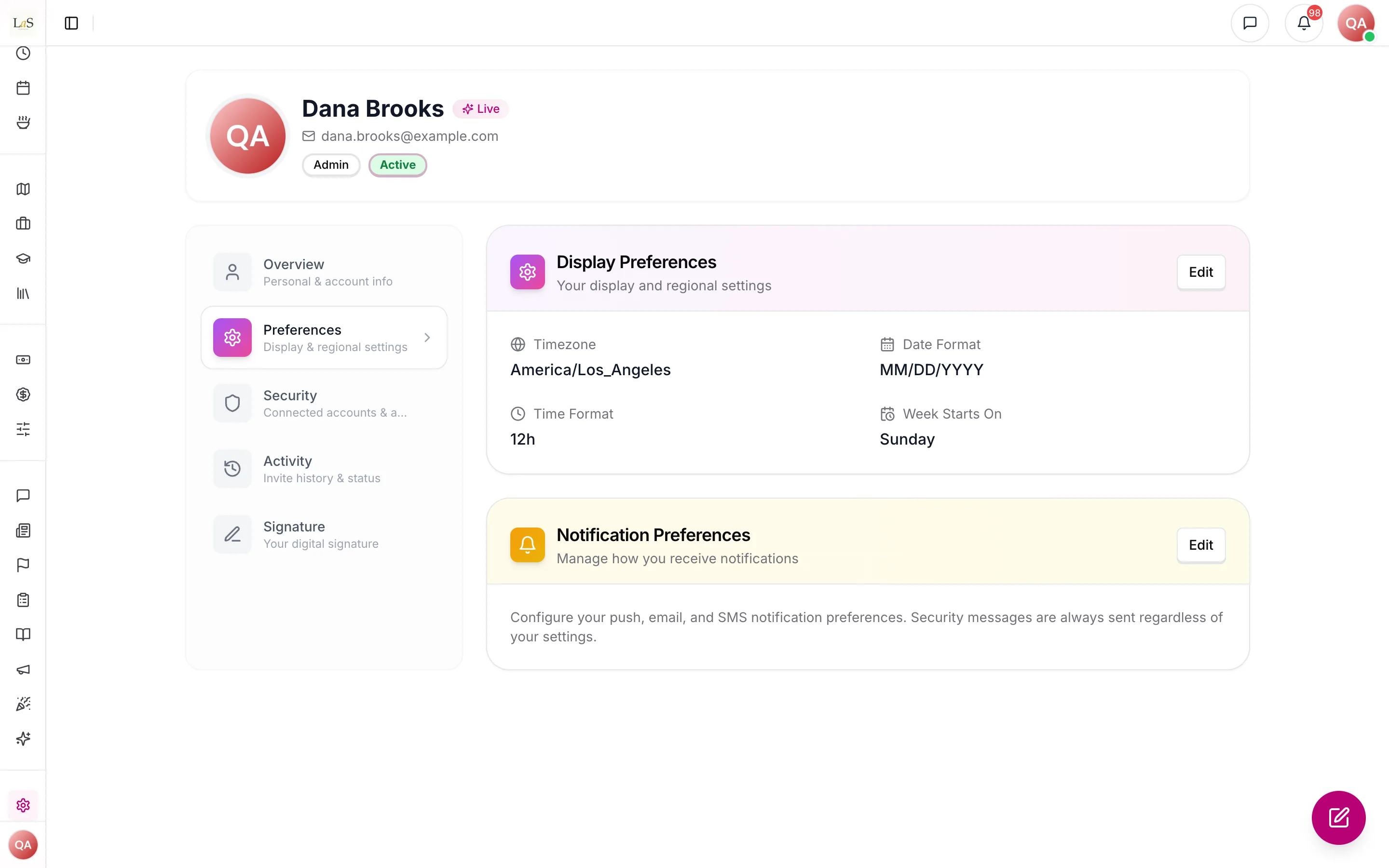
What exists today: Preferences hold regional settings (timezone, date and time formats, the first day of the week) and no language. Every screen is in English.
Key terms
- Multi-language support — localizing the platform's own interface so the app displays in the user's chosen language; it does not translate other people's messages.
- Interface language — the single language a user has selected for their view of the platform; it controls all interface text that user sees.
- Starter languages — the recommended initial set the platform ships with: English, Spanish, Tagalog, Mandarin, French, and Haitian Creole.
- Default language — the language the interface falls back to before the user has chosen one, and for any text not yet available in the chosen language; English on this platform.
- Subscriber demand — requests from subscribing agencies for a language not yet offered; the signal used to decide which language to add next.
- Translation Services — the separate real-time conversation translation capability (see Communication); it is a different feature from this one and is out of scope here.
How it works
Choosing a language
Every user chooses an interface language during onboarding, and can change it at any time from settings (see Identity & Access). The choice is saved to the user's own account, so it follows them across devices and sessions and does not affect anyone else. Before a user has made a choice, the interface displays in the default language, English.
Displaying the interface
Once a language is selected, the entire interface displays in that language: navigation, screen labels, buttons, form fields, and system messages. The starter set is English, Spanish, Tagalog, Mandarin, French, and Haitian Creole. If a particular piece of interface text has not yet been localized into the chosen language, that text falls back to the default language rather than showing nothing, so the user is never left with a blank or broken screen.
Adding more languages
The starter set is a starting point, not a ceiling. New languages are added over time based on subscriber demand: when subscribing agencies ask for a language the platform does not yet offer, that request feeds the decision about which language to localize next. Adding a language makes it available for any user to select.
Not the same as Translation Services
Multi-language support changes only what the platform itself shows a user. It does not read, change, or translate content other people create — messages, notes, posts, or documents stay in the language they were written in. Translating a live conversation between two people who speak different languages is Translation Services, a separate real-time integration documented under Communication and Integrations & API.
Rules
- LANG-1 — Each user must be able to choose an interface language during onboarding. (🚧 Spec only)
- LANG-2 — Each user must be able to change their interface language at any time from settings (see Identity & Access). (🚧 Spec only)
- LANG-3 — A user's interface language must be saved to their own account and must apply only to that user, following them across devices and sessions. (🚧 Spec only)
- LANG-4 — Once a language is selected, the entire platform interface — navigation, labels, buttons, form fields, and system messages — must display in that language. (🚧 Spec only)
- LANG-5 — The platform must offer at least the starter language set: English, Spanish, Tagalog, Mandarin, French, and Haitian Creole. (🚧 Spec only)
- LANG-6 — Before a user has chosen a language, the interface must display in the default language, English. (🚧 Spec only)
- LANG-7 — Where a piece of interface text is not yet localized into the user's chosen language, the platform must fall back to the default language for that text rather than display nothing. (🚧 Spec only)
- LANG-8 — Additional languages must be added based on subscriber demand, and once added must be selectable by any user. (🚧 Spec only)
- LANG-9 — Multi-language support must localize only the platform's own interface; it must not translate content other users create, such as messages, notes, or documents. (🚧 Spec only)
- LANG-10 — Real-time conversation translation between people who speak different languages is Translation Services, a separate integration (see Communication and Integrations & API), and must not be conflated with multi-language support. (🚧 Spec only)
Who can do what
| Action | Roles |
|---|---|
| Choose an interface language at onboarding | SuperAdmin, Owner, Admin, Care manager, Care provider, Representative, Medical professional |
| Change their own interface language in settings | SuperAdmin, Owner, Admin, Care manager, Care provider, Representative, Medical professional |
| Decide which new language to add next | SuperAdmin |
| Request a language not yet offered (subscriber demand) | Owner, Admin |
Decisions needed
- What is the unit of "subscriber demand" that triggers adding a language? The PRD says languages are added "based on subscriber demand" but does not define the threshold. Options: a single agency request; a count of requests across agencies; a tier or seat-count weighting; a manual SuperAdmin decision informed by the requests.
- Should the default interface language be derived from the user's device or browser locale before they choose? The PRD only specifies that users choose a language; it is silent on the pre-choice default. Options: always English; match the device/browser locale when it is one of the offered languages, otherwise English.
- Do dates, numbers, and currency formats follow the interface language, or are they handled separately? The PRD describes localizing interface text but does not address formatting. Options: localize formats together with the interface language; keep formats tied to region or timezone settings independently.
How is this page?
Last updated on