Health Readings
Part of the Anaya Care Handbook — the source of truth for how the product must behave. When the product needs to change, change this document first, then make the system match it.
What this covers
This page governs how the platform records a client's health readings. Anaya Care is a non-medical home care provider and does not monitor anyone's health: a family member or representative asks for a reading, and a care provider writes the number down during a visit and reports anything unusual, without interpreting it or acting on it. Covered here: readings recorded during care visits, the per-client thresholds that decide when a reading raises an alert, symptom and side-effect tracking, a pointer to the client's wound tracker (Anaya Healing Ally, which owns every wound rule), the acknowledgment of DNR and advance-directive orders by care providers, and doctors' appointments with reminders and AI visit-history summaries. The story in one paragraph: care providers write down requested readings and symptoms as part of their care tasks; the platform checks every reading against thresholds set for that individual client and turns the entries into charts, trend lines, alerts, and AI-assisted period reports. Wounds are tracked in Healing Ally, which has its own page. When a client has a DNR order or advance directive, every care provider serving that client must acknowledge it. Doctors' appointments are scheduled with travel time, remind the care team automatically, and capture the visit outcome — including new prescriptions — when a care manager completes or approves them.
Change-of-condition health observations are a sibling feature covered in Change of Conditions. When a client leaves care, their health record follows the Transition of Care (discharge) process.
Key terms
- (formerly "vital signs") — numbers written down during care visits at the family's or representative's request: weight, blood pressure, heart rate, oxygen saturation, blood sugar, body temperature, and respiratory rate. Anaya Care records them; it does not monitor, assess, or interpret them.
- Out-of-range reading — a recorded reading outside the healthy range, flagged with a severity of low, high, or critical so it can be reported.
- Per-client alert numbers — the high/low limits for one reading on one client, entered by a care manager in line with the client's healthcare-provider direction (physician orders), rather than a single range applied to everyone.
- Two-tier alert severity — the two alert levels a care manager can configure for each reading: a note-it alert (write it down and mention it) and a report-immediately alert (notify the care team without delay).
- Symptom log — a care provider's record of a symptom or medication side effect observed during a shift, captured per shift and kept as a chronological history.
- Symptom pattern — a recurring or escalating symptom the platform detects across a client's symptom history, which can raise an escalation alert at a defined threshold.
- Symptom report — a summary of a client's logged symptoms prepared for a healthcare provider.
- Period health report — an AI-assisted summary of a client's health over a chosen date range, optionally compared against a previous period; drafted, edited by a care manager, then finalized.
- , — defined on Anaya Healing Ally, the client's wound tracker.
- DNR / advance-directive acknowledgment — a care provider's confirmation that they have reviewed a client's DNR order or advance directive.
- Stale acknowledgment — an acknowledgment made before the newest directive document was uploaded; the care provider must acknowledge again.
- Doctor's appointment — a scheduled visit between a client and a medical professional, with travel time, reminders, and an outcome the care provider submits from the visit and a care manager reviews and approves.
- Visit-history summary — an AI-written overview of a client's completed appointments, downloadable as a PDF or an editable Word document.
How it works
Health readings
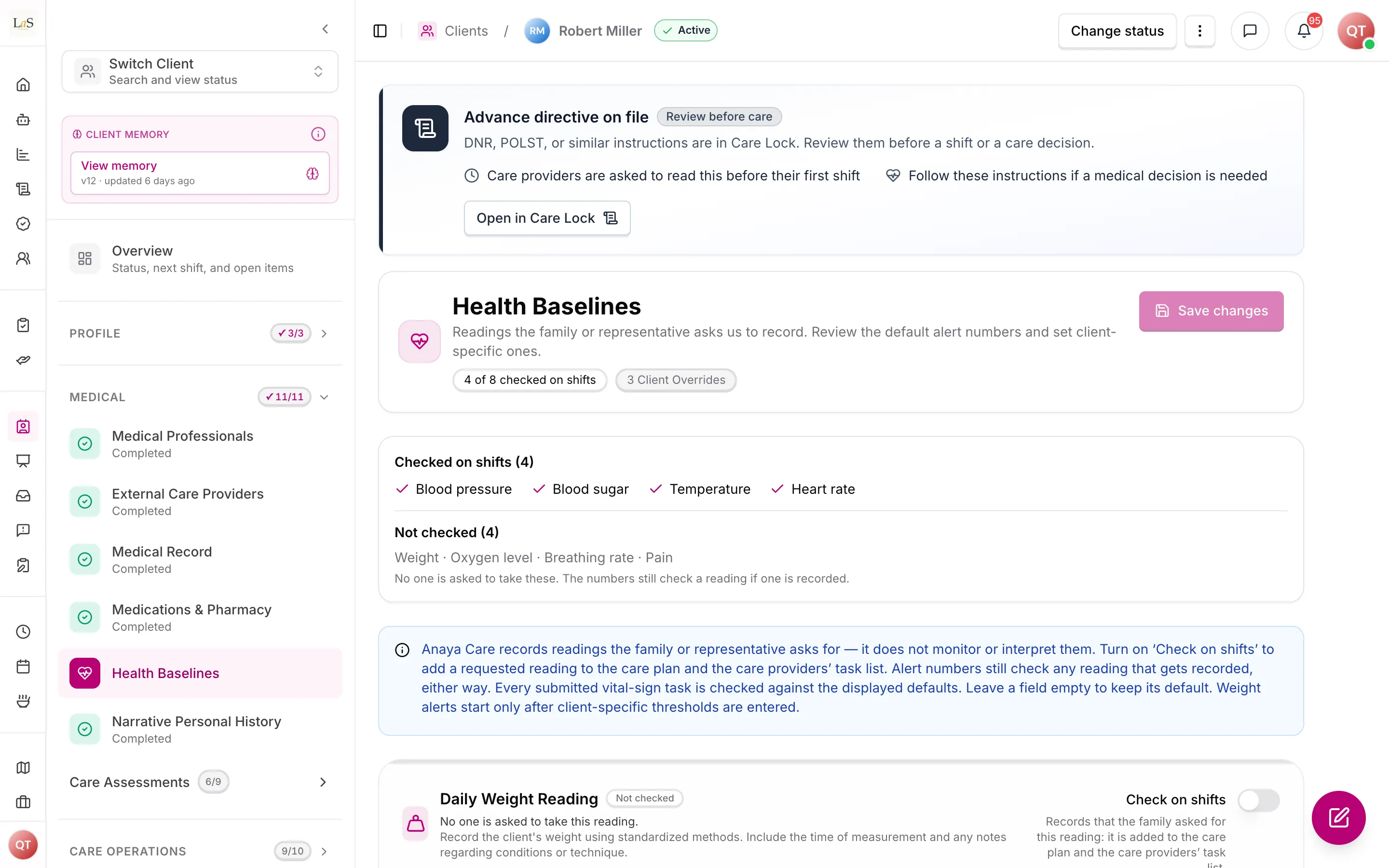
Who asks for a reading. The family member or representative asks; the care manager records that request by marking the reading Check on shifts on the client's Health Baselines. Anaya Care is non-medical — it writes numbers down and reports anything unusual, and never assesses or interprets them ().
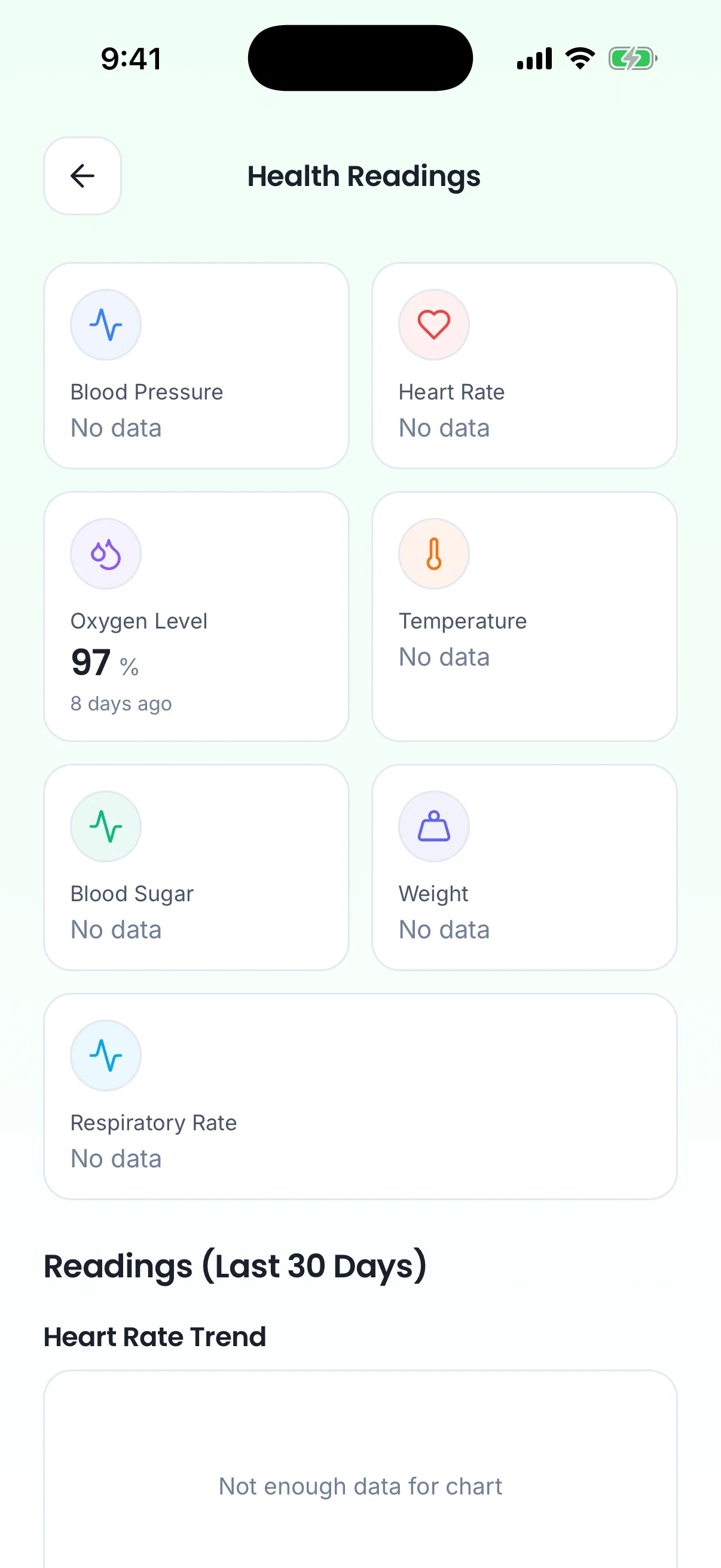
The client's readings on the care provider's phone.
Care providers do not enter readings in a separate place — they are captured as answers inside reading care tasks (blood-pressure check, weight check, and so on) during their shifts (see Care Plans & Tasks). The platform reads those submitted entries to build everything else: the latest value per reading, trend lines over time, and a list of out-of-range readings. Every reading is checked against the thresholds and flagged when out of range, with a severity of low, high, or critical. A trend is called "increasing" or "decreasing" when the second half of the period differs from the first half by more than five percent; otherwise it is "stable".
Per-client alert numbers. The high/low limits for each reading are meant to be set for the individual client, following the direction of that client's healthcare provider (physician orders) — they are never fixed platform-wide values. On top of those limits, a care manager can configure a two-tier alert severity for each metric: a note-it alert (write it down and mention it) and a report-immediately alert (notify the care team without delay). Both tiers are configured in line with the client's healthcare-provider direction. These thresholds are entered by people only — the AI never proposes a number for them; at most it reminds a care manager, once and gently, that they can add the doctor's numbers (AI Features ).
Period health reports
A care manager can generate a report over a date range — either a single period or a comparison of two periods. The platform gathers the vitals, behavioral, and care-delivery data, asks the AI for a written summary and recommendations, and saves the result as a draft. The care manager can edit the draft (their edits sit on top of the AI's text), then finalize it. A finalized report is locked forever. Either version can be exported as a Word document or as a PDF derived from it, with the manager's edits taking precedence over the AI text.
The written summary is part of the report, not a decoration on top of it, so a report is only saved once the AI has written one. If that call fails, nothing is stored and the care manager is told to try again — rather than leaving a numbers-only draft in the list that looks finished, reads as a report, and quietly says nothing about what the numbers mean.
The comparative report is the only place in the platform that compares one period against another. A care summary describes a single period in narrative form for a chosen audience; a comparative period report answers a different question — what changed, and by how much — which is what a reassessment or a change to authorized hours has to be argued from. The single-period mode is a vitals-only snapshot and overlaps with the care summary by design; reach for the care summary when the reader needs the narrative.
Every metric in the report carries a weekly breakdown — average, lowest, highest, and readings per week, plus the count of readings that fell outside the client's normal range that week. Period totals say how many alerts there were; only the weekly split says whether they clustered at the start of the period or the end.
Symptom & side-effect tracking
Care providers log symptoms and medication side effects during each shift, the same way they record vitals — as part of their care tasks. Each entry joins the client's symptom history, a chronological log anyone with health access can read. The platform watches that history for symptom patterns — symptoms that recur or escalate — and raises an escalation alert when a pattern crosses a defined threshold. Side effects are watched especially closely after a medication change. On request, the platform can produce a symptom report for a healthcare provider, and when a symptom is significant the client's representatives are notified.
Wounds (Anaya Healing Ally)
A client's wounds are tracked in Anaya Healing Ally: a body map of the client's wounds, where each came from, and photo-first . Each check is a photo, with optional notes, saved in one step. A wound's progress is its checks in order, with the photos side by side, and the check schedule shows due and overdue checks. Healing Ally never judges a wound and raises no alerts. That page owns every wound rule ( – ); the wound rules this page used to carry were moved there.
DNR / advance-directive acknowledgment
When a client is flagged as having a DNR order or an advance directive, the platform shows a prominent, non-dismissible alert at the top of both the client profile and the care plan, and every care provider serving that client must acknowledge that they have reviewed it before their first shift with that client (see Scheduling & Shifts). The acknowledgment is per care provider, per client. If a newer directive document is uploaded afterward, the existing acknowledgment becomes stale and the care provider must acknowledge again. Acknowledging requires that a directive document is actually on file. Admins and care managers can review who has acknowledged for each client.
Doctors' appointments
An appointment links a client and a doctor (a medical professional user) with a start time in the client's timezone, travel time, transportation details, location, purpose, and optional pre-visit documents. The title is suggested automatically from the purpose, with a simple "Dr. Name – date" fallback. Recurring appointments (daily, weekly, monthly, yearly, with an end date or count) are created as individual occurrences that share a series identifier; the series is generated up to its end date or at most one year ahead, and changes apply to one occurrence at a time.
Travel time blocks the calendar both before and after the appointment. Before saving, the platform checks that blocked window against the client's shifts and care-plan tasks; overlapping task occurrences can be excused with the reason "doctor appointment" so care providers are not penalized for skipping them (see Scheduling & Shifts).
An appointment moves through five statuses. The care provider who attended submits the visit notes; that submission stays pending review until a care manager checks them, edits anything that is wrong, and approves. There is no send-back — the manager fixes the record. A care manager can still complete a scheduled or rescheduled appointment in one step when no care provider submitted notes. A next visit is always a new doctor's appointment, created separately; completing this one never books a follow-up.
Rescheduled appointments still count as upcoming and still receive reminders. Pending-review appointments do not: the visit already happened. Completing or approving an appointment captures the visit outcome — diagnosis, prescriptions, notes, lab results, follow-up instructions, referrals, and post-visit documents — and any newly prescribed medications are added to the client's medication list automatically (see Clients). Medications are added only when the appointment becomes completed, never when the care provider submits.
Reminders: when creating an appointment, the scheduler picks alert lead times (from 24 hours down to 5 minutes before). At each chosen time, the platform notifies the client's care team — that client's assigned care managers and assigned care providers — by in-app and push notification. Each person receives each reminder at most once. Representatives are not reminded: appointment reminders are a staff-coordination signal, and family notification is a separate decision ().
: on request, the AI reads all of the client's completed appointments and writes a structured overview a doctor can review before the next visit. The newest summary is kept on the client; on the web it is shown on the client's Doctor's appointments page, where staff who manage the client can generate or refresh it, and anyone who can see the client can download it as a PDF or as a Word document to edit before sending. At least one completed appointment is required.
Rules
- HEALTH-1 — Reading history must be derived from submitted care-task entries only; there is no separate readings log, and unsubmitted or draft task entries never count.
- HEALTH-2 — The platform records exactly seven kinds of reading: weight, blood pressure, heart rate, oxygen saturation, blood sugar, body temperature, and respiratory rate. It records them at the family's or representative's request; it does not monitor them.
- HEALTH-3 — Every recorded reading must be checked against the platform's healthy ranges and flagged as in range or out of range, with out-of-range readings carrying a severity of low, high, or critical. The flag exists so a care provider knows to report it, never so the platform can interpret it.
- HEALTH-4 — Abnormality checks must respect the unit each reading was recorded in (for example pounds vs. kilograms, or the two blood-sugar scales).
- HEALTH-5 — Abnormal-reading lists, averages, and trends must cover all seven vital types.
- HEALTH-6 — A period health report can cover a single date range or compare two ranges, and is always saved as a draft first.
- HEALTH-8 — Care-manager edits to a report sit alongside the AI's original text and take precedence in the exported document, in both Word and PDF form.
- HEALTH-9 — A finalized report can never be edited or returned to draft.
- HEALTH-10 — Retired 2026-10-07. Moved to Healing Ally as and (a wound is Open or Healed; its body region, first-noticed date and origin).
- HEALTH-11 — Retired 2026-10-07. Moved to Healing Ally as .
- HEALTH-12 — Retired 2026-10-07. Replaced by on Healing Ally: the trend comes from the person's Better / Same / Worse call, not from area and tissue percentages. was itself retired on 2026-10-09; see .
- HEALTH-13 — Retired 2026-10-07. Replaced by on Healing Ally: every check answered Worse alerts the management team. was itself retired on 2026-10-09; see .
- HEALTH-14 — Retired 2026-10-07. Replaced by and on Healing Ally: an ordinary confirmed check no longer notifies the management team — only a Worse check or an overdue one does. was itself retired on 2026-10-09; see . now says a check is saved in one step, with no draft.
- HEALTH-15 — Retired 2026-10-07. Moved to Healing Ally as . was itself retired on 2026-10-09; see .
- HEALTH-16 — Retired 2026-10-07. Moved to Healing Ally as . was itself retired on 2026-10-09; see , which now says a check is saved in one step, with no draft.
- HEALTH-44 — Retired 2026-10-07. Moved to Healing Ally as . now says a check is saved in one step, with no draft.
- HEALTH-45 — Retired 2026-10-07. Replaced by and on Healing Ally: the AI drafts only a size estimate and a description. and were themselves retired on 2026-10-09; see .
- HEALTH-46 — Retired 2026-10-07. Moved to Healing Ally as . was itself retired on 2026-10-09; see .
- HEALTH-17 — Retired 2026-10-07. Moved to Healing Ally as . was itself retired on 2026-10-09; see .
- HEALTH-18 — Retired 2026-10-07. Moved to Healing Ally as . was itself retired on 2026-10-09; see , which now says a check is saved in one step, with no draft.
- HEALTH-19 — Retired 2026-10-07. Moved to Healing Ally as .
- HEALTH-20 — DNR / advance-directive acknowledgment is required exactly when the client is flagged as having a DNR order or an advance directive. (🚧 Spec only — the acknowledgment flow is not usable end-to-end yet; see Known gaps)
- HEALTH-21 — Each care provider has at most one current acknowledgment per client; uploading a newer directive document makes it stale, and the care provider must acknowledge again. (🚧 Spec only)
- HEALTH-22 — A care provider can only acknowledge when a directive document is actually on file for the client. (🚧 Spec only)
- HEALTH-23 — Every appointment must have a client, a doctor, a start time, a timezone, and a travel time; the title is suggested from the purpose with a "Dr. Name – date" fallback.
- HEALTH-24 — Recurring appointments are created as individual occurrences sharing one series, generated up to the series end date or at most one year ahead; edits, completions, and cancellations apply per occurrence.
- HEALTH-25 — Travel time blocks the calendar symmetrically before and after the appointment when checking for conflicts.
- HEALTH-26 — When an appointment is created, overlapping care-plan task occurrences within the blocked window can be excused with the reason "doctor appointment".
- HEALTH-27 — An appointment that is completed or cancelled can never change status again. Only scheduled or rescheduled appointments can be cancelled, rescheduled, completed directly by a manager, or submitted for review. A pending-review appointment can only become completed, when a manager reviews (and may edit) and approves; it cannot be cancelled, rescheduled, or schedule-edited, and the care provider cannot submit again.
- HEALTH-28 — Rescheduled appointments still count as upcoming and still receive reminders. Pending-review appointments do not count as upcoming.
- HEALTH-29 — Completing an appointment captures the visit outcome, and newly prescribed medications are added to the client's medication list automatically — only when the appointment becomes completed, never when visit notes are submitted for review.
- HEALTH-30 — Appointment reminders fire at each chosen lead time and notify the client's care team — that client's assigned care managers and assigned care providers (), not agency-wide management users and not representatives — with each person receiving each reminder at most once.
- HEALTH-31 — A visit-history summary can only be generated for a client with at least one completed appointment, and the newest summary must be downloadable as a PDF and as an editable Word document.
- HEALTH-32 — Appointments, like all health data on this page, must only be visible and editable within the client's own agency, by people granted the matching permission.
- HEALTH-33 — Every view of a client's health metrics or wound records is recorded in the access audit trail.
- HEALTH-34 — Alert numbers must be configurable per client in line with that client's healthcare-provider direction (physician orders), and never applied as fixed platform-wide values. They are entered by people only — the AI never proposes a number for them (). (🚧 Spec only)
- HEALTH-35 — Each vital metric must support a two-tier alert severity — an observation alert and a report-immediately alert — that a care manager configures in line with the client's healthcare-provider direction. (🚧 Spec only)
- HEALTH-47 — A reading is written down because a family member or representative asked for it, never because the agency decided to watch it. Each reading on the client's Health Baselines carries its own Check on shifts mark; the care manager sets that mark to record the family's request. Only marked readings are asked for routinely: they appear in the care plan's Health Readings section and get check tasks on the Care Task List (Care Plans & the Care Task List ). The alert numbers keep working either way — any reading that does get recorded is still checked against the client's numbers (), marked or not. When the care manager answers the AI's baseline reminder and ticks "also save", the reading is marked as part of that same save — the care manager's own action, said plainly on the consent row, never an AI decision (). No surface may describe this as monitoring, tracking, or watching a client's health.
- HEALTH-36 — Care providers must be able to log symptoms and medication side effects during each shift, and every entry must join the client's chronological symptom history. (🚧 Spec only)
- HEALTH-37 — The platform must detect recurring or escalating symptom patterns across a client's history and raise an escalation alert when a pattern crosses its defined threshold. (🚧 Spec only)
- HEALTH-38 — A symptom report must be producible for a healthcare provider, and a client's representatives must be notified when a significant symptom is logged. (🚧 Spec only)
- HEALTH-39 — A period health report must be built as a Word document, with any PDF derived from that same document, so the two can never disagree.
- HEALTH-40 — A period health report must present every metric's weekly breakdown as text, not only as a chart, so a care manager can correct a number that a rendered image would leave uneditable.
- HEALTH-41 — A week with no readings for a metric must be reported as absent, never as a measured zero; a report must not imply a reading or an in-range result that was never taken.
- HEALTH-42 — An assigned care provider can submit a visit outcome for a scheduled or rescheduled appointment; that submission stays pending review until a care manager with client-manage access reviews, may edit, and approves it. Submitting does not grant create, cancel, reschedule, or delete.
- HEALTH-43 — Submitting visit notes notifies that client's assigned care managers only — not other care providers and not representatives. Family is not told about unapproved visit notes.
Who can do what
| Action | Roles allowed |
|---|---|
| View a client's recorded readings, trends, and out-of-range readings | Owner, Admin, Care Manager, assigned Care Providers, Medical Professionals |
| Set per-client alert numbers and two-tier alert severity | Owner, Admin, Care Manager |
| Log symptoms and medication side effects during a shift | assigned Care Providers |
| View a client's symptom history and generate symptom reports | Owner, Admin, Care Manager, Medical Professionals |
| Generate, edit, finalize, and export period health reports | Owner, Admin, Care Manager, Medical Professionals |
| Wounds and wound checks | See Anaya Healing Ally |
| Acknowledge a client's DNR / advance directive | Care Providers (anyone who works the client's shifts) |
| Review the list of acknowledgments for a client | Owner, Admin, Care Manager |
| Create, cancel, reschedule, and delete doctors' appointments | Owner, Admin, Care Manager |
| Submit visit notes after attending a doctor's appointment | assigned Care Providers |
| Review, edit, and approve pending visit notes; complete a scheduled appointment directly | Owner, Admin, Care Manager |
| Generate and download visit-history summaries | Owner, Admin, Care Manager |
Decisions needed
- Can a representative see the readings they asked for? now says the family or representative is who asks for a reading, but the "Who can do what" table above grants viewing to Owner, Admin, Care Manager, assigned Care Providers and Medical Professionals — Representatives appear on neither readings row. A person who requests a reading and then cannot see it is a gap the new wording makes visible rather than creates. Options: grant Representatives view on their own client's readings; grant it only where the care manager has marked the reading Check on shifts; or keep readings staff-only and say so plainly on the request surface. This is an access-control decision and was deliberately left unmade by the 2026-08-29 reword.
- Should DNR acknowledgment gate clock-in? Today it is informational only. Options: block a care provider from clocking in to a shift until they have a current acknowledgment; show a blocking prompt at clock-in but allow override; or keep it as a passive requirement reviewed by managers.
- (Resolved 2026-10-07: AI wound findings stay advisory. The AI's Worth flagging note never raises an alert; the person's Worse call does — , on Healing Ally.) (Superseded 2026-10-09: Healing Ally no longer reads photos, records a Better / Same / Worse call, or raises alerts — , .)
- Should recurring appointment series be editable as a series? Today every change applies to a single occurrence. Options: support "edit/cancel this and all future occurrences"; keep per-occurrence editing only.
- Vitals thresholds per client — resolved direction, not yet built. v4.2 settles that thresholds must be set per client from the client's healthcare-provider direction (physician orders), never as platform-wide values, with a two-tier alert severity per metric (, ). Open question: who is allowed to enter and change those thresholds and the alert tiers — care manager only, or also a medical professional — and whether changes require a recorded physician-order source. Today the same ranges still apply to everyone (see Known gaps).
- How significant is a "significant symptom"? Representatives must be notified when a significant symptom is logged (). Open question: what defines significance — a fixed symptom list, a care-manager-set severity, or an AI judgement — and whether the representative notification is automatic or care-manager-confirmed.
How is this page?
Last updated on