Anaya Healing Ally
Part of the Anaya Care Handbook — the source of truth for how the product must behave. When the product needs to change, change this document first, then make the system match it.
Implementation status — the wound tracker is built: the body map, wounds that are Open or Healed, where each wound came from, photo-first wound checks, the progress of photos side by side, and the check schedule with due and overdue checks. Since 2026-10-09 Healing Ally records and never judges: nothing reads the photo, a check is a photo and optional notes saved in one step, and wounds have no size, pain level, Better / Same / Worse call or trend, and raise no alerts. The professional-routing half is not built, because it depends on Care Coordination & Provider Integration, which is still Planned. Legend: ✅ In code · ⚠️ Partial · 🚧 Spec only (not yet built).
What this covers
This page governs Anaya Healing Ally, the client's wound tracker: where each of a client's wounds is on the body, where it came from, what it has looked like over time, and whether it has been checked when it should have been. It owns every rule about wounds and wound checks; Health Readings points here.
A care provider who notices a wound places it on the client's body map and says when it was first noticed and whether it was there when care started. From then on the wound is checked on a schedule — weekly unless someone changes it. A check is a photograph, taken with the in-app camera, with any notes the person wants to add. The checks build the wound's progress: its photos side by side, in order. A check that is due shows up for the care provider on the client and on their shift; a check that is missed is marked overdue. When the wound heals, someone marks it Healed.
Healing Ally records a wound; it never judges one. It does not measure a wound, score the client's pain, or say whether a wound is getting better or worse — that judgment belongs to the client's own healthcare providers. Healing Ally is non-skilled documentation and coordination support only. It does not treat, dress, debride, or otherwise manage a wound, and it does not replace a healthcare provider's judgment. The actual wound treatment stays entirely with the client's own healthcare providers; this feature only helps a care provider record what they see and get it in front of the right person.
Key terms
- Healing Ally — the name of the wound tracker module. It names the module only: the things inside it are and , and no screen calls the product "wound care".
- Wound — one wound on one client: where it is on the body, when it was first noticed, where it came from, whether it is Open or Healed, and its check schedule.
- Body map — a front and back outline of a person, drawn for Anaya, on which each of the client's wounds is a pin in its body region. It is how a wound's location is chosen and how a client's wounds are seen at a glance.
- Wound origin — whether a wound was present at the start of care, appeared during care, or the person adding it is not sure. A wound that appeared during care is the agency's to explain, so it prompts an incident report.
- Wound check — one dated look at a wound: a photo (from the in-app camera on the phone, or uploaded on the web) and any notes, with who logged it, when, and the shift when there was one. Formerly called a wound assessment or Healing Ally entry.
- Progress — a wound's checks in order, with their photos side by side, so anyone can see how it has changed. It is the only comparison Healing Ally offers, and it never says whether a wound is better or worse.
- Check schedule — how often a wound should be checked: every visit, every N days, or weekly (the default).
- Due check / overdue check — a check the schedule asks for now, and one that was not logged in time.
- Professional coordination — sending a wound's photos and notes to the client's authorized home health team for their review and action.
How it works
Adding a wound
From the client's Healing Ally, a person with access taps the place on the where the wound is. The map shows the front and the back of the body, and its regions include the places pressure injuries most often appear: heels, the sacrum and buttocks, hips, elbows, shoulder blades, the ears, and the back of the head. The person then says when the wound was first noticed and where it came from — present at the start of care, appeared during care, or not sure — and may add a note. The wound starts Open, with a weekly check schedule.
When a wound appeared during care, the phone app offers to file an straight away, opened already describing the wound, and the report is linked back to it. The person can skip it. The web dashboard, which cannot file incident reports, reminds the person to file one from the app.
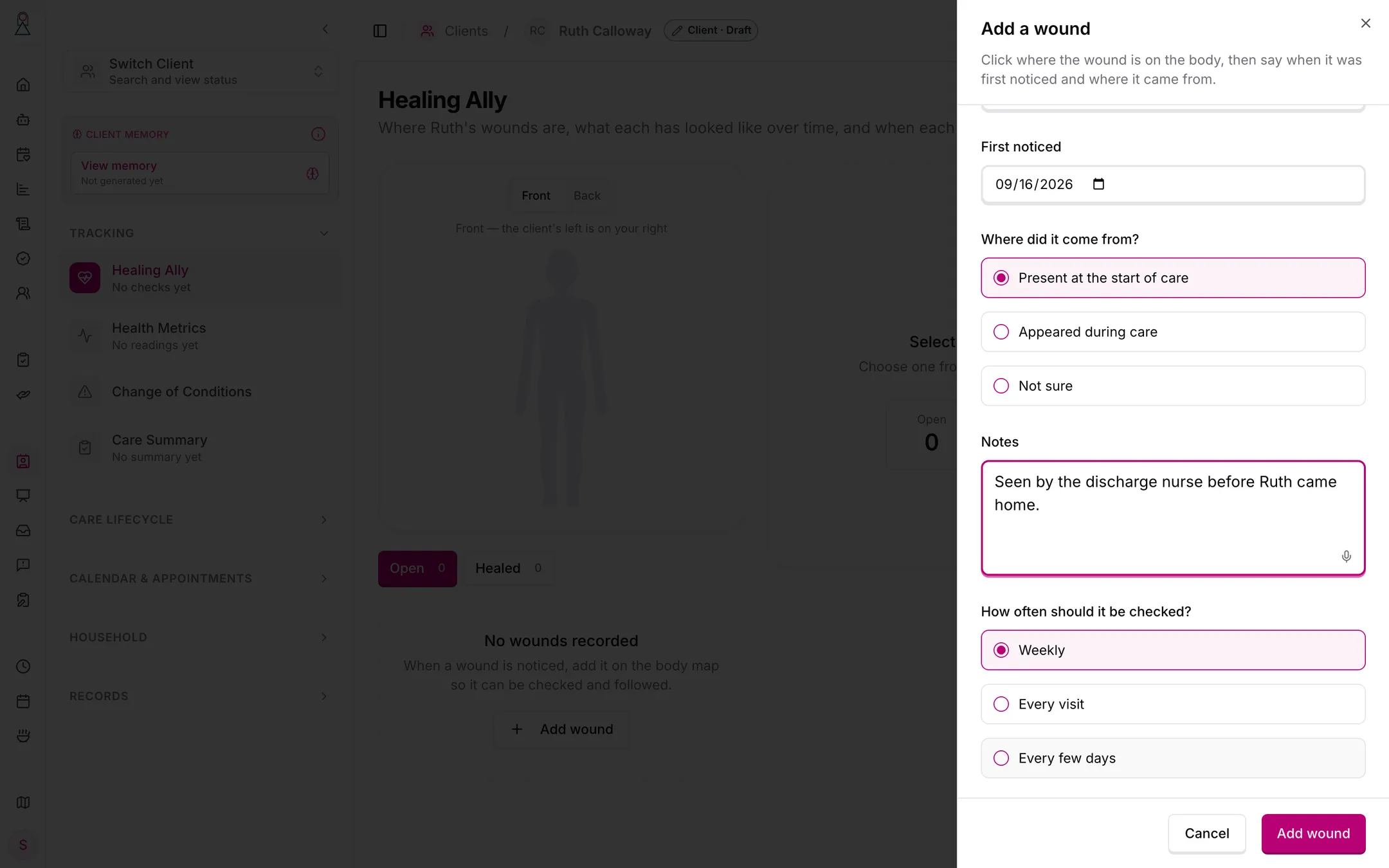
A wound present at the start of care, checked weekly.
Checking a wound
A is a photograph and, if the person wants, notes. The photo is required: on the phone it must be taken with the in-app camera; office staff on the web may upload one, because they are not in the home. Notes are optional — anything the person saw or was told, including anything the client's healthcare providers did for the wound.
The person saves the check and it joins the wound's history straight away. There is no draft and nothing to wait for: nothing reads the photograph, the notes are the person's own words with no AI writing help, and the check asks for no size, no pain score, and no "better, same or worse".
A check logged during a shift with the client is linked to that shift.
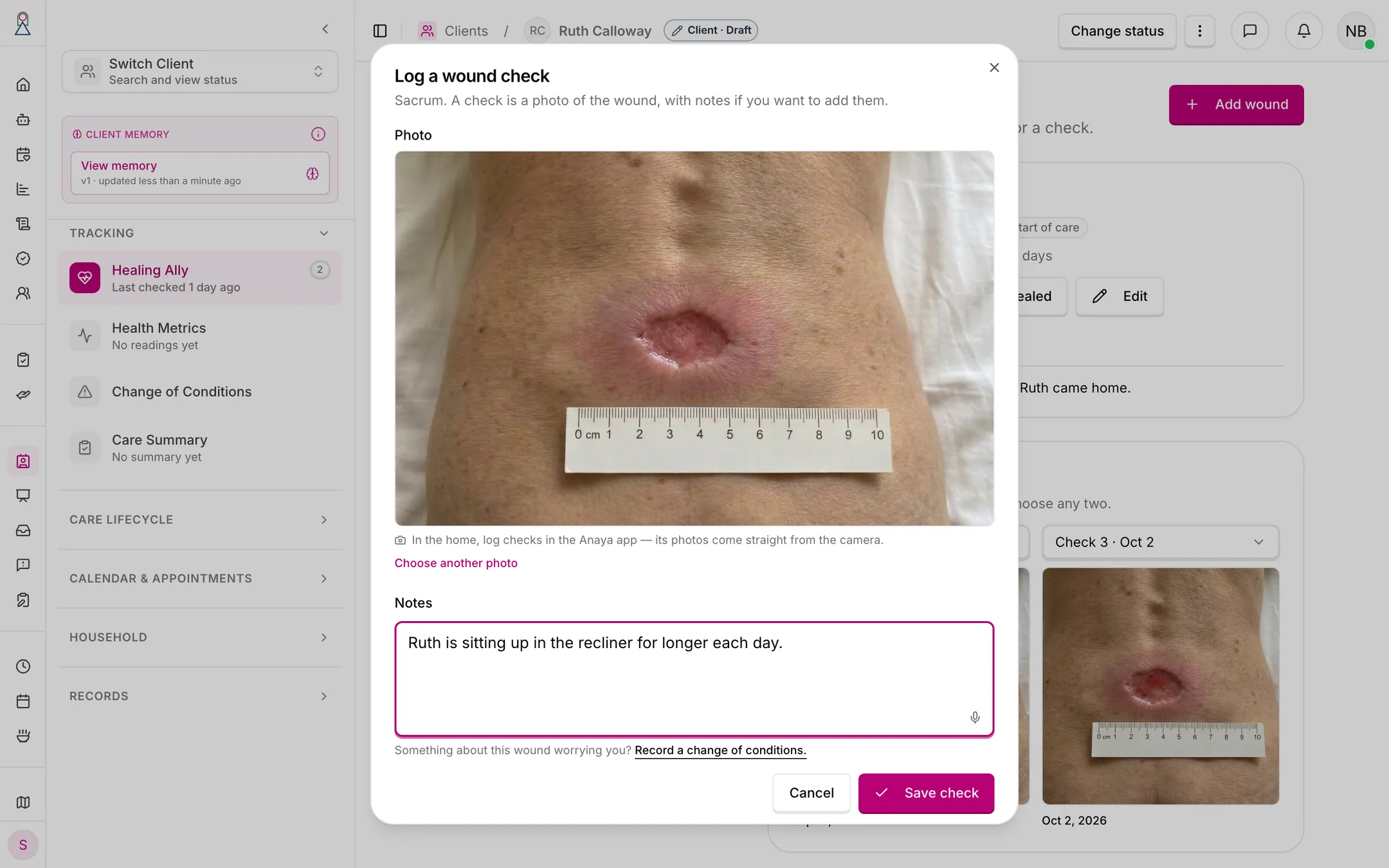
A check is a photo and, if the person wants, notes. The screen points a worried person to a change of conditions.
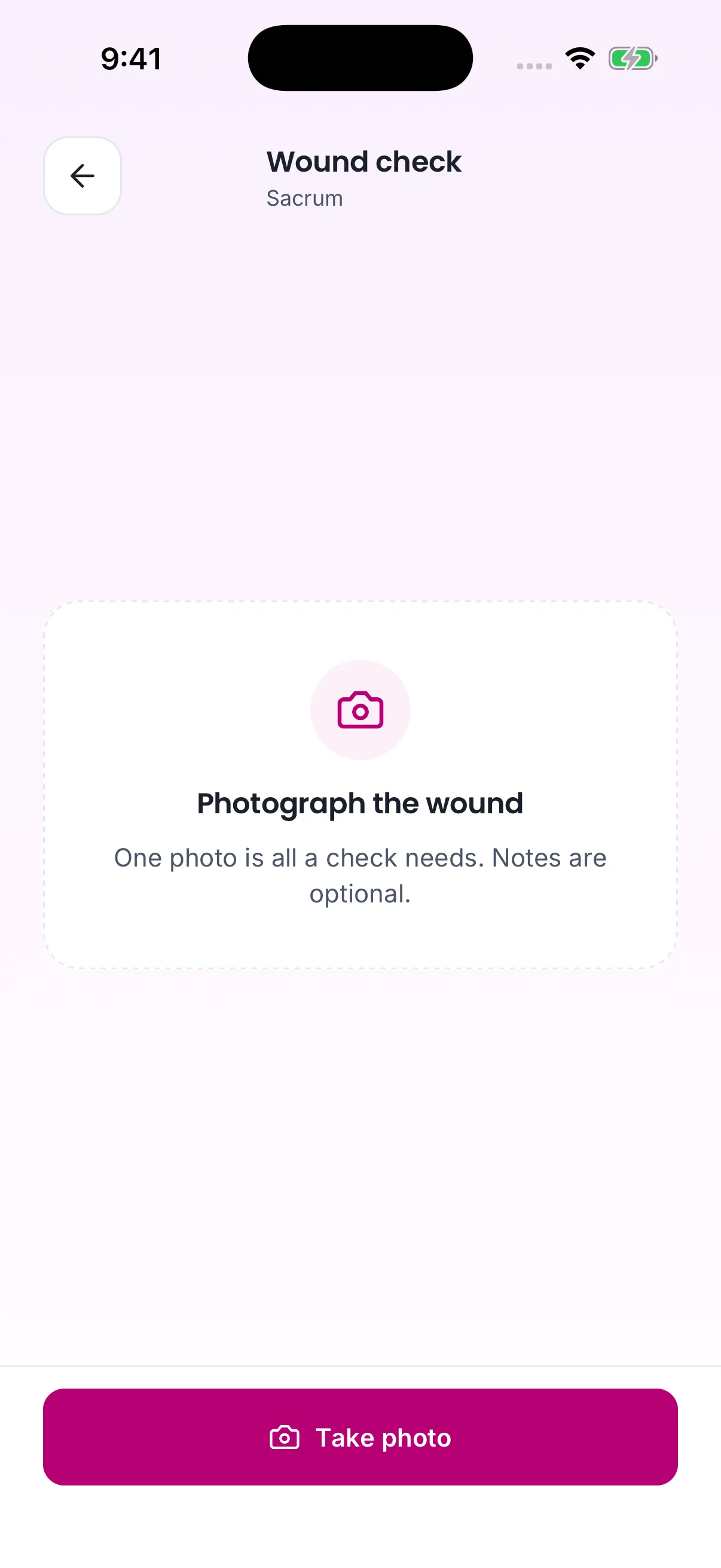
In the home, a check starts from the app's own camera.
If something about the wound worries the person, the check screen points them to record a change of conditions, which a care manager reviews. Healing Ally itself tells no one.
Following progress
Each wound's shows its checks in order with their photos side by side, so anyone can see how it has changed and set one check beside another. It never says whether the wound is better or worse; judging that belongs to the client's healthcare providers. The timeline never overwrites or deletes an earlier check; a mistake is put right by logging a new one.
The client's Healing Ally opens on the with every open wound pinned in its region and marked Overdue when its check is late, beside a list of the wounds. Healed wounds are kept and can be shown.
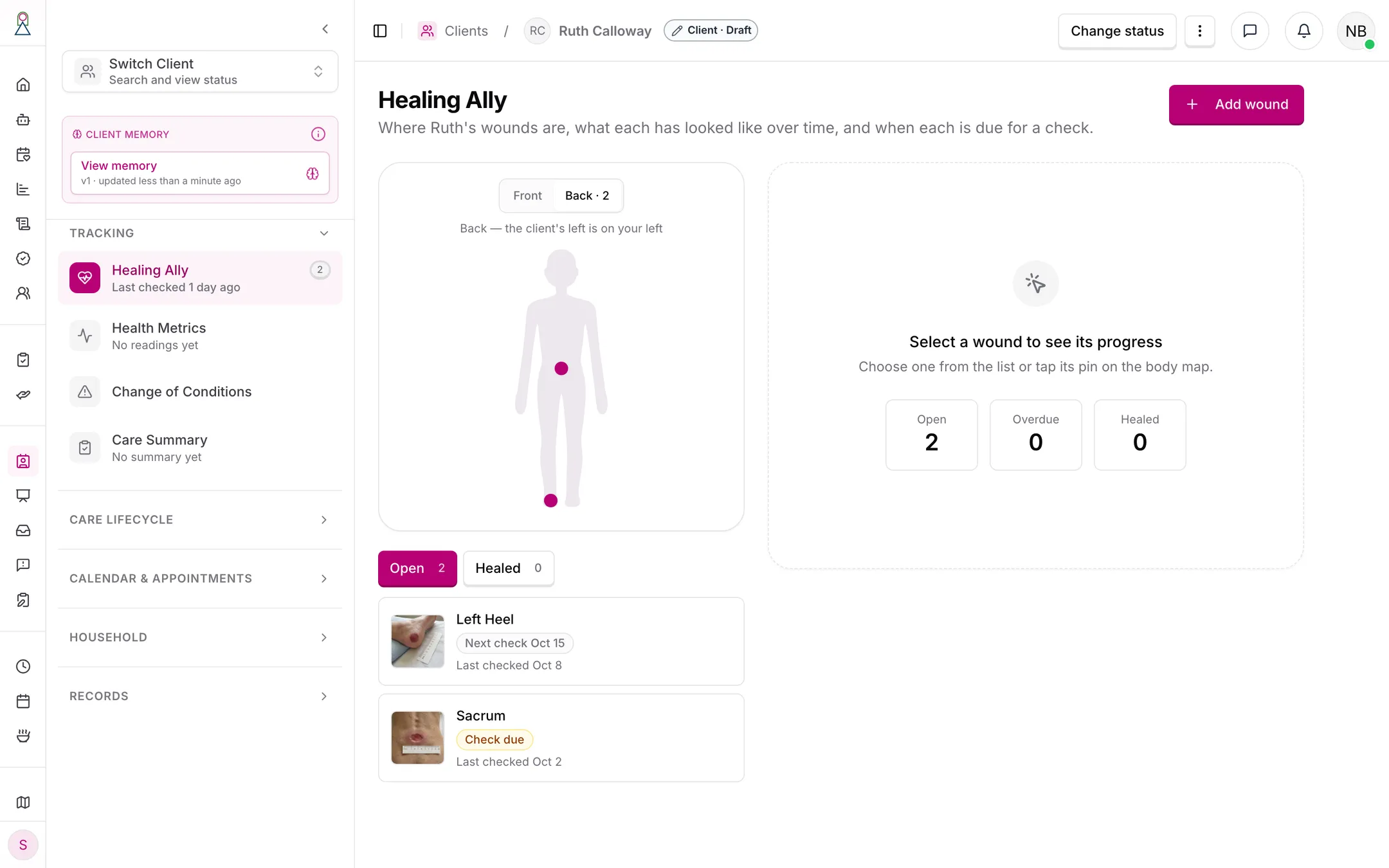
Two open wounds. The sacrum's check is due today.
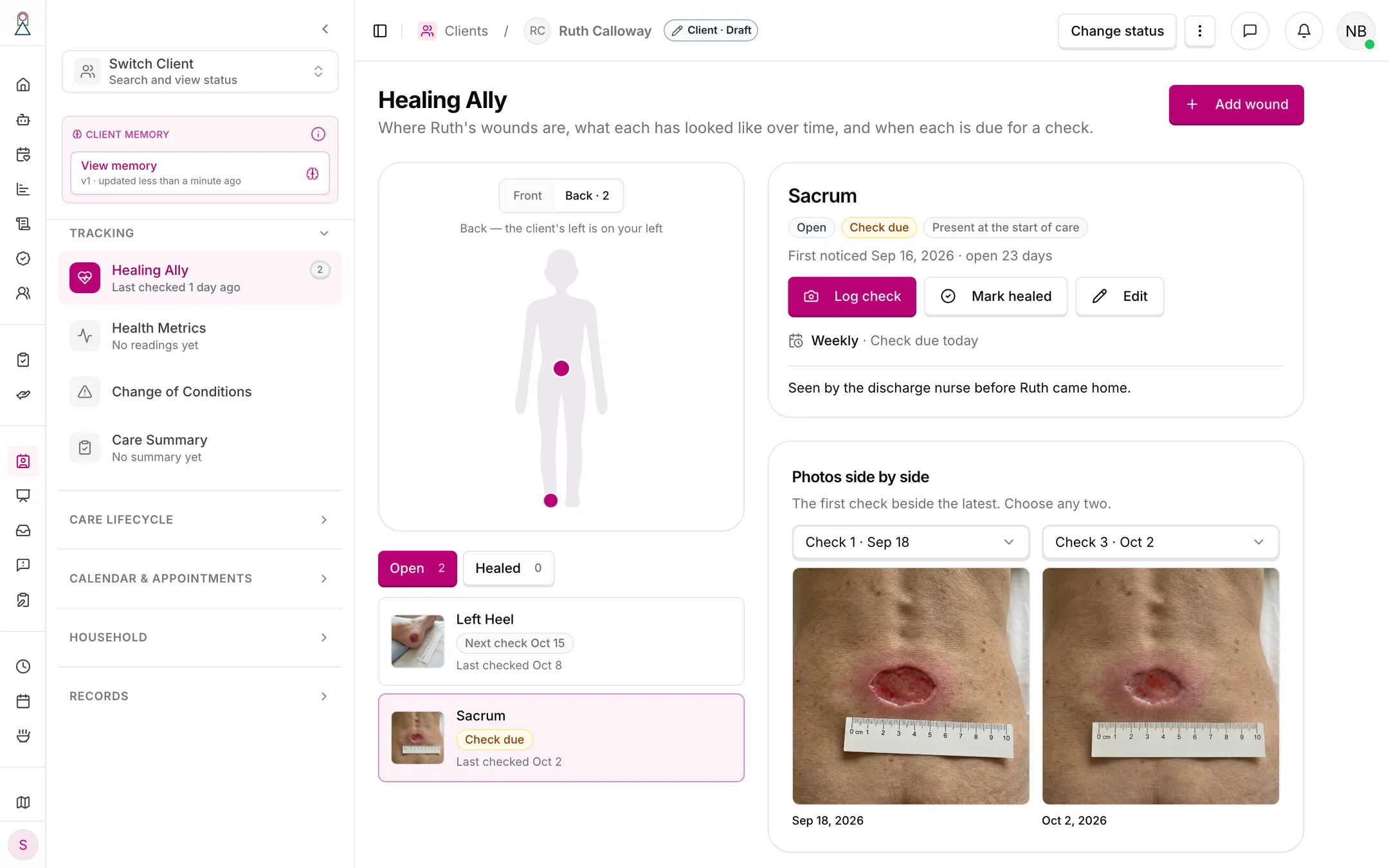
The first check beside the latest. Any two checks can be chosen.
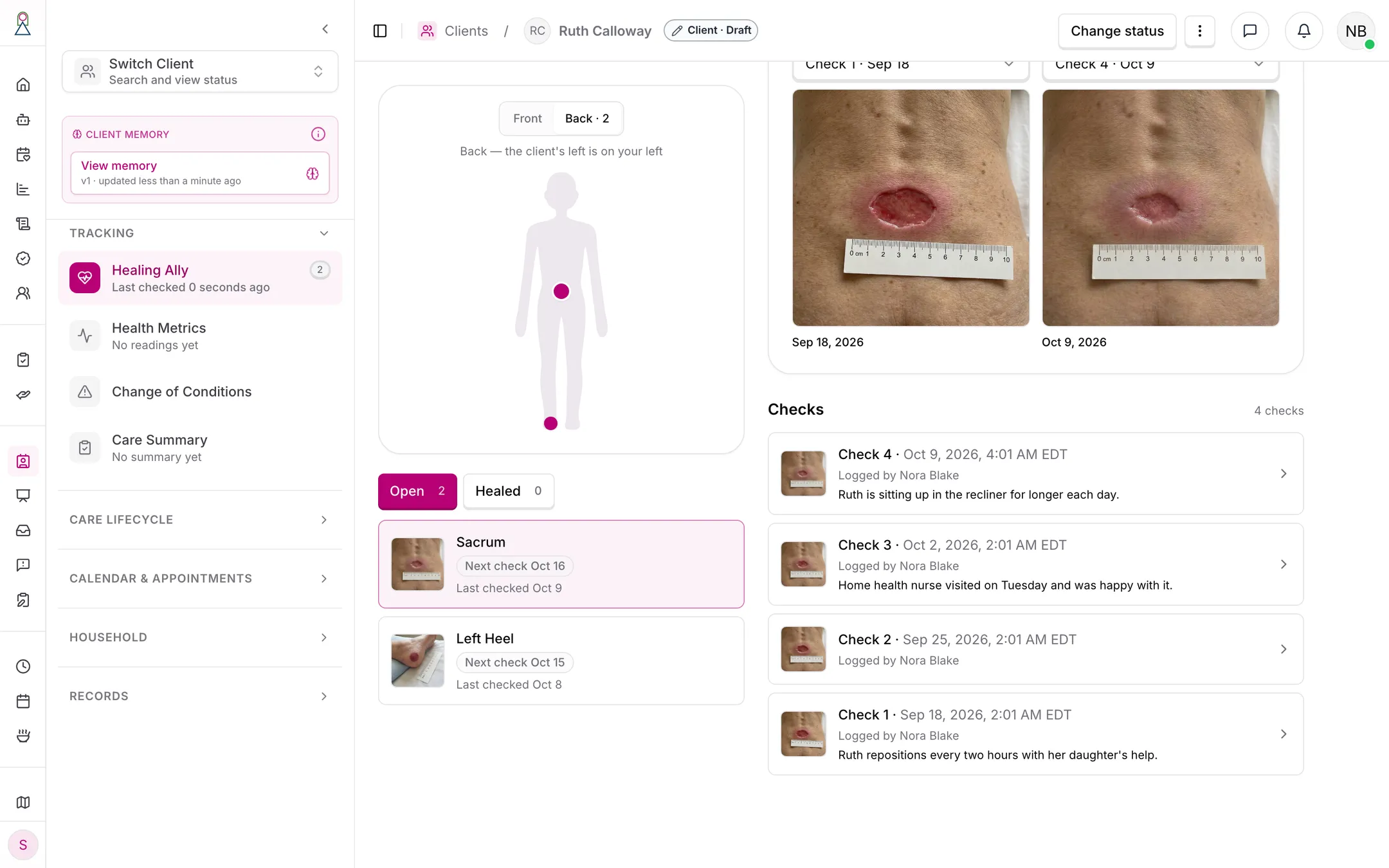
Four weekly checks, newest first. A check is never edited; a correction is a new check.
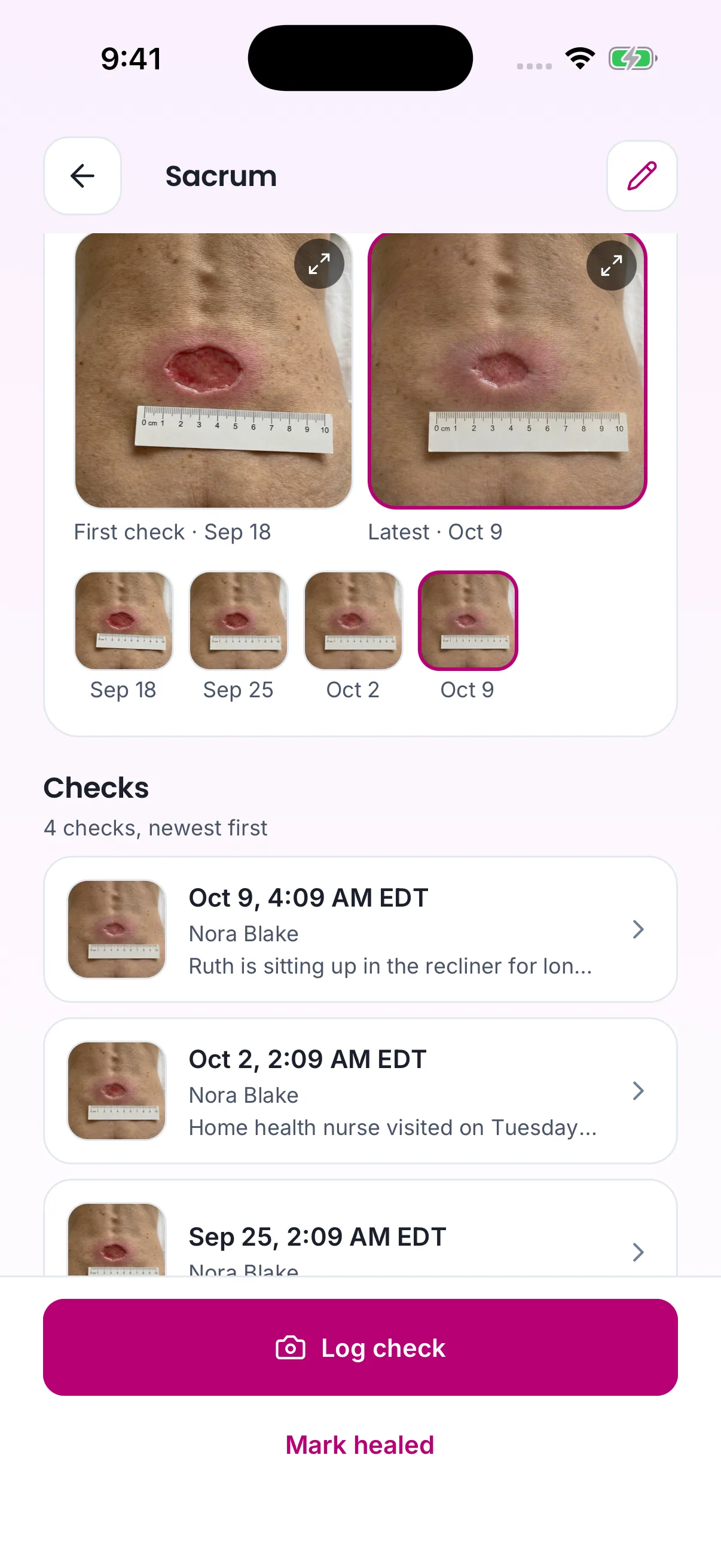
The same progress in the app, with Log check and Mark healed at the bottom.
The check schedule
Every open wound has a : weekly by default, or every N days, or every visit. Anyone who may manage wounds can change it, and every change is recorded.
- Weekly / every N days — a check is due N days after the last check (or after the wound was added, before its first check), and overdue once that day has ended in the client's time zone.
- Every visit — a check is due during each shift with the client, and overdue when the shift ends without one.
A due check appears as a Wound check due card on the client's hub in the app and on the care provider's home screen while they are on a shift with that client; tapping it opens the camera. A wound with an overdue check is marked Overdue on the body map, in the wound list, and on the client's overview, until a check is logged. Nobody is notified; the mark is there for whoever looks.
Healing and reopening
When a wound has healed, someone marks it Healed. The app offers to log one last check with a photo first, so the timeline ends on the healed wound, but it can be skipped — for example when the client's home health nurse confirmed it by phone. Marking it healed records the date. A healed wound takes no new checks and is never due; if it opens again, someone reopens it, which returns it to Open and clears the healed date.
No alerts
Healing Ally raises no alerts and sends no notifications — not for a check, not for an overdue check, and not for a wound that looks worse. Whether a wound needs attention is a judgment, and judgments belong to the client's healthcare providers. A care provider who is worried records a change of conditions, which the agency already reviews; the check screen points there.
Coordinating with home health
Wound photos and notes can be sent to the client's authorized home health team for their review — this is how a wound's progress reaches someone qualified to judge it. Healing Ally does not create that authorization itself: the representative (or responsible party) authorizes who may receive the client's health information through Care Coordination & Provider Integration, and the agency may never reach out to an outside professional on its own. Healing Ally only packages the wound documentation and routes it to a professional who is already authorized.
Family
The client's representatives can open Healing Ally read-only: the body map, each wound, its checks and their photos. They see no due cards or schedule controls.
Rules
- HEAL-1 — Healing Ally is non-skilled documentation and coordination support only; it never treats, dresses, or manages a wound, and it never replaces a healthcare provider's judgment. (✅ In code)
- HEAL-27 — Healing Ally records a wound; it never judges one. Nothing reads the photo, no AI writes or rewrites a wound's or a check's notes, and a wound check never records or infers a size, a better / same / worse comparison, a trend, or the client's pain. Whether a wound is healing is for the client's healthcare providers to judge. (✅ In code)
- HEAL-2 — A wound belongs to exactly one agency and one client and is visible only within that agency. A wound check can only be logged against an existing, open wound of a client of the person's agency. (✅ In code)
- HEAL-3 — A wound photo must be taken with the in-app camera on mobile, never imported from the device gallery, so the image provably originates at the visit. Office staff on the web dashboard may upload a file, because they are not in the home. (✅ In code)
- HEAL-4 — Retired 2026-10-09. Healing Ally no longer estimates a wound's size; see .
- HEAL-5 — Retired 2026-10-09. Nothing reads the photo any more; see .
- HEAL-6 — Every wound check must record who logged it, when, the photo, the notes when there are any, and the shift it was logged in when there was one. (✅ In code)
- HEAL-7 — Wound checks must form a chronological progress timeline per wound, with their photos side by side so checks can be compared; a check is never edited, overwritten or deleted — a correction is a new check. (✅ In code)
- HEAL-8 — Wound photos and notes may be sent only to a home health team the representative (or responsible party) has already authorized; the agency may never contact an outside professional on its own. (🚧 Spec only)
- HEAL-9 — Each wound and its checks must link to the client's care plan so wound documentation sits alongside the rest of the client's care. (🚧 Spec only)
- HEAL-10 — Retired 2026-10-09. No check alerts anyone, because a check has no better / same / worse call; see and .
- HEAL-28 — Healing Ally raises no alerts and sends no notifications about a wound or a check, overdue checks included. The wound check screen must point the person to change of conditions for anything about the wound that worries them. (✅ In code)
- HEAL-11 — Wound photos and notes are client health information and must be protected accordingly: never publicly accessible, and every view, status or schedule change, and send recorded in the audit trail. (⚠️ Partial — sends do not exist yet, see )
- HEAL-12 — Retired 2026-10-09. There are no AI-generated values left to carry a disclaimer; see .
- HEAL-13 — A wound check needs a photo and nothing else; notes are optional. It is saved in one step and joins the wound's history the moment it is saved — there is no draft. (✅ In code)
- HEAL-14 — Retired 2026-10-09. Nothing is drafted, and a check no longer records a pain level or a better / same / worse call; see .
- HEAL-15 — Retired 2026-10-09. Nothing is drafted; see .
- HEAL-16 — A wound is Open or Healed. Marking it healed records the healed date and offers — never requires — a final check with a photo. A healed wound takes no checks and is never due; reopening it returns it to Open and clears the healed date. (✅ In code)
- HEAL-17 — Every wound records its body region, chosen on the body map, the date it was first noticed, and its origin: present at the start of care, appeared during care, or not sure. The body map's regions include left and right heels, elbows, ears and shoulder blades, and the back of the head. (✅ In code)
- HEAL-18 — When a wound is recorded as having appeared during care, the phone app must offer to file an incident report already describing the wound and, when one is filed, link it to the wound; it never forces one. The web dashboard, which cannot file incident reports, must remind the person to file one from the app. (✅ In code)
- HEAL-19 — Every open wound has a check schedule — every visit, every N days, or weekly — which is weekly unless someone changes it. Anyone who may manage wounds can change it, and every change is recorded in the audit trail. (✅ In code)
- HEAL-20 — Under a weekly or every-N-days schedule, a check is due N days after the last check (or after the wound was added, before its first check) and overdue once that day has ended in the client's time zone. Under every visit, a check is due during each shift with the client and overdue when the shift ends without one. (✅ In code)
- HEAL-21 — A due check must be shown as a Wound check due card on the client's hub in the app and on the care provider's home screen while they are on a shift with that client. A wound with an overdue check must be marked on the body map, in the wound list, and on the client's overview. (✅ In code)
- HEAL-22 — Retired 2026-10-09. An overdue check no longer notifies anyone; it is still marked (). See .
- HEAL-23 — Retired 2026-10-09. Wounds no longer have a trend; see .
- HEAL-24 — Retired 2026-10-09. There is no Worth flagging note; see .
- HEAL-25 — Retired 2026-10-09. There is no photo reading left to fail; see .
- HEAL-26 — On every screen, "Healing Ally" names the module only; the things inside it are called wounds and wound checks, and no screen describes the product as providing wound care. (✅ In code)
Who can do what
| Action | Roles |
|---|---|
| View a client's body map, wounds, checks and photos | Owner, Admin, Care manager, Care provider (assigned), Medical professional, Representative (read-only) |
| Add a wound, log a wound check, mark a wound healed or reopen it | Owner, Admin, Care manager, Care provider (for their clients) |
| Change a wound's check schedule | Owner, Admin, Care manager, Care provider (for their clients) |
| See due-check cards | Care provider (on the client's hub and on their shift with the client) |
| Send wound photos and notes to home health | Owner, Admin, Care manager |
| Receive wound photos and notes | The authorized home health team (Medical professional) |
| Authorize which home health team may receive the documentation | Representative / responsible party |
Decisions needed
- Does sending to home health require a fresh confirmation each time, or a standing authorization? Options: send automatically to any already-authorized provider; require a care manager to confirm each send; or let the representative pre-approve standing wound-documentation sharing for a named provider.
How is this page?
Last updated on