Meals
Part of the Anaya Care Handbook — the source of truth for how the product must behave. When the product needs to change, change this document first, then make the system match it.
What this covers
This page governs meals: the agency's meal bank, the per-client approval of meals by the family, and the placement of approved meals onto meal-preparation tasks inside scheduled shifts — so the care provider on duty knows exactly what to prepare. Its sibling features have their own pages: Engagement Activities, Essential Needs, and Home Inventory.
Meal planning is available to all agencies and to Tier 2 family subscribers.
Key terms
- Meal bank — the agency's library of meals (recipes with ingredients, steps, and nutrition) that can be offered to clients.
- Meal link — the connection between one meal and one client, carrying that client's own approval decision for the meal.
- Shift attachment — placing one approved meal onto one specific meal-preparation task within one scheduled shift.
- Bulk scheduling — automatically spreading a client's approved meals across the matching meal-preparation tasks in their upcoming shifts.
How it works
From bank to plate
An agency builds a meal bank. Meals are written by hand or generated by the AI assistant for a specific client — staff choose how many breakfasts, lunches, dinners, and snacks they want, list preferred and avoided ingredients, and pick a generation depth (fast, standard, or thorough). The assistant checks the client is eligible, studies their profile and dietary needs, drafts the meals (optionally with photos), and reports progress live until it finishes. Generation can be cancelled mid-run, and existing meals can spawn AI variations.
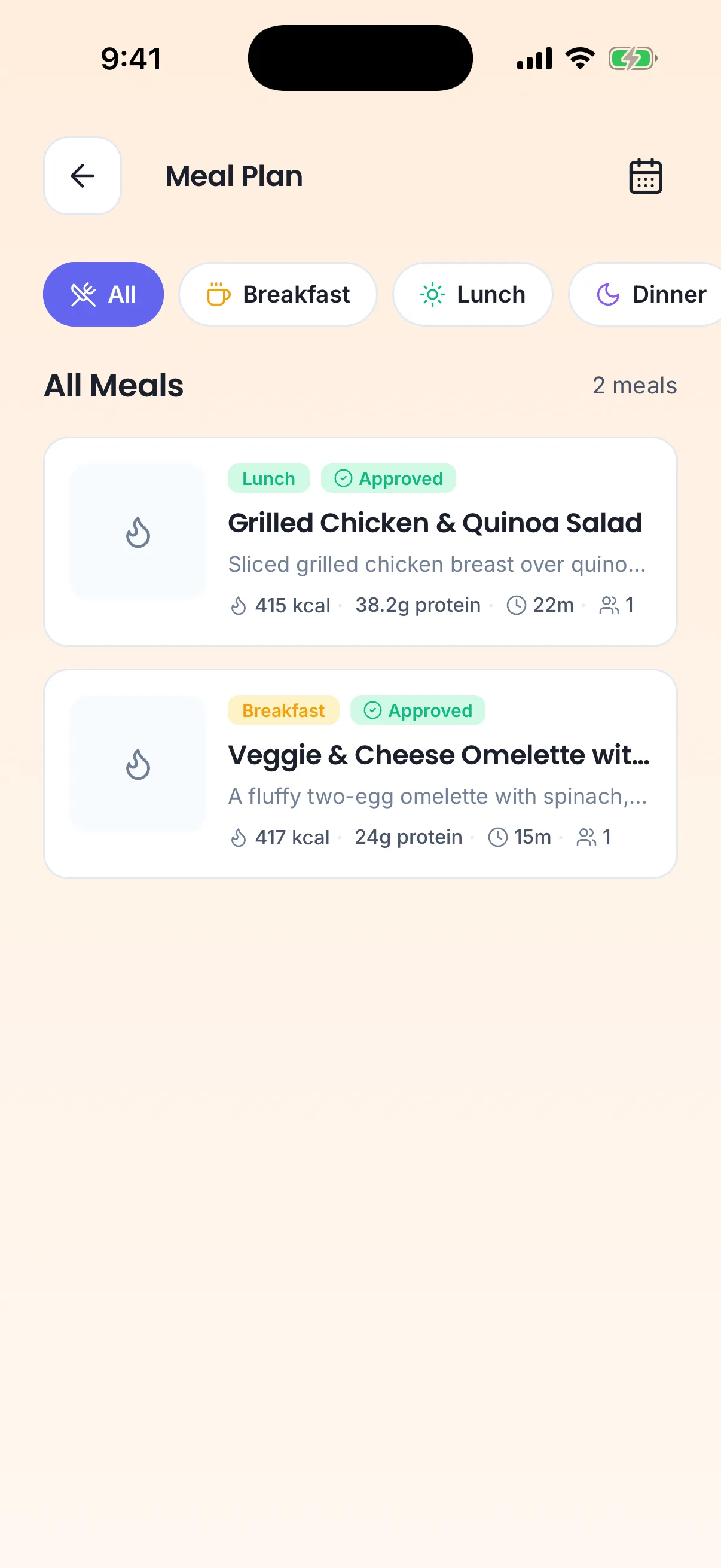
The meals assigned to this shift, on the care provider's phone.
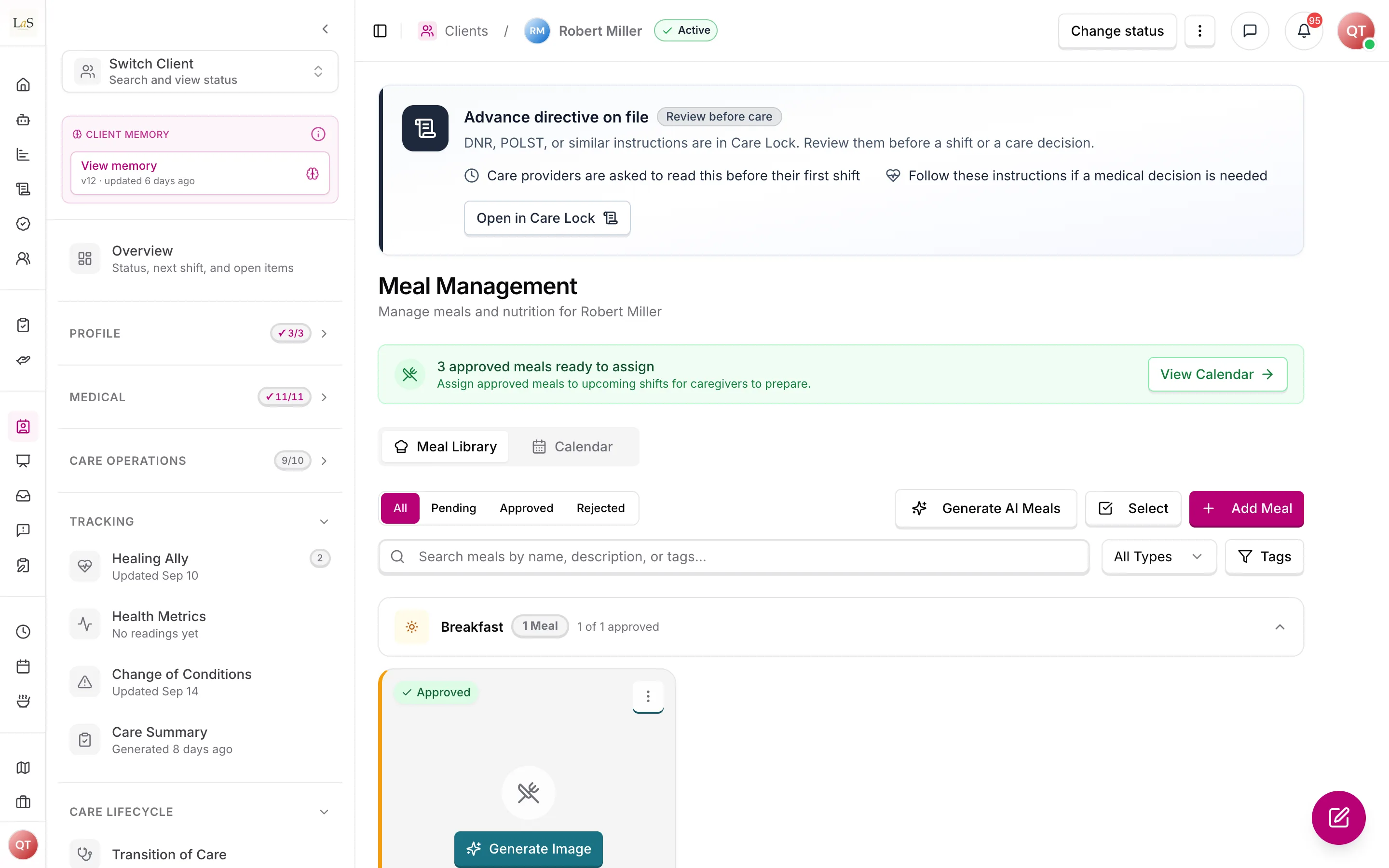
A meal only matters to a client once it is linked to them. Each link carries its own approval decision, so the family can approve a meal for one client while another family rejects the same meal:
Once approved, a meal can be attached to a meal-preparation task inside a shift — one meal per task. Staff can place meals one task at a time, or bulk-schedule: the system takes the client's approved meals, matches them to tasks by meal type (breakfast meals onto breakfast tasks, and so on), and rotates through them evenly across upcoming shifts.
Changing a generated meal by asking
Once Anaya has written a meal, a care manager can change it by typing what they want in plain words beside it — "make this softer to chew", "swap the rice for mashed potato" — rather than editing the recipe field by field. Each request revises the meal as it currently stands, including any edits made by hand, and leaves every other ingredient, step, time and warning exactly as it was.
Refining changes the ONE meal it was opened on; it never adds to the client's meal bank, and it never redraws the meal's picture. Requests are answered one at a time, and every one is kept with the meal along with what it changed — including requests that failed or were cancelled. Only meals Anaya generated can be refined: a meal a person wrote themselves has no draft to revise from. See AI-34 – AI-38.
Rules
- MEAL-1 — Every meal belongs to exactly one agency. Staff browsing the meal bank must only ever see their own agency's meals.
- MEAL-2 — Only one AI generation run (meals or engagement activities) can be active per client at a time; a second request joins the run already in progress instead of starting another.
- MEAL-3 — Every AI-generated meal is automatically linked to the client it was generated for and starts as Pending approval.
- MEAL-4 — A meal can be linked to a given client only once; attempts to link it again are ignored, never duplicated.
- MEAL-5 — Meal approval is decided per client: the same meal can be approved for one client and rejected for another. Approving meal plans is inherent to the Representative role and cannot be removed by permission configuration (ACCESS-35).
- MEAL-6 — Only meals approved for a client may be attached to that client's meal-preparation tasks.
- MEAL-7 — A meal-preparation task in a shift holds at most one meal. Assigning a new one replaces the old.
- MEAL-8 — Bulk meal scheduling must use only the client's approved meals, match them to tasks by meal type, rotate through them evenly, skip cancelled shifts, leave existing choices untouched unless overwriting was explicitly requested, and refuse to run when the client has no approved meals.
- MEAL-9 — When a meal is rejected or unlinked from a client, it must no longer appear on that client's upcoming shift tasks.
- MEAL-10 — Deleting a meal removes all of its client links and shift attachments. Deleting a client removes all of their meal records.
- MEAL-11 — A meal's nutrition totals are always calculated from its ingredients; nutrition is never entered or stored separately.
- MEAL-12 — Meals are visible only to logged-in users whose role permits it, and never cross agency boundaries.
- MEAL-13 — When the representative reviews a meal plan, they may approve it, ask for a meal to be changed, or substitute a meal; the care manager applies the requested changes and finalizes the plan. (🚧 Spec only)
- MEAL-14 — When a meal-preparation task comes due, the care provider on duty must be able to document that the meal was prepared and record the client's response to it. (🚧 Spec only)
Note: This page's rules were retired from the old Daily Living page: DAILY-1 – DAILY-11 → – (the meal halves of DAILY-7 and DAILY-10); DAILY-27 → . IDs are never reused.
- MEAL-15 — A generated meal can be changed by asking, in plain words, on the meal itself. The request revises that one meal as it currently stands — including any hand edits — never a blank one, never more than the request reaches, and never a second meal. A meal a person wrote by hand cannot be refined, because there is no generated draft behind it. Substitutions recorded against an ingredient, and the meal's picture, survive every refinement. (✅ In code)
Who can do what
| Action | Roles allowed |
|---|---|
| Create, edit, delete meals; run AI meal generation | Owner, Admin, Care Manager |
| Approve or reject a meal for a client | Owner, Admin, Representative (family) |
| Attach meals to shift tasks (single or bulk) | Owner, Admin, Care Manager |
| Request a meal change or substitute on a plan under review | Representative |
| Finalize a plan after the representative's review | Owner, Admin, Care Manager |
| Document meal preparation and the client's response | Care Provider |
| View meals for their assigned clients | Care Provider |
Decisions needed
- Are approval decisions final? Today a meal can be flipped between approved and rejected indefinitely, even after it has been scheduled into shifts. Options: lock the decision once made; allow changes only until the first shift attachment; keep decisions freely changeable.
- Should meal planning be gated on the nutritional assessment? The PRD's 30-day meal plan is generated only after the client's nutritional and dietary assessment — the Meal Assessment library instrument (see Care Assessments) — is completed, but generation today only checks general eligibility (, ). Options: hard-block generation until the meal/nutritional assessment is signed off; warn but allow; leave the gate to staff judgement.
- What must the nutritional and dietary assessment capture? The PRD expects it to record dietary restrictions, allergies, medical requirements, food preferences, cultural considerations, swallowing needs, and overall nutritional status before any plan is drafted. Today meal generation reads only the general client profile and dietary needs (); the full set of fields above is not yet defined as a structured assessment. Decide where this assessment lives (Care Assessments vs. this page) and which fields are mandatory. The Meal Assessment instrument already asks most of them, with none needed to complete; the meal plan reads its completed answers (ABLD-19).
How is this page?
Last updated on