Scheduling & Shifts
Part of the Anaya Care Handbook — the source of truth for how the product must behave. When the product needs to change, change this document first, then make the system match it.
What this covers
This page governs how a client's care plan becomes real, trackable work. Agency staff define recurring or one-time for each client; the system expands those schedules into individual , offers or assigns them to care providers, and tracks each shift from assignment through clock-in, the work itself, clock-out, handover, and an end-of-shift reflection. It also covers timesheets, automatic safeguards (no-show detection, auto clock-out), AI-assisted shift handovers, date-range shift summaries, and the daily working-hour limits that protect care providers from being over-booked. All times throughout follow the client's timezone.
Key terms
- Schedule — a recurring or one-time time slot for a client's care (start time, duration, repeat pattern), defined in the client's timezone.
- Schedule revision — the version number that changes whenever a schedule's timing, duration, recurrence, exclusions, or notes change.
- Shift — one concrete occurrence of a schedule on a specific day, worked by at most one care provider.
- Shift-generation batch — one retained expansion of selected schedule revisions into concrete unassigned shifts for a bounded window.
- Not available — a shift whose assigned care provider cannot work it. It returns to the open pool and the care team is told it needs coverage.
- Routine times — the client's wake, sleep, and meal times, set directly on the client schedule page; the operational source used to derive schedule defaults and task timing. Each one is a window — an earliest and a latest time, for example "wake between 6:30 AM and 7:00 AM" — not a single instant. The care plan may propose them (see Care Plans & Care Provider Tasks).
- Recurring time-anchored task — a care task that must be done on a repeating clock interval during a shift (for example repositioning every two hours, scheduled vitals checks, or medication reminders), where each completion drives when the next one is due.
- Time Performed — the time the care provider records as when they actually carried out a recurring time-anchored task; when present, it sets the clock for the next occurrence instead of the originally scheduled time.
- Interval threshold — the maximum allowed gap between two entries on a recurring time-anchored task before the care manager is alerted; configurable per task type and per agency (default for repositioning is 2 hours 15 minutes).
- Recurring-task timeline — the care manager's view of a recurring time-anchored task showing each occurrence's scheduled time against its actual performed time.
- Care team — the set of care providers linked to a client; shifts can only be assigned to or picked up by care-team members.
- Timesheet — the clock-in/clock-out record for a worked shift, including the locations where the care provider clocked in and out.
- Geofence — the allowed distance from the client's address within which a care provider may clock in.
- Handover — a note for the incoming care provider, written by the outgoing care provider or generated automatically from a change-of-condition or incident report.
- Care readiness quiz — a short, AI-generated, client-specific quiz a care provider takes on mobile before a shift, scored against a passing mark; a client can require a passed quiz before clock-in.
- Reflection — a short end-of-shift questionnaire (three required prompts) the care provider completes after clocking out.
- Shift summary — an AI-written care report covering a date range for one client, tailored to an audience (e.g. family vs. medical).
- No-show — a shift whose assigned care provider never clocked in within the agency's grace window.
- Daily-hour limit — the cap on how many hours a care provider may work per day.
How it works
From schedule to shifts
Staff create schedules per client — a start date and time, a duration, and optionally a repeat pattern with an end date (or no end). Individual dates can be excluded. Every meaningful edit increments the schedule revision.
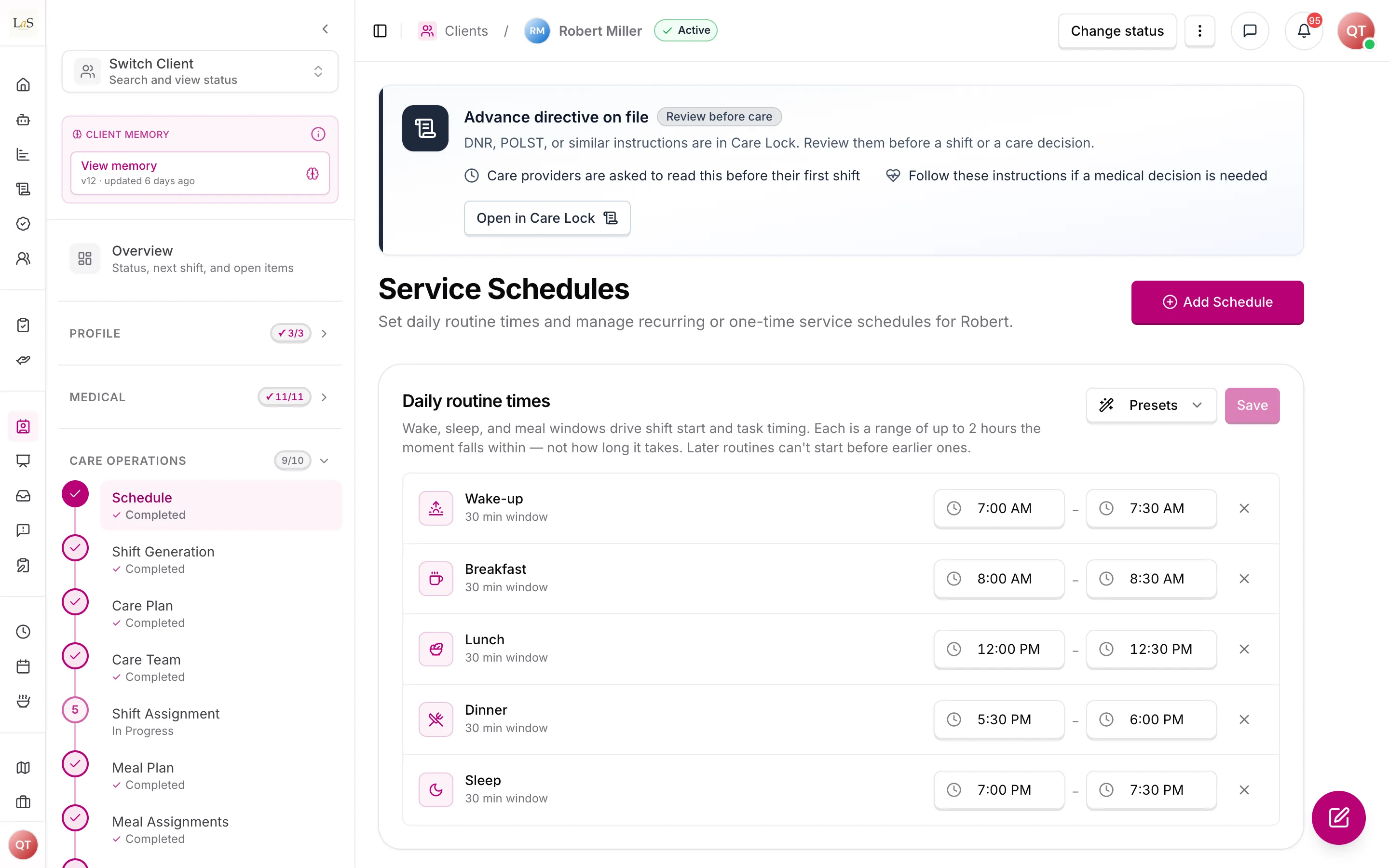
Daily routine times drive shift start and task timing.
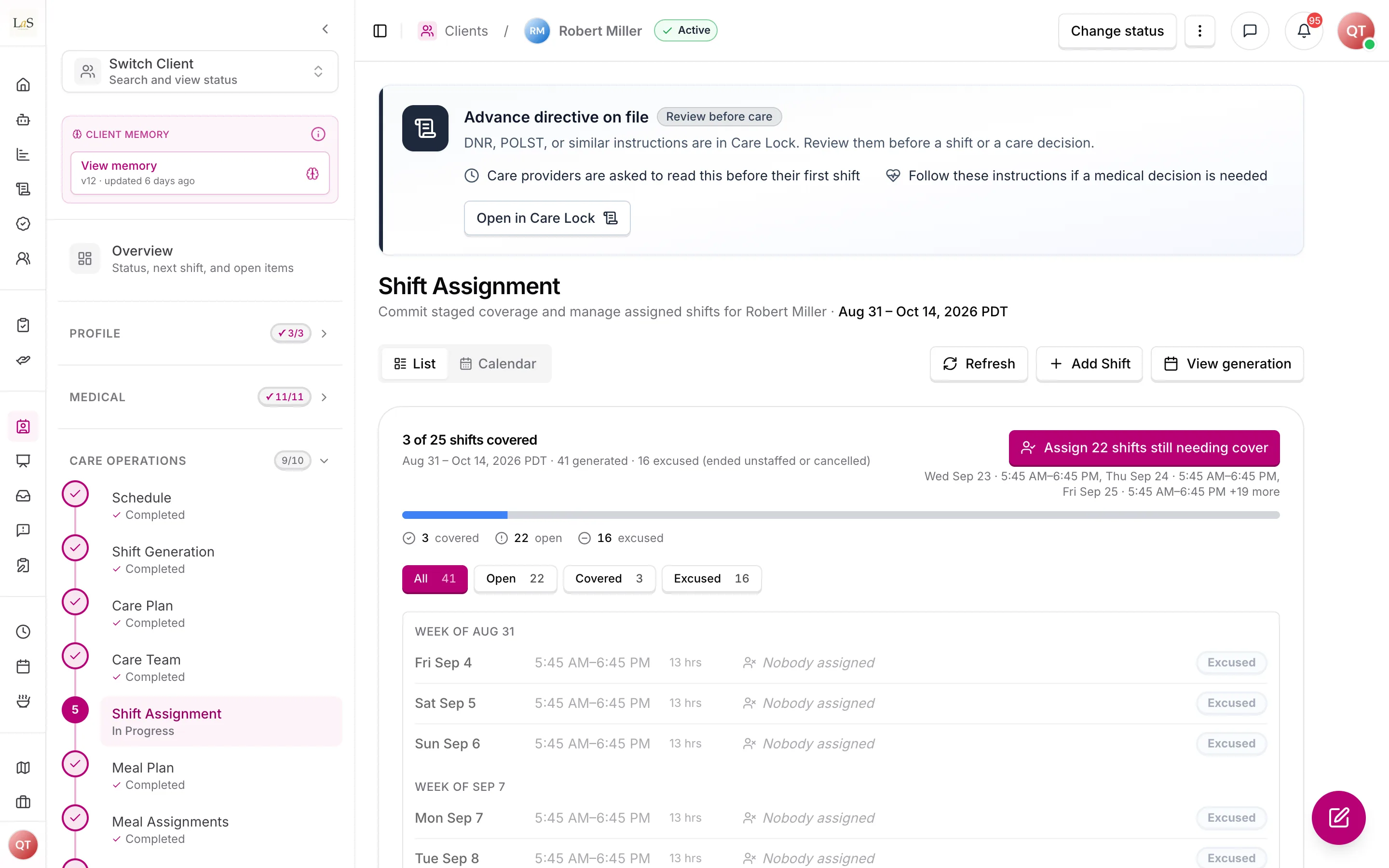
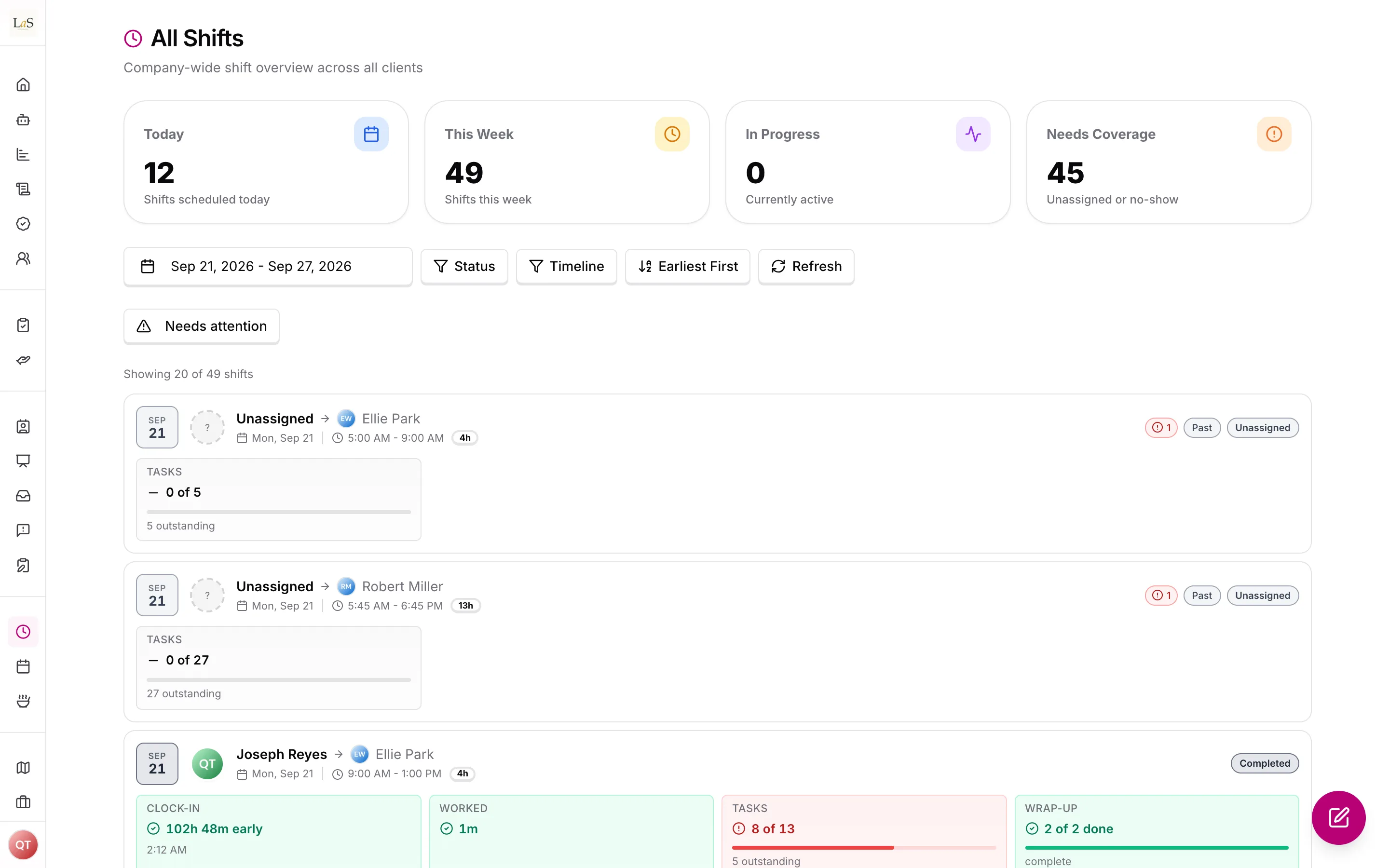
Generated shifts, and how many still need someone assigned.
Shift Generation is its own Care Operations step. One retained generation batch expands every current client schedule revision in the client's timezone for at most 45 days. Every resulting shift starts unassigned; generation never chooses a caregiver. Re-running a current batch is idempotent and quietly reuses matching occurrences. Regeneration after a schedule edit reconciles future unworked shifts but preserves accepted, in-progress, and completed work.
Generated shifts are staffed by a care manager choosing someone from the client's care team. A job posting recruits people, not shifts: it advertises the weekly schedule the role needs, and accepting an application adds that person to the care team and nothing more. Shift Assignment is the single act that puts a care provider on a shift, and it commits immediately — there is no offer to answer and no staged intermediate state.
Because assignment commits immediately, the alert that carries it is the only thing standing between a care manager's decision and a care provider who does not know they are expected. How loudly it lands scales with how soon the shift starts: an assignment weeks out is ordinary news, while one made inside the agency's imminent-assignment window is urgent and breaks through a silenced phone. The system then watches two things a person cannot: whether the assignment was ever seen, and whether the shift still has nobody on it as its start time approaches. Either one alerts the care team while there is still time to act.
Routine times & schedule defaults
A client's — wake, sleep, and meal times — are set directly on the client schedule page. Each is recorded as a window with an earliest and a latest time, because a client wakes or eats within a tolerance rather than on the minute. They are the operational source that positions schedules and drives AI task timing, and they don't require a published care plan (the care plan may propose them and seed the empty windows on publish — see Care Plans & Care Provider Tasks). When a wake window is set, schedule creation offers time-based defaults instead of blank fields — for example "start 60 minutes before wake — 7:00 AM", measured from the earliest time the client could be awake — so a shift that begins before the client wakes naturally covers pre-wake preparation (, ). This is a matter of where the schedule is positioned; there is no separate agency prep-lead setting.
The shift lifecycle
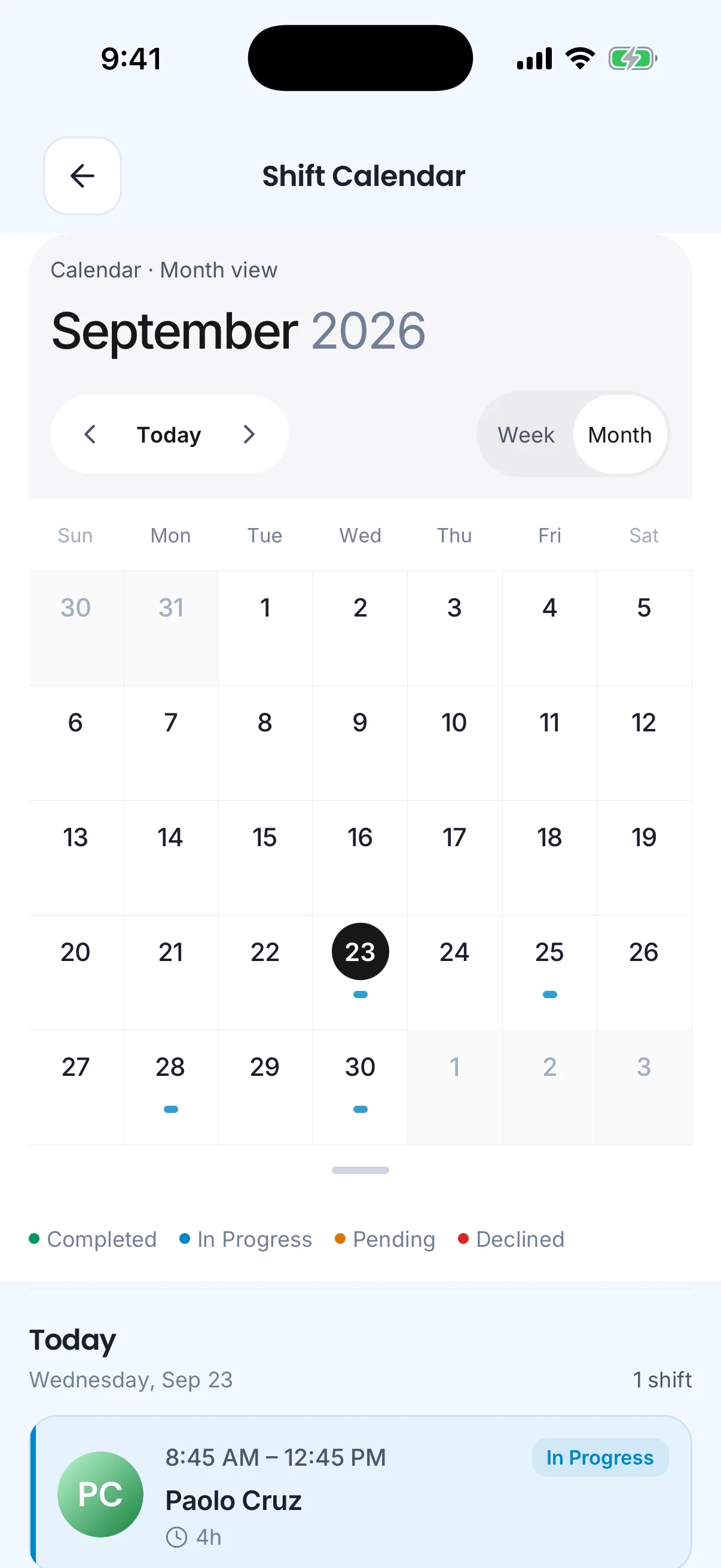
Care providers work the shifts assigned to them: clock in, clock out, and reflect. There is no offer to answer — a shift a care manager assigns is already theirs. A provider who cannot work a shift marks it , which returns it to the open pool; they may also pick up a shift nobody holds. Staff with shift-management access assign, reassign, unassign, cancel, mark or revert no-shows, and force clock-outs. The system itself marks no-shows, auto-clocks-out forgotten timesheets, and closes out expired reflection windows.
Working a shift
To clock in, the care provider must be the person assigned to the shift, be physically near the client's address (within the agency's geofence radius), be inside the allowed time window, have no other open timesheet, have passed any care readiness quiz the client requires, and — where the agency enforces it — have acknowledged the client's advance directive (). Clocking in starts the timesheet and puts the shift in progress. The agency's early-clock-in window () is not the same as starting a shift before the client's wake time (): early clock-in lets a care provider start the timesheet ahead of the scheduled start, while a shift positioned to begin before the wake time is scheduled that way on purpose — the pre-wake stretch is part of the shift window, so pre-wake prep work is paid.
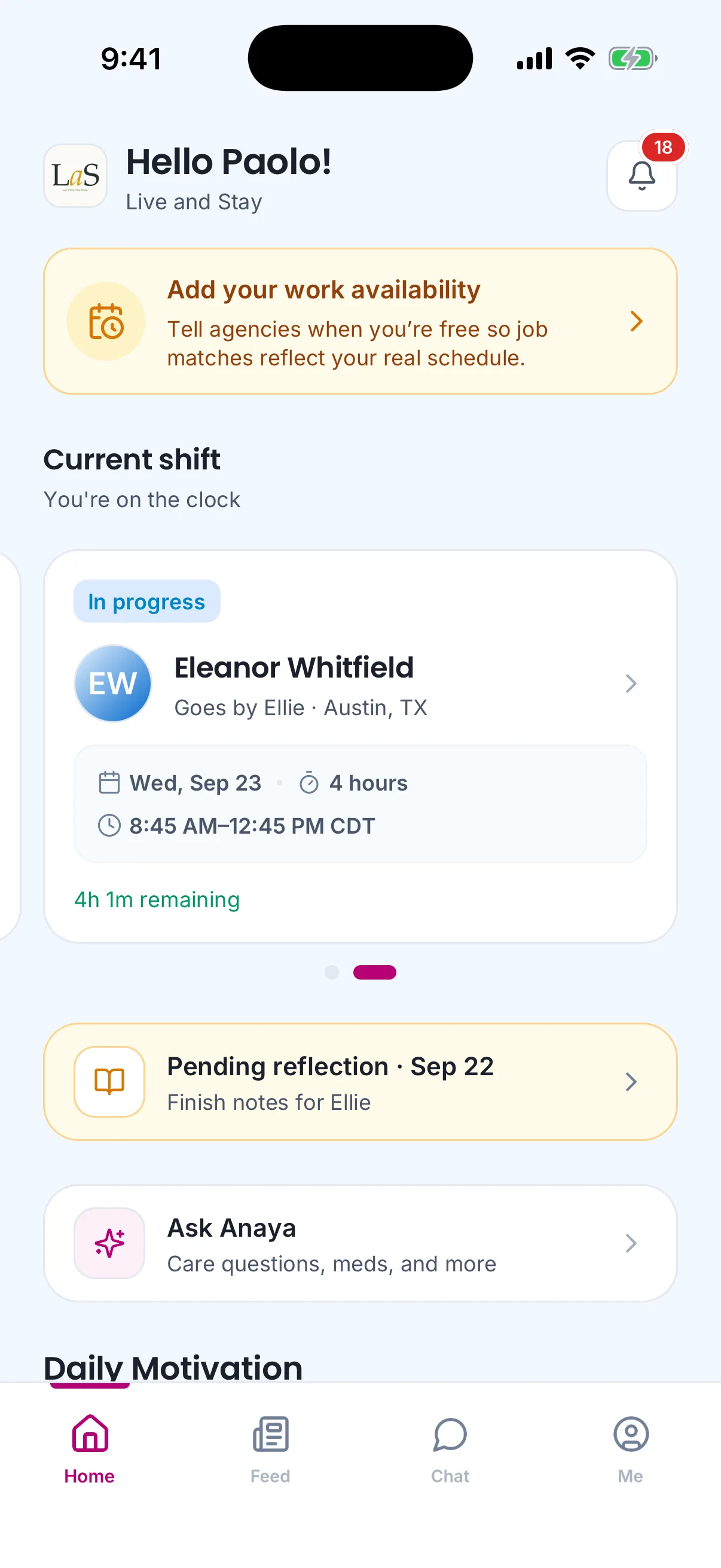
What the care provider sees while on the clock.
Care readiness quiz
Before starting a shift, a care provider can take an AI-generated quiz about this specific client — their conditions, preferences, and care approach — so they walk in prepared. The quiz is generated on request (pending → generating → in progress → completed), answered on mobile, and each attempt is scored from 0 to 100 against a passing score. A client can be set to require a passed quiz, in which case clock-in is blocked until the care provider passes.
To clock out, the shift's required tasks must have been submitted — unless the shift has run a full day, in which case clock-out is allowed with a warning. Clocking out ends the timesheet, starts the reflection grace period, and takes the care provider through an optional handover-notes step and then the required reflection.
Recurring time-anchored tasks
Some care tasks repeat on a clock interval during a shift — repositioning every two hours, scheduled vitals checks, and medication reminders are the common examples. For these, the next occurrence is timed from when the work was actually done: when the care provider records a , the next occurrence is scheduled from that time; if no Time Performed is recorded, the next occurrence is scheduled from the originally scheduled time instead. This keeps a real interval (for example a true two hours between repositioning) rather than drifting off the original clock.
If the gap between two entries on a recurring task runs past the task's interval threshold, the care manager is alerted. The threshold is configurable per task type and per agency, with a default of 2 hours 15 minutes for repositioning. The care manager can review a recurring-task timeline for the shift, which lays each occurrence's scheduled time next to its actual performed time so missed or late cycles are easy to spot.
Handovers
When a change-of-conditions note or incident report is submitted, the system decides automatically whether the next care provider needs a heads-up, and if so writes a handover for them; every such decision — including decisions not to create one — is kept so managers can see why an alert was or wasn't raised. Outgoing care providers can also write their own handover notes after clock-out. The incoming care provider sees pending handovers for their upcoming shift (and the shift just before it) and acknowledges them; acknowledging is encouraged but does not block clock-in. A note written after the next care provider has already clocked in still reaches them immediately.
Shift summaries
Staff and authorized viewers can generate an AI-written care report for a client over any date range up to one year, tailored to an audience; the report aggregates completed tasks, medication logs, and health observations. The same range and audience returns the saved report unless a fresh one is explicitly requested.
Reviewing a worked shift
A care manager reviewing a shift is looking for problems, not confirmations. A shift therefore opens with everything that deviated from expectation gathered in one place — nobody assigned, a no-show, required tasks left undone, a failed care readiness quiz, an unacknowledged advance directive, a late or out-of-range clock-in, an early or automatic clock-out, tasks submitted away from the client's home, readings outside their thresholds, a handover nobody acknowledged, and a missing reflection. Each one says which part of the shift record answers it, so the manager can go straight there.
Exceptions are ranked, not merely listed: the ones where a care obligation went unmet come before the ones worth a second look. A shift with nothing outstanding says so plainly, rather than leaving the reader to work it out from an absence.
The same signal appears wherever shifts are listed, so a manager can triage a day's work without opening anything. A list row knows less than the shift's own page does — it can see that required tasks are outstanding but not how many, and it cannot see handover or task-level detail at all — so a row may under-report, but it never claims a shift is clear. Only the shift's own page makes that claim.
Rules
- SCH-1 — Every schedule belongs to exactly one client and one agency, and all of its times are interpreted in the client's timezone.
- SCH-2 — A schedule must have a start date/time and a positive duration; a recurring schedule must have a valid repeat pattern. Specific dates can be excluded from a recurring schedule.
- SCH-3 — Schedules and shifts must not be created for a client who is On hold or Closed.
- SCH-4 — Editing a schedule must pass the same validation and client-status checks as creating one, and time changes must carry through to future shifts that have not yet been accepted or worked, with the affected care providers notified.
- SCH-5 — A schedule cannot be deleted while one of its shifts is in progress. Deleting a schedule removes its shifts and everything recorded against them (tasks, timesheets, assessments, observations), and staff must be shown a preview of what will be removed before confirming.
- SCH-6 — A retained shift-generation batch can cover at most 45 days, must include every current client schedule, records those schedule revisions and produced shift IDs, and is the source used by the later Care Operations steps.
- SCH-7 — A client can never have two shifts for the same date, time, and duration; generating over an existing slot must quietly skip it, never fail.
- SCH-8 — A shift can only be assigned to or picked up by a member of the client's care team. Shift generation never assigns a care provider.
- SCH-9 — Assigning a shift commits it. A shift a care manager assigns is immediately the assigned care provider's to work: there is no acceptance step, no response deadline, and no decline. The care provider is notified that the shift is theirs, and how insistently follows from how soon the shift starts: an assignment made inside the agency's imminent-assignment window is a time-sensitive alert that reaches the care provider even if they have switched push off, on the same footing as the pre-shift reminders (). Because assignment commits without an answer, an assignment the care provider never sees is not an unanswered offer — it is a client with nobody arriving.
- SCH-10 — A care provider who cannot work a shift assigned to them may mark it , and only before the shift has started being worked. Doing so returns the shift to the open pool and the rest of the care team must be notified that it needs coverage. Staff may also unassign a shift to the same effect. Marking a shift not available is reporting a fact, not refusing an offer — the shift records who said so, when, and any reason they gave.
- SCH-11 — Staff may reassign a shift to a different care provider; if that person is not yet on the care team, reassignment invites them onto it. Reassignment commits the new care provider immediately, on the same terms as any other assignment (), and the previous care provider is told the shift is no longer theirs. Staff may also unassign a shift, returning it to the open pool.
- SCH-12 — Retired. This rule defined the coverage-bundle job posting: a set of unfilled generated shifts from a client's active batch, selected by staff, each shift belonging to at most one open bundle. Postings no longer advertise individual shifts at all — every posting states a weekly schedule and recruits a person (), and the shifts they will work are assigned afterwards (). The ID is kept because IDs are never reused.
- SCH-13 — A care provider must never hold two overlapping shifts. Every staffing path — manual assignment, bulk assignment, reassignment, and pickup — must check the shifts that care provider already holds.
- SCH-14 — A care provider must not exceed the daily working-hour limit: 12 hours per day across different clients, and at most 24 hours per day for a single client. Every staffing path must enforce this, counting the shifts that care provider already holds.
- SCH-15 — Daily hours are calculated per calendar day in the shift's timezone; an overnight shift counts its hours toward each day it touches, and both days must pass the limit.
- SCH-16 — Retired. This rule required every shift in a coverage bundle to show whether a care provider could select it and, if not, why. A care provider no longer sees individual shifts on a posting, so there is nothing to select: now governs how a posting's weekly schedule reads against their declared availability, and governs the checks that run when a care manager assigns real shifts. The ID is kept because IDs are never reused.
- SCH-58 — A shift that crosses midnight must be evaluated as one segment per local calendar day, and each segment matched against that day's declared availability. A provider covers an overnight shift only when they have declared both day-boundary halves. (✅ In code)
- SCH-17 — Only the care provider assigned to a shift may clock in to it. There is no separate acceptance to clear first — assignment is the commitment ().
- SCH-18 — Clock-in must happen within the allowed window: no earlier than the agency's early-clock-in window before the start (default 8 hours), and never after the shift's scheduled end.
- SCH-19 — Clock-in records the care provider's location and distance from the client's address. By default an out-of-range clock-in is allowed but flagged; an agency can choose to hard-block out-of-range clock-ins instead. The default radius is 30 meters and is configurable per agency.
- SCH-20 — A care provider can have only one open timesheet at a time — never two shifts in progress at once.
- SCH-21 — If the client requires a care readiness quiz, the care provider must have passed it before clocking in.
- SCH-22 — Clock-out is only possible while the shift is in progress. Distance from the client's address at clock-out is recorded and may warn, but never blocks.
- SCH-23 — Required scheduled tasks must be submitted before clock-out; after 24 hours of continuous work, clock-out is allowed with a warning instead. Any task still in progress at clock-out is automatically completed. Required tracking tasks never block clock-out — a shift may genuinely offer no opportunity to take a reading — but their omission is recorded ().
- SCH-24 — A clock-out covering less than the agency's minimum percentage of the scheduled shift (default 50%) is flagged as an early clock-out for review.
- SCH-25 — A shift whose care provider has not clocked in within the agency's no-show window after the start time (default 30 minutes) is automatically marked . Open, unassigned shifts are never marked no-show. Staff can mark or revert a no-show manually.
- SCH-26 — An open timesheet left running past the shift's end plus the agency's grace period (default 30 minutes) is automatically clocked out, clearly recorded as an automatic clock-out, and the shift moves on as if the care provider had clocked out.
- SCH-27 — After clock-out the care provider must complete a reflection (three required prompts, optional notes) within the agency's reflection window (default 24 hours). A reflection can be submitted only once. A reminder is sent midway through the window; when it expires, the shift closes as completed without reflection.
- SCH-28 — A shift is completed only when its required tasks are done and its reflection is submitted; otherwise it waits in pending completion until the reflection arrives or the window expires. "Required tasks" here means both kinds — scheduled and tracking ().
- SCH-29 — Writing handover notes after clock-out is optional and never blocks shift completion — the system generates handovers from change-of-condition and incident reports on its own.
- SCH-30 — Every automatic handover decision must be recorded — including decisions not to create a handover — so a manager can always answer "why wasn't I alerted?".
- SCH-31 — Pending handovers must be shown to the incoming care provider for their upcoming shift and the shift immediately before it for the same client. Acknowledging a handover is recorded once, with who and when; only people involved in that client's care at that agency may acknowledge it.
- SCH-32 — A handover note written after the next care provider has already clocked in attaches to that active shift and notifies them immediately.
- SCH-33 — Every shift keeps a full history of its status changes: what changed, when, by whom, and whether it was a person or the system.
- SCH-34 — Pre-shift reminders go to the care provider, and overdue clock-ins escalate to managers; repeated alerts for the same event must not be duplicated. Each configured reminder is sent once per shift, and its wording states the lead time measured when the reminder was raised — never a fixed phrase that contradicts the agency's setting.
- SCH-35 — A shift summary covers at most 365 days, is tailored to its audience, and only includes the information appropriate for that audience — in the report and in any exported document. One saved summary exists per client, date range, and audience; regenerating requires an explicit request and replaces the saved versions for that range.
- SCH-36 — Agencies can configure their own shift settings — no-show window, early clock-in window, auto-clock-out grace, geofence radius and enforcement, early clock-out threshold, reflection window, reminder timings, the clock-in-required window, the imminent-assignment window (), the coverage-gap lead time (), the unacknowledged-assignment lead time (), and advance-directive enforcement () — and every rule above uses the agency's values where one exists. Which reminder an alert is follows from the agency's configured tier, not from how far away the shift happens to be.
- SCH-37 — A care readiness quiz belongs to one shift and one care provider. Only that care provider (or staff of the same business) can see or take it. (moved from AS-23)
- SCH-38 — Each quiz attempt is scored 0–100 against the quiz's passing score, and every attempt is kept — a failed attempt never erases history. (moved from AS-24)
- SCH-39 — For a recurring time-anchored task (repositioning, scheduled vitals checks, medication reminders), the next occurrence is scheduled from the care provider's recorded when one is present, and from the originally scheduled time otherwise. (🚧 Spec only)
- SCH-40 — When the interval between two entries on a recurring time-anchored task exceeds the task's interval threshold, the care manager must be alerted. (🚧 Spec only)
- SCH-41 — The interval threshold for a recurring time-anchored task must be configurable per task type and per agency, defaulting to 2 hours 15 minutes for repositioning. (🚧 Spec only)
- SCH-42 — The care manager must be able to view a recurring-task timeline for a shift, showing each occurrence's scheduled time against its actual performed time so missed or late cycles are visible. (🚧 Spec only)
- SCH-47 — A schedule may start before the client's wake window so the opening stretch of the shift covers pre-wake preparation. "Before wake" is measured against the earliest time the client could be awake, so preparation is complete before the client can wake. This is a property of where the schedule is positioned, not a separate agency prep-lead setting, and the pre-wake stretch is inside the shift window and paid. (✅ In code — schedule form offers "start 60 minutes before wake" and other wall-clock chips; no separate agency prep-lead setting)
- SCH-48 — A client's — wake, sleep, and meal times — are set directly on the client schedule page (no published care plan required) and are the operational source that positions schedules and drives task timing. Each routine time is a window (earliest and latest), never a single instant; both ends are required and are cleared together (). When a routine time is set, schedule creation must offer time-based defaults derived from the window start (e.g. "start 60 minutes before wake — 7:00 AM"). (✅ In code —
ClientRoutineTimeson the schedule page; chips seed schedule start/end; care-plan publish fill-if-empty) - SCH-50 — Every new shift produced by Shift Generation starts unassigned in Generated status; generation has no assignment strategy, caregiver selector, or response deadline. (✅ In code)
- SCH-51 — Every schedule edit increments its revision and marks any generation batch grounded in an older revision Stale. (✅ In code)
- SCH-52 — Regenerating after a schedule change may create, update, or remove future unworked shifts, but must preserve accepted, in-progress, completed, and otherwise historically worked shifts. (🚧 Spec only)
- SCH-53 — Retired. This rule gave one approved job application exclusive staged ownership of a shift, at most one active reservation per shift, enforced by a partial unique index. Accepting an application no longer stages anything — it is a hiring decision that adds someone to the care team () — so assignment is the single commit and the only thing that can claim a shift (). The ID is kept because IDs are never reused.
- SCH-54 — Shift Assignment must re-run declared-availability, date-override, overlap, and daily-hour checks immediately before committing a care provider to a shift, on every assignment path — single, bulk, reassignment, and pickup alike. Because assignment now commits without the care provider answering (), this check is the only thing standing between an assignment and an impossible one. (✅ In code)
- SCH-55 — Final assignment is atomic for the submitted set: if any selected assignment fails live validation, none of that submitted set is committed. (🚧 Spec only)
- SCH-56 — The Shift Assignment workflow is complete only when every upcoming shift in the active generation batch has one assigned care provider. (✅ In code)
- SCH-57 — Schedule generation, assignment, and reassignment must each retain who acted, when, the source schedule revision, and the resulting counts. (✅ In code)
- SCH-59 — A shift that reaches its end time without a committed care provider is a fact about the past, not outstanding work. It stays in the batch as a historical record, is excluded from the coverage requirement, and is never retroactively assigned to anyone. A cancelled shift is excluded on the same grounds. One unstaffable shift must never strand the rest of the batch: final assignment refuses only for shifts that can still be worked, and it must name them rather than merely count them. (✅ In code)
- SCH-60 — A worked shift must gather everything that deviated from expectation into one ranked list, shown before any other detail: nobody assigned, a no-show, a shift left not available and never refilled, required tasks left undone, a failed care readiness quiz, a late clock-in, an out-of-range clock-in, an early or automatic clock-out, tasks submitted away from the client's home, readings outside their thresholds, an unacknowledged handover, a skipped handover, and a missing reflection. Each entry must name the part of the shift record that answers it. A shift with nothing outstanding must say so plainly. (✅ In code — the shift page opens on the ranked list, and each entry links to the tab that answers it)
- SCH-61 — Every exception is either critical — a care obligation went unmet, or care was delivered without a safeguard the agency requires — or a warning, meaning care happened and the deviation deserves review. Critical exceptions are always listed first. Two calls follow from the rules above rather than from preference: a missing reflection is a warning, because already closes such a shift as completed without reflection and the client still received care; and a clock-in later than the agency's no-show window is critical, because by that shift should already have been marked a no-show. (✅ In code)
- SCH-62 — Wherever shifts are listed, each row must carry the same exception signal the shift's own page would show, drawn only from what the list already knows so that no row costs an extra lookup. A row may under-report, because it cannot see task-level or handover detail — but it must never state that a shift is clear. Only the shift's own page may say a shift has nothing outstanding. (✅ In code — both shift lists carry the badge, and All Shifts has a "Needs attention" filter that says plainly it only covers the loaded page)
- SCH-63 — A shift must be reachable at its own address, so it can be bookmarked, shared with a colleague, or linked from a notification, and must open from that address alone — never depending on the reader already having the right list, filter, or page of results open. (✅ In code — every shift has its own page under its client, and a shift id on its own resolves to it)
- SCH-64 — Holding a shift id must not by itself grant access to the shift. A care provider may open a shift they are assigned to, or one that needs coverage — the latter because reviewing an available shift is how picking it up begins. Staff with agency-wide shift access may open any shift in their own agency, and never one in another agency. A shift's clock record is shown to a reviewer as timing and distance-from-home facts; the care provider's recorded coordinates and any internal notes stay behind the location view, which is held to a stricter permission. (✅ In code)
- SCH-65 — A required tracking task with no submission counts as a missed required task: it leaves the shift short of its requirements (), appears in the shift's outstanding list (), and is counted in the required-task totals shown on shift rows and reports. It never blocks clock-out (); the care provider is warned at clock-out and may proceed. This closes a gap where a tracking task marked required was invisible to every completion check, so skipping one left no trace anywhere. (✅ In code)
- SCH-66 — Retired. This rule let a care provider answer many awaiting shifts in one action, reporting each shift's outcome separately and announcing the batch once. Assignment now commits without an answer (), so no shift ever awaits a response and there is nothing to answer in bulk. What survives of it: a care provider still marks shifts not available one at a time (), and each such shift still records its own status change and audit entry (). The ID is kept because IDs are never reused.
- SCH-67 — A shift approaching its start with nobody assigned must raise an alert at the agency's configured lead time, to the client's care team and to staff who monitor shifts, so it can be picked up or staffed while there is still time. Silence is not an acceptable answer to an unstaffed shift: a shift nobody holds is the one case where no care provider is watching, so nothing else in the system will notice on the agency's behalf. The alert is raised once per shift per lead time, never repeated tick after tick ().
- SCH-68 — The platform records whether an assigned care provider has seen their assignment, and alerts the care manager when an assignment is still unseen as the shift draws close. Seeing is observed, never demanded — the care provider is asked to do nothing, and 's "no acceptance step" stands. This exists so a manager can tell an assignment that landed from one that vanished, and re-staff before it becomes a no-show rather than after.
- SCH-69 — When the client has an advance directive on file and the care provider has not acknowledged the current version of it (), clock-in is flagged by default and blocked only where the agency has turned enforcement on. Enforcement is off out of the box, because turning it on for every agency at once would stop shifts that are already staffed and under way. A flagged clock-in appears in the shift's exception list for the care manager, alongside a late or out-of-range clock-in. An advance-directive indicator with no document behind it never blocks ().
Note: , , and are retired. Their IDs are kept and never reused.
Who can do what
| Action | Who |
|---|---|
| Create, edit, delete client schedules | Owners, admins, and care managers with schedule/shift management access |
| Set a client's routine times (wake / sleep / meals) | Owners, admins, and care managers with client management access |
| Generate shifts, assign, reassign, unassign, cancel | Staff with shift management access |
| Mark or revert a no-show; force a clock-out | Staff with shift management access |
| Convert a shift to a job posting | Staff with job-posting conversion access |
| Change agency shift settings | Staff with shift-settings access |
| Mark an assigned shift not available | The care provider it is assigned to, before the shift has started () |
| Pick up a shift nobody holds | Care-team members for that client |
| Clock in / clock out / submit reflection | Only the care provider assigned to that shift |
| Take the care readiness quiz | The care provider assigned to that shift (mobile) |
| Write handover notes | The care provider who worked the shift |
| Acknowledge a handover | The incoming care provider for that client, within the same agency |
| View all handovers for a shift | Management staff |
| Review a worked shift and its exceptions | Staff with shift view access to that client |
| Generate and view shift summaries | Staff and care providers with access to that client |
| Record a recurring time-anchored task's Time Performed | The care provider working the shift |
| View the recurring-task timeline (scheduled vs. performed) and receive interval-threshold alerts | Care managers |
| Configure recurring-task interval thresholds (per task type, per agency) | Staff with shift-settings access |
| Receive shift notifications (clock-in/out) | The client's family representatives |
| Manage schedules or shifts | Not family representatives or medical professionals — they have view/notification access only |
Decisions needed
- Daily-hour limit: 16 or 12/24? The stated requirement says a care provider must not be scheduled more than 16 hours in a day. The product today enforces 12 hours/day across different clients and 24 hours/day for a single client (to allow live-in care). Options: adopt 16 as a single cap; keep the 12/24 split and retire the 16-hour statement; or make the cap configurable per agency.
- Should unacknowledged handovers expire? Handovers are designed to eventually expire, but today they stay pending forever until acknowledged. Options: expire after a set time, expire once the next shift ends, or keep them pending indefinitely.
- Should incident handovers block clock-in? Acknowledging handovers is currently optional, even for incidents flagged "acknowledge before shift". Options: keep acknowledgment optional, or require it before clock-in for incident-type handovers.
- Hidden vs. explained job postings. Job search results hide postings a care provider can't take, while the posting's detail page explains why they can't apply. Options: show ineligible postings with the reason everywhere, or hide them everywhere.
- Should out-of-range clock-in be a hard block by default? PRD v4.1 (§5/§7) says a care provider "can only clock in within" the geofence radius, with an override that requires a documented reason and alerts the care manager — stronger than today's default, which allows an out-of-range clock-in and merely flags it (). Options: make hard-block the default with a reason-and-alert override; keep flagging as the default and rely on the per-agency hard-block setting (); or treat the documented-reason override as a new requirement on top of either.
- Should the care readiness quiz run daily with fresh questions? PRD v4.1 §6 frames this quiz as a "Daily Login Quiz" — the same AI-generated, client-specific, scored quiz this page already defines (, , ), just presented at login with questions that do not repeat on consecutive days. Today it is a per-shift gate the client can require, with no daily cadence or no-repeat guarantee. Options: regenerate questions so they never repeat on consecutive days and require a daily attempt; keep it a per-shift, client-required gate; or make the cadence configurable per agency.
- Should clock-out conflicts and forgotten clock-outs follow the PRD edge cases? PRD v4.1 §7 calls for: a second care provider attempting to clock in to the same shift being blocked with the conflict flagged to the care manager; a care provider who forgets to clock out alerting both the care provider and the care manager, with the care manager able to manually close the shift (); and approaching-overtime alerts to both the care provider and the care manager (, ). Confirm which of these are in scope versus the current behaviour, which only auto-clocks-out a forgotten timesheet and does not surface a same-shift clock-in conflict.
How is this page?
Last updated on