Anaya Library Instruments
Part of the Anaya Care Handbook — the source of truth for how the product must behave. When the product needs to change, change this document first, then make the system match it.
Template-driven intake — decided 2026-10-01, live since 2026-10-06. The six care assessments this page governs are locked in the Assessment Builder's Anaya library, filled on the client record like any agency assessment; the six fixed forms they replaced are gone. , , and are retired.
What this covers
This page governs the six care assessments — the Simplified Routine Task Inventory, the Routine Task Inventory, the Montessori Profile, the Allen Cognitive Level, Home Safety and the Meal Assessment — as Anaya library instruments: templates Anaya holds under their licences — its own, or their owners' permission — which an agency adds to its library locked and which are placed on every client's record (ABLD-34). Together they answer the questions an agency must answer before it can care for someone well: What can this person do on their own? How does their mind work? Who are they as a person? Is their home safe? Can they eat and swallow safely? The answers are the foundation for the care plan, the care provider's daily tasks, and the AI's understanding of the client.
The rest of the handbook still calls them the . How they are added, filled, completed and read by Anaya is the Assessment Builder's, like any template's; this page owns what each one asks and the rules that belong to its content. Every agency with records received all six when the old forms moved across (); a new agency adds them from the library.
The intake assessment of a prospective client is covered in Initial Assessments — it runs on the agency's intake template, which may be one of these instruments; the notes care providers record when a client's condition changes are covered in Change of Conditions. Staff can fill any of the six from a visit conversation with Fill with Anaya (ABLD-25).
Key terms
- Care assessments — the six evaluations on every client record: Simplified Routine Task Inventory, Routine Task Inventory, Montessori Profile, Allen Cognitive Level, Home Safety, and Meal Assessment. Each client has at most one of each.
- Library instrument — one of the six as a template in the Anaya library: added locked, one copy per agency, placed on every client, with its licence and any credit line its owner asks for (ABLD-34, ABLD-27).
- ADL (Activities of Daily Living) — the basic self-care activities of everyday life: bathing, dressing, eating, toileting, moving around, continence, communication, and managing medication.
- IADL (Instrumental Activities of Daily Living) — the practical life skills that keep a household running: preparing meals, housekeeping, managing money, transportation, shopping, and managing appointments.
- Capacity — in the Simplified Routine Task Inventory, what the client can do for a task on their own: Independent · Supervision / Cueing · Minimal Assistance · Moderate Assistance · Dependent · Not Established.
- Support now — in the Simplified Routine Task Inventory, who currently performs a task for the client: Self · Family · Paid Caregiver · Unmet (needed, but no one does it).
- Risk — in the Simplified Routine Task Inventory, a flag meaning the client can do a task but doing so is unsafe.
- Allen Cognitive Level (ACL) — a standardized 6-level scale of cognitive functioning, from Level 1 (automatic reflex actions, total care) to Level 6 (fully planned, independent actions).
- ACL mode — a fine-grained step within an Allen level (e.g. 4.4 "Complete a Goal"); the assessor selects exactly one mode for the client.
- Food texture / drink thickness — how soft or thick a client's food and drinks must be when swallowing is difficult. The Meal Assessment names them in plain words: drinks are thin (ordinary), slightly, mildly, moderately or extremely thickened; foods are liquidised, smooth and pureed, minced and moist, soft and bite-sized, or regular.
- IDDSI level — the numbered international scale (drinks 0–4, foods 3–7) the fixed Meal Assessment form recorded texture and thickness on. The Meal Assessment instrument doesn't use it: the move maps each stored number one-to-one to its plain-words name.
- MNA-SF (Mini Nutritional Assessment — Short Form) — a standardized nutrition screening of six scored questions that the fixed Meal Assessment form used. It is not part of any Anaya template (decided 2026-10-01): answers stored in it are archived by the move and never shown.
- Assessment status — where each assessment stands: Not Started, Draft, or Completed. Which statuses each of Anaya's plans reads is set per plan (ABLD-19).
- Revision — one save of an assessment, kept with its answers, its status, who made it, when and why (). One assessment, many revisions. (The fixed forms called these versions, and kept the last 20.)
- Agency assessment — any filled-in copy of a template on the client record: one of these six, or an assessment the agency built itself with the Assessment Builder.
- Assessment generation — retired with . A client-level stamp that used to be cut across all six at once when reassessment suggestions were applied. Each assessment now keeps its own revisions, and a care plan records the revisions that grounded it (PLAN-36).
The six instruments
Each instrument below keeps the content of the form it replaces, apart from the changes named under it — the Meal Assessment drops the MNA-SF and the IDDSI numbers, Home Safety gives each checkpoint three states, the Allen Cognitive Level's step guidance changes for some modes, and the Simplified Routine Task Inventory's equipment and home-safety lists become choice grids. Each is placed on every client, one per client, carries its answers forward into the next assessment unless a question says otherwise, and feeds Anaya's plans as ABLD-19 sets out.
1. Simplified Routine Task Inventory
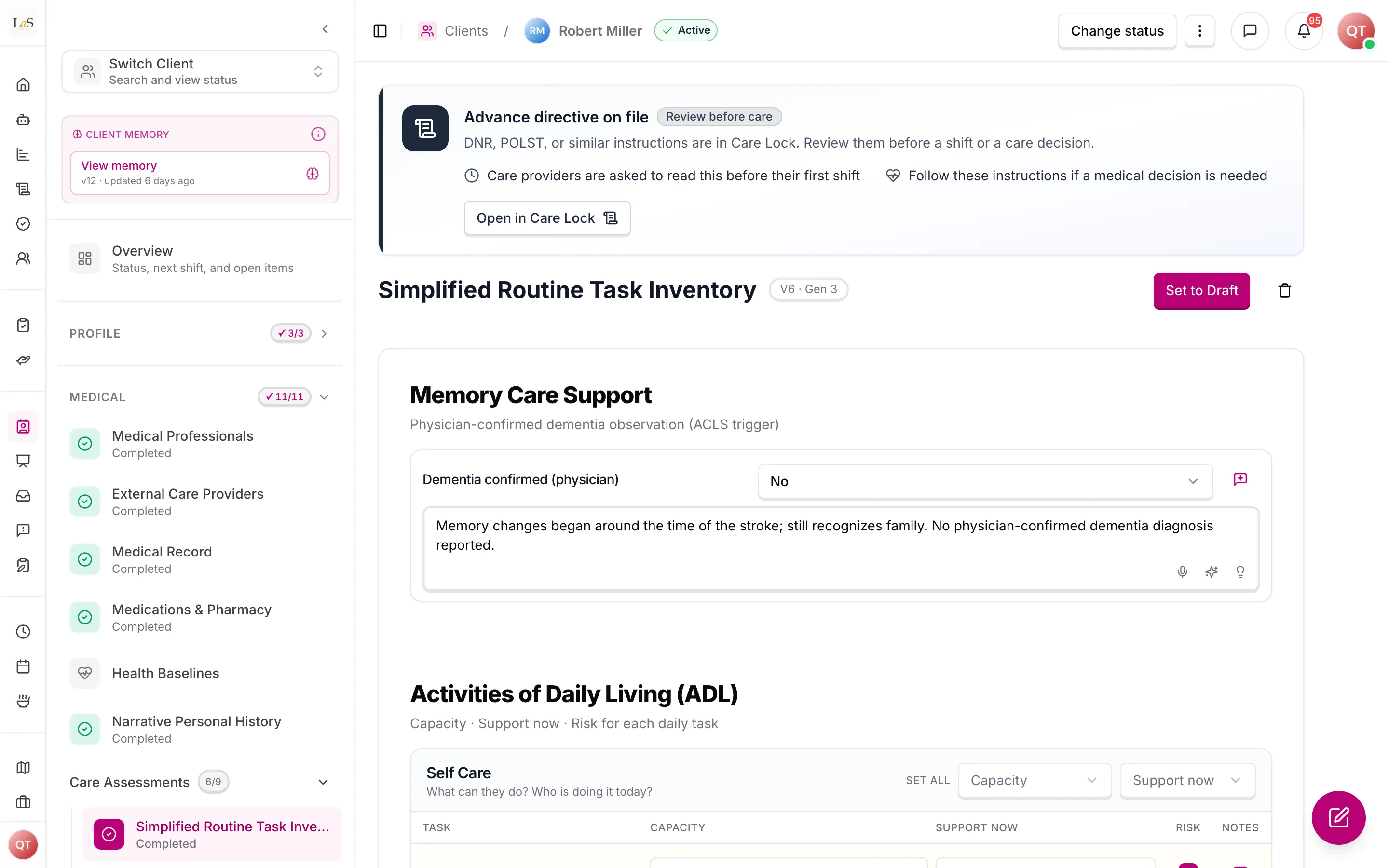
Purpose: a quick, structured picture of what the elder can do and who is doing it today — the agency's working summary of service scope. Shorthand Simplified RTI or SRTI (the on-screen label stays the full name). It follows the Initial Care Assessment model — the reference care framework Anaya adopted for this instrument — in which and are recorded separately because they are different facts. It is also a ready choice for an agency's intake or proposal template (ABLD-35), and it is Live and Stay's; a client created from a proposal on it receives a copy of the proposal's answers (ABLD-37).
Licence: Anaya's own. Used as published; the questions are fixed.
What it covers:
| Area | What is recorded |
|---|---|
| Memory care support | Confirmed dementia — Yes only when a doctor has confirmed it — with notes. It decides whether the Allen Cognitive Level shapes activity recommendations; unanswered means not known, never No (ABLD-15) |
| Self care · dressing · eating · toileting (incl. toilet hygiene) · mobility (walking, transfers, stairs, balance, mobility aids) · continence · communication (incl. vision) · medication (reminder, self-administration, refill) | |
| Meal prep (cook, hydration, dietary adherence) · home management · finances (budget, paying bills) · transportation · technology & contact · daily essentials · health management | |
| Equipment | Walker, cane, wheelchair, hospital bed, siderails, commode, urinal, shower chair, Hoyer lift, other |
| Home safety | Pathways, grab bars (bath/toilet), non-slip mat, emergency alert, smoke/CO detectors, lighting, stair handrails |
How it is answered (ADL / IADL): every task gets three facts plus optional notes:
- Capacity — Independent · Supervision / Cueing · Minimal Assistance · Moderate Assistance · Dependent · Not Established
- Support now — Self · Family · Paid Caregiver · Unmet
- Risk — tick when the elder can do it but doing so is unsafe
Each ADL and IADL area is a task grid: one row per task, with these columns. Equipment and home safety are choice grids: one answer per row, with a note. Equipment uses Has & uses / Has, not used / Not present (an equipment row may also carry a Risk flag); Home safety uses In place / Present, inadequate / Not present / Not applicable / Not evaluated. The last two score nothing: Not applicable is for a feature the home has nothing for, like stair handrails in a home with no stairs, and Not evaluated is for a feature nobody has checked yet. The inventory also records optional mobility extras (two-person assist, bedbound, falls in the last six months) and free-text observations for meal prep, ADLs, and IADLs. It is 27 questions, about 30 minutes; every grid and the dementia question are needed to complete.
How it is used: a primary input when Anaya drafts the care plan, care provider tasks, job postings and activity sheets. Unmet support rows and risk flags are the clearest service-scope signals. It never sets a price: the score uplift it used to carry on proposals is gone (CP-34).
2. Routine Task Inventory
Purpose: the deep version of the same question. Where the Simplified inventory records a score, the full Routine Task Inventory records the evidence — for each ability, the assessor works through detailed behavioral criteria and identifies the highest level of independence the client genuinely demonstrates. It is the comprehensive baseline for care planning and for tracking change over time.
What it covers — four domains:
| Domain | Abilities assessed |
|---|---|
| Physical daily living | Grooming · dressing · bathing · walking and exercising · feeding · toileting · taking medication · using adaptive equipment |
| Instrumental daily living | Housekeeping · preparing and obtaining food · spending money · doing laundry · traveling · shopping · telephoning · child care |
| Communication | Listening and comprehension · talking and expression · reading and comprehension · writing and expression |
| Work readiness | Maintaining pace and schedule · following instructions · performing simple and complex tasks · getting along with co-workers · following safety precautions · planning work and supervising others |
How it is scored: each ability has a ladder of rating levels (roughly 1–6), and each level lists concrete behavioral criteria (e.g. "initiates grooming tasks and follows typical procedures to completion"). Each ability is one question whose answers are its criteria, in the manual's own words and grouped under their level. The assessor ticks the criteria that apply; the level Anaya reads for the ability is the highest level among the criteria ticked (). This is a professional-judgment instrument — the system records the evidence, it does not compute a verdict. Anaya may quote what was said about an ability but never ticks a criterion itself. No ability is needed to complete, and each may be marked Not applicable or Not evaluated.
How it is used: the detailed reference behind the care plan, and the baseline against which decline or improvement is recognized. Its results are also a direct input when the AI builds task instruction steps, so a task's step-by-step guidance matches the level of independence this assessment records; a change of one level or more in any ability is material to a reassessment (RAC-13). In generation contexts the other pages also call this instrument (the expanded Routine Task Inventory) — it is the same assessment described here.
Licence: held by Noomi Katz (Routine Task Inventory–Expanded); used unchanged with the author's permission, confirmed 2026-10-01, and its criteria may not be reworded. Credit line: "Routine Task Inventory–Expanded (RTI-E), N. Katz. Used with permission."
3. Montessori Profile
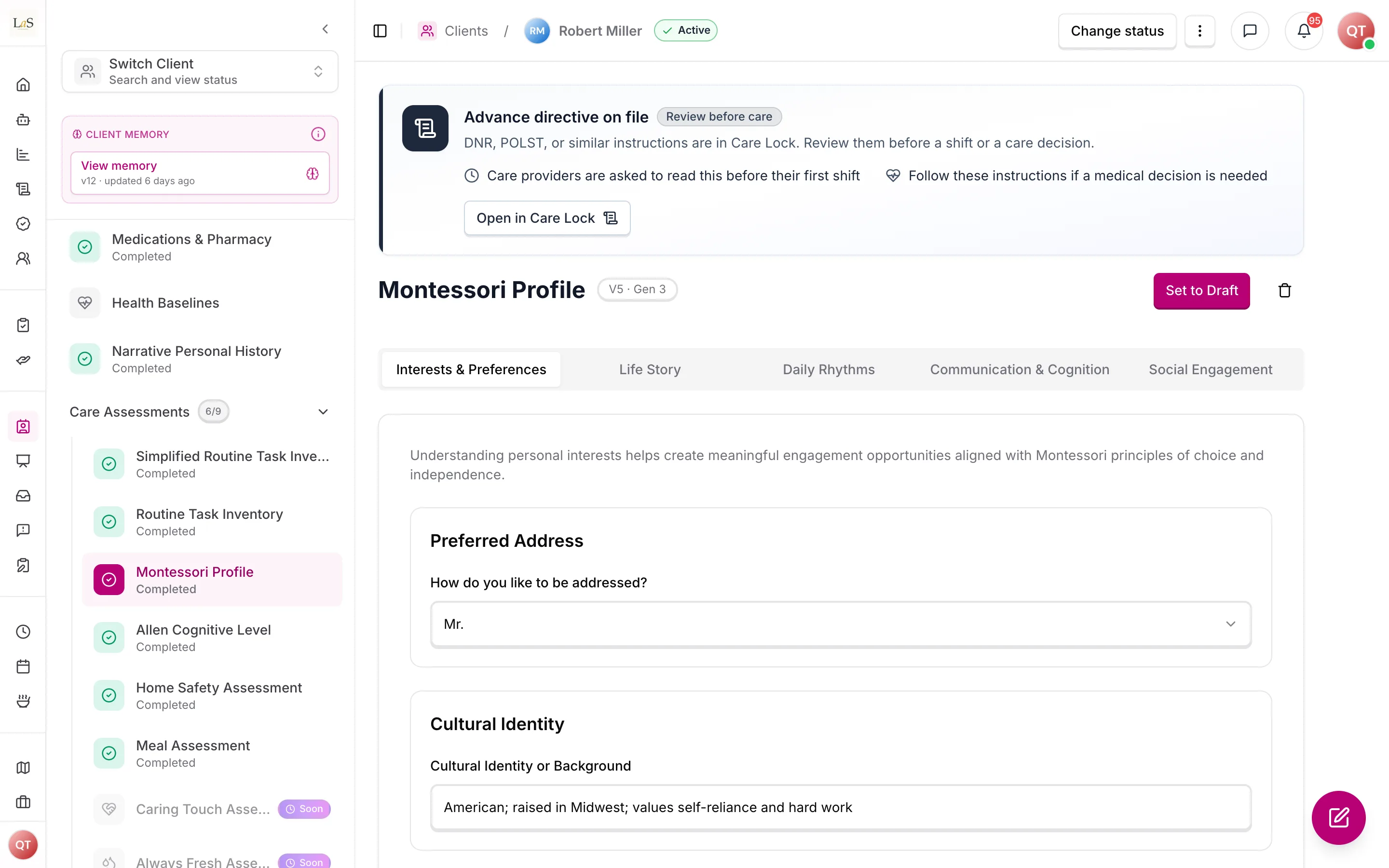
Purpose: the assessment of who the client is rather than what they can do. Following the Montessori approach to dementia and elder care, it captures the person's history, preferences, routines, and ways of communicating — so care providers can offer activities and interactions that are meaningful to this person, not generic ones.
What it covers — five areas:
- Likes & dislikes — how they prefer to be addressed; favorite time of day; favorite social, physical, recreational, and spiritual activities; music, reading, TV, games and sports preferences; household chores they enjoy (cooking, gardening, laundry…); cultural identity; meaningful roles past and present.
- Personal history — place of birth; family members; religious affiliation; education and job history; military service; awards, clubs, spouses, best friends; significant life events; proudest accomplishments; favorite memories; pets; travel.
- Daily routine — a typical day for each day of the week; wake-up and bedtime routines; what makes them happy; what upsets them and what comforts them; calming strategies; anxiety triggers; sundowning and nap patterns; sleep disturbances; social preferences.
- Cognition & language — hearing aid and glasses; languages spoken; how they converse (single words … full conversations); orientation to the rooms of their home; reading ability and preferences; preferred communication style; nonverbal communication; tips for communicating; cognitive strengths (procedural memory, long-term memory topics, decision-making, attention span).
- Observation — how they communicate wants and needs; responsive behaviors with their triggers and time of day; engagement level (high / moderate / low / variable); when they engage best; signs of engagement and disengagement; what motivates them.
How it is scored: it isn't. The Montessori Profile is narrative — text, choices, checklists, lists (family, jobs, the typical week) and a few choice grids (how they converse, orientation, social behaviour) with no numeric score and no total. Its value is in its detail. It is about 95 questions, none needed to complete.
How it is used: drives the personalization of engagement activities and meals and gives every care provider the context to connect with the client as a person. Its Daily routine area — the wake-up and bedtime routines and the typical week — is also a source signal the AI reads when drafting the care plan's routine anchors (, ) — the profile itself stays narrative; structure is added at the care plan.
Licence: Anaya's own.
4. Allen Cognitive Level
Purpose: a standardized, evidence-based placement of the client's cognitive functioning on the Allen scale — the single most consequential data point for how much supervision and what kind of guidance the client needs.
What it covers: the assessor selects exactly one mode out of 24, grouped into six levels (a few neighbouring modes of the lowest levels are combined into ranges):
| Level | Name | What it means | Typical assistance |
|---|---|---|---|
| 1 | Automatic actions | Reflexive responses only; no purposeful movement | Total assistance, 24-hour care |
| 2 | Postural actions | Can move the body and overcome gravity, but not toward goals | Maximum assistance |
| 3 | Manual actions | Can grasp and manipulate objects; acts on what is touched, without anticipating results | Moderate to maximum assistance |
| 4 | Goal-directed actions | Can complete familiar routines and follow visible cues, but cannot solve new problems | Minimum to moderate assistance |
| 5 | Exploratory actions | Learns by trial and error; handles concrete problems, struggles with abstract planning | Standby to minimum assistance |
| 6 | Planned actions | Plans ahead, anticipates errors, reasons abstractly | Independent |
Each mode within a level (e.g. 4.4 "Complete a Goal", 5.6 "Consider Social Standards") carries a precise behavioral description the assessor matches the client against. Each answer shows the mode, what the level means, the typical assistance, and how many steps to give at a time — one at levels 1–3, two at level 4, three at level 5, and up to five at level 6. The level Anaya reads is the whole number of the chosen mode (). The mode is needed to complete, and Anaya may quote what was said about it but never chooses it.
A Care guidance section follows, none of it needed: cognitive and physical assistance, functional goals, the approach that works, common problems, what makes sense to the client, and the treatment focus. The last two stay out of Anaya's plans.
How it is used: the selected mode translates directly into care guidance — how tasks must be presented, how much supervision shifts need, and what the client can safely be asked to do. It is also a direct input when the AI builds task instruction steps. For engagement activities, the Allen Cognitive Level result is used only when the Simplified Routine Task Inventory says the client has confirmed dementia; for clients without it, or when that answer is not recorded, engagement is driven by the Montessori Profile and client profile instead. A mode that moves between Allen levels is material to a reassessment (RAC-13).
Licence: held by the Allen Cognitive Network; the levels and modes are used with permission, confirmed 2026-10-01. Credit line: "Allen Cognitive Levels and modes of performance © Allen Cognitive Network. Used with permission."
5. Home Safety
Purpose: a room-by-room inspection of the client's home, because in home care the environment is part of the overall picture. It identifies hazards and accessibility barriers and ends in concrete recommendations.
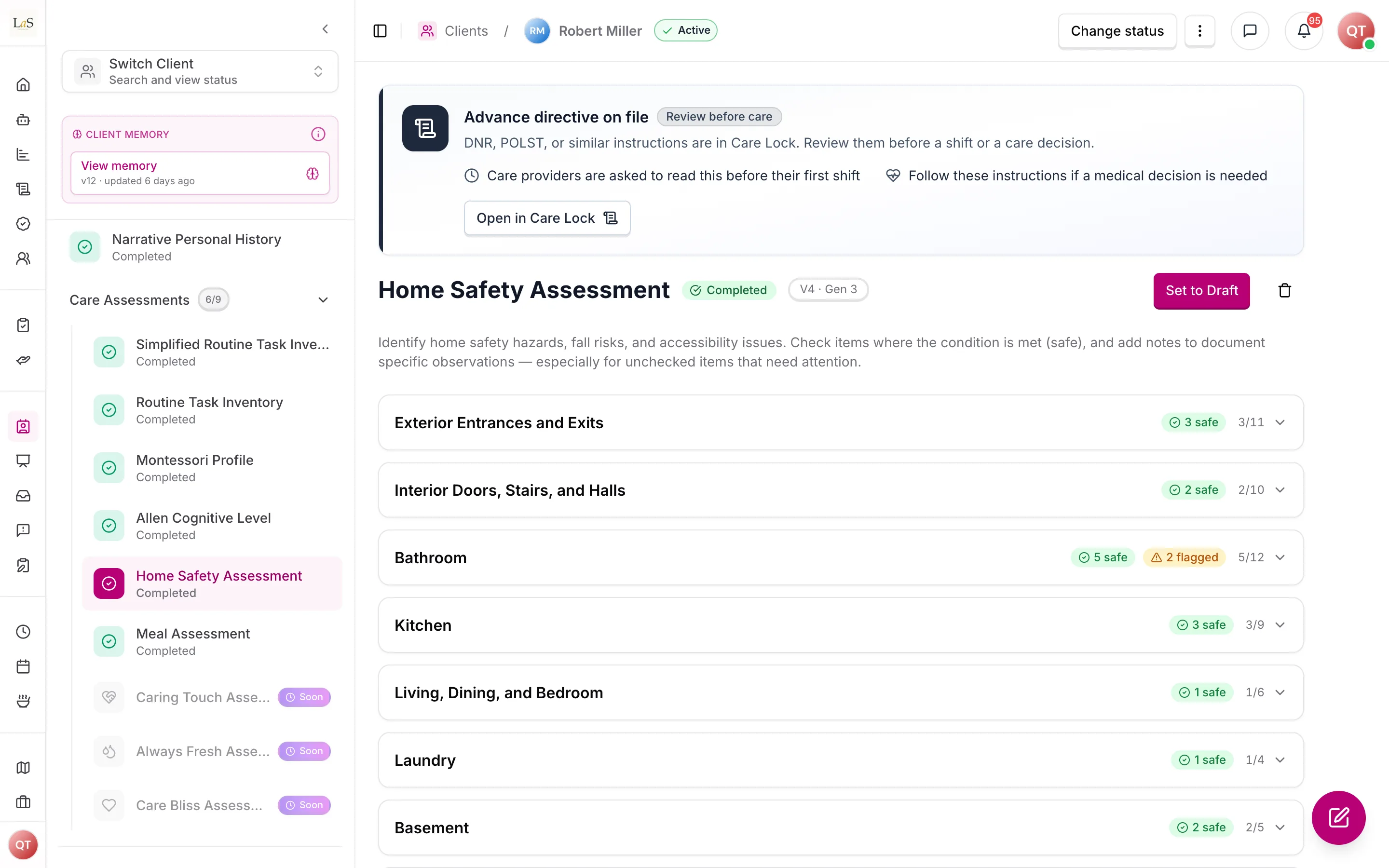
What it covers — twelve areas, 85 checkpoints:
- Exterior entrances and exits — walkways, handrails, lighting, thresholds, locks, visible house numbers
- Interior doors, stairs, and halls — doorway widths, floor level changes, stair rails and lighting, clutter
- Bathroom — tub and shower access, grab bars, bath bench, toilet height, non-slip surfaces, room for a care provider
- Kitchen — task lighting, counter and shelf reach, stove controls, heat-safe surfaces
- Living, dining, and bedroom — chair and bed heights, rug safety, reachable phone and remote, clear pathways
- Laundry — washer and dryer access, sorting surfaces, dryer vent condition
- Basement — stair condition, handrails, combustibles, moisture
- Telephone and door — phone usability, visitor identification, emergency response device
- Storage — closet reach, dresser operation, closet lighting
- Windows — opening mechanisms, locks, sill safety
- Electrical outlets and controls — outlet placement, ground-fault protection, switch reach, cord hazards
- Heat, air, light, smoke and CO alarms, water temperature — alarms present and working, fire extinguisher, thermostat reach, water heater temperature
How it is scored: each area is a checklist in which a tick means the feature is in place; an unticked checkpoint needs attention, and any checkpoint can be marked Not applicable or Not evaluated. Every checkpoint is needed to complete, with the assessor's notes; there is no numeric score. The assessment closes with a written recommendations summary, also needed, written by staff — Fill with Anaya can suggest it from a visit conversation for staff to review. The separate Generate recommendations button, which drafted it from the checklist, is retired. Thirteen questions, about 15 minutes.
How it is used: drives home adaptations, informs the care plan's safety section, and tells care providers what to watch for in the home.
Licence: the checklist is adapted from the Rebuilding Together "Safe at Home" checklist with its permission. Credit line: "Adapted from the Rebuilding Together Safe at Home Checklist. Used with permission."
6. Meal Assessment
Purpose: the complete picture of how the client eats — covering safety (swallowing), health (nutrition), ability (feeding), and identity (preferences). Eating is where health risk and daily quality of life meet, so this assessment feeds both safety rules and meal planning.
What it covers — five areas:
- Swallowing & dysphagia — the drink thickness and food texture the client needs, in plain words (thin, slightly, mildly, moderately or extremely thickened; liquidised, smooth and pureed, minced and moist, soft and bite-sized, or regular); aspiration risk; swallowing ability — including nothing by mouth — and oral-motor function; a checklist of dysphagia warning signs (coughing at meals, wet voice, pocketing food, prolonged chewing, drooling, food refusal, weight loss, pneumonia history), with any other signs listed; required positioning during meals.
- Nutritional status — hydration status and estimated daily fluid intake; appetite level and patterns; oral health concerns (missing teeth, ill-fitting dentures, mouth sores, dry mouth, chewing difficulty, pain). There is no nutrition-screening score: the MNA-SF the fixed form used is not part of the instrument ().
- Feeding abilities — self-feeding level; a skills checklist (bringing food to mouth, using utensils, drinking from cup or straw, opening containers, keeping attention on the meal, pacing); adaptive equipment in use or needed (built-up utensils, plate guard, nosey cup, weighted utensils, non-slip mat, two-handled cup…); whether setup, assistance, supervision, or cueing is required; preferred eating position and environment.
- Dietary needs & preferences — food allergies with severity and reactions; dietary restrictions; intolerances; cultural and religious food requirements; medication–food interactions; preferred and disliked foods; preferred cuisines; meal timing, fluid and snack preferences.
- Recommendations — the assessor's written summary.
How it is scored: it isn't — everything is recorded as findings, choices and notes, with no total (). None of it is needed to complete; it is about 43 questions and 40 minutes.
How it is used: governs which meals may be offered to the client, informs meal-preparation tasks and AI meal generation, and alerts care providers to swallowing risks. Its named safety questions — swallowing ability (the source of nothing by mouth), drink thickness, food texture, aspiration risk, allergies, intolerances, dietary restrictions and special considerations — are the only answers Anaya's safety checks read (ABLD-15), and Anaya may quote what was said for them but never chooses their answers. Its meal timing preferences are also a source signal the AI reads when drafting the care plan's routine anchors (, ); the preferences stay narrative — structure is added at the care plan.
Licence: Anaya's own — a general version written by Anaya (decided 2026-10-01). It carries no MNA-SF and no IDDSI framework content, credit line or level numbers, for any agency. It stays locked because Anaya's safety checks read its named questions.
Lifecycle
Each of the six has its own status on the client's record, the same as any agency assessment (ABLD-18):
Completed is a deliberate sign-off, not a save button. Every answer saves on its own and leaves the assessment in Draft; a person must explicitly mark it Completed, which checks the questions the instrument needs (ABLD-11). A completed assessment opens read-only, and Edit returns it to Draft. The status matters because Anaya's plans read assessments by status — the care plan only Completed ones, some other plans drafts too (ABLD-19).
Every instrument starts empty. A client created from a care proposal also receives a copy of the proposal's assessment (ABLD-37); when the proposal ran on the Simplified Routine Task Inventory, that copy is the client's inventory, Completed if the proposal's was.
Revisions
Statuses say where an assessment stands; revisions say what it said. Every save of one of the six keeps a — its answers, its status, who made it, when, and why: a person, Anaya's fill, a copy, the move to templates, or a reassessment — and the assessment stays singular (), so nothing about "one of each" changes; the history simply lives with it (). A care plan records the revision of each instrument that grounded it (PLAN-36), which is what makes "which picture of the client produced this plan?" answerable. The client-wide that used to be cut across all six when reassessment suggestions were applied is retired ().
Where this fits in the care lifecycle
The assessments are the start of the loop, not the end of it. Completed assessments feed the AI that drafts the care plan; the plan drives the Care Task List; and each task's instruction steps are written from these same assessment answers. When the client changes, that loop runs in reverse — a reassessment proposes question-by-question changes to these assessments for the care manager to apply (, ), and changed answers ripple back out to the plan and instructions. The whole loop is mapped on the Care Lifecycle page.
Because the and are the two assessments that feed instruction generation directly, completing either one, or changing the answers of a completed one, is a recognized trigger to refresh the affected instructions — see .
Rules
Implementation status — audited against
apps/backend/src/clients,packages/shared/src/types/simplified-routine-task-inventory.ts, andapps/backend/src/common/utils/is-simplified-routine-task-inventory-completed.tson 2026-07-18. ✅ In code · ⚠️ Partial (built, but doesn't fully match the rule) · 🚧 Spec only (not yet built). The Capacity / Support now / Risk model and thesimplified-rtiroutes are shipped. , , and – were re-audited on 2026-09-29 while researching the Assessment Builder. On 2026-10-01 the rules were rewritten for template-driven intake, and – , , , – , and were re-audited against the library instruments on 2026-10-06, when it shipped. Retired rules carry no tag.
Rules through were originally published as AS-12 through AS-17 on the Assessments page and moved here unchanged.
- CA-1 — A client has at most one of each of the six: each library instrument is one per client and placed on every client (ABLD-9, ABLD-34). Saving never creates duplicates — it updates the one assessment, and each save is kept as a (). (✅ In code)
- CA-2 — Saving and completing follow ABLD-18: every change saves on its own and leaves the assessment in Draft, marking it Completed is a separate, deliberate action, and Edit returns a Completed one to Draft. Accepted reassessment suggestions are written as a revision stamped with that reassessment (). (✅ In code)
- CA-3 — Which of Anaya's plans read the six, and at which status, is set by ABLD-19, and who may see them by ABLD-20. (✅ In code)
- CA-4 — Retired 2026-10-01. This rule said that when a client is created from a care proposal, the Simplified Routine Task Inventory is pre-filled from the proposal and starts as Completed. The client now receives a copy of the proposal's own assessment, whatever template it ran on (ABLD-37). Must not be reused.
- CA-5 — Retired 2026-10-01. This rule said deleting a client deletes all six of their assessments and duplicating a client copies all six. The six are agency assessments now, and ABLD-32 covers them: duplicating copies them as drafts. Must not be reused.
- CA-6 — The six can only be viewed and changed by the client's agency staff — never by care providers, family, medical professionals or users from another business, whether on their own screens or through the client summary. ABLD-20 governs them with every other assessment. (✅ In code)
- CA-7 — Every one of the six shows its current status (Not Started, Draft, Completed) on the client's record, taken from the client's list of agency assessments, so staff can see at a glance what has and hasn't been evaluated; one nobody has started shows as Not Started without an empty assessment being stored. (✅ In code)
- CA-8 — Retired 2026-10-01. This rule set when the Simplified Routine Task Inventory counts as complete: a Capacity and a Support now on every functional item, a status on every equipment and home-safety item, and a Yes or No on dementia. The instrument marks exactly those questions as needed, and completion is checked against them like any template's (ABLD-11). Must not be reused.
- CA-9 — In the Routine Task Inventory, each ability is answered by ticking the behavioural criteria the client shows, offered in the manual's own words and grouped by level; the level Anaya reads is the highest level among the criteria ticked. The system records the evidence and never overrides the assessor's judgement, and Anaya may quote what was said but never ticks a criterion. (✅ In code)
- CA-10 — An Allen Cognitive Level assessment records exactly one mode of the 24 on the standardized scale, and each mode shows its level, meaning, typical assistance and how many steps to give at a time when the assessor chooses it. The level Anaya reads is the whole number of the chosen mode. (✅ In code)
- CA-11 — A Home Safety assessment must address every checkpoint in all twelve areas — each in place, needing attention, not applicable or not evaluated — and end in a written recommendations summary. Anaya may suggest the recommendations from a visit conversation, but staff review and own the final text. (✅ In code)
- CA-12 — The Meal Assessment records drink thickness and food texture in plain words, each mapped one-to-one from the numbered level the fixed form stored, and carries no nutrition-screening score or total: the MNA-SF is not part of any Anaya template, and answers stored in it are archived by the move to templates and never shown (decided 2026-10-01). (✅ In code)
- CA-13 — The Montessori Profile is narrative: it carries no scores or totals, and no part of the product may reduce it to one. Its content personalizes engagement activities and meals. (✅ In code)
- CA-14 — Completing the or the , or changing the answers of a completed one — the two assessments that feed instruction generation directly — must flag the affected task instruction steps for regeneration (the receiving rule is ). The regeneration is routed to the care manager for review rather than applied automatically. (⚠️ Partial — completing an RTI or ACL, or changing the answers of a completed one, marks the client's whole care provider task lists as out of date and notifies the care manager; it does not flag the affected steps, and nothing regenerates)
- CA-15 — Every save of one of the six is kept as a : its answers, its status, who made it, when, and why. The assessment itself stays singular — revisions never create a second assessment ( still holds) — and the history is viewable by the same staff who may view the assessment (). The move to templates keeps each form's saved versions as revisions, numbered as they were. (⚠️ Partial — every save keeps a revision, though a revision that fails to write is logged and never stops the save; there is no way to view the history yet)
- CA-16 — Retired 2026-10-01. This rule cut a synchronized across all six assessments whenever reassessment suggestions were applied, and let Apply keep their status. Each assessment keeps its own revisions instead, and a care plan records the revisions that grounded it (PLAN-36). Must not be reused.
- CA-17 — The Montessori Profile's wake-up routine, bedtime routine and typical-week questions and the Meal Assessment's meal timing question are the source signals the AI reads when drafting the care plan's routine anchors (); the assessments themselves stay narrative — structure is added at the care plan, never by scoring the profile ( unchanged). Because an anchor is a window and these sources give at best a single time, the AI must widen a narrative time into a defensible earliest-and-latest pair rather than inventing false precision. (🚧 Spec only)
Who can do what
| Action | Who is allowed |
|---|---|
| Add the six library instruments to the agency | Staff with the publish-templates permission (owner and admin by default) (ABLD-34) |
| Fill in, save, complete, or return to Draft any of the six | Staff with the agency-assessments fill permission (owner, admin and care manager by default) |
| View the six | Staff with the agency-assessments view or fill permission (owner, admin and care manager by default) |
| Care providers, family representatives, medical professionals | No access — they see the assessments' effects (care plan, tasks, meals), not the assessments |
| Another business | Never — assessments are sealed inside the client's business |
Decisions needed
- (Resolved by //.) Should editing a Completed assessment revert it to Draft? Manual saves keep the revert — stands, and re-completing remains the deliberate re-review. What the revert used to cost — silently losing what was on record — is now covered by the revision history (). The reassessment Apply exception keeps a Completed response Completed and records a new revision: Apply is itself the deliberate review (D67).
- (Resolved 2026-10-01 by template-driven intake: each instrument marks the questions it needs, checked when it is marked completed (ABLD-11); the Simplified Routine Task Inventory and Home Safety need theirs, and the other four need only what their content requires.) Should completing a care assessment require the form to be fully filled in, the way completing an initial assessment does? Options: require completeness; or allow partial assessments to be marked Completed at staff discretion.
- (Resolved by the Assessment Builder: Caring Touch, Always Fresh and Care Bliss are Anaya starter templates, adopted from the library and filled under the client's Agency assessments (the since-retired ), and the placeholders are gone from the client record.) Three placeholder assessments appeared on the client dashboard as "coming soon": Caring Touch (compassionate-touch needs), Always Fresh (dignity-focused continence support), and Care Bliss (end-of-life companionship and comfort). Options: define and build each as a real assessment in this catalog, or remove the placeholders. A fourth placeholder, , was removed from this catalog: wound-care collaboration is delivered by the wound care feature and reached from the client's health readings, not as a care assessment.
- (Addressed by /.) Should assessments expire? Assessments still do not expire on a timer, but they no longer go stale silently: every reassessment re-reviews them field by field — the agent proposes per-field updates () and the care manager applies the accepted ones, each written as a revision (; the synchronized generation of is retired). Templates can carry a Review due after date (Assessment Builder); the six instruments carry none, and reminders remain a possible refinement.
- How aggressive should the RTI / ACL regeneration trigger be? now establishes that changing these two assessments flags the affected task instruction steps for regeneration, routed to the care manager. The remaining open question is the degree of automation: re-generate the draft automatically and queue it for review (current default), or only prompt the care manager to start it. Full auto-apply without review is excluded by the platform principle "AI drafts, humans decide."
- (Resolved by D67.) Does reassessment Apply keep a Completed assessment Completed? Yes. Apply writes a revision with
source: "reassessment"and its reassessment id; the response stays Completed because Apply is the review. Manual edits still reopen it to Draft ().
How is this page?
Last updated on