Assessment Mode
Part of the Anaya Care Handbook — the source of truth for how the product must behave. When the product needs to change, change this document first, then make the system match it.
Implementation status — audited against
apps/backend/src/ai/agents/initial-assessment(the durableinitialAssessmentRestate workflow) and itsapps/backend/src/ai/prompts/initial-assessment.prompts.md(system-interview+systemsections) on 2026-07-24. The guided interview and structured generation now run as one durable workflow — the interview is shipped as the Initial Assessment ; its topics come from the agency's intake template, and the rules template-driven intake rewrote were re-audited on 2026-10-06. ✅ In code · ⚠️ Partial · 🚧 Spec only (not yet built).
Template-driven intake — decided 2026-10-01, live since 2026-10-06. The interview's topics come from the agency's , and instead of extracting the fixed Simplified Routine Task Inventory the run ends with Anaya suggesting answers for the intake's assessment, for staff to review. , , , and were rewritten for it.
What this covers
This page governs — user-facing name the — the guided AI conversation that fills in an initial assessment. When a care manager launches it, the assistant walks them through the client's care setting and the sections of the agency's one topic at a time, asking conversational questions and forcing follow-ups whenever a gated topic is still uncovered. When every gated topic is covered it writes a warm narrative plus a Milestones Snapshot and fills in the client's details, grounding them in the interview transcript; then it hands the interview to Fill with Anaya, which suggests answers for the intake's assessment from it, for staff to review on the intake. It is optional and pre-client: an initial assessment can equally be filled in by hand, and there is no client record yet.
Assessment Mode is one way the assistant supports documentation; the broader AI documentation capability used during shifts (shift notes, incidents, symptoms) lives in AI Features. What the assessment itself contains is covered in Initial Assessments and the Assessment Builder; once the assessment is converted, the intake's answers are carried into the proposal's own assessment, which grounds AI care proposal generation.
Key terms
- Assessment Mode / Guided Narrative — the optional guided-intake conversation launched on an initial assessment; the code names it "Guided Narrative — Anaya Assessment Mode".
- Gated topic — a topic the interview must cover before it will generate: the care setting, the family's voice, and each section of the agency's intake template (). A gated topic cannot be skipped while it is still uncovered.
- Life's Milestones — the six care domains: physical health & safety, nutritional needs, personal care assistance, cognitive & mental health, emotional support, and social engagement.
- Care setting — a gated topic, asked in the fixed opening questions: where the client is coming from (for example post-hospital).
- Clarifying follow-up — a question the assistant asks (during the interview) to cover a still-uncovered gated topic, or (at generation time) a single source-cited clarification when a high-value fact is unclear.
- Narrative summary — the warm, person-first narrative the assistant writes, plus a Milestones Snapshot (one sentence per Life's Milestone) and a "Still to assess once care begins" block for milestones not covered at intake.
- Milestones summary confirmation — an optional care-manager-approved narrative framing that can be passed into generation.
- Logistics — practical details (weight/height, schedule, contact, pets, referral) the interview gathers but does not gate readiness on.
How it works
Launching the interview
A care manager launches the Guided Narrative from the initial assessment — it is an optional entry point ("Optional: Guided Narrative — a phone-call intake can auto-populate this assessment; not required for Ready status"), not a mode that turns on automatically. The assessment can also be completed by filling the form directly, without ever running it.
Walking the topics
The assistant covers the gated topics — the care setting, the family's voice and the sections of the agency's intake template — asking conversational questions calibrated to each. It runs in short rounds of one to three questions and keeps going (up to about forty rounds, with at most two coverage-retry passes) until every gated topic is covered; a gated topic cannot be left uncovered. If an answer is vague or keyword-only, the assistant acknowledges it and asks for the missing detail rather than moving on. The user is never made to feel they did something wrong by giving a short answer. Logistics (weight/height, schedule, contact, pets, referral) are gathered along the way but do not gate readiness. The interview's questions, and the Condition Basics follow-ups — the ready-made answer chips offered when a condition such as a stroke or Parkinson's is named — use everyday words, never clinical labels (Anaya — the AI Persona ).
The topics come from the agency's : after the fixed opening questions on the care setting and the family's voice, each of the template's sections is a gated topic (). An agency that needs to ask more changes its intake template (ABLD-35).
Producing the narrative and suggesting the intake's answers
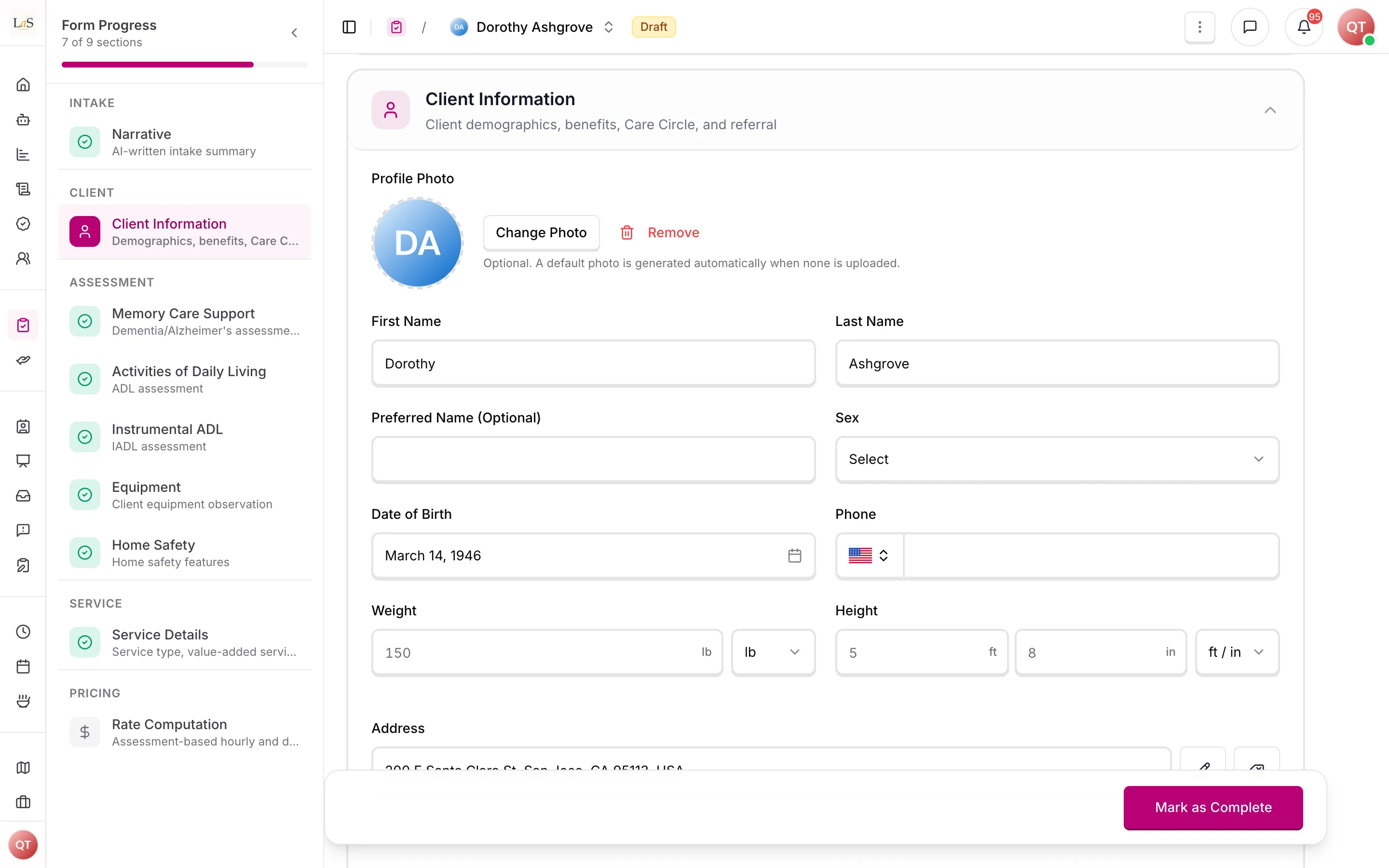
Once every gated topic is covered, the durable run writes the narrative (plus the Milestones Snapshot and a "Still to assess once care begins" block) and fills in the client's details — every field grounded in the transcript, not re-derived from the prose. If a high-value fact is missing or ambiguous, the run pauses to ask the care manager one source-cited, choice-based question, then folds the answer in. The narrative and client details save as a Draft that the care manager owns and edits. The run then hands the interview to Fill with Anaya, which suggests answers for the intake's assessment, each with the words it came from (ABLD-25), and finishes with "Anaya finished the interview; review the suggested answers on the intake." Completing the initial assessment is the separate deliberate action, and it waits until every suggestion is reviewed (see Initial Assessments ). The narrative is stored on the initial assessment and copies onward to the care proposal and client.
Rules
- AMODE-1 — The Guided Narrative is an optional intake path a care manager launches on an initial assessment; it is not auto-activated and is not required to complete the assessment. (⚠️ Partial — built, but behavior changed from the original auto-activation spec)
- AMODE-2 — The assistant guides the care manager through the gated topics () in a fixed three-phase flow (build the picture, add the human voice, check for gaps). (✅ In code)
- AMODE-3 — For each topic the assistant asks simple, conversational questions calibrated to that topic's content. (✅ In code)
- AMODE-4 — When an answer is vague or keyword-only, the assistant acknowledges the input and asks for the missing detail before it will treat a gated topic as covered. (✅ In code)
- AMODE-5 — The interview runs in rounds of one to three questions, up to about forty rounds with at most two coverage-retry passes; a gated topic cannot be left uncovered. (There is no fixed "three follow-ups per topic" cap.) (✅ In code)
- AMODE-6 — A user is never told they did something wrong for giving a short or single-word answer. (✅ In code)
- AMODE-7 — The interview's topics come from the intake template the initial assessment runs on (Initial Assessments ): an agency that wants the interview to ask more changes its intake template (ABLD-35); there is no separate topic setting. (✅ In code)
- AMODE-8 — The gated topic set is the care setting, the family's voice and each section of the intake template, in the template's order. The care setting and the family's voice are covered by the fixed opening questions; the assistant itself must cover the template's sections. Logistics are gathered but do not gate readiness. (⚠️ Partial — in code, except that a section with no question Anaya may fill — only signatures, photos or questions set to Never — is not a gated topic)
- AMODE-9 — After every gated topic is covered, the assistant writes a warm narrative plus a Milestones Snapshot and fills in the client's details, grounding every field in the transcript. It never changes a name already on the record: the client's first and last name are filled in, as two separate fields, only when the intake has neither, and the Responsible Party and every other Care Circle member keep their names exactly as saved. In the same durable run, Anaya then suggests answers for the intake's assessment from the interview. (⚠️ Partial — in code, except that the suggested answers come from a separate Fill with Anaya run, which the interview's run starts once the narrative and details are saved)
- AMODE-10 — Items that could not be covered at intake surface as a "Still to assess once care begins" block, and unclear high-value facts surface as source-cited clarification questions during generation. (✅ In code)
- AMODE-11 — Anaya's answers for the intake's assessment are suggestions reviewed on the intake: each shows the words it came from and its support state, and the intake can't be completed while any is unreviewed (ABLD-25, ). The narrative and the client's details carry no separate review gate: the care manager owns and edits them, and finalization is the initial-assessment completion check (). An optional confirmed-Milestones summary may be passed in as approved framing. (✅ In code)
- AMODE-12 — The finished narrative is stored on the (there is no client yet) and carries over — a lossless clone — to the care proposal on convert, and onto the client record when a client is created. (✅ In code)
- AMODE-13 — On convert, the narrative copies into the care proposal, and the intake's answers are carried into the proposal's own assessment as ABLD-36 says — copied as a Draft on the same template, suggested by Anaya on a different one — for staff to review and complete. Care-proposal generation grounds on the proposal's own answers (CP-30). (✅ In code)
- AMODE-14 — Every generated narrative should end with a disclaimer footer stating it is documentation, not clinical interpretation. (🚧 Spec only — the intake narrative currently ends with the Milestones Snapshot and carries no disclaimer footer)
Who can do what
| Action | Roles |
|---|---|
| Launch the Guided Narrative and answer its questions | Agency staff with the initial-assessment manage permission |
| View the generation status and the narrative | Agency staff with initial-assessment view access |
| Complete the initial assessment | Agency staff with the initial-assessment manage permission |
| Choose the intake template, whose sections are the interview's topics | Agency staff with the publish-templates permission, at agency setup or under Settings › Assessments (ABLD-35) |
Decisions needed
- (Resolved 2026-10-01 by template-driven intake: the topics come from the agency's intake template (, ). On 2026-09-29 the Life's Milestones had been kept as the canonical set.) Whether to build agency-configurable intake domains (), or keep the Life's Milestones as the canonical set.
- Whether to add the disclaimer footer () — the intake narrative currently omits one — and, if so, its exact wording and whether agencies may customize it.
- How a "Still to assess once care begins" item connects to downstream work (a task, a reassessment, or a care-manager to-do) once the client exists.
How is this page?
Last updated on