Client Calendar
Part of the Anaya Care Handbook — the source of truth for how the product must behave. When the product needs to change, change this document first, then make the system match it.
What this covers
This page governs the client calendar (the PRD calls it Anaya Calendar): the per-client calendar view on the client's record that brings the client's upcoming care onto one screen. Today it shows three kinds of items — the meals assigned to the client's meal-preparation tasks, the engagement activities assigned to their engagement tasks, and their doctor's appointments. Management views it on the web dashboard (on the client's record); the mobile app has the same calendar for the client's care team.
The longer-term intent is for the calendar to be the central place where all of a client's care is scheduled and coordinated — shifts, appointments, telehealth, service bookings, activities, medication reminders, and routines — with changes flowing through to the care provider's daily tasks (see Care Plans & Care Provider Tasks) and to confirmed bookings from the ARMI Marketplace and Scheduling & Shifts. Those behaviors are not built yet and are written below as spec.
For one person's own calendar across every client they are linked to, see My Calendar.
Key terms
- Calendar item — one entry on the client calendar: a meal assignment, an engagement-activity assignment, or a doctor's appointment.
- Event-type filter — a toggle that shows or hides one kind of calendar item without changing any underlying data.
- Calendar event — any item created or edited directly on the calendar (an appointment, a shift, or a recurring entry), as distinct from items that are mirrored in from another feature.
- Recurring event — a calendar event that repeats on a set pattern; editing one occurrence prompts the user to choose whether the change applies to that occurrence only or to all future occurrences.
- Conflict detection — an automatic check that flags when a newly created or moved event overlaps a shift already on the calendar.
- Confirmed ARMI booking — a booking from the ARMI Marketplace that both parties have accepted; it mirrors onto the calendar as a shift with a distinct ARMI indicator.
- Pending ARMI booking — a requested but not-yet-accepted ARMI booking; it shows on the calendar as tentative and does not block time or generate tasks.
How it works
The calendar loads the client's items for the visible date range and color-codes them by kind: meals (amber), engagement activities (violet), doctor's appointments (rose).
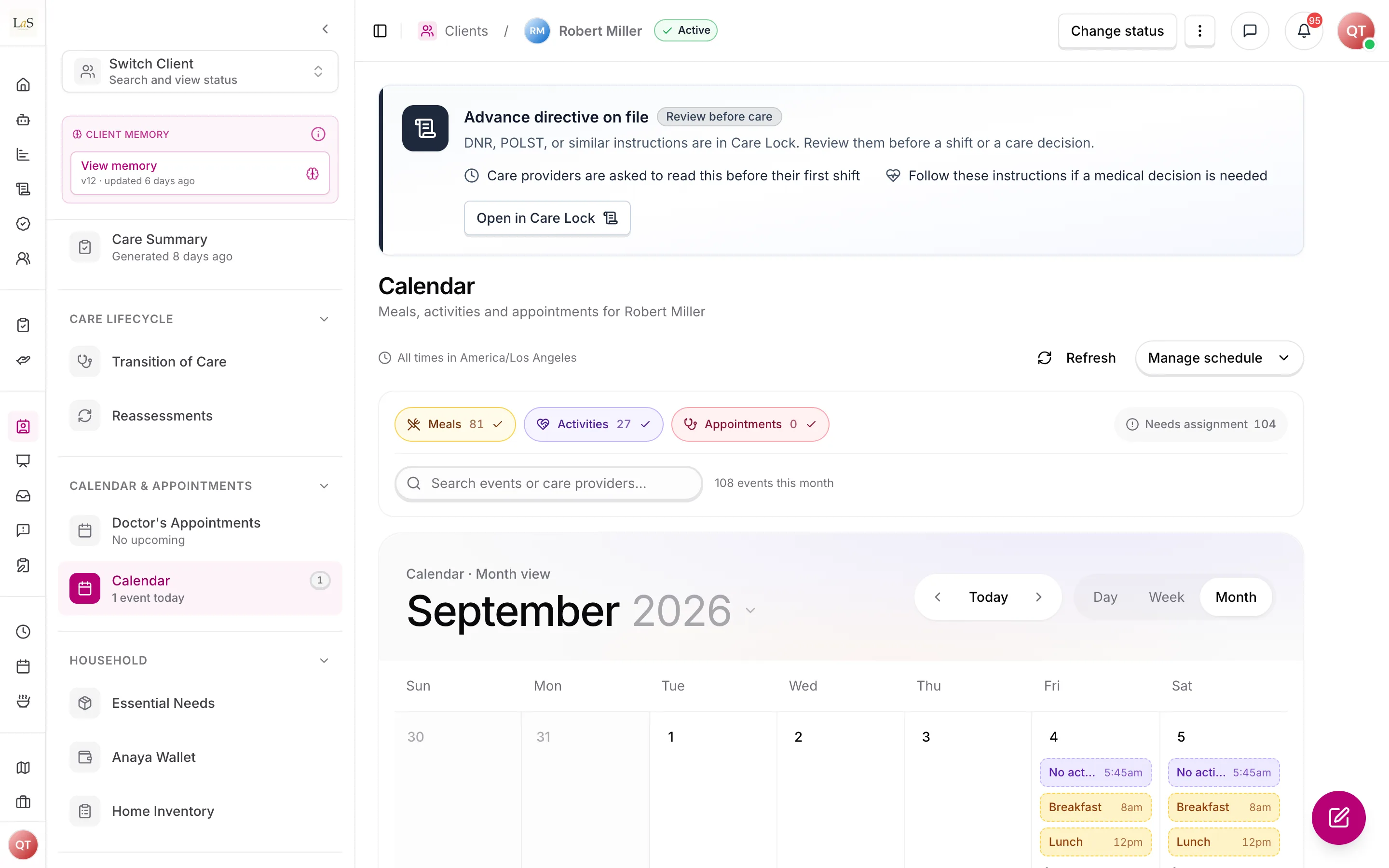
Meals, activities and appointments for one client, in one calendar.
- Meal and engagement items come from the client's scheduled shift tasks. A slot that has a meal or activity assigned shows what it is; an empty slot shows as unassigned, so staff can spot gaps to fill (see Meals and Engagement Activities).
- show the appointment and its status — scheduled, completed, cancelled, or rescheduled (see Health Readings).
- Filters: on the web, each of the three event types can be shown or hidden independently, with a count per type. On mobile, one filter is active at a time (All / Meals / Activities), plus a month and day picker.
Creating and changing events (spec)
The longer-term calendar is meant to be edited directly: management can create, edit, and cancel events on the calendar, and representatives can create and edit appointments (but not shifts). When an event is created, changed, or cancelled, the relevant parties are notified according to their role — the care manager, the assigned care provider, and the representative. Because the calendar is the backbone of the schedule, changing it also keeps the care provider's daily care tasks in sync (see Care Plans & Care Provider Tasks).
- Conflict detection: when a new or moved event overlaps a shift already on the calendar, the system flags the conflict and prompts the care manager to resolve it before saving (see Scheduling & Shifts).
- Recurring events: an event can be set to repeat on a pattern. Editing a single occurrence of a recurring event prompts the user to choose between changing that event only or all future occurrences.
- Per-role views: care providers can only see their own schedule, never the full client schedule.
Confirmed ARMI bookings (spec)
When a booking from the ARMI Marketplace is confirmed by both parties, a shift entry is created automatically in three places at once: the agency's schedule view, the ARMI care provider's personal calendar, and the assigned client's calendar. The care manager and relevant staff receive a push notification, and the shift carries a distinct ARMI indicator so it is recognizable at a glance.
- Pending bookings appear as tentative entries; they do not block time or generate care tasks until they are confirmed.
- Cancellation of a confirmed booking removes the calendar entry, notifies all parties immediately, and alerts the care manager to arrange coverage.
- Conflicts between a new ARMI booking and an existing committed shift are auto-flagged, and the care manager is notified before the booking is confirmed.
Rules
- CAL-1 — Every client's record offers a calendar that shows, for the visible date range, the client's meal assignments, engagement-activity assignments, and doctor's appointments.
- CAL-2 — The calendar shows only one client's items, never crosses agency boundaries, and is visible only to logged-in users whose role permits viewing that client.
- CAL-3 — All calendar items follow the client's timezone — never the viewer's.
- CAL-4 — Meal and engagement items reflect their assignment state (assigned vs. unassigned task slot); appointment items reflect their appointment status (scheduled, completed, cancelled, rescheduled).
- CAL-5 — Event-type filters only change what is displayed; they never change the underlying schedules, assignments, or appointments.
- CAL-6 — A change to a calendar event (creation, modification, or cancellation) automatically keeps the assigned care provider's daily care tasks in sync with the calendar. (🚧 Spec only)
- CAL-7 — When a calendar event is created, modified, or cancelled, the relevant parties (care manager, assigned care provider, and representative) are notified according to their role. (🚧 Spec only)
- CAL-8 — When a new or moved event overlaps a shift already on the calendar, the system flags the conflict and prompts the care manager to resolve it before the event is saved. (🚧 Spec only)
- CAL-9 — Calendar events can be set to recur; editing a single occurrence of a recurring event prompts the user to choose between applying the change to that occurrence only or to all future occurrences. (🚧 Spec only)
- CAL-10 — Care providers can view only their own schedule on the calendar, never the full client schedule. (🚧 Spec only)
- CAL-11 — Representatives can create and edit appointments on the calendar but cannot create or edit shifts. (🚧 Spec only)
- CAL-12 — A confirmed ARMI Marketplace booking automatically creates a shift entry in the agency's schedule view, the ARMI care provider's personal calendar, and the assigned client's calendar, with a push notification to the care manager and relevant staff and a distinct ARMI indicator on the entry. (🚧 Spec only)
- CAL-13 — A pending ARMI booking appears as a tentative calendar entry and does not block time or generate care tasks until it is confirmed. (🚧 Spec only)
- CAL-14 — Cancelling a confirmed ARMI booking removes the calendar entry, notifies all parties immediately, and alerts the care manager to arrange coverage. (🚧 Spec only)
- CAL-15 — Conflicts between a new ARMI booking and an existing committed shift are auto-flagged and the care manager is notified before the booking is confirmed. (🚧 Spec only)
Who can do what
| Action | Roles allowed |
|---|---|
| View a client's calendar (web) | Owner, Admin, Care manager |
| View a client's calendar (mobile) | Care team members with access to that client |
| Create, edit, or cancel calendar events (spec) | Owner, Admin, Care manager |
| Create or edit appointments only (spec) | Representative |
| View own schedule only (spec) | Care provider |
Decisions needed
- What else should the calendar show? Today it shows meals, activities, and appointments — but not the client's shifts themselves, care-plan task occurrences, medication reminders, or birthdays. The longer-term spec ( onward) treats shifts as the calendar's backbone; still open is how far to go — add medication reminders, add all task occurrences, add telehealth and service bookings, or stage these in.
- How are representatives notified, and what do they see? and say representatives are notified of event changes and can create/edit appointments only. Open: whether representatives get the full read-only schedule or a trimmed view, and which event changes are worth a notification versus a quiet update.
- What is the "unconfirmed beyond threshold" window for pending ARMI bookings? keeps a pending booking tentative until confirmed, but the PRD also says the care manager is notified if a booking stays unconfirmed past a threshold. The threshold value is not yet defined (see ARMI Marketplace).
How is this page?
Last updated on