Initial Assessments
Part of the Anaya Care Handbook — the source of truth for how the product must behave. When the product needs to change, change this document first, then make the system match it.
What this covers
This page governs the of a prospective client — the intake step where the agency first evaluates a person's care needs, and the source of every care proposal. An initial assessment is a shared client intake: the identical data shape carried, without re-entry, into the care proposal and (later) the client record.
An agency can fill an initial assessment in by hand, or run it as a guided AI conversation — the (Assessment Mode) — which interviews the care manager and suggests answers for the intake. The completed intake then feeds AI-assisted care proposal generation.
Template-driven intake — decided 2026-10-01, live since 2026-10-06. The intake no longer embeds the fixed Simplified Routine Task Inventory: it runs on the published the agency chooses at agency setup (Assessment Builder), its requested service carries the agency's in place of value-added services, and its rates carry no assessment-score uplift. , , , , and were rewritten for it, was added and retired.
Not to be confused with. The on this page is the pre-client intake record in the funnel (
/dashboard/initial-assessments). Its assessment is an agency assessment on the agency's intake template, which may be one of the six library instruments — for Live and Stay, the Simplified Routine Task Inventory — or a template the agency chose or built. The Assessment Builder owns how that assessment is filled and completed; this page does not restate it.
The six care assessments on every client's record are covered in Care Assessments; the notes care providers record when a client's condition changes are covered in Change of Conditions; the schedule on which a client is re-evaluated after they become active is covered in Reassessment & Care Plan Review Cycle; the care readiness quiz a care provider takes before a shift is covered in Scheduling & Shifts.
Key terms
- Initial assessment — the intake record for a prospective client, and a shared client intake: client demographics and photo, the Care Circle and responsible party, the requested service (with the agency's service add-ons and a weekly schedule), a rate computation, an AI narrative, and its own assessment on the agency's intake template. Once completed, it converts into a care proposal.
- Care Circle — everyone involved in the client's care other than the client, each with a relationship and roles; the client is never a member, and a (a Care Circle member or the client themselves) must be resolved before the assessment can be completed. Defined in full on Clients.
- Intake template — the published template the agency chose at agency setup for its initial assessments; every new intake starts its assessment on that template's live edition (ABLD-35).
- Setup gate — the hold on the agency's staff until someone who may publish templates has chosen the intake and proposal templates and listed the service add-ons (ACCESS-40). No initial assessment can be created before then ().
- Service add-on — a service the agency offers on top of care, with an optional extra price per hour; chosen on the intake's Service step, which keeps a copy (ABLD-38).
- Guided narrative — the optional AI-guided intake conversation (the , Anaya's Assessment Mode) that interviews the care manager across the client's care setting and the intake template's sections, writes a warm narrative, and suggests answers for the intake's assessment — each grounded in the interview transcript, for staff to review.
- Client photo — an optional profile photo on the intake; when none is uploaded a default avatar is generated automatically, and it travels with the intake on convert.
- Assessment Builder — the tool for an agency to build its own assessment templates and use Anaya's library, including the six care assessments as locked instruments. The intake and the proposal each run on a template the agency chooses. See Assessment Builder.
How it works
Initial assessments (before someone is a client)
Agency staff create an initial assessment for a prospect on the web dashboard, once the agency is set up (). It starts in Draft with an empty intake and a Not Started assessment on the agency's intake template. Staff fill in the prospect's details and photo, the Care Circle and responsible party, the requested service (with the agency's service add-ons and a weekly schedule), and the intake template's questions — optionally helped by the Guided Narrative interview, which writes a narrative and suggests answers for staff to review. Drafts autosave freely, even when partly filled or invalid; the completeness checks apply only when the assessment is marked Completed. A completed assessment shows as Ready, and can be converted into a care proposal: conversion copies the intake — demographics, Care Circle, responsible party and proposal addressees, service, service add-ons, weekly schedule, the rate computation (copied as-is, not recomputed), and the narrative — onto a new Draft proposal, and carries the intake's answers into the proposal's own assessment for staff to review and complete (ABLD-36).
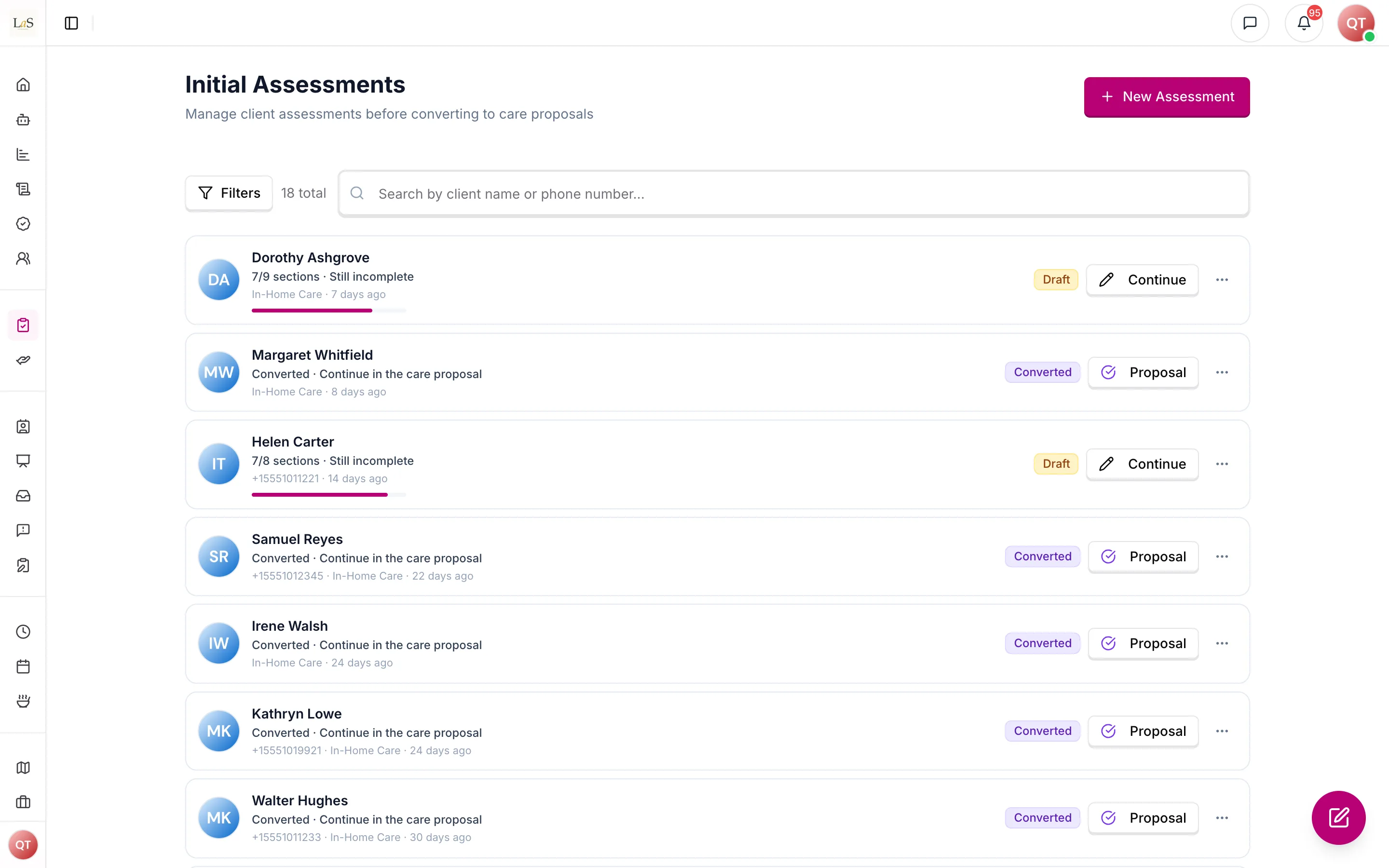
Initial assessments in progress and converted to care proposals.
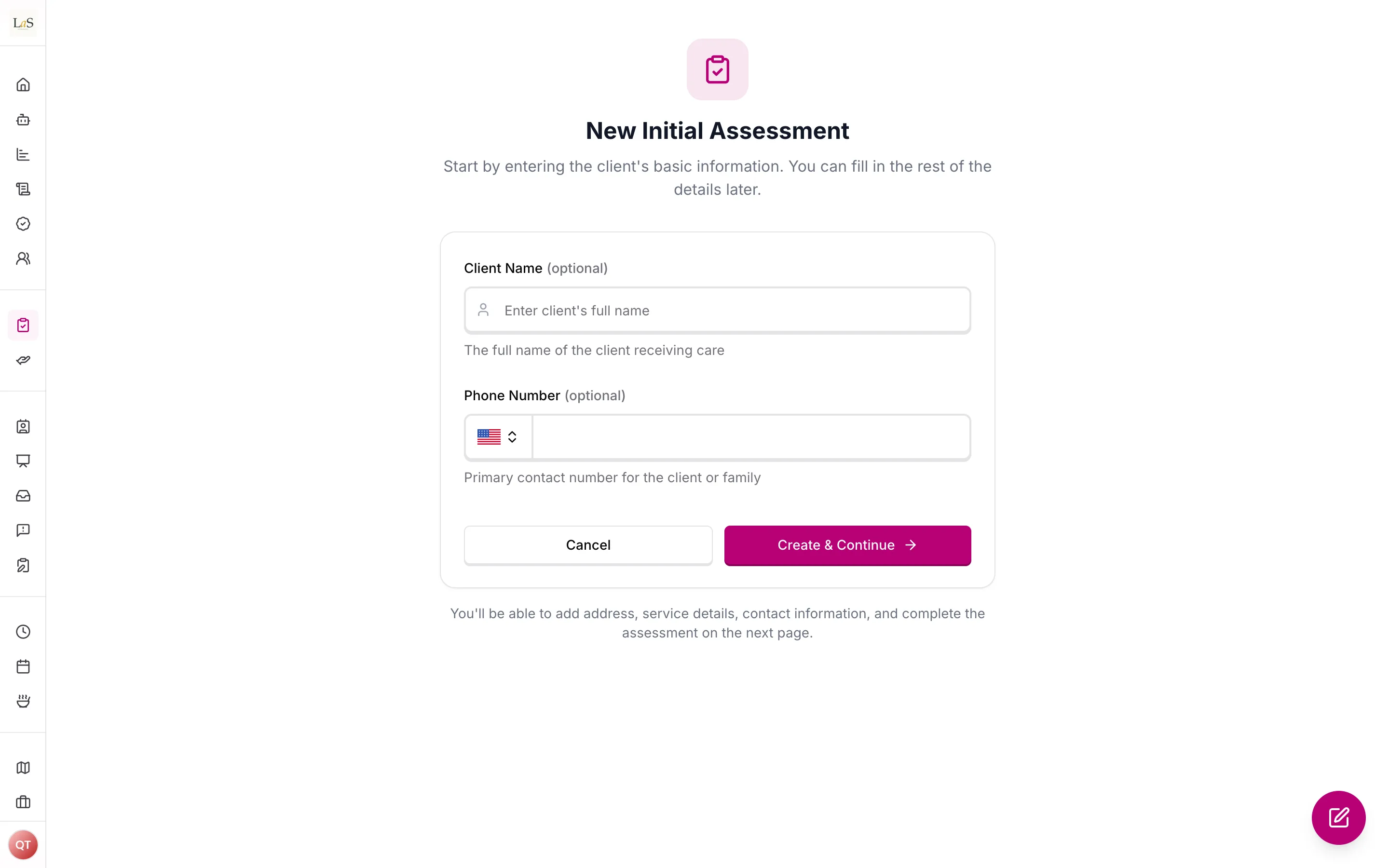
A new initial assessment needs only an optional name and phone number.
For the whole journey from a first intake to a client, with a screenshot of every step, see From intake to client.
A Completed assessment is not locked: it can be reopened to Draft explicitly (Reopen as draft in the assessment's ⋯ menu), and editing any of its content (a field, the narrative, its assessment's answers, or the rates) reopens it to Draft automatically, with the note "Reopened by editing" in its history. A save that changes nothing leaves it Completed. Either way it must be marked complete again before it can be converted, so a Completed assessment has always passed the completeness check on what is stored. The one hard lock is conversion — once the assessment is linked to a care proposal, its status is frozen and it cannot be edited or converted again until the link is removed (by deleting the proposal).
Converting asks first. Conversion is one-way, so the Convert button opens a confirmation that says what is copied to the proposal and what is left to do there; the request is sent only when it is confirmed. Conversion checks completeness again on what is stored and names anything missing.
Archiving. Archive assessment in the ⋯ menu sets an assessment aside without deleting it. An archived assessment shows a banner saying so, with Restore to draft, the only way back; it cannot be completed or converted until it is restored.
Every status change is recorded in a permanent history with who made it and when.
When the proposal is later accepted and a client is created from it, the client receives a copy of the proposal's assessment — not the intake's (ABLD-37); the six library instruments are placed on the client like on every client.
Guided Narrative and AI generation
Intake runs on the the agency chose at agency setup, plus the optional guided interview (Assessment Builder, ).
- Guided Narrative. Instead of typing every field, a care manager can run the Assessment Mode interview: the assistant asks conversational questions until it has covered the care setting and the intake template's sections, then writes a warm narrative and fills in the client's details, and Anaya suggests answers for the intake's assessment from the interview, each for staff to review before the intake can be completed. It is optional — the assessment can be filled in by hand — and it does not by itself mark the assessment Completed.
- Durable generation with clarification-only review. Generation runs as a single durable job per assessment (only one in flight at a time). When a high-value fact is missing or ambiguous, the run pauses and asks the care manager one source-cited, choice-based clarifying question, then folds the answer back in — there is no separate approve/reject review gate. The generated draft auto-saves as a Draft for the care manager to edit and complete.
Rules
Implementation status — audited against
apps/backend/src/initial-assessments,packages/shared/src/types/intake.ts, andapps/backend/src/ai/agents/initial-assessmenton 2026-07-18; , , , and re-audited on 2026-09-26. Rules rewritten on 2026-10-01 for template-driven intake were re-audited on 2026-10-06, when it shipped. ✅ In code · ⚠️ Partial (built, but doesn't fully match the rule) · 🚧 Spec only (not yet built). Retired rules carry no tag.
- AS-1 — An initial assessment is always created in Draft, with an empty intake, by agency staff on the web dashboard. (✅ In code)
- AS-2 — An initial assessment can only be marked Completed when the prospect's first and last name, date of birth, and a full address (including the city and state), the service type, at least one complete Care Circle member (name, phone, a valid email, and relationship), at least one proposal addressee, and a resolved responsible party (the client or a Care Circle member) are all present — and the intake's assessment can be completed: every question the intake template marks as needed is answered, on the edition the assessment is pinned to, and no answer Anaya suggested is left to review (ABLD-11, ABLD-25). Completing the intake completes its assessment. Incomplete assessments must be rejected with a clear list of missing fields and questions. These are the fields the converted proposal needs before it can be submitted for approval, so a Completed assessment never converts into a proposal that cannot move. (⚠️ Partial — the checks are in code, and email format is enforced only at completion (drafts accept any string); the missing details and the assessment's unanswered questions are not listed together: the questions are named only once the client's details are complete)
- AS-3 — Initial assessment status can only move along the lifecycle above: Draft ↔ Completed, Draft/Completed → Archived, Archived → Draft, Completed → Converted. A Completed assessment can be reopened to Draft — explicitly, or automatically when any of its content is edited; a save that changes no content does not reopen it. The one hard lock is conversion: once the assessment is linked to a care proposal, its status is frozen and it cannot be edited or converted again until the proposal is deleted. (✅ In code — the automatic reopen was marked in code from 2026-07-18 but was not built until 2026-09-26)
- AS-4 — Only a Completed initial assessment can be converted into a care proposal, and conversion re-checks on what is stored, naming anything missing. An Archived or Draft assessment can never be converted. An assessment converts into one proposal however many times Convert is pressed: while a conversion is under way, or once it has finished, another is refused with a message saying so, and a conversion that is taking longer than usual says it may still finish and asks the person to refresh rather than convert again. (✅ In code)
- AS-5 — An initial assessment can be converted at most once. While it is linked to a care proposal, its status cannot be changed and it cannot be converted again. (✅ In code)
- AS-6 — Converting copies the intake onto a new Draft care proposal without loss: identity, measurements, address, pets and client photo, the Care Circle, responsible party and proposal addressees, care-decision involvement and benefits, service type, the chosen service add-ons as they were copied onto the intake, and weekly schedule, the rate computation (copied as-is — nothing is recomputed), and the narrative. The proposal gets its own assessment on the proposal template, and the intake's answers are carried into it as ABLD-36 says: copied as a Draft when the templates are the same, suggested by Anaya when they differ — nothing lands Completed by copying. Later edits to either side do not affect the other. (✅ In code)
- AS-7 — If the linked care proposal is deleted, the initial assessment returns to Completed, with an audit note, and may be converted again. (✅ In code)
- AS-8 — Duplicating an initial assessment creates a fresh Draft copy owned by the person duplicating, with no link to any care proposal. (✅ In code)
- AS-9 — Deleting an initial assessment can optionally delete the linked care proposal at the same time; the person deleting must choose explicitly, and is offered the choice only if they may also delete care proposals. (✅ In code)
- AS-10 — Every initial assessment status change is appended to a permanent history (status, note, time, author); the current status is always the newest entry. History is never rewritten. (✅ In code)
- AS-11 — Staff with "view own" access see only initial assessments they authored; staff with "view all" access see every assessment in their business. There is no in-between tier. (✅ In code)
- AS-12 – AS-17 — moved to Care Assessments as rules – . Retired; must not be reused.
- AS-18 – AS-22 — moved to Change of Conditions as rules – . Retired; must not be reused.
- AS-23 – AS-24 — moved to Scheduling & Shifts as rules – (the care readiness quiz is a shift-operations concern). Retired; must not be reused.
- AS-25 — Retired. This rule previously required a Completed assessment to be immutable (never reopened to Draft). The product went the other way — editing a Completed assessment reopens it to Draft, and the prior state is kept in the status history — so immutability is not pursued. The lifecycle is now governed by ; the only hard lock is conversion. Must not be reused.
- AS-26 — Every initial assessment runs on the agency's : the published template the agency chose at agency setup (ABLD-35), plus the optional guided interview. A new intake starts its assessment on that template's live edition and keeps that edition for life. Choosing the template is part of agency setup, and staff wait at the setup gate until it is done (ACCESS-40, ). The agency may change the template later; intakes already started keep theirs. (✅ In code)
- AS-27 — An initial assessment may be filled in through the (Assessment Mode): the assistant interviews the care manager, writes the narrative and fills in the client's details, and Anaya suggests answers for the intake's assessment from the interview. Those answers are suggestions: each shows what it came from, and the intake can't be completed while any is unreviewed (ABLD-25). The care manager owns and edits the draft directly, and completing the assessment is the separate deliberate action gated by . (✅ In code)
- AS-28 — Retired 2026-10-01. This rule made the intake's Simplified Routine Task Inventory the assessment that grounds AI generation once the intake is converted, and said no RTI-E, ACL/ACLS-5 or ADM is captured on the intake. The intake and the proposal now run on templates the agency chooses, and proposal generation is grounded in the proposal's own answers (CP-30). Must not be reused.
- AS-29 — An initial assessment is a shared client intake — the identical data shape used by the care proposal and (later) the client record — so nothing is re-entered when it is converted. (✅ In code)
- AS-30 — Contacts are captured as a : everyone involved in the client's care other than the client, each with a relationship and one or more roles. The client is never a Care Circle member; where the client must be referenced (as responsible party or addressee) a reserved client reference is used. (✅ In code)
- AS-31 — Every completed assessment must have a resolved responsible party — the client themselves or an existing Care Circle member. It is never auto-invented: an unset or stale pointer resolves to no one, and the platform must not fall back to the first contact. (✅ In code)
- AS-32 — AI generation is a single durable run per assessment (only one in flight at a time). It requires a Guided Narrative transcript that has covered every gated topic (AMODE-8), and it grounds every structured field in that transcript, saving the narrative and the client's details together; the answers for the intake's assessment follow as reviewed suggestions (). (✅ In code)
- AS-33 — Human-in-the-loop during generation is clarification-only: the run may pause to ask the care manager a single source-cited, choice-based question when a high-value fact is unclear, and folds the answer back in. There is no approve/reject review gate, and generation does not by itself mark the assessment Completed. (✅ In code)
- AS-34 — Drafts autosave freely with partial or invalid data (including malformed emails and incomplete Care Circle members); email format and required-field validation are deferred to completion (). Editing a Completed assessment reopens it to Draft (). (✅ In code — the reopen since 2026-09-26)
- AS-35 — A client photo is optional on the intake; when none is uploaded a default avatar is generated automatically, and the photo (or generated avatar) travels with the intake on convert. (✅ In code)
- AS-36 — The intake captures the requested service with the agency's (ABLD-38) and a weekly schedule, plus a rate computation (previously proposal-only); all copy to the proposal on convert. The rate is the client's city rate, else state rate, else base rate, with each chosen add-on's extra hourly price added to every hourly row — no assessment score changes it (CP-34). Computing rates requires the initial-assessment manage permission and manual rate overrides require the care-proposal rates permission. (✅ In code)
- AS-37 — An initial assessment can't be created, or converted into a care proposal, until the agency's setup is done (ACCESS-40): the request is refused with what is still missing, whatever screen it came from. (✅ In code)
Who can do what
| Action | Who is allowed |
|---|---|
| Create, edit, complete, reopen, archive, restore, duplicate, or delete an initial assessment | Agency staff (owner, admin, care manager) with the matching initial-assessment permission |
| Delete the linked care proposal along with the assessment | Only staff who also hold the care-proposal delete permission |
| Run the Guided Narrative / AI generation and compute rates | Agency staff with the initial-assessment manage permission |
| Override the computed hourly rate | Agency staff with the care-proposal rates permission |
| Convert an initial assessment into a care proposal | Agency staff with the convert permission |
| Family and medical professionals | No access to initial assessments |
Decisions needed
- (Resolved 2026-10-01 by template-driven intake: the intake runs on a template the agency chooses at agency setup (, ABLD-35). On 2026-09-29 the Assessment Builder had kept it fixed.) Assessment Builder (). Whether to build agency-configurable intake domains at all, or commit to the fixed standard form as canonical.
How is this page?
Last updated on