ARMI Marketplace
Part of the Anaya Care Handbook — the source of truth for how the product must behave. When the product needs to change, change this document first, then make the system match it.
What this covers
This page governs the : Anaya's vetted pool of independent care professionals that an agency can discover, contact, and book to cover shifts. The marketplace is built around each ARMI's profile, a three-layer availability calendar, an availability-aware search filter tied to Job Postings, and a booking flow that ends in a confirmed shift on the Client Calendar. ARMI stands for Above and Beyond, Respect, Mission, Integrity — the values every ARMI commits to during validation.
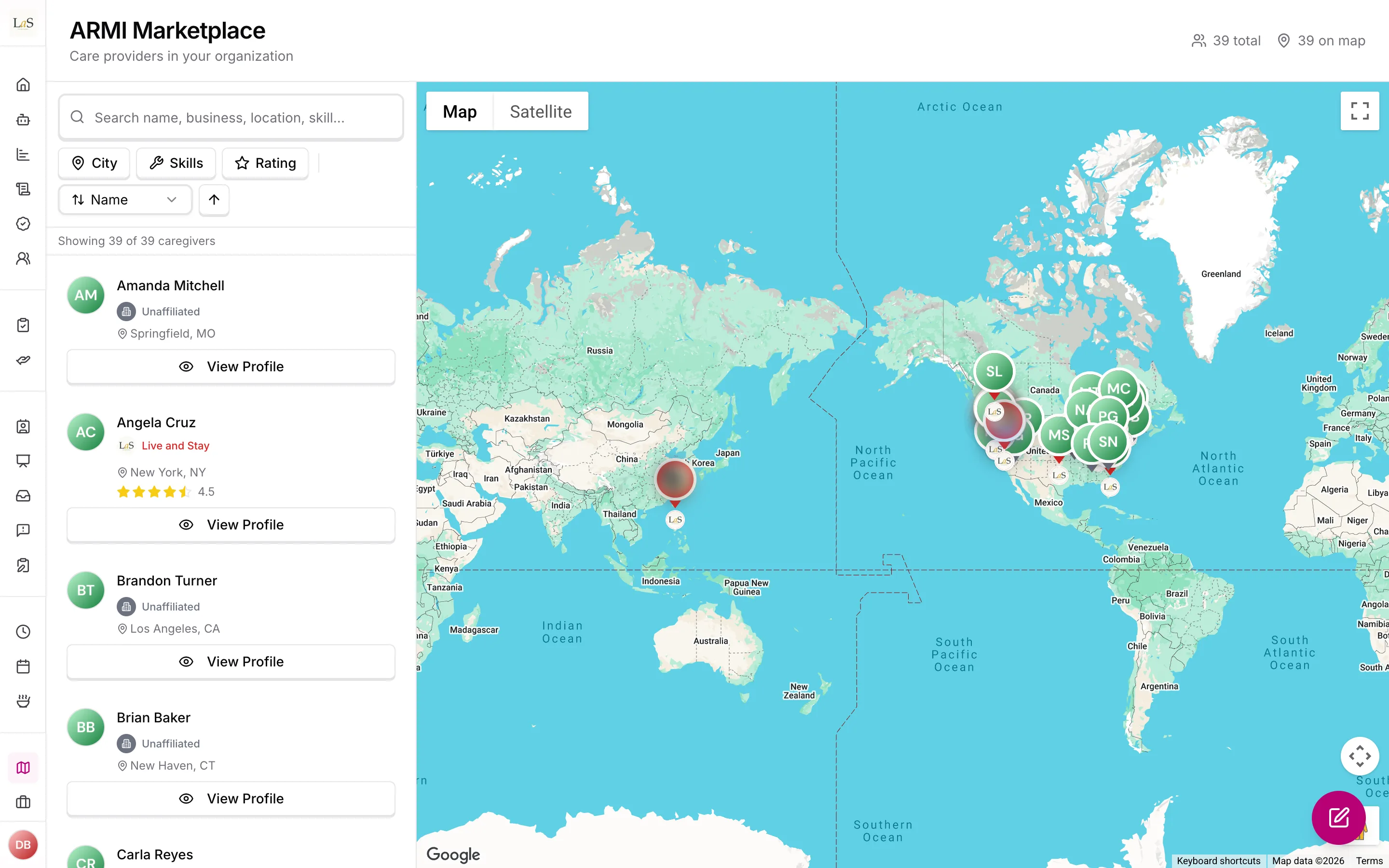
The page also still governs the older care provider map (the dashboard page once labelled ): a map and list view of an agency's own care providers plus independent ones, showing each provider's location, photo, average rating, and skills. The map is the only part built today; the marketplace itself is specified but not yet built.
Key terms
- ARMI — a qualified, vetted independent care professional in the marketplace; the acronym stands for Above and Beyond, Respect, Mission, Integrity, and is introduced once during onboarding.
- ARMI Marketplace — Anaya's vetted pool of independent care professionals that agencies can search, contact, and book.
- ARMI validation — the gateway process (identity and eligibility documents, the ARMI Values in Practice course, and CNA registry verification where applicable) that activates a care professional in the marketplace.
- ARMI profile — the public marketplace card for an ARMI, showing badge level, expertise, certifications, specializations, training completions, star rating, languages, and committed hours.
- Caregiver Level Badge — a Level 1–4 classification set by the originating agency, reflecting tenure, certification, areas of expertise, and specialization achievement.
- Availability calendar — the timezone-aware record of when an ARMI is willing and free to work, combining weekly available windows, date-specific overrides, and the Anaya shifts they already hold.
- Care provider map — the existing map/list view of care providers with their location, rating, skills, and agency affiliation.
- Independent care provider — a care provider account not attached to any agency, visible on the map as available talent.
How it works
The care provider map (today)
Agency staff open the ARMI page on the web dashboard. The map plots care providers at their stored address coordinates; the list alongside shows each provider's name, photo, star rating, skills, and which agency they belong to (or that they are independent). Filters narrow the view, and providers can be sorted by rating. When viewed from within an agency, the map shows that agency's own care providers plus independent providers.
Becoming an ARMI
Any qualified care professional can become an ARMI — HCAs, CNAs, HHAs, and others. A CNA certification is a credential displayed on the profile, not a restriction: an ARMI who holds a CNA can still work in any care provider role. To activate, the care professional registers and submits identity and eligibility documents, completes the ARMI Values in Practice gateway course through the Training Module, and — for CNAs — submits their CNA certification for registry verification, including a revoked-status check. The marketplace activates the account once validation completes.
The ARMI profile
Each profile carries the information an agency needs to decide before reaching out: the Caregiver Level Badge (Level 1–4, set by the originating agency), areas of expertise (such as 1-on-1, B&C, ALF), certifications including CNA status, completed specializations, Training Module completions, a star rating from completed shifts, languages spoken, and total committed hours — all visible before a booking is made.
The availability calendar
An ARMI declares recurring weekly available windows in one timezone, with effective start and optional end dates. Date-specific overrides can make a normally available period unavailable (time off) or add an exceptional available window. A date override wins over the weekly pattern for the interval it covers. The platform then removes time occupied by the Anaya shifts the provider already holds. These commitments cannot be manually overridden.
Care providers manage this record primarily in the mobile app because mobile is their operational workspace. Me → Work Availability opens the full editor, and both assigned and unassigned provider home screens show a persistent setup banner until at least one weekly window has been saved. The web profile remains a secondary editing surface. The mobile job application flow sends the provider back to availability setup when it is incomplete, and otherwise shows how the posting's weekly schedule sits against their declared hours. There is nothing to select: availability is declared once, on the provider's own record, and every posting is read against it.
Finding and booking an ARMI
Every job posting states its shift pattern — weekdays plus clock times — in the same vocabulary ARMIs declare availability in, so the marketplace can cross-reference every ARMI availability calendar in real time and rank by fit. ARMIs available for only part of the pattern are flagged, not excluded; ARMIs holding a conflicting committed shift are flagged; and an ARMI whose calendar has not been updated is flagged with a warning. The same search can apply location, care professional type, certifications, minimum star rating, languages, specializations, training completions, and caregiver level filters at the same time.
From there the booking flow runs: discovery (browse filtered results or post a job), secure in-platform contact, the agency's own hiring decision (including background checks and employment decisions — these are the agency's responsibility), and a confirmation step where both parties confirm. On confirmation the slot auto-blocks in the availability calendar and a shift entry is created on the Client Calendar for the agency, the ARMI, and the assigned client. The ARMI then delivers the shift through the platform, and the agency and/or representative rate the ARMI afterward, feeding the marketplace star rating.
Rules
Implementation status — the full identity, validation, directory, and booking product remains planned. The shared availability record, mobile and web editors, incomplete-availability banner, coverage-bundle evaluation, concrete shift selection, and submit/accept/commit rechecks are now implemented through Job Postings. The care provider map (, ) also already exists. Legend: ✅ In code · ⚠️ Partial · 🚧 Spec only (not yet built).
- MAP-1 — The care provider map shows the viewing agency's own care providers and independent (unaffiliated) care providers. One agency's staff must never see another agency's care providers on it.
- MAP-2 — A map entry may show the provider's name, photo, location, average rating, skills, and agency affiliation — never contact details or anything from their employment record.
- MAP-3 — ARMI stands for Above and Beyond, Respect, Mission, Integrity; the full acronym is introduced once during care provider onboarding and the brand name carries it thereafter. (🚧 Spec only)
- MAP-4 — Any qualified care professional — HCA, CNA, HHA, or other — can be an ARMI; a CNA certification is a credential displayed on the profile, not a restriction, and an ARMI holding a CNA can work in any care provider role. (🚧 Spec only)
- MAP-5 — ARMI validation requires the care professional to register and submit identity and eligibility documents, complete the ARMI Values in Practice gateway course via the Training Module, and — for CNAs — submit their CNA certification for registry verification including a revoked-status check; the marketplace activates the account only on successful completion. (🚧 Spec only)
- MAP-6 — Each ARMI profile displays the Caregiver Level Badge (Level 1–4 set by the originating agency to reflect tenure, certification, areas of expertise, and specialization), areas of expertise (such as 1-on-1, B&C, ALF), certifications including CNA status, completed specializations, Training Module completions, a star rating, languages spoken, and total committed hours — all visible to agencies before a booking. (🚧 Spec only)
- MAP-7 — An ARMI's declared availability consists of timezone-aware recurring weekly available windows with effective dates plus date-specific available or unavailable overrides. A single window never wraps past midnight; overnight availability is two day-boundary segments meeting exactly at
24:00/00:00. (✅ In code) - MAP-8 — A date-specific override wins over the weekly pattern for its interval; the Anaya shifts a provider already holds block matching time and cannot be manually overridden. (✅ In code)
- MAP-9 — When an agency creates or reviews a job posting, the marketplace cross-references the posting's weekly schedule against live declared availability and date overrides, and against the shifts a provider already holds. (⚠️ Partial — applicant and acceptance evaluation ships; directory-wide marketplace search is still planned)
- MAP-10 — Declared availability shapes how a posting reads, never whether a provider may apply. Full fit, partial fit with the unfitting days named, and no fit are all shown, and none of them blocks. The single blocking condition is an incomplete availability profile, which must be clearly flagged and offer a direct path to completing it. (✅ In code)
- MAP-11 — A job-posting search can simultaneously filter ARMIs by location, care professional type, certifications, minimum star rating, languages, specializations, Training Module completions, and caregiver level. (🚧 Spec only)
- MAP-12 — The ARMI booking flow runs as discovery, secure in-platform contact, the agency's own hiring decision (including background checks and employment decisions, which are the agency's responsibility), and a confirmation step where both parties confirm. (🚧 Spec only)
- MAP-13 — On booking confirmation the slot auto-blocks in the ARMI's availability calendar and a shift entry is created on the Client Calendar for the agency, the ARMI, and the assigned client; the ARMI then delivers the shift through the platform. (🚧 Spec only)
- MAP-14 — After the shift, the agency and/or representative rate the ARMI, and that rating feeds the marketplace star rating. (🚧 Spec only)
- MAP-15 — Labor-compliance controls apply to ARMI bookings: a daily hour cap, rest-period enforcement preventing back-to-back shifts without sufficient rest, weekly committed-hour visibility, state-specific labor-law flags based on work location, and an overtime alert when a new booking would push hours into overtime (see Performance Evaluation). (🚧 Spec only)
- MAP-16 — Hiring through the ARMI Marketplace is available to Tier-1 agencies only; Tier-2 representatives can view the marketplace but cannot hire. (🚧 Spec only)
- MAP-17 — Weekly availability windows must not overlap, must have a positive duration, and may cross midnight only as validated day-boundary segments. Adjacent windows that merely touch count as continuous availability, so one shift may be covered by more than one window on the same day. The editors must offer overnight entry directly and write both segments themselves. (✅ In code)
- MAP-18 — Availability evaluation converts each proposed shift to an absolute interval and then evaluates it in the provider's declared timezone, including daylight-saving transitions. (✅ In code)
- MAP-19 — Care providers manage availability primarily from the mobile app, with a secondary web-profile editor. Assigned and unassigned mobile home screens must show a setup banner until availability is complete; an incomplete profile reached from a job flow must provide a direct path to setup. (✅ In code)
- MAP-20 — Availability is re-evaluated when a posting is viewed, when an application is submitted, when an application is accepted, and — the only moment it can refuse anything — when a care manager assigns a shift. (✅ In code)
- MAP-21 — The weekly availability editor must offer one-tap presets for the common shift patterns — weekdays, around-the-clock (24 hours every day), weekday overnights, and weekends — and must state that applying one replaces the current weekly hours before it does so. Date-specific overrides are never affected. (✅ In code)
- MAP-22 — A care provider must be able to copy one day's hours onto any set of other days in a single action. The copy replaces the target days rather than merging into them, days that already hold hours are named before the copy is confirmed, and a source day whose hours run to midnight must say that the following morning's half is not carried across. (✅ In code)
- MAP-23 — Adding hours must never produce an invalid schedule: a new window is placed in the day's first free gap, and the action is unavailable once the day is fully covered. Because a time picker has no hour 24, an end time must offer "end of day" directly so a whole-day window can be entered at all. (✅ In code)
Who can do what
| Action | Roles |
|---|---|
| View the care provider map | Owner, Admin, Care manager (web dashboard) |
| View the ARMI Marketplace and profiles | Owner, Admin, Care manager; Representative (view only) |
| Search and filter ARMIs against a job posting | Owner, Admin, Care manager |
| Contact and book an ARMI | Owner, Admin, Care manager (Tier-1 agency only) |
| Be listed and booked as an ARMI | Care provider (validated) |
Decisions needed
- Is a cross-agency care provider map intended? The map is built to optionally show every care provider across all agencies — useful as a recruiting/marketplace view, but in tension with the one-business-one-world principle. Options: agency-scoped only (own staff + independents); a deliberate cross-agency talent map with explicit consent; platform-team-only global view. (The ARMI Marketplace itself, onward, is the deliberate cross-agency talent pool — decide whether the legacy map collapses into it.)
- What location should the map show? Today it plots the provider's stored home address coordinates. Options: exact coordinates; approximate (city-level) location; only city/region text with no pin.
- Which permission gates the map and marketplace? No dedicated permission exists today. Options: reuse a users-view permission; add a dedicated care-provider-map permission; add a separate ARMI Marketplace permission.
- Directory (planned). A separate "Directory" page for browsing care providers, families, and medical professionals exists as a placeholder. Options: build it as the agency-scoped sibling of the marketplace; fold it into this page; drop it.
- How is the Caregiver Level Badge set across agencies? says the originating agency sets the Level 1–4 badge, but an ARMI is bookable by other agencies. Decide whether the originating agency's level is authoritative everywhere, or whether each agency sees its own rating of the ARMI (see Performance Evaluation).
How is this page?
Last updated on