Reassessment & Care Plan Review Cycle
Part of the Anaya Care Handbook — the source of truth for how the product must behave. When the product needs to change, change this document first, then make the system match it.
Implementation status — audited against
apps/backend/src/reassessments, the agency care-review workspace, and the caregiver clock-in flow on 2026-07-30. Routine scheduling, event triggers, accountable care-manager assignment, proposal-by-proposal review, draft preparation, final publication, task-list currency checks, and caregiver acknowledgment are in code (the standalone hospitalization/ER trigger in is the one exception — see Known gaps). The comparative-period report ships as the on Health Readings, not through the Report Generation module: is ✅, and are ⚠️ (the care-episode and future-date checks are enforced and name the period that failed; overlap and data sufficiency are not checked), and and stay 🚧. Legend: ✅ In code · ⚠️ Partial · 🚧 Spec only (not yet built).
Template-driven intake — decided 2026-10-01, live since 2026-10-06. The six care assessments are agency assessments on locked library instruments, so reassessment suggests changes question by question, on any assessment it reads, and Apply writes revisions instead of cutting a synchronized generation. , and were rewritten for it.
What this covers
This page governs the reassessment and care plan review cycle: the recurring and event-driven re-evaluation of a client that keeps the care assessments and care plan matched to how the client actually is. Each agency configures how often a routine review falls due; Anaya then schedules it and notifies the care manager. Certain events — a significant change of condition, a hospitalization, a serious incident, a return from discharge, or a representative's request — pull a reassessment forward outside the routine schedule.
It also governs the comparative-period report logic that a reassessment relies on: a side-by-side comparison of two defined periods, with extra validation so the two periods are honest and comparable. When a reassessment finds that a client's scores have changed, this page is also where the link to AI-Generated Task Instruction Steps is set, so the daily instructions that depend on those scores are flagged for regeneration.
The reassessment agent is a suggestion engine, never an editor: it proposes question-by-question changes to the client's assessments — the six care assessments and the agency's own (Assessment Builder) — and leaves them inert until the care manager applies the ones they accept.
Reassessment is the hub of the care lifecycle: it is where the loop turns around. Several modules feed into it (a significant change of condition, a discharge, a repeatedly-flagged instruction step), and its outcome feeds out to the care plan, the Care Task List, and the instruction steps.
Key terms
- Reassessment — a re-evaluation of a client's care assessments and care plan, run either on the agency's routine schedule or because a triggering event occurred.
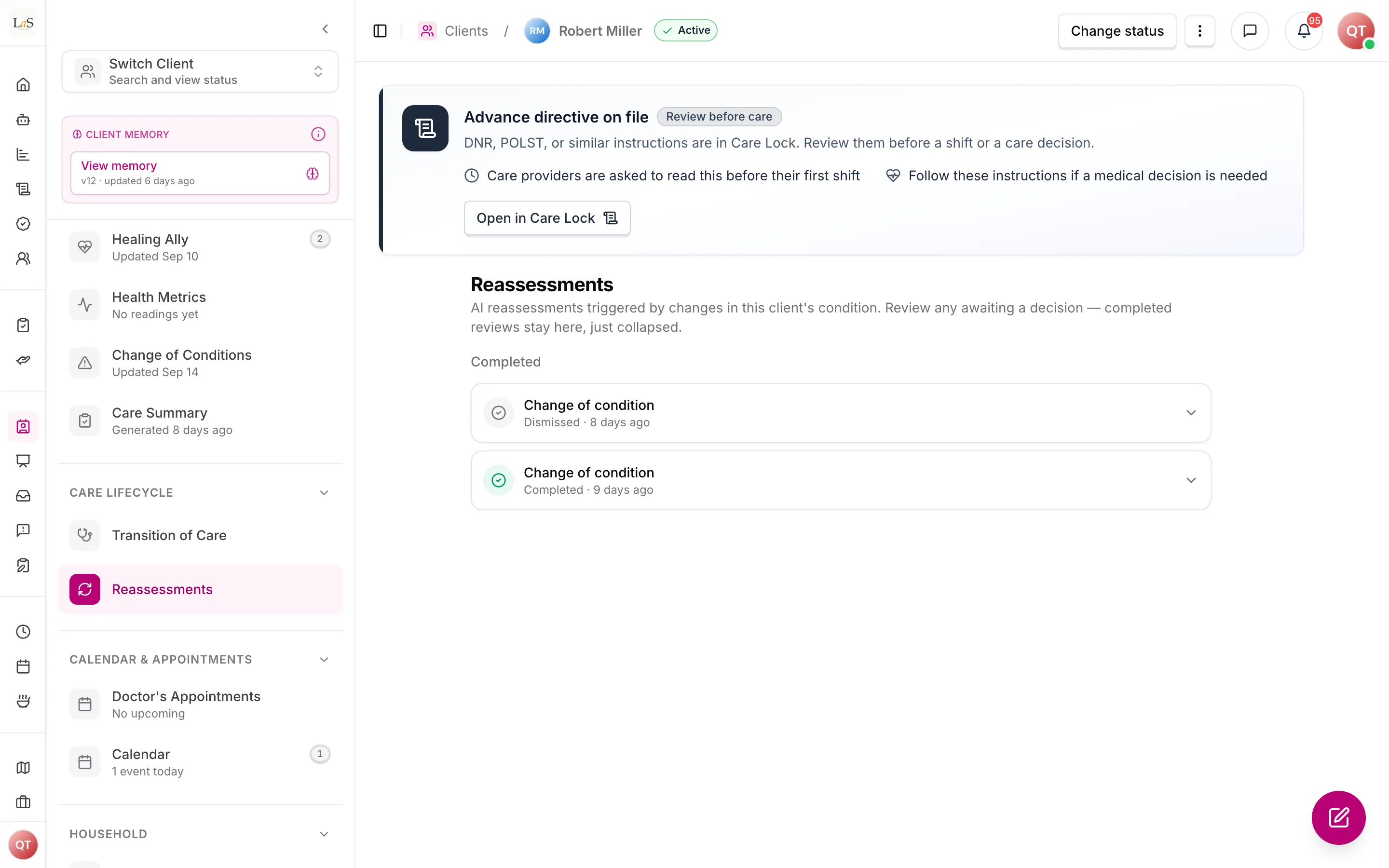
- Care review — the care manager's act of working through one open reassessment: reading what changed, deciding each proposed update, and publishing the revised care. A reassessment is the record; a care review is what a care manager does with it, and the two are named separately throughout the product. The agency-wide queue of reviews still awaiting a decision is ; a single client's full reassessment history, completed ones included, stays on that client's page.
- Reassessment interval — the agency-configured period between routine reassessments; once set, Anaya uses it to auto-schedule each next review.
- Due date — the calculated date a routine reassessment falls due, derived from the interval and surfaced to the care manager ahead of time.
- Event-triggered reassessment — a reassessment pulled forward outside the routine schedule by a defined event: significant change of condition, hospitalization or ER visit, high or critical-severity incident, return from discharge, or representative request.
- Suggested assessment change — one question-by-question proposal from the reassessment agent: the assessment, the question (and row, for a grid), its label as "template › section › question", the current answer, the suggested answer, and a rationale (). The reviewer edits it in the control that question uses on the form (a task grid's Capacity choice, an Allen mode picker, a food texture, and so on) with the agent's value as a preset. Suggestions are inert until a care manager applies them. A suggestion carried over from before template-driven intake may show as text only, with no question to apply it to.
- Accountable care manager — a staff member with care-review permission who is explicitly assigned to the client. A client may have several equal co-managers, but at least one is required before the client can become Active.
- Change package — the revisioned, human-owned set of proposed assessment, schedule, task, medical-instruction, equipment, care-plan, and communication changes. Every proposal is accepted or rejected separately; rejected proposals require a reason.
- Prepare — applies accepted assessment changes and creates a private care-plan draft. It does not change live care.
- Publish — the final care-manager approval. For material care changes, the reassessment remains open until the new care plan and every affected Care Task List are published and current.
- Care-update acknowledgment — a caregiver's confirmation that they reviewed material instructions. A pending acknowledgment blocks the next clock-in for that client unless the caregiver records an audited emergency override; assigned care managers are alerted.
- Comparative-period report — a report that places two defined periods side by side so the care manager can see what changed between them (see Health Readings, where it ships).
- Comparative period — one of the two date ranges being compared; each has a start and end and a length.
- Event-anchored period — a comparative period whose boundaries are fixed to an event date — typically the periods just before and just after a discharge or hospitalization.
- Threshold reconfiguration — a change to the alert or scoring thresholds that happened between the two periods being compared; when present it is noted in the report so differences are not misread as purely health-driven.
How it works
Routine reassessment scheduling
Each agency configures its own reassessment interval. From that interval Anaya calculates a due date for every client and notifies the care manager ahead of time so the review can be planned, not missed. The reassessment date also appears on the Client Calendar alongside care plan review dates. When the reassessment is carried out, the care manager works through the client's care assessments and care plan, records the outcome, and the next routine due date is recalculated from the interval.
Event-triggered reassessment
A reassessment can be pulled forward when one of these events occurs:
- a is recorded (see Change of Conditions);
- a hospitalization or ER visit;
- a high or critical-severity incident (see Incident Reports);
- a return from discharge, which also drives the Transition of Care flow; or
- a representative request.
An event-triggered reassessment does not replace the routine cycle — it runs in addition to it, and the care manager is notified the same way as for a routine review.
Comparative-period reporting
A reassessment leans on the comparative-period report: two defined periods placed side by side so the care manager can see what changed. The aggregation layer computes each metric for both periods, so the report can tell a new observation apart from an ongoing pattern (see Report Generation & Audience Management).
For a post-discharge or post-hospitalization comparison, the periods are event-anchored — their boundaries are fixed to the event date so the comparison reads "before the event" against "after the event."
Before generating the report, the platform validates the two periods:
- each period must contain enough care data to compare;
- the periods must not overlap; and
- neither period may include future dates.
If the alert or scoring thresholds were reconfigured between the two periods, the report notes the change so a difference in alert counts is not misread as a purely health-driven change.
Proposal-by-proposal review and publication
Alongside its comparative analysis, the agent proposes changes but never selects or publishes them. An assigned care manager claims the review, then accepts or rejects each proposal in the change package. A rejection requires a clinical or operational reason. The manager also chooses the overall outcome: prepare updates, no change, monitor and revisit, or request clinical input.
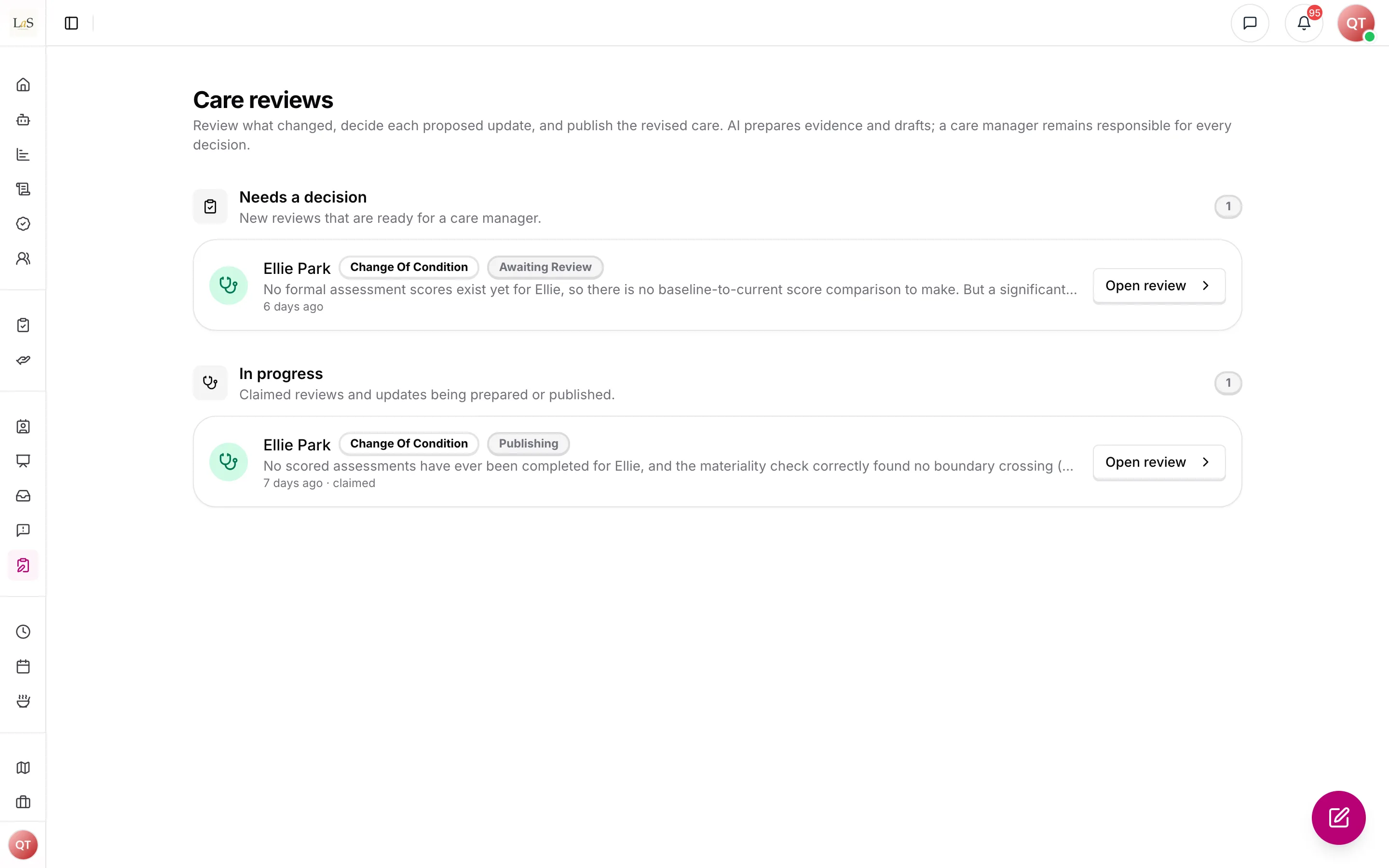
Care reviews across all clients: waiting for a decision, and in progress.
Preparing an update applies only the accepted assessment proposals — each as a revision of the assessment it changes, stamped with the reassessment — recomputes materiality, and creates a private care-plan draft. The manager reviews that result and uses a separate final confirmation to publish it. If the draft is not correct, Revise decisions discards the private draft and returns the same claimed review to its proposal decisions; it does not affect live care. Selected representatives and clinicians are notified after publication; assigned caregivers are always notified. The review is not Completed while any affected published Care Task List still points to an older care-plan version.
If preparation or the operational task-list update fails, the review moves to Needs attention with the blocking error visible. The claimed care manager can retry after resolving it. Retry resumes an already-published plan from the task-list step and never publishes the same care-plan version twice.
Scores changing flags task instructions
When a reassessment finds materially different scores, the platform flags the affected AI-Generated Task Instruction Steps for regeneration, because those steps were written from the earlier scores. The care manager then confirms or defers each regeneration; deferred regenerations stay in the care manager's review queue rather than disappearing.
The cascade from an open review, through the optional Apply step, out to the daily instructions — each step gated by a care-manager decision — is:
Rules
- RAC-1 — Each agency configures its own reassessment interval, and Anaya uses that interval to calculate the next routine due date for every client. (⚠️ Partial — the next due date is calculated from the client's own interval, or 180 days when none is set; an agency-wide interval can be stored but nothing reads it, and neither has a screen yet)
- RAC-2 — Anaya must auto-schedule routine reassessments from the configured interval and notify the care manager ahead of the due date. (✅ In code)
- RAC-3 — A reassessment due date must appear on the Client Calendar alongside care plan review dates. (⚠️ Partial — the due date is scheduled and tracked; the calendar marker is a pending web surface)
- RAC-4 — A reassessment must be triggered outside the routine schedule by any of: a significant change of condition (emitted by ); a hospitalization or ER visit; a high or critical-severity incident; a return from discharge (see ); a representative request; or a task instruction step flagged repeatedly by pattern analysis (emitted by ). (⚠️ Partial — the significant change-of-condition, significant incident, return-from-discharge, representative-request, and repeated-step-flag triggers are in code; the standalone hospitalization/ER trigger is not yet wired as its own signal — the hospital round-trip is currently reached through the return-from-discharge path ())
- RAC-5 — An event-triggered reassessment must not reset or replace the routine cycle; the routine due date continues to be tracked independently. (✅ In code)
- RAC-6 — Completing a reassessment must recalculate the next routine due date from the configured interval. (✅ In code)
- RAC-7 — A reassessment must let an assigned care manager review the evidence, assessments, current plan, and proposed operational changes together. The manager decides every proposal before preparing an outcome. (✅ In code)
- RAC-8 — The comparative-period report must place two defined periods side by side, with each metric computed for both periods so the report can tell new observations apart from ongoing patterns (see Health Readings). (✅ In code)
- RAC-9 — For post-discharge and post-hospitalization comparisons, the two periods must be event-anchored — their boundaries fixed to the event date. (🚧 Spec only)
- RAC-10 — Before generating a comparative-period report, the platform must validate that both periods contain sufficient care data, that the periods do not overlap, and that neither period includes future dates. (⚠️ Partial — both periods are clamped to the client's care episode and refused if they reach past the last reportable day; overlap and data sufficiency are not checked)
- RAC-11 — If a comparative-period report fails any of the period checks in , the platform must not generate the report and must tell the care manager which check failed. (⚠️ Partial — a failing period blocks generation with a message naming which period and why, for the checks enforces today)
- RAC-12 — If the alert or scoring thresholds were reconfigured between the two periods, the report must note that change so differences in alert counts are not misread as purely health-driven. (🚧 Spec only)
- RAC-13 — When a reassessment finds that a client's scores have changed by at least the agency-configured , the platform must flag the affected AI-Generated Task Instruction Steps for regeneration (the receiving rule is ). The default threshold is any change that crosses an independence-level or cognitive-level boundary, read from the library instruments' answers by fixed rules (ABLD-13): an Allen Cognitive Level mode that moves between Allen levels, or a Routine Task Inventory ability whose level changes by one or more. No agency score counts toward it. The threshold is configurable; the regeneration flag is not — once the threshold is met, the link must fire. Materiality is recomputed whenever suggested assessment changes are applied (), so the flag always reflects the values actually on record. (⚠️ Partial — the levels are read per ability from the instruments and recomputed on Apply, but the threshold can't be configured yet: every reassessment uses the default — see Known gaps)
- RAC-14 — The care manager must be able to confirm or defer each flagged regeneration, and a deferred regeneration must remain in the care manager's review queue rather than being dropped. (✅ In code)
- RAC-15 — A reassessment that begins from a return from discharge must drive the Transition of Care flow rather than running in isolation; it is the reassessment leg of the hospitalization round-trip defined by . (✅ In code)
- RAC-16 — The reassessment agent is a suggestion engine, never an editor: alongside its comparative analysis it proposes changes question by question on the client's assessments that it reads (ABLD-19) — each suggestion naming the assessment, the question (and row, for a grid) that it addresses on the assessment's own edition, the current answer, the suggested answer, and a rationale. A suggestion that doesn't fit that edition is refused. The care manager reviews each suggestion in the control that question uses on the form — a task grid's Capacity or Support now choice, the Allen mode, a food texture or drink thickness and similar closed choices; a number box, a yes/no, or text otherwise — with the agent's value as a one-click preset they can edit before accepting. The rationale is written in plain words, and is rejected and rephrased if it carries a clinical label (). The agent must never write to an assessment itself (). A reassessment finished before template-driven intake may show some suggestions as text only, with no question to point at; they can be read but not applied. (✅ In code — suggestions are AI-produced and may be absent on some runs)
- RAC-17 — While a reassessment is InReview, its claimed care manager accepts or rejects every proposal; rejection requires a reason. Preparing applies accepted assessment changes — each written as a revision of the assessment it changes, stamped with this reassessment, and never one whose suggestion has no question to point at — recomputes materiality (), and may create a private plan draft. There is no client-wide generation cut. It does not publish care. (✅ In code)
- RAC-18 — Every client must have at least one accountable care manager before becoming Active. Multiple assigned co-managers are equal; all receive the review notification and the first to claim owns the active decision session. (✅ In code)
- RAC-19 — AI output is advisory. Only a human care manager may decide proposals, prepare updates, or perform the final publish. (✅ In code)
- RAC-20 — A reassessment that changes care is Completed only after the approved care plan and every affected Care Task List are published against the same live plan version. (✅ In code)
- RAC-21 — All assigned caregivers are notified when material care becomes live. Selected representatives and clinicians may also be notified from the final change package. (✅ In code)
- RAC-22 — A caregiver with an unacknowledged material update is blocked from clocking in for that client. An emergency override requires a reason, remains pending for later acknowledgment, is written to the shift audit, and alerts every assigned care manager. (✅ In code)
Who can do what
| Action | Roles |
|---|---|
| Configure the agency's reassessment interval | Owner, Admin |
| Receive the due / event-triggered reassessment notification | Care manager |
| Claim, decide, prepare, and publish a reassessment | Assigned care manager |
| Assign or remove accountable care managers | Staff with Client Care Manager assignment permission |
| Request a reassessment | Representative; Care manager; Owner; Admin |
| Generate a comparative-period report | Owner, Admin, Care manager |
| Confirm or defer flagged task-instruction regeneration | Assigned care manager |
| Acknowledge a published material care update | Assigned caregiver |
Decisions needed
- Confirm the default "materially different" threshold for . now fixes the link (a material change always flags regeneration) and sets a default threshold: any change that crosses an independence-level or cognitive-level boundary. The open question is only whether to keep that default, make it a configurable delta, or treat any change to a scored item as material. The existence of the link is settled.
- How far ahead should the routine reassessment notification fire ()? The reference requires notifying the care manager "when due" but not the lead time. Options: a fixed lead (e.g. notify N days before); on the due date only; an agency-configurable lead.
- What is the minimum "sufficient care data" bar for a period ()? The reference requires enough data but does not quantify it. Options: a minimum number of documented shifts or data points; a minimum proportion of expected entries; an agency-configurable minimum.
- Should an event-triggered reassessment have a deadline and escalation? The reference defines the triggers but not a turnaround expectation. Options: a fixed deadline per trigger severity with escalation to Owner/Admin if missed; care-manager discretion with no timer.
- Does a representative's reassessment request require care-manager acceptance? The reference lists "representative request" as a trigger but does not say whether it auto-creates the reassessment. Options: auto-create on request; create a request the care manager accepts or declines with a reason.
How is this page?
Last updated on