AI Features
Part of the Anaya Care Handbook — the source of truth for how the product must behave. When the product needs to change, change this document first, then make the system match it.
What this covers
This page governs the platform's AI generation framework: drafting care plans, care provider tasks, meal plans, and Care Prints worksheets for a client; summarizing shifts and client profiles; helping staff write and dictate text; and an AI-assisted documentation helper that guides care providers as they record what they observe. AI in Anaya Care is an assistant, never a decision-maker — it produces drafts and suggestions that people review, and it must respect each business's privacy boundaries.
Three AI features have their own pages: the AI Chat Assistant (the general helper plus its safety gate), the Knowledge Base (the document library that grounds training generation), and Client Memory (the evolving per-client narrative that grounds generation for a client, replacing the old client profile summary). Related AI behaviors also live on their own pages: guided assessment intake on Assessment Mode, per-task step generation on AI-Generated Task Instruction Steps, and the AI-built report templates on Report Generation & Audience Management. Home-inventory item identification from a photograph is governed by Home Inventory (), the care readiness quiz by Scheduling & Shifts, daily motivational quotes by Daily Motivations, AI proposal content by Care Proposals, medication help by Medications, and job posting copy by Job Postings.
Key terms
- AI generation — a request where the AI drafts content (a care plan, tasks, meals, or activities) for a specific client, using that client's profile as context.
- Generation mode — the quality/speed setting for a generation: Fast, Standard, or Thorough. Thorough adds an automated quality review with refinement passes.
- Focus areas — optional topics the requester selects to steer what a generation emphasizes.
- Additional instructions — free-text guidance the requester can add to a generation request.
- Business AI defaults — per-business preferred AI settings that pre-fill every generation request for that business.
- Client memory — the evolving, AI-maintained per-client narrative that grounds generation for a client; it replaces the retired "client profile summary." Governed by Client Memory.
- Shift summary audience — the intended reader of a shift summary (for example family vs. staff); the summary's content is tailored and filtered per audience.
- AI-assisted documentation — a real-time helper that offers structured choices, guided prompts, and auto-suggestions as a care provider records an observation, so the finished note is complete and consistent.
- Keyword input — a single word or short phrase a care provider types as a starting point (for example "shouting", "fell", "not eating", "bleeding"); the helper accepts it as a valid start and builds the rest of the note through questions.
- Clarifying question — a question a generation pauses to ask when a fact it needs is missing, ambiguous, or contradicted by the client's records. The generation waits until someone answers.
- Record correction — an offer attached to a clarifying question to save the answer onto the client's or intake record, not only into the draft being written (). The AI proposes; the reviewer agrees or declines ().
- Correctable field — one of the specific fields the platform has opened for correction. Anything outside that set cannot be proposed at all (). Vital-sign baselines are correctable only by the care manager's own hand: the AI may remind, once and gently, but never proposes a value for one ().
- Inherited value — the value in force on a blank field because nobody has set one for this client — typically a standard default. Shown alongside a correction offer so a blank field is not read as "nothing is happening" ().
How it works
What the AI can create
For a chosen client, authorized staff can ask the AI to draft a , a set of care provider tasks (aligned to the client's schedules, and de-duplicated against tasks that already exist), a meal plan (honoring dietary restrictions and ingredient preferences, optionally with a photo per meal), or a Care Prints worksheet (client activities — one type, one sheet, matched to the client's interests and cognitive level). The AI also produces shift summaries, maintains an evolving (the per-client narrative that replaced the old client profile summary), runs guided question-and-answer flows that help staff fill in assessments and forms, and builds training content from the business's knowledge base.
With the Assessment Builder, Anaya also drafts an agency's own assessment templates from a description or a photographed paper form (), and suggests answers to an agency assessment from a visit conversation, each with its quote, for the care manager to review (). An agency can switch each kind of help off ().
How a generation runs
The requester picks a mode, optional focus areas, and optional additional instructions; the request form is pre-filled with the business's AI defaults. Generations run in the background — the requester sees live progress, gets notified in-app and by push notification when the generation finishes or fails, and can cancel a running generation at any time. Only one generation of a given type can run for a client at a time; asking again while one is running simply shows the one already in progress.
Changing a draft afterwards
A finished draft is a starting point, not a verdict. On a , a , a meal, or an AI draft, a panel sits beside the document: the care manager types what they want changed in their own words — "the cover letter is too formal, warm it up", "shorten the mobility recommendations", "rephrase the whole thing in plainer words" — and the AI revises the saved draft in place. The conversation stays with the document, so a later reader can see what was asked for and what changed.
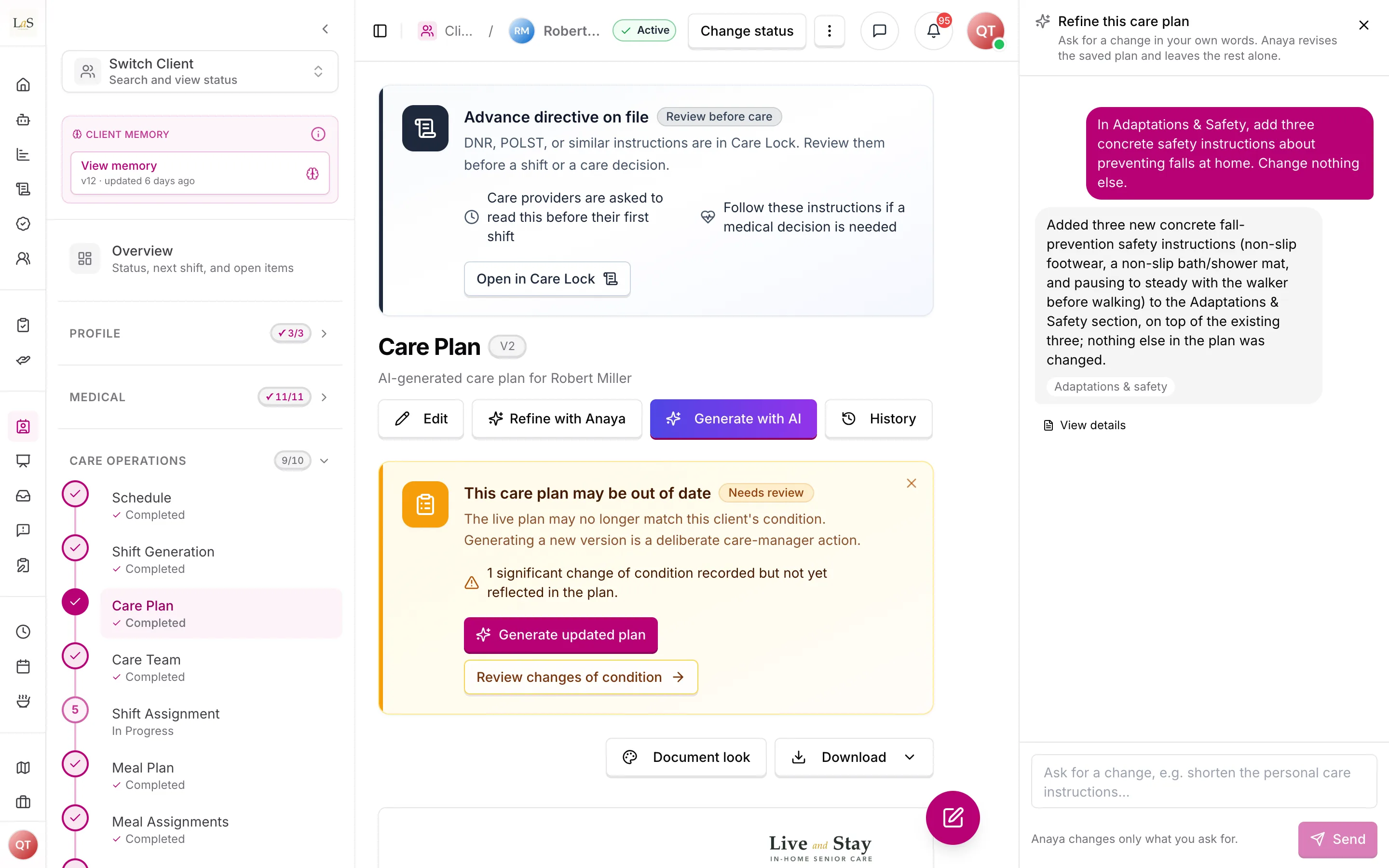
Ask for a change in your own words; Anaya revises only that part of the saved plan.
It opens from Refine with Anaya in the document's own row of actions, and it is the same panel on every one of the four. On a wide screen it takes a column down the right-hand side and the document makes room for it, so the part being discussed stays readable; on a narrower screen, where there is no room for two columns, it slides in over the side of the page instead. It stays open until it is closed, and an unsent request is still there on the way back.
Each request is a fresh, cancellable generation that starts from the document as it stands, not from a blank page. Anaya rewrites only what the request reaches and leaves everything else exactly as it was — including wording someone has already edited by hand. If a request is genuinely ambiguous, Anaya asks a clarifying question the same way any other generation does (), in the panel rather than taking over the page.
Refining is not a second kind of approval: the draft is already saved, and refining edits that saved draft. Publishing, sending and approving are unchanged.
Generation modes
- Fast — quickest single-pass draft.
- Standard — the recommended single-pass draft.
- Thorough — the draft is automatically quality-reviewed and refined, up to three passes, before it is saved.
Writing and dictation helpers
Anywhere staff write longer text, the AI can improve or rewrite a draft, continue a sentence, or transform selected text on request. Staff can also dictate: voice recordings (up to 25 MB) are transcribed to text. These helpers act only on the text the user gives them.
AI-assisted documentation
While a care provider records what they observed, the AI helps them write a complete note in real time. It offers structured choices, guided prompts, and auto-suggestions drawn from whatever the care provider has entered so far, so important details are not missed. This helper is meant to be available across the places care providers document: shift notes and daily observations, change of condition reports, incident reports, symptom and side-effect logging, and outing documentation in Anaya Walk.
A care provider can begin with just a keyword. If they type a single word or a short phrase — "shouting", "fell", "not eating", "bleeding" — the helper treats that as a valid start. It first acknowledges what the care provider wrote, then asks targeted clarifying questions to build a complete observation: who was involved, when it happened, how long it lasted, what was happening at the time, and what was observed. The tone is always supportive; a care provider is never made to feel they did something wrong by entering a short input.
When a keyword suggests a possible emergency (for example "not moving" or "bleeding heavily"), the helper prompts an immediate safety check or 911 guidance before it continues with documentation — getting help comes before finishing the note.
Shift summaries and audiences
The AI writes shift summaries tailored to the intended audience. A family-facing summary must only contain sections appropriate for families — alarming internal caregiver notes are removed and only the most important health warnings are kept — while staff-facing summaries can include the full picture. The audience filter is a fixed product rule, not an AI judgment, and it is applied both when the summary is written and again before it is shown.
Rules
- AI-1 — Access to AI generation tools must be controlled by a dedicated business permission; only users granted it can run generations or change AI settings.
- AI-2 — Each business can set its own AI defaults (preferred setup, mode, and standing instructions). These defaults must apply to every generation request made for that business, regardless of how the request is made.
- AI-3 — Every generation request must offer three modes — Fast, Standard, and Thorough — and Thorough must always include an automated quality review with up to three refinement passes before the draft is saved.
- AI-4 — Every AI generation for a client must use that client's own current profile (details, medications, schedules, and assessments) as its context, and never another client's information.
- AI-5 — Only one generation of a given type can run for a client at a time. A duplicate request must not start a second run; it must surface the run already in progress.
- AI-6 — A requester must be able to cancel a running generation, and cancellation must stop the work promptly.
- AI-7 — The requester must be notified of generation progress, completion, and failure, both inside the app and by push notification.
- AI-8 — All AI-generated content (care plans, tasks, meals, activities, training material, summaries) is a draft. It must be reviewed by a qualified person before it directs anyone's care.
- AI-9 — When a generation fails, the failure must be clearly reported. The system must never present incomplete or fallback output as if it were a normal, finished result.
- AI-16 — Family-facing shift summaries must exclude staff-only content. The audience filter is a fixed rule applied to every summary, both when it is written and before it is shown.
- AI-17 — Client information sent to outside AI services must be the minimum needed for the task, and such services may only be used under agreements that properly cover personal health information.
- AI-18 — Free-text instructions a user adds to an AI request must not be able to override the product's safety rules, audience filters, or privacy boundaries.
- AI-19 — Voice transcription must enforce its limits: recordings up to 25 MB, with a cap on how often a user can transcribe per minute.
- AI-20 — Each business's client information, knowledge base, and AI conversations are isolated to that business. AI features must never mix one business's data into another's results.
- AI-21 — AI-assisted documentation must be available in real time wherever care providers record observations — shift notes and daily observations, change of condition, incident reports, symptom and side-effect logging, and outing documentation (Anaya Walk) — offering structured choices, guided prompts, and auto-suggestions drawn from what the care provider has already entered. (🚧 Spec only)
- AI-22 — The documentation helper must accept a single word or short phrase as a valid starting point, acknowledge the care provider's input first, and then ask targeted clarifying questions (who, when, how long, what was happening, what was observed) to complete the observation. (🚧 Spec only)
- AI-23 — When a care provider's input indicates a possible emergency, the documentation helper must prompt an immediate safety check or 911 guidance before continuing with documentation. (🚧 Spec only)
- AI-24 — The documentation helper must never make a care provider feel they did something wrong for submitting a short or incomplete input; its prompts must stay supportive. (🚧 Spec only)
- AI-25 — When a generation asks a clarifying question whose answer belongs on a client or intake record, the question must offer to save that answer to the record as well as to the draft. Answering must not be the only outcome — otherwise the same gap is found and asked about on every later generation. (✅ In code — care plan, care proposal, initial assessment, reassessment, meal plan, care-provider tasks, engagement, job posting, and client memory)
- AI-26 — A record correction is only ever offered. The AI proposes the field and a value; a person decides. Nothing an AI proposes may reach a record without someone explicitly agreeing to it on the answer card. This is and applied to data rather than care documents. (✅ In code)
- AI-27 — Only fields the platform has explicitly opened for correction may be proposed. A generation must not be able to reach any other part of a record, and a proposal outside that set must be refused rather than partially applied. Corrections are refused outright if they would leave the record in a state the ordinary edit screen would reject. (✅ In code)
- AI-28 — Every correction offer must show the reviewer what is on record today, what is proposed, and why — including, when a field is blank, what value is being used in the meantime, so an empty field is not mistaken for nothing happening. (✅ In code)
- AI-29 — Filling a blank field may be pre-selected for the reviewer; replacing a value a person already entered must never be. Either way the choice is visible and reversible before submitting. (✅ In code)
- AI-30 — Applying a correction must be recorded: what changed, from what to what, who agreed, and which generation proposed it. A correction to a care assessment carries the same consequences as one applied during a reassessment review — including the revision it writes on the assessment () and the downstream regeneration flag ( → ) — because the effect on care does not depend on which screen approved it. (⚠️ Partial — the correction is recorded and written as a revision of the assessment, but nothing recomputes materiality after it, so it raises no regeneration flag of its own; a correction to a completed assessment returns it to Draft, and only completing it again flags the client's task lists, under )
- AI-31 — A consented HITL answer may fill a blank care-assessment field. Hallucinated paths that do not name a real leaf are still refused. Nothing is written unless the reviewer ticks "also save this". (✅ In code)
- AI-32 — The AI never proposes or suggests a health reading, alert number, or baseline, on any surface — not in a generated draft, not as a pre-filled value on a clarifying question, not as an "Anaya suggests" preset. Those numbers come from the client's healthcare-provider direction and are typed in by a care manager on the client's Health Baselines (Health Readings ). When a client has none, the AI may remind — once, gently, and only as a reminder the care manager can act on or skip ("If there is a doctor's order with blood-pressure numbers to watch for, you can check it and add them here — if not, just skip this"): the readings form is offered empty, with no choices and no suggested numbers. Pointing the care manager to the doctor's order is helpful and wanted; questioning their work is not — the AI never asks why a baseline is missing or whether they are sure. Where a client has no baselines, AI drafts say nothing about readings. No AI surface may describe the agency as monitoring, tracking, or watching a client's health — it records a reading the family asked for and reports anything unusual; this is enforced at runtime, not merely asked for in the prompt: the vocabulary is rejected in the AI's clarifying questions and in the drafted care-plan Health Readings section, and the draft is handed back for a rewrite rather than only logged. When the care manager answers the reminder and ticks "also save", that save also marks the reading Check on shifts (Health Readings ) — the consent row says so in plain words; it is the care manager's action, not an AI proposal. (✅ In code)
- AI-34 — A completed care-proposal, care-plan, job-posting or meal draft, or a training section (Trainings ), can be changed by asking, in plain words, on the document's own screen. Each request revises the draft as it currently stands — including any edits a person has made by hand — never a blank one, and it never discards the parts the request did not reach. (✅ In code — care proposal, care plan, job posting, meal and, since 2026-09-27, an agency's training from its editor)
- AI-35 — A refinement changes the least that satisfies the request. A request that names no section touches only the prose it plainly refers to; a request that is explicitly document-wide ("rephrase the whole thing") is honoured in full, in one pass. Where the wording genuinely will not settle how far to reach, Anaya takes the narrower reading and says so, rather than rewriting work the care manager has already reviewed. (✅ In code)
- AI-36 — A request about voice never changes facts. Rewriting warmer, shorter or plainer keeps every recommendation, clinical detail, time and name exactly as it is. Adding, removing or correcting content is the reverse: the content changes and the voice is left alone. (✅ In code)
- AI-37 — Every refinement request and its outcome is kept with the document and shown to staff — including requests that failed or were cancelled, so a request that changed nothing is never mistaken for one that was applied. What a refinement reports as changed must be what actually changed, established by comparing the document before and after rather than by asking the AI what it did; where the two disagree, staff are shown what moved without being mentioned. Each refinement is also recorded in the activity log against the document it changed. (✅ In code)
- AI-38 — Only one refinement runs at a time per document. Asking again while one is running says so rather than queueing a second request the AI would never see. (✅ In code)
- AI-33 — Every generation, summary, and helper on this page writes in plain words, per and on Anaya — the AI Persona: about a 12-year-old's reading level, no clinical or diagnostic labels, what the person does or what was seen instead. Summaries for medical audiences are not exempt — they still get the exact readings, trends, and dates, in plain words. (✅ In code)
- AI-39 — Plain is not the same as short, and only settles the first. Care proposals and care plans additionally carry a per-item length budget: each care-area recommendation (Care Proposals ) and each line a care provider follows (Care Plans & Tasks ) is one plain sentence — about 12–20 words and never over 28 for a proposal item, about 12–25 words for a care-plan line. The two numbers differ because the readers do: a proposal is skimmed by a family deciding whether to buy care, a care-plan line is followed by a provider mid-shift. Other surfaces keep their own budgets; there is no product-wide number. A qualitative instruction ("short sentences") does not substitute for one — the model calibrates to whichever number the prompt actually states, and to the length of the worked examples beside it, so both have to say the same thing. additionally enforces its ceiling deterministically rather than by prompt copy alone. (✅ In code — care proposal, care plan)
Note: Rules AI-10 – AI-13 were retired and live on as – on AI Chat Assistant; AI-14 → on Knowledge Base; AI-15 → on Trainings. IDs are never reused.
Note: The — a one-shot AI blurb regenerated from scratch — has been replaced by the evolving (rule prefix MEM). 's client-scoped-context and 's draft-review rules continue to apply to what the AI drafts from that memory.
Who can do what
| Action | Who is allowed |
|---|---|
| Change the business's AI defaults | Owner, Admin (with the AI tools permission) |
| View the business's AI defaults | Any staff member of the business (read-only) |
| Run care plan / task / meal / activity generation for a client | Owner, Admin, Care Manager (with the AI tools permission) |
| Cancel a running generation | The person who requested it |
| Review and approve AI-generated drafts | Qualified agency staff (per the owning feature's rules) |
| Use writing help and dictation | Any signed-in user, on text they can already edit |
| Use AI-assisted documentation while recording observations | Care providers (and any staff who record the supported observation types) |
Decisions needed
- Should a business's AI defaults be binding or just convenient? Today they pre-fill the request form. Options: enforce them on every request server-side; keep them as form defaults only; or make enforcement a per-business choice.
- What should Standard mode actually do? Today only Thorough runs the quality review, leaving Fast and Standard nearly identical. Options: give Standard a single quality-review pass; merge Fast and Standard into one mode; or keep three modes and differentiate them some other way.
- What should happen when a care plan generation fails partway? Options: save nothing and report a clear failure; save a clearly-labeled partial draft that cannot be treated as complete; or keep saving a minimal fallback (current behavior) but flag it loudly for review.
- Should every generation feature offer the same options? Engagement activity generation offers fewer choices than care plans, tasks, and meals. Options: align all generation features on one consistent set of options, or accept per-feature differences deliberately.
- How should the documentation helper decide that an input means a possible emergency ()? Options: a maintained keyword list, a model classification step, or a combination — and the helper still needs a clear, agreed line on which phrases trigger the safety check or 911 guidance versus normal documentation.
- Where should the AI-assisted documentation helper live across surfaces ()? It must reach shift notes, change of condition, incident reports, symptom and side-effect logs, and Anaya Walk outing docs — but whether these share one helper component or each surface embeds its own is not yet decided.
How is this page?
Last updated on