My Calendar
Part of the Anaya Care Handbook — the source of truth for how the product must behave. When the product needs to change, change this document first, then make the system match it.
What this covers
This page governs : each signed-in person's own calendar, on the web dashboard and in the mobile app, for every role in an agency. It brings onto one screen everything that person takes part in — the shifts they work, the visits of the people they represent, the appointments and meetings they are part of, the trainings they owe — plus the announcements their agency posts for everyone.
It sits beside two other calendars and replaces neither:
- the agency calendar, the office's view on the web dashboard of every shift, appointment and schedule across the whole agency, for staff who manage the schedule (care providers, representatives and medical professionals cannot open it);
- the client calendar, one client's upcoming care on that client's record.
My Calendar answers a narrower question: what is on my plate?
Key terms
- My Calendar — a person's own calendar: the events they take part in, plus their agency's announcements. Every member of an agency has one.
- Involvement — why an event is on someone's calendar: it is assigned to them, they are the doctor, they set it up, they are invited, it concerns the person they represent, the client is on their care team, they manage the client's care, or the agency posted it for everyone.
- All-day item — an event that falls on a day rather than in a time slot: a training's due date, an announcement's deadline, or the day an announcement was posted.
How it works
The calendar loads one window at a time — a month, a week, or a day — and draws each kind of event in its own colour: shifts, appointments, meetings, trainings, and announcements. Each kind can be shown or hidden on its own; hiding a kind changes only what is drawn.
What appears, and for whom
| Event | It is on your calendar when… |
|---|---|
| you are its care provider. A representative also sees every visit for the person they represent. | |
| you are the doctor it is with; or you are a care provider linked to the client (on its care team, or holding or having recently worked one of its shifts); or you represent the client; or you are the client's care manager. | |
| Onboarding meeting | you set it up, or you are on its guest list as the client's representative. |
| Training | it is assigned to you and not yet completed, on its due date. |
| Announcement | always — every announcement your agency publishes, on its deadline day, or on the day it was posted if it has no deadline. |
Every event says which of these is the reason, so nobody has to guess why something is there.
On the web dashboard
sits near the top of the sidebar, under Overview, for every role that uses the dashboard. Month, week and day views share the agency calendar's layout. In week and day view, all-day items sit in a row above the hours rather than claiming midnight. On wide screens, a Coming up panel beside the calendar lists the next few events. Opening an event shows when it is, who it concerns, why it is yours, and a link to where that record lives — with Join meeting for an onboarding meeting that has a call link. A medical professional's dashboard opens My Calendar from its Open Calendar button.
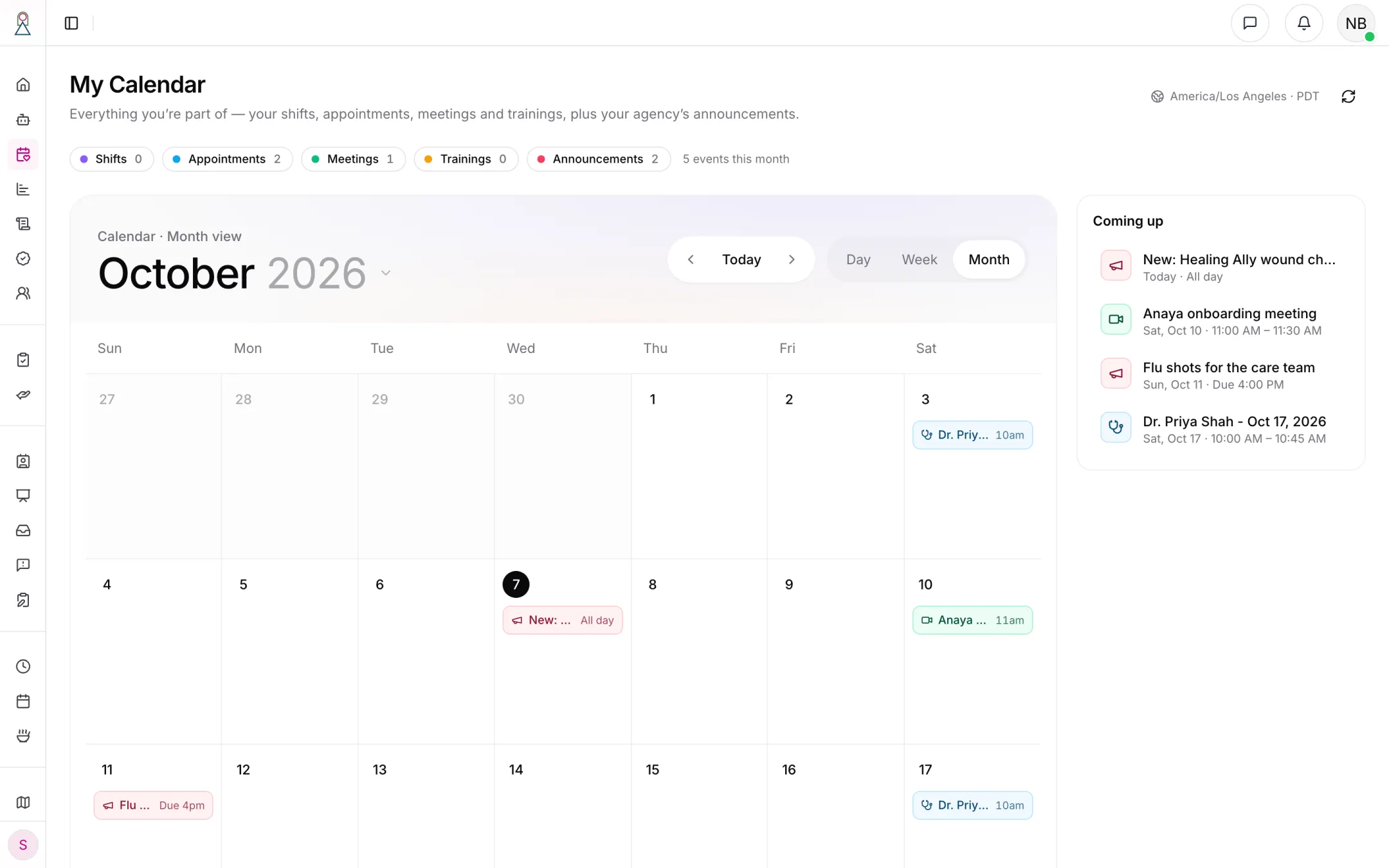
An admin's month: appointments for a client whose care they manage, an onboarding meeting they set up, and two announcements.
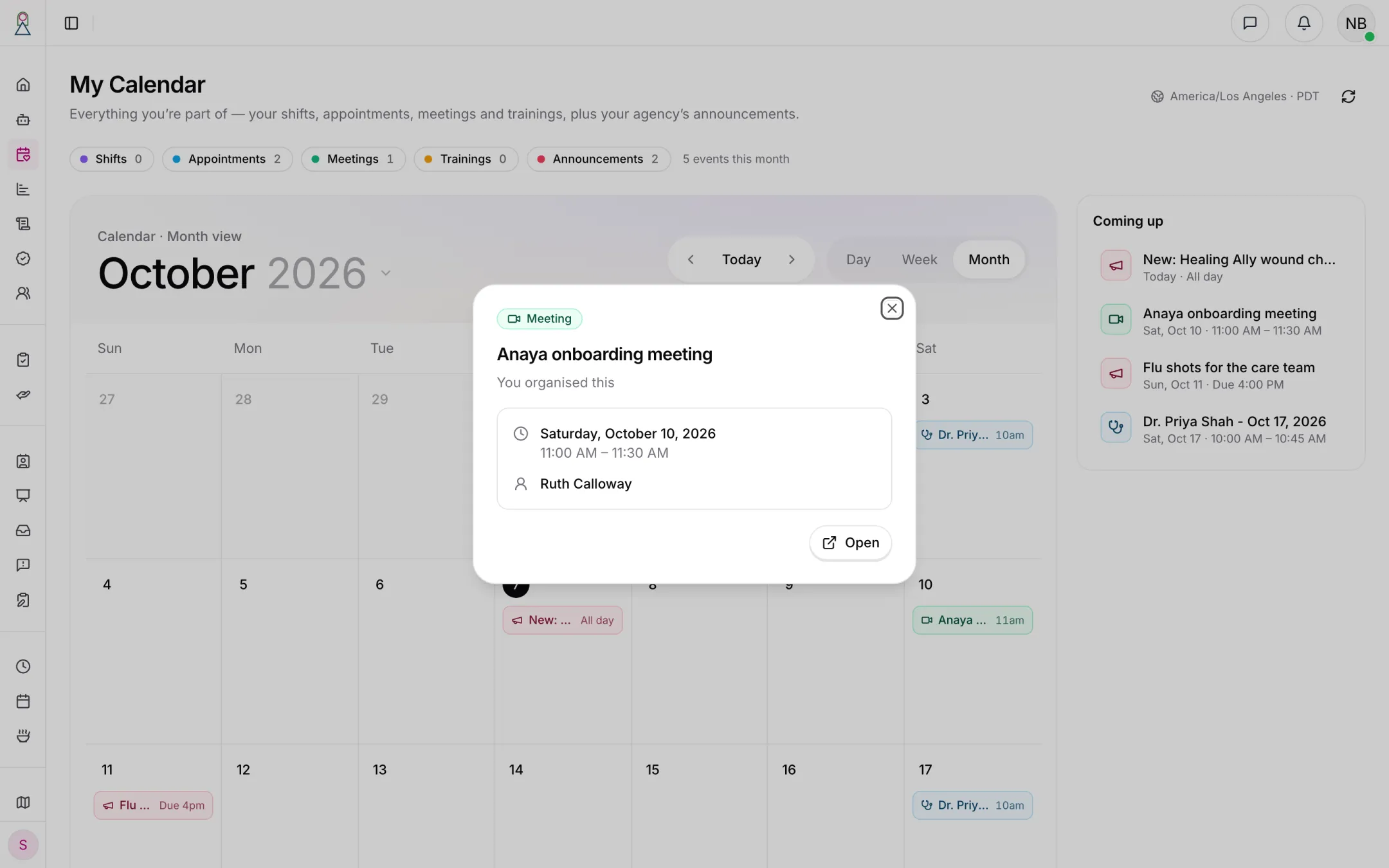
Every event says why it is on your calendar.
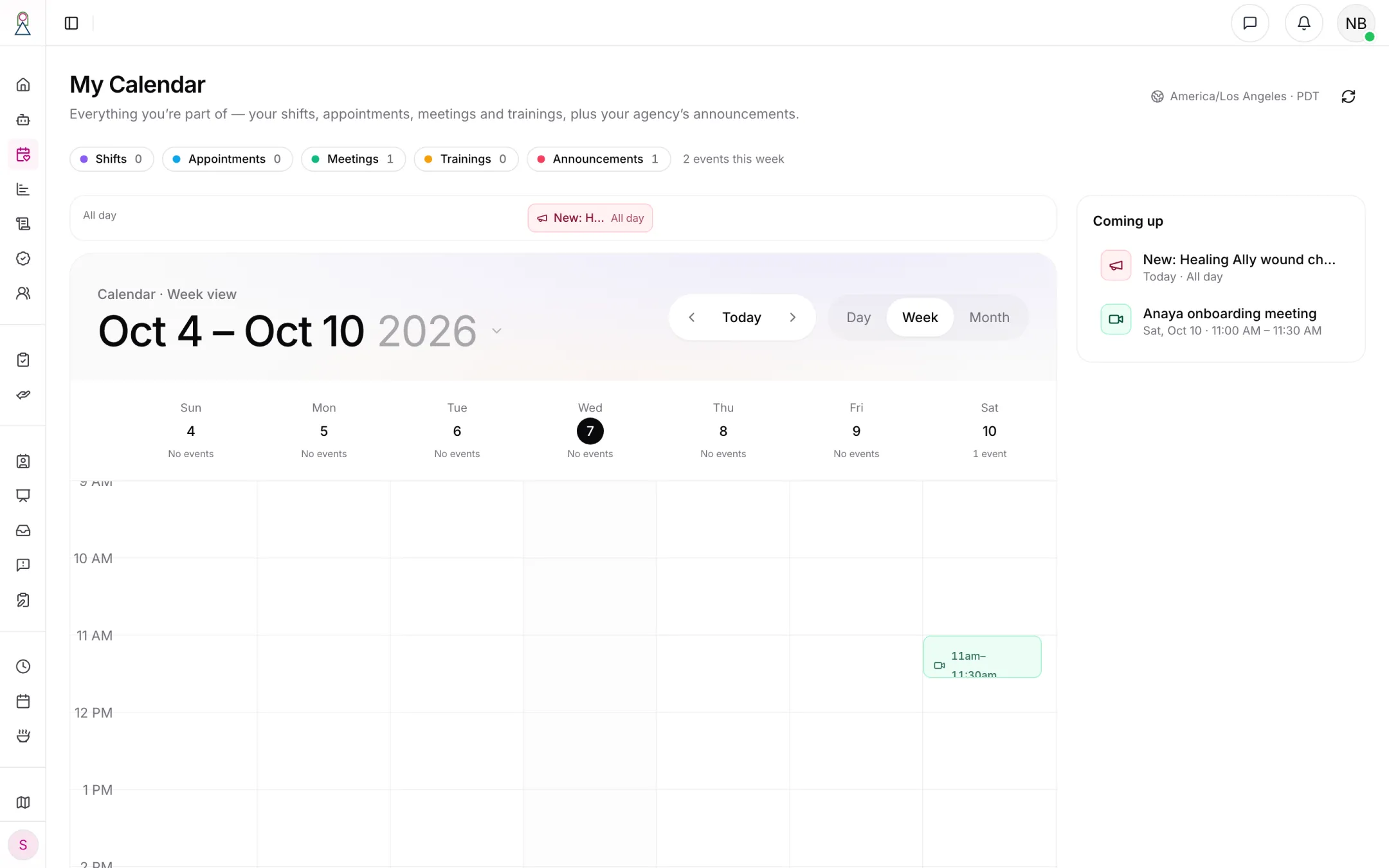
In week view, all-day items sit above the hours.
On the phone
is the first row on the Me screen, for every agency role. The month grid marks each day with a dot per kind of event (up to three); tapping a day lists that day's events below it, each saying why it is yours. When a month holds more than one kind, filter chips show one kind at a time. Tapping an event opens it where it lives: your own shift opens the shift, an appointment opens the appointment, a meeting with a call link joins the call, an announcement opens the announcement, and a training opens your trainings. Two kinds of row are information only: a representative's view of a visit, because there is no shift screen for a representative to open, and a meeting that has no call link yet.
Times and days
A shift, appointment or meeting keeps its own time zone. On the phone it is filed under the day it starts in that zone — a shift under its client's day, as on My Schedule — and the phone names that zone whenever it is not the viewer's own. The web draws everything on the viewer's own clock, as the agency calendar does, and gives the event's local time in its details. An all-day item falls on the viewer's own day, so a deadline at 2:00 AM UTC is still "today" for someone in California.
Cancelled shifts
A cancelled shift stays where it was, struck through, on the calendar of everyone it was on, so a visit that was called off reads as called off instead of silently disappearing. It is never listed as coming up.
Rules
- MYCAL-1 — Every signed-in member of an agency has a My Calendar: owners, admins, care managers (custom roles), care providers, representatives, medical professionals and other members. It is on the web dashboard for the roles that use the dashboard, and in the mobile app for every role. Platform staff, who belong to no agency, have none.
- MYCAL-2 — My Calendar shows only events the person takes part in, plus their agency's announcements. It never shows another agency's records, and never a client's records unless the person is linked to that client or named on the record (the doctor an appointment is with).
- MYCAL-3 — A shift is on a care provider's calendar when they are its care provider. A shift they marked not available has gone back to the open pool and is no longer on their calendar.
- MYCAL-4 — A representative sees the visits of each client they represent: every visit that is staffed or has happened, and an unstaffed visit while it is still ahead. A slot nobody picked up whose time has passed is not shown.
- MYCAL-5 — A cancelled shift stays on the calendar of everyone it was on, drawn struck through, and is never listed as coming up.
- MYCAL-6 — A doctor's appointment is on the calendar of the medical professional it is with, of the client's representatives, of the care providers linked to the client (on its care team, or holding or having recently worked one of its shifts — the same care providers who can open the client's record), and of the client's active care manager. A cancelled appointment is not shown. A medical professional linked to a client does not see that client's appointments with other doctors. Where the Doctor's Appointments module is withheld, no appointments are shown.
- MYCAL-7 — A confirmed client onboarding meeting is on the calendar of the staff member who set it up and of each representative on its guest list, with a way to join the call when it has a link. An open invite that has no time yet, and a cancelled meeting, are not shown.
- MYCAL-8 — A training assigned to the person is on their calendar on its due date until it is completed.
- MYCAL-9 — Every published announcement is on every member's calendar: on its deadline day when it has one, otherwise on the day it was posted. Drafts, scheduled announcements not yet published, and deleted announcements are not shown.
- MYCAL-10 — On the phone, a timed event is filed under the day it starts in its own time zone and names that zone when it differs from the viewer's. On the web, events are placed on the viewer's own clock, and an event's details give its local time when its zone differs. An all-day item falls on the viewer's own day on both.
- MYCAL-11 — Every event on My Calendar says why it is on the person's calendar.
- MYCAL-12 — My Calendar is read-only. Opening an event leads to the place where that record is managed; nothing is created, changed or cancelled from My Calendar itself.
Who can do what
| Action | Roles allowed |
|---|---|
| View My Calendar on the web dashboard | Owner, Admin, Care manager, Medical professional, Other |
| View My Calendar in the mobile app | Every agency role, including Care provider and Representative |
| See a client's visits on My Calendar | The client's care provider for that shift; the client's representatives |
| See a client's doctor's appointments on My Calendar | The doctor; care providers linked to the client; the client's representatives and active care manager |
| Join an onboarding meeting from My Calendar | The staff member who set it up; representatives on its guest list |
Decisions needed
- What else belongs on My Calendar? Today it shows shifts, doctor's appointments, onboarding meetings, trainings and announcements. Candidates: reassessments a care manager has claimed and their due dates, care-proposal reviews assigned to someone, medication reminders for a care provider's clients, and birthdays from the Care Feed.
- Should cancelled appointments stay too? keeps a cancelled shift on the calendar, struck through; a cancelled appointment is still removed (). Whether appointments should match is open.
- Should a representative's visit open anything? A representative's visit rows are information only, because no visit screen exists for representatives. A read-only visit summary would give those rows somewhere to go.
- Personal events and outside calendars. Whether people can add their own events, and whether My Calendar should be offered as a feed to Google or Apple Calendar, is undecided.
How is this page?
Last updated on