Anaya Walk
Part of the Anaya Care Handbook — the source of truth for how the product must behave. When the product needs to change, change this document first, then make the system match it.
Implementation status — this module is specified but not yet built. Every rule below is 🚧 Spec only until the feature ships and this page is audited against the code. Legend: ✅ In code · ⚠️ Partial · 🚧 Spec only (not yet built).
What this covers
This page governs : live tracking and documentation of an outing — a walk, an errand, an appointment, any trip away from home — that a care provider takes with a client. While an outing is active, the platform shows the real-time location of both the client and the care provider, raises a geofencing alert if the client moves outside a defined safe zone, prompts periodic safety check-ins, lets the care provider document the outing (with AI assistance), and logs the completed outing back into the care plan as a finished engagement activity. The client's representative can follow the outing in real time and review the outing history afterwards.
Anaya Walk is not the ARMI Marketplace map. That map is a workforce view that plots care providers for agency staff to find available talent; it has nothing to do with a client's outing. Anaya Walk tracks one client-and-provider pair during one live trip and is visible to that client's care team and representative, never to the wider workforce.
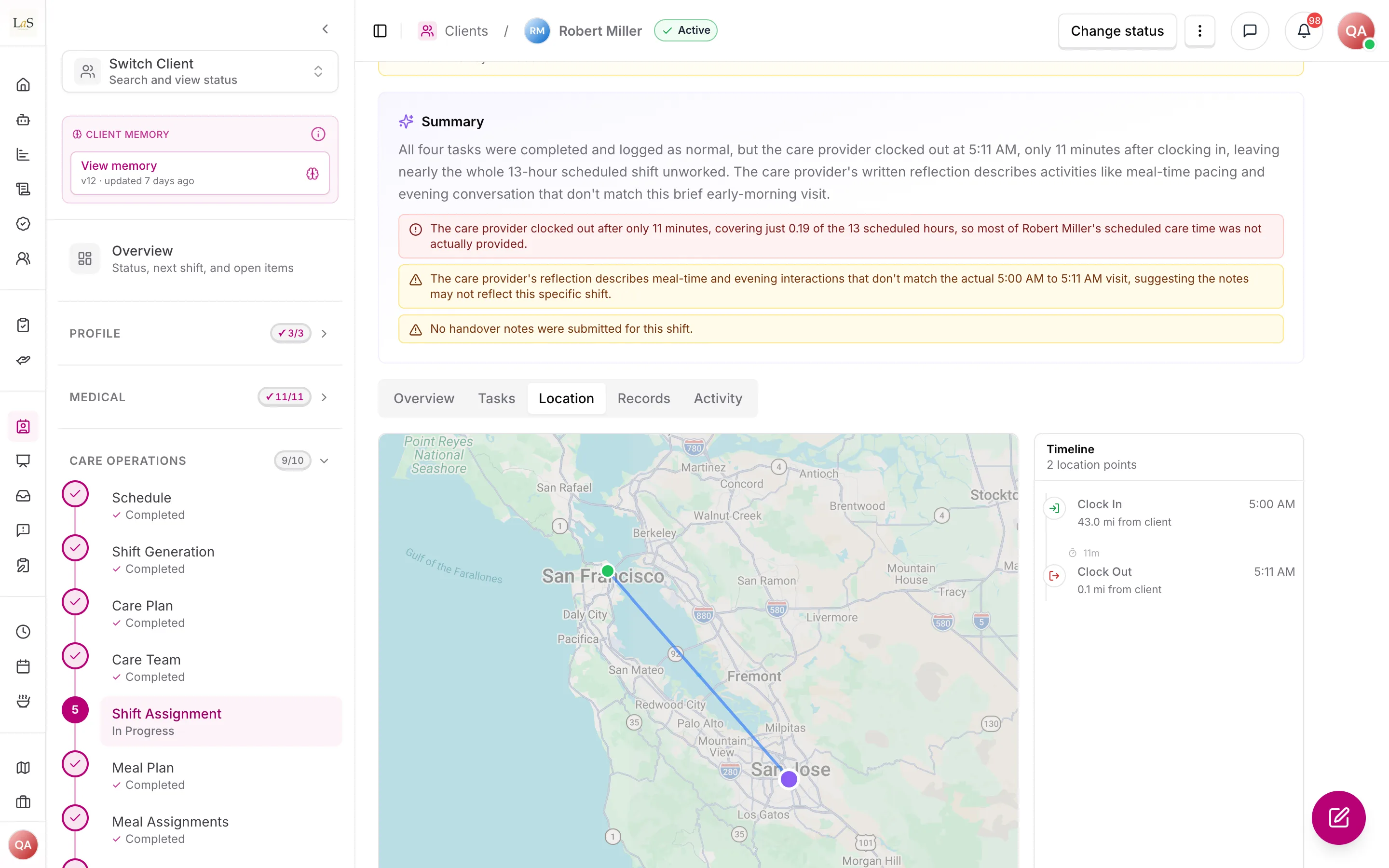
What exists today: the nearest thing is a shift's Location tab, which shows where the care provider clocked in and out against the client's home. An outing has no live location, safe-zone alert or check-in.
Key terms
- Outing — A trip away from the client's home that a care provider records in Anaya Walk, with a start, a live phase, and an end.
- Live tracking — The real-time location of the client and the care provider shown on a map while an outing is active.
- Safe zone — A geographic boundary (a radius around the home or a defined area) within which the client is expected to remain during an outing.
- Geofencing alert — A notice raised when the client's tracked location crosses outside the safe zone.
- Safety check-in — A periodic prompt during an outing asking the care provider to confirm the client is safe and well.
- Outing documentation — The care provider's account of the outing — where they went, what happened, how the client did — written with AI assistance.
- Outing history — The stored record of past outings for a client, with route, duration, check-ins, and documentation.
- Representative visibility — The representative's ability to follow an active outing on a map and review its history.
How it works
Outing lifecycle
A care provider starts an outing in Anaya Walk at the beginning of a trip with a client. The outing enters its Active phase: the platform tracks the location of both the client and the care provider in real time, shows them on a map, and begins prompting safety check-ins on a set cadence. The care provider can document the outing as it unfolds. When the trip ends, the care provider ends the outing; it moves to Completed, the live tracking stops, and the outing is saved to the client's outing history. A completed outing is also written back to the care plan as a finished engagement activity, so the work shows up alongside the client's other logged care.
Geofencing and safety
While an outing is active, the platform compares the client's tracked location against the outing's safe zone. If the client crosses outside the safe zone, a geofencing alert is raised to the care provider and to the client's care team. Safety check-ins run on a set cadence throughout the outing; a missed check-in is itself a signal that the care team should be alerted. None of this replaces the real-time panic action — if something goes wrong on an outing, the care provider can still trigger an emergency alert (SOS), and anything that went wrong can be filed as an incident report tied to the outing.
Representative visibility
The client's representative can follow an active outing in real time — seeing the client and care provider on the map — and can review the outing history once the trip is over. Representative visibility is limited to that representative's own client; no role outside the client's care team and representative can see an outing.
Rules
- WALK-1 — A care provider may start an Anaya Walk outing for a client they are assigned to, and the outing must record a start, a live phase, and an end. (🚧 Spec only)
- WALK-2 — While an outing is active, the platform must track the real-time location of both the client and the care provider and show them on a map. (🚧 Spec only)
- WALK-3 — An outing must support a safe zone, and the platform must raise a geofencing alert when the client's tracked location crosses outside it. (🚧 Spec only)
- WALK-4 — A geofencing alert must notify the care provider and the client's care team. (🚧 Spec only)
- WALK-5 — During an active outing the platform must prompt safety check-ins on a set cadence, and a missed check-in must alert the client's care team. (🚧 Spec only)
- WALK-6 — The care provider must be able to document the outing, with AI assistance, capturing where they went, what happened, and how the client did. (🚧 Spec only)
- WALK-7 — When an outing is ended, it must be saved to the client's outing history and written back to the care plan as a completed engagement activity. (🚧 Spec only)
- WALK-8 — The client's representative must be able to follow an active outing in real time and review the outing history afterwards, limited to their own client. (🚧 Spec only)
- WALK-9 — An outing must be visible only to the client's care team and the client's representative; no other role, and no other agency, may see it. (🚧 Spec only)
- WALK-10 — During an outing the care provider must be able to trigger an emergency alert (SOS) and to file an incident report tied to the outing. (🚧 Spec only)
- WALK-11 — Anaya Walk must be kept distinct from the ARMI Marketplace workforce map; the two must never share a view, and outing tracking must never expose a client's location to the workforce map. (🚧 Spec only)
- WALK-12 — Live location must be tracked only while an outing is active; ending the outing must stop tracking. (🚧 Spec only)
Who can do what
| Action | Roles |
|---|---|
| Start, document, and end an outing | Care provider assigned to the client |
| Define a client's safe zone | Owner, Admin, Care manager |
| Receive geofencing and missed-check-in alerts | The outing's care provider; Owner, Admin, Care manager |
| Follow an active outing in real time | The client's care team; the client's Representative |
| Review a client's outing history | The client's care team; the client's Representative |
Decisions needed
- Who defines the safe zone, and per outing or per client? Options: management sets a standing safe zone on the client that applies to every outing; the care provider sets a per-outing safe zone at start; or both, with the per-outing zone overriding the standing one.
- What is the safety check-in cadence, and what happens on a miss? Options: a fixed interval for all outings; a configurable interval per client; escalation to the care manager after one missed check-in versus a grace period of several misses.
- Should a geofencing alert auto-escalate to an emergency alert? Options: treat a geofence breach as an SOS automatically; keep it a separate, lower-tier notice that the care provider must escalate manually.
- How long is live location retained after an outing ends? Options: keep the full route in outing history indefinitely; keep the route for a fixed retention window then keep only summary data; let the responsible party choose (see Data Ownership & Retention).
- Does the client need to consent to live tracking, and can a representative pause it? Options: consent captured once at onboarding; consent per outing; representative able to opt the client out of location sharing.
How is this page?
Last updated on