Communication
Part of the Anaya Care Handbook — the source of truth for how the product must behave. When the product needs to change, change this document first, then make the system match it.
What this covers
This page governs how people on the platform talk to each other and how the platform talks to them: Care Connect — secure, encrypted one-to-one and group messaging with attachments, replies, reactions, and receipts; in-app audio/video calls inside one-to-one chats; the notification system (the single place that decides who gets told what, when, and through which channels — in-app, push, email, or text message); and announcements (business-wide bulletins that people must read and acknowledge). Care Connect is also the channel for real-time health updates and critical alerts, sharing care plans with authorized parties, family-engagement messages (visit summaries, progress reports, and feedback), emergency communication to representatives and emergency contacts, and appointment reminders. The AI assistant chat is a separate feature — see AI Chat Assistant. Live video consultations with medical professionals are covered in Telehealth Services, and coordination across outside providers in Care Coordination & Provider Integration.
Key terms
- Conversation — a chat thread between people in the same business; either private or group.
- Private conversation — a one-to-one chat between exactly two people; each pair has at most one.
- Group conversation — a named chat with any number of members, owned by its creator.
- Call — an audio or video call between the two members of a private conversation.
- Call history — the record of every finished call: who called, the outcome, and the duration.
- Notification — a message from the platform telling a person something happened that concerns them.
- Channel — a way a notification reaches someone: in-app feed, push, email, or text message (SMS).
- Notification preferences — each user's personal switches controlling push, email, and SMS delivery.
- Unread badge — the counter showing how many unread notifications a person has.
- Announcement — a business-wide bulletin with a priority, an optional schedule, and an optional response deadline.
- Acknowledgment — a member's one-time confirmation that they have read an announcement.
- Deadline reminder — an automatic nudge sent before an announcement's deadline to members who have not yet acknowledged it.
How it works
Care Connect (messaging)
Care Connect is the secure, encrypted messaging space. Everyone in an agency with chat access can message colleagues, representatives, and medical professionals in that agency. Starting a chat with a person you already chat with reopens the existing private conversation rather than creating a duplicate. Messages can carry text, attachments (with a shared media gallery per conversation), replies that quote the original message, and emoji reactions. Each message tracks, per person, whether it has been delivered and read, and conversations show per-person unread counts.
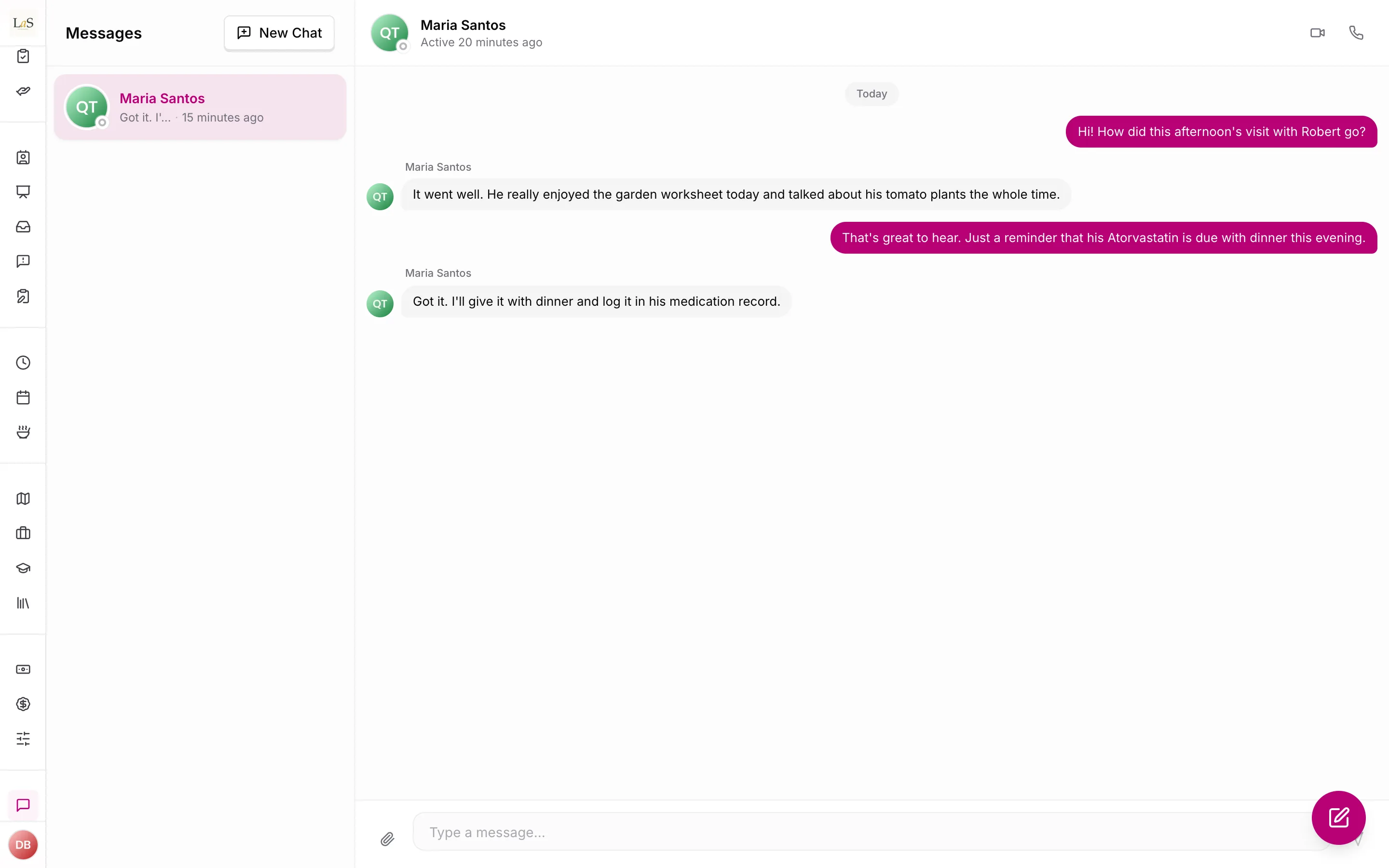
Care Connect also carries care-related communication beyond plain chat: real-time health updates and critical alerts when a client's condition changes, care plans shared with authorized parties, family-engagement messages (visit summaries, progress reports, and feedback), emergency communication to representatives and emergency contacts, and appointment reminders.
When a new message arrives, members who are not actively using the app receive a push notification showing the sender's name and a short preview; tapping it opens the conversation. Care Connect deliberately stays out of the in-app notification feed — the chat screen itself is where messages live.
Captioning and translation (planned)
Two accessibility features for live calls are on the roadmap and not yet built: captioning of in-app calls, and Translation Services — real-time, two-way translation of a live conversation between people who speak different languages. Translation Services is distinct from interface localization (translating the app's own labels and screens), which lives in Multi-Language Support; Translation Services translates what people say to each other in real time.
In-app calls
In-app audio and video calling is built. Calls happen only inside private conversations, between exactly two people, with one active call per conversation at a time. The caller starts an audio or video call; the other person sees it ringing on every device they're signed in to (or gets a push if they're away). They can accept or decline; if nothing happens within 45 seconds the call is marked missed and the absent person gets a missed-call push. Every finished call — ended, declined, or missed — is saved to the call history and shown as an entry inside the conversation. Someone on multiple devices isn't dropped from a call just because one device disconnects.
Notifications — who gets told what
Everything noteworthy on the platform flows through one notification system: shift assignments and responses, care proposal status changes, incident reports and emergency alerts, client requests, medication stock warnings, job postings, community post activity, birthdays, and announcements. Notifications reach people through four channels — push, in-app feed, email, and text message (SMS) — and fall into broad categories such as care plan, shifts and scheduling, medication and health, emergency and safety, Care Feed, Care Lock, training and certification, marketplace, reporting, and general or system messages.
Each notification type has a defined audience (for example: emergency alerts go to the agency's managers and the client's representatives; incident reports go to staff entitled to view them) and a defined importance tier that sets its channels:
- Standard — in-app feed and push.
- High priority — adds an email.
- Critical — adds a text message, so it reaches people even with the app closed.
A type's tier is usually fixed, but a few are chosen per notification because the same event can be routine or urgent depending on timing. Shift assignment is the clearest case: a shift assigned weeks ahead is ordinary news, while one assigned shortly before it starts is urgent and is sent so that it interrupts a silenced phone ().
A notification that reaches nobody is recorded as a failure, not a success. Because the in-app feed can never be switched off, a notification that ends up delivered on no channel at all means something went wrong rather than that someone opted out — including the case where a person has no registered device and so cannot receive a push.
Users control delivery with three master switches — push, email, SMS — all on by default. The in-app feed can never be switched off, so nothing is ever completely invisible. For community posts only, users can additionally toggle individual kinds (likes, comments, comment replies, comment likes, mentions). Bursts of post likes are grouped into combined notifications so nobody is spammed. The unread badge always reflects the true number of unread notifications, and the system corrects the count automatically if it ever drifts.
Beyond personal preferences, two governance ideas from v4.2 are not yet built: emergency and safety notifications should never be silenceable regardless of a person's switches, and care managers should be able to set company-wide notification defaults that apply across the agency. A handful of notification types are also specified but not yet wired up: a report-ready alert to the care manager, an authorization escalation to the Company Admin (Owner/Admin) after a defined window, a report-delivered confirmation to both the recipient and the care manager, and a recurring-task interval-exceeded alert to the care manager when a care provider's recorded time on a recurring task crosses its threshold. See Report Generation & Audience Management for the report flow these notifications support.
Announcements
An announcement is written by a manager and moves through a simple life:
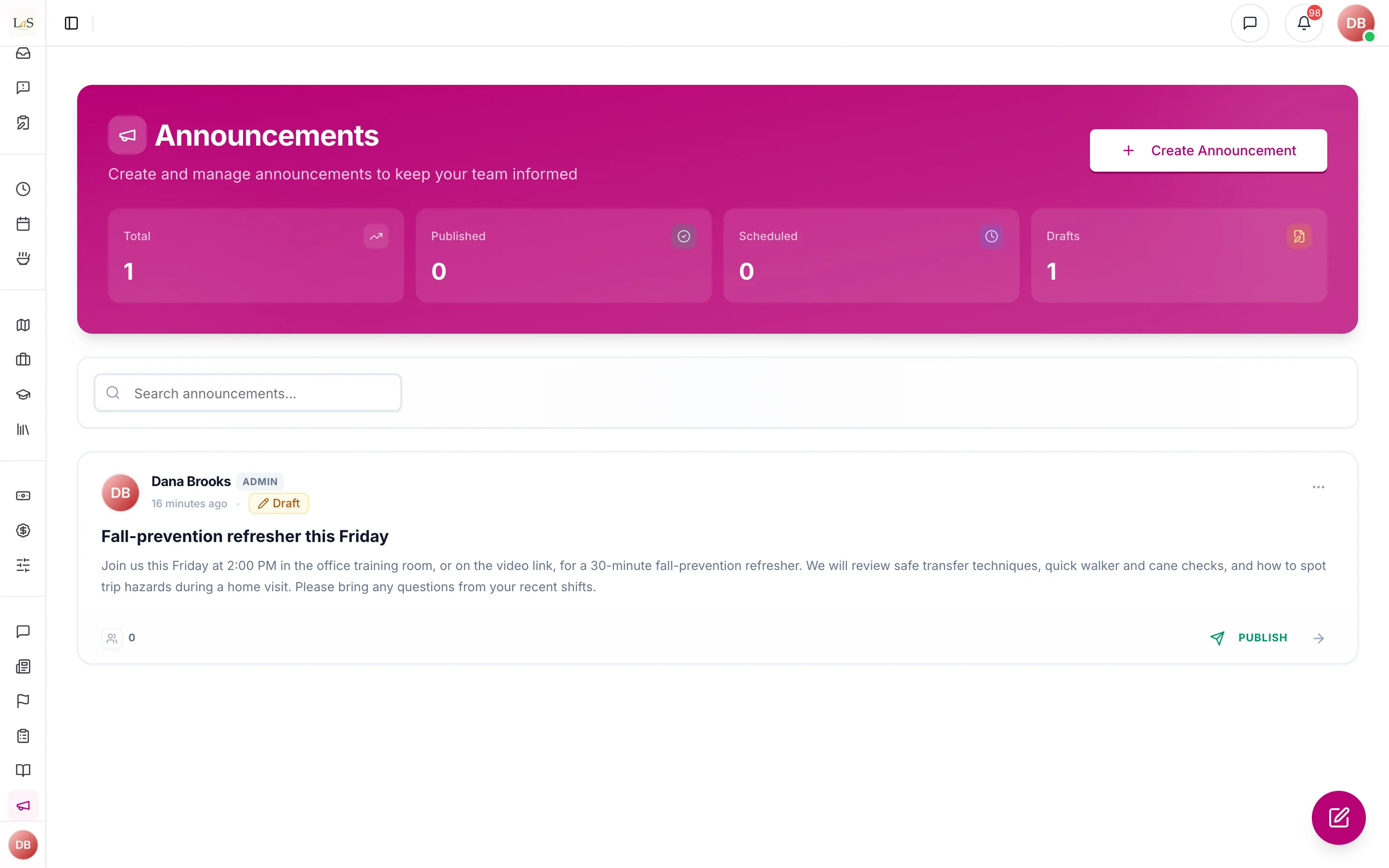
On publish, every active member of the business (except the author) is notified; urgent announcements push prominently and immediately. If the announcement has a deadline, the author chooses reminder times (for example, 24 hours and 1 hour before), and members who haven't acknowledged get reminded at exactly those times — never twice for the same reminder. Members acknowledge once, and managers can see who has and hasn't. An announcement past its deadline remains readable and can still be acknowledged late.
Email and text messages
All product email comes from the official Anaya Care address with consistent branding. Account-security messages — email verification, sign-in links, password resets, invitations — always send, even when general email notifications are switched off for the environment. Delivery of care-proposal and invitation emails is tracked (sent, delivered, delayed, bounced, complained, opened, clicked) so staff can see whether a family actually received them. Text messages carry verification codes and critical alerts.
Rules
Chat
- COMM-1 — Every conversation belongs to exactly one business, and every member of a conversation must belong to that business. Messaging across businesses must not be possible.
- COMM-2 — There can only ever be one private conversation between a given pair of people; starting a new chat with the same person must reopen it, never duplicate it.
- COMM-3 — A message must contain text, at least one attachment, or both — never nothing.
- COMM-4 — Only members of a conversation can read it, send messages to it, or view its media gallery and call history.
- COMM-5 — A deleted message shows only "This message was deleted"; its content, attachments, and reactions are removed for everyone, and deletion cannot be undone.
- COMM-6 — Only the message's sender can delete it, except platform administrators, who can delete any message for moderation.
- COMM-7 — Only a group's creator can rename or delete the group, and the creator can never be removed from it. A platform administrator can delete any conversation.
- COMM-8 — Either member can delete a private conversation. Deleting any conversation permanently removes all of its messages.
- COMM-9 — When a message arrives, every member who is not actively connected gets a push showing the sender and a short preview; chat messages never create entries in the in-app notification feed.
- COMM-10 — A chat push is never shown for the conversation the person currently has open.
Calls
- COMM-11 — Calls exist only in private conversations, with exactly two participants and at most one active call per conversation.
- COMM-12 — An unanswered call rings for 45 seconds, is then marked missed, and the missed person receives a missed-call push. A person away from the app gets an incoming-call push the moment a call starts ringing.
- COMM-13 — Every finished call is recorded in the call history with its outcome (ended, declined, or missed) and appears as an entry in the conversation. Duration is recorded only for answered calls, measured from the moment of answering.
- COMM-14 — For someone signed in on several devices, a call ends due to disconnection only when their last device disconnects.
Notifications
- COMM-15 — All platform notifications flow through one system; every notification type defines its audience and its channels (in-app, push, email, SMS).
- COMM-16 — Critical alert types must reach people through push, email, and text message together.
- COMM-17 — A person can only ever see, read, or dismiss their own notifications.
- COMM-18 — Users can switch off push, email, and SMS individually; the in-app feed can never be switched off.
- COMM-19 — Email and text messages are only sent to active accounts.
- COMM-20 — Failed notification deliveries are retried automatically; devices that can no longer receive pushes are removed automatically, and a device stops receiving pushes when its user signs out.
- COMM-41 — A notification's delivery record must state what actually happened on each channel for each person. A channel that could not deliver — no registered device, no email address, no phone number — is recorded as skipped with the reason, never as sent. A notification that reached no channel at all is recorded as a failure whenever the type carries the in-app feed, which nobody can switch off.
- COMM-21 — The unread badge must always equal the person's actual number of unread notifications; marking one or all as read updates it immediately.
- COMM-22 — Notifications expire and disappear automatically after 90 days.
- COMM-23 — Bursts of post likes are grouped into combined notifications rather than sent one by one.
Announcements
- COMM-24 — An announcement's title is at most 200 characters and its content at most 5,000.
- COMM-25 — A scheduled announcement publishes automatically within one minute of its chosen time.
- COMM-26 — Publishing an announcement notifies every active member of that business except the author — and no one outside the business. Urgent announcements push prominently as time-sensitive.
- COMM-27 — Deadline reminders go only to business members who have not yet acknowledged, at exactly the configured times, and the same reminder is never sent twice to the same person.
- COMM-28 — A member can acknowledge an announcement only after it is published (including past its deadline), and only once.
- COMM-29 — An announcement is marked past-deadline within minutes of its deadline passing, and stays readable and acknowledgeable.
- COMM-42 — Draft and scheduled announcements are seen only by people with the announcement-management permission and by owners. Everyone else sees only published and past-deadline announcements: the announcements list and its counts leave the others out, and opening one or its statistics answers "not found", the same as an announcement that doesn't exist. The list of who has acknowledged an announcement is only for people with the announcement-management permission.
Email and SMS
- COMM-30 — Account-security emails (verification, sign-in links, password resets, invitations) always send, even when general email notifications are disabled.
- COMM-31 — Emails sent from the staging environment are clearly labeled so they can never be mistaken for production mail.
- COMM-32 — Delivery status of care-proposal and invitation emails is tracked from sending through delivery, opens, clicks, bounces, and complaints.
Planned communication features
- COMM-33 — In-app calls offer live captioning of spoken audio for the people on the call. (🚧 Spec only)
- COMM-34 — Translation Services translate a live conversation between two people in real time, in both directions, so each person reads or hears the other in their own language; this is separate from interface localization in Multi-Language Support. (🚧 Spec only)
Planned notification controls
- COMM-35 — Emergency and safety notifications must always reach their audience and can never be silenced by a person's notification switches. (🚧 Spec only)
- COMM-36 — Care managers can set company-wide notification defaults for their agency, which apply to members who have not overridden them with personal preferences. (🚧 Spec only)
- COMM-37 — When a report is ready for authorization, its care manager is notified. (🚧 Spec only)
- COMM-38 — If a report is not authorized within the defined window, the request is escalated by notifying the Company Admin (Owner or Admin). (🚧 Spec only)
- COMM-39 — When a report is delivered to a recipient, both that recipient and the care manager are notified that delivery succeeded. (🚧 Spec only)
- COMM-40 — The recurring-task interval-exceeded alert to the care manager (specified in Scheduling & Shifts rule ) is delivered through this notification system. (🚧 Spec only)
Who can do what
| Action | Who |
|---|---|
| Chat and send messages | Every standard role (admins, care managers, care providers, representatives, medical professionals); controllable per role |
| Create a group conversation | Anyone with chat access |
| Rename or delete a group | The group's creator; platform administrators can delete any conversation |
| Delete a private conversation | Either of its two members |
| Delete a message | Its sender; platform administrators (moderation) |
| Start an audio/video call | Anyone with call access (on by default for all standard roles) |
| Create, edit, schedule, publish, or delete announcements; see drafts, scheduled announcements, and who has acknowledged () | Roles with the announcement-management permission (owners, admins, care managers by default) |
| View the announcements list and statistics, for published and past-deadline announcements only | Roles with the announcement-view permission |
| Read and acknowledge announcements | Every member of the business |
| Manage their own notification preferences | Every user |
| Set company-wide notification defaults (planned) | Care manager and above |
| Read or dismiss a notification | Its recipient only |
| Send a manual push message to chosen users | Administrators only |
Decisions needed
- Should users get fine-grained notification preferences? Today users can only switch whole channels on or off (plus the community-post toggles), even though notifications fall into about twenty categories grouped under the v4.2 categories (care plan, shifts and scheduling, medication and health, emergency and safety, and so on). Options: keep channel-level switches only, or add per-category controls.
- Should notification emails have distinct designs per type? Today every notification email uses one shared branded layout, although distinct designs per type were envisioned. Options: keep the single layout, or build per-type designs.
- How do company-wide notification defaults interact with personal preferences ()? When a care manager sets agency-wide defaults, we must decide whether a member's personal switch always wins, whether defaults apply only until a member overrides them, or whether emergency and safety categories () are locked on regardless of either setting.
How is this page?
Last updated on