Care Plans & the Care Task List
Part of the Anaya Care Handbook — the source of truth for how the product must behave. When the product needs to change, change this document first, then make the system match it.
What this covers
This page governs how a client's plan of care is written and how that care is carried out shift by shift. There are two distinct documents: the — the narrative describing how the client should be cared for — and the — the concrete, recurring to-do list attached to each of the client's schedules. Care providers see the Care Task List expanded into their shifts on mobile, record each task as a , and families review those submissions and can raise that the agency must address.
For the step-by-step instructions a care provider reads before performing each task, see AI-Generated Task Instruction Steps. This page sits at the centre of the care lifecycle: the care plan is built from the care assessments, and it must change whenever the client does — see When the plan must change.
Key terms
- Care plan — the narrative plan describing how the client should be cared for: daily-living approaches, goals, safety adaptations, memory care, health readings, and escalation protocol. Versioned as Draft → Published → Archived; the newest Published version is current. A reassessment draft is private until final human approval. In this handbook, "care plan" always means this narrative document — never the operational list below.
- Daily Routine section — the structured section of the care plan that proposes the client's routine time anchors; the only place in the care plan where clock times belong.
- Routine anchor — one named, time-typed moment in the client's day (wake, sleep, or a meal): a client-local time window — an earliest and a latest time — plus care guidance. The window says when the moment may fall, not how long the activity lasts.
- Care Task List — the operational list of recurring tasks attached to one client schedule, which care providers perform during shifts. Moves through Draft → Published → Archived. (Formerly called the "task plan"; renamed to end the constant confusion with "care plan." The in-code entity is
CareProviderTasks.) - Task template — a platform-wide form definition for one kind of task (e.g. "Blood Pressure Reading"): the fields to fill in, which answers are required, and which values trigger warnings.
- Scheduled task — a task that occurs at set times and is completed once per occurrence per shift.
- Tracking task — a task that can be recorded any number of times during a shift (e.g. fluid intake), each entry numbered.
- Task submission — a care provider's record of performing one task on one shift, including form answers, files, location, and any warnings. An attachment field can hold several files (see ).
- Threshold warning — an automatic flag when a submitted health value (e.g. blood pressure) falls outside the safe range for that client. Warns, never blocks.
- Concern — a comment on a submission flagged for agency follow-up; it moves Open → Acknowledged → Resolved.
- Excused occurrence — a single task occurrence waived because it collides with a doctor appointment.
- Daily task view — the single, ordered list of everything a care provider is expected to do on one shift, consolidating every source (the Care Task List, approved engagement programs, approved meal-plan prep and grocery pickup, calendar events, and confirmed ARMI Marketplace bookings).
- Completion state — how a task was finished: Completed or Skipped. Skipped needs a reason chosen from the platform's list plus a note. The completion state lives on the submission itself, not inside the task's form answers, so it can be counted and reviewed. Every state change records a completion timestamp.
- Skip reason — the reason a care provider gives for skipping a task, chosen from a fixed platform list: client refused, client unavailable, client unwell, supplies unavailable, not enough time, safety concern, or other.
- Time-anchored task — a task tied to a set time, which appears in the daily task view in its scheduled position. A non-time-anchored task has no fixed time and can be completed in any order, following a recommended sequence the care manager configures.
- Time Performed — the time a care provider records for a time-sensitive task (for example repositioning); the next cycle of a recurring time-sensitive task is scheduled from this entered time, not the originally scheduled time.
- Care domain category — the area of care a task belongs to (Life's Milestone or the agency's configured equivalent), used for reporting and pattern analysis.
- Reference media — optional photos, short video, or audio the agency can attach to a task to guide the care provider.
How it works
The care plan
A care plan is written manually by agency staff or generated by the platform's AI, which draws on the client's profile, medications, and completed assessments. The plan is never edited in place: every save creates a new version. Normal authoring publishes a version through its existing human gate; reassessment preparation creates a private Draft. Publishing that draft archives the previous Published version. Staff can compare versions, revert to an earlier one, and export the current published plan as a PDF. Families and care providers can read published care; only authorized agency staff can change it.
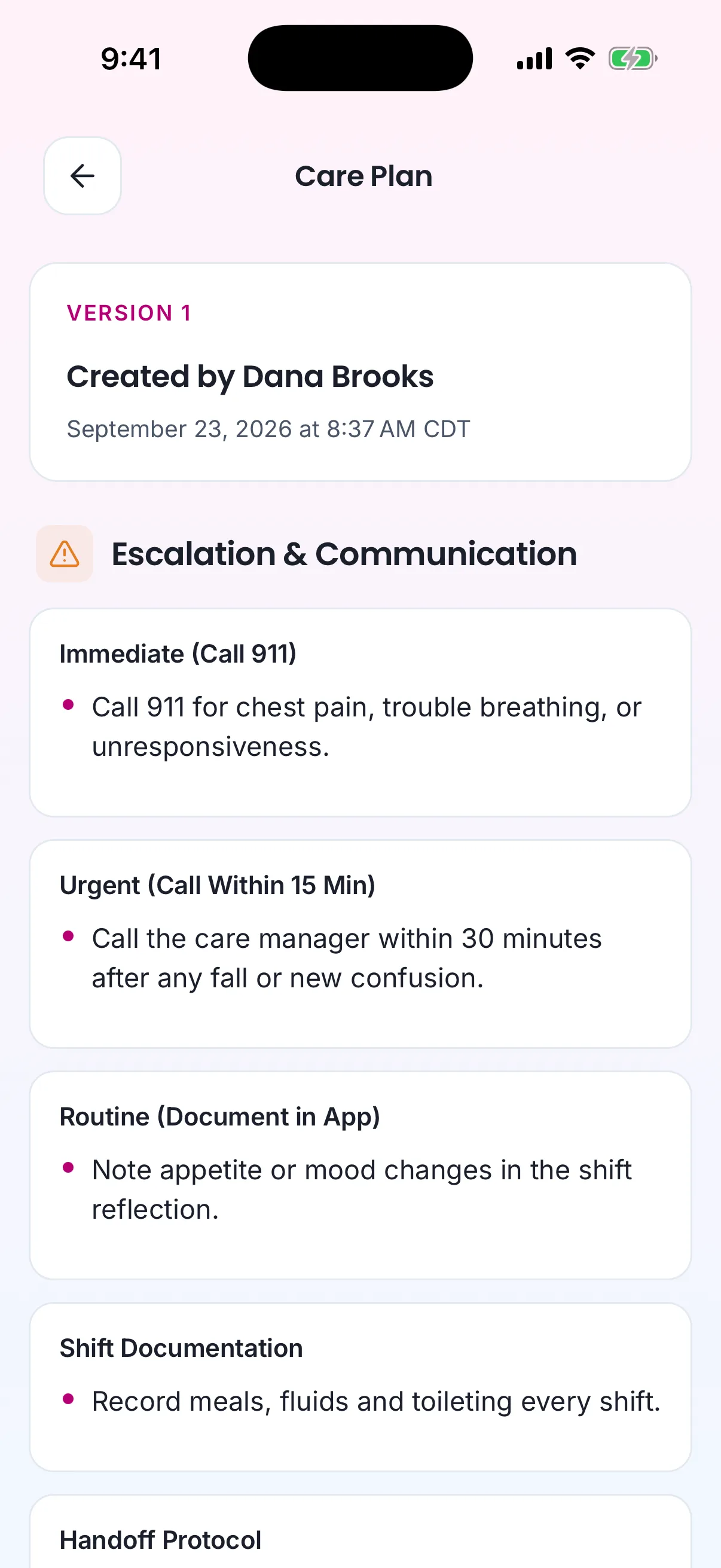
The same plan on the care provider's phone.
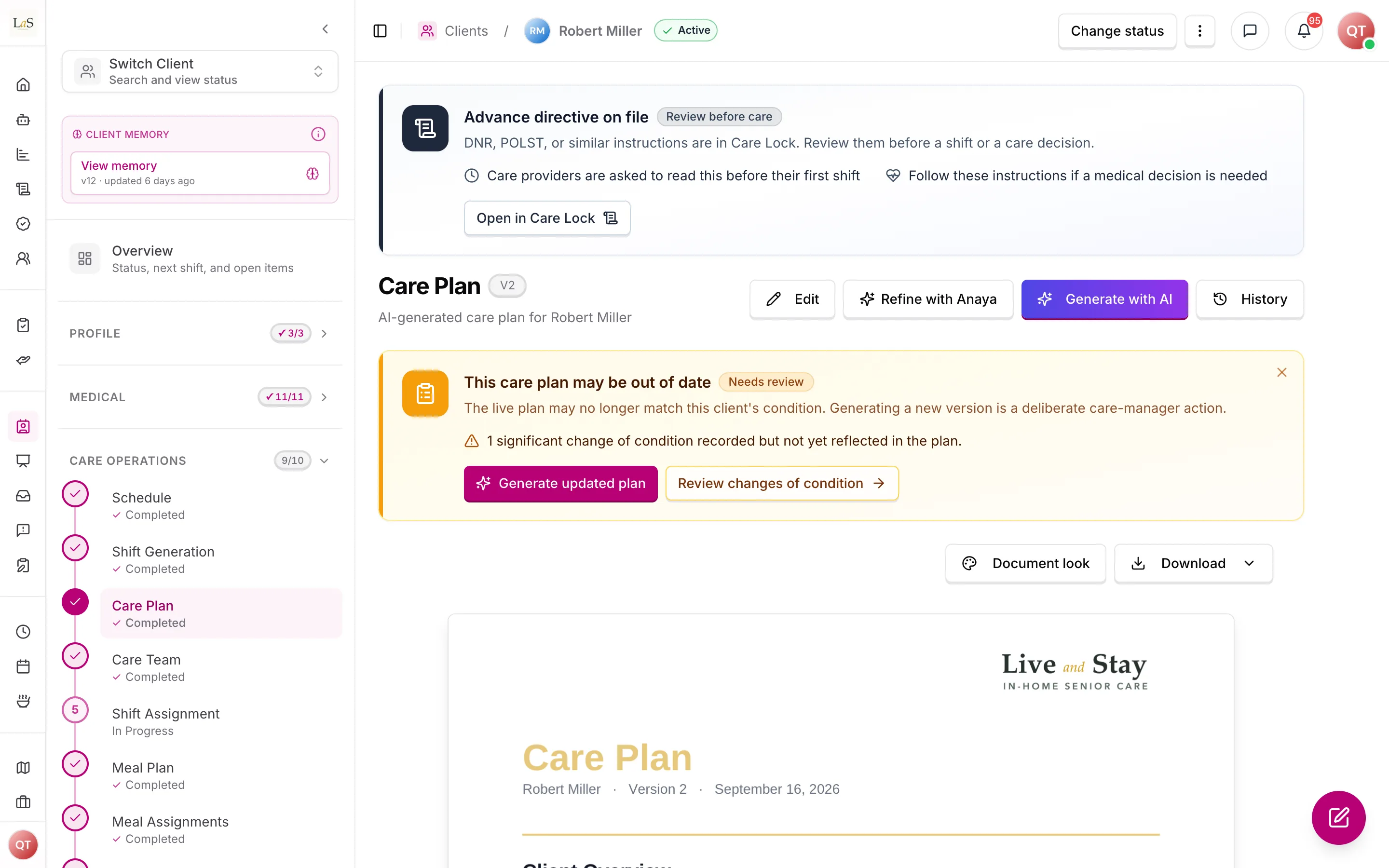
The care plan page. The notice appears when a significant change of condition is not yet in the plan.
For initial Care Operations setup, a plan can be created only after the current shift-generation batch succeeds. The plan records that batch and the exact schedule revisions it used. This does not make shifts care-plan content; it makes the plan's operational grounding auditable and lets the product explain when a later schedule edit has made setup stale.
The plan carries a structured Daily Routine section: the client's routine time anchors (wake, sleep, and meal times — each a client-local time window plus care guidance). The AI drafts it from the care assessments — the Montessori Profile's wake-up routine, bedtime routine and typical-week questions and the Meal Assessment's meal-timing question () — a human reviews it, and it is versioned with the rest of the plan. It is the only home for clock times in the care plan; every other section references anchors by name (). This section proposes the client's routine times: publishing the plan seeds any routine-time field the care manager has not yet set on the client's routine-times record (fill-if-empty, never overwriting a set value), where those times feed schedule defaults and AI task timing (, , ).
The plan's section (paired with Memory Care Support) is where requested readings appear. Anaya Care does not monitor health: a family member or representative asks for a reading, and the care manager records that request by marking it Check on shifts on the client's Health Baselines (part of the client profile — each reading has its own mark, Health Readings ), with the numbers as configured. A reading with alert numbers but no mark stays out of the plan — its numbers still check any value that happens to be recorded, but nobody is asked to take one. When none are marked, the plan carries no reading content — the AI never invents a reading, a threshold, or a doctor's order; at most it reminds the care manager once, gently, that they can add the doctor's numbers (AI Features , Health Readings ). The section still covers everyday observation — appetite, hydration, mood, skin, moving about, behaviour — and when to report a change ().
When the plan must change
A care plan is born from the care assessments, but the client keeps changing, so the plan has to keep up. Four upstream events open a , and they all converge on the same review action and update the same care plan document ():
- a ();
- a discharge after a hospital stay ();
- a routine or event reassessment falling due (); and
- a repeatedly-flagged instruction step caught by pattern analysis ().
When the review produces a new care plan version, that change must ripple outward — because a Care Task List built from an old plan version is now stale. Publishing a new care plan version flags the dependent Care Task Lists stale and records which plan version each was built from (), so staff know exactly what to refresh; the affected instruction steps are flagged for regeneration (). Every plan version also records the revision of each assessment that grounded it () — completing the trace from "this picture of the client" through "this plan version" to "these published tasks" (). The full loop is mapped on the Care Lifecycle page.
The Care Task List and its lifecycle
Each client schedule has at most one Care Task List. It is created either as an empty draft (staff add tasks by hand) or generated by AI from the client's current care plan. Tasks are added, edited, and removed only while the plan is a draft. Publishing makes the plan live for shifts and archives the previously published version; staff can later start a new draft from the published plan, or revert to an earlier published version.
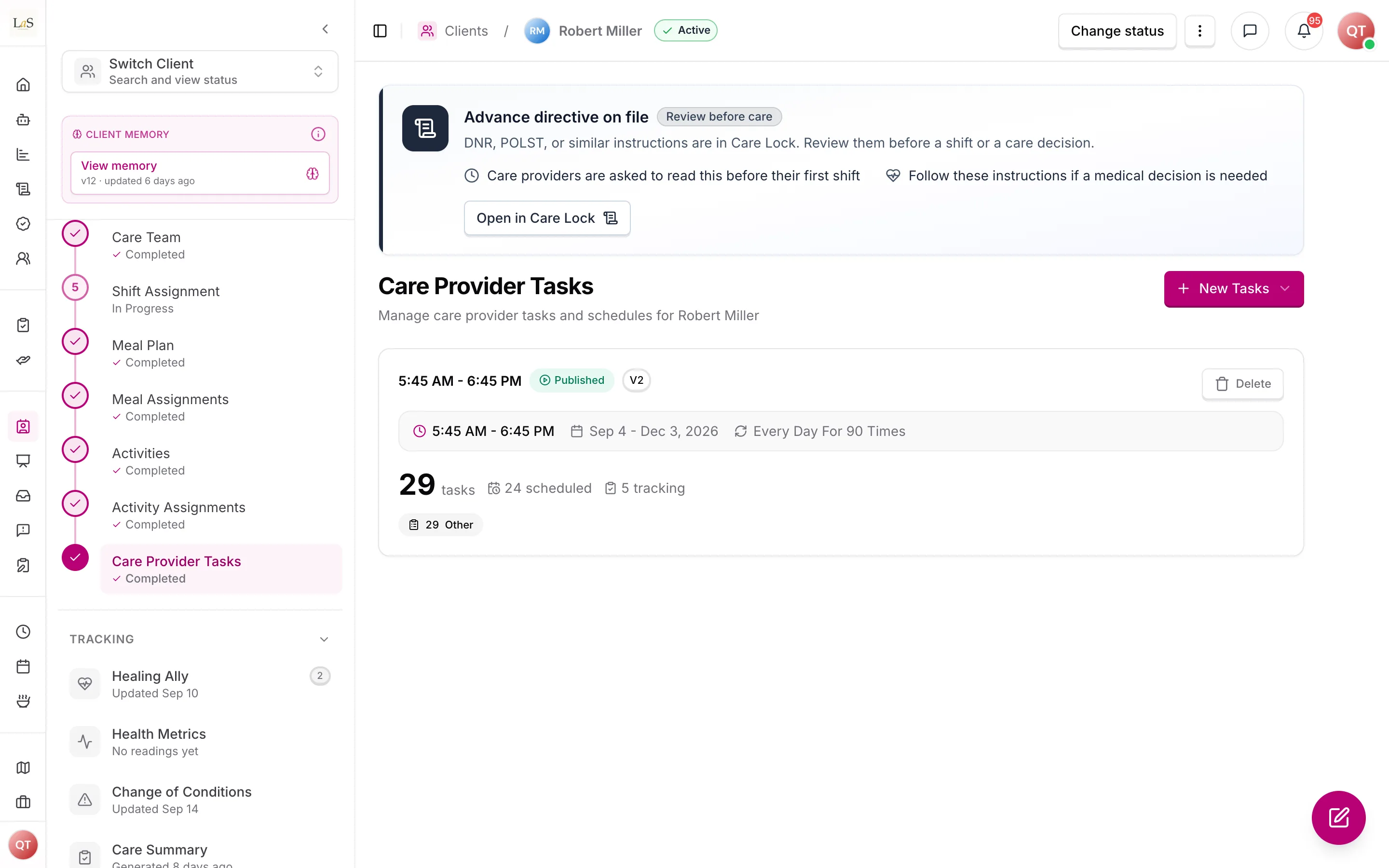
The first time any Care Task List is published for a client, the client automatically becomes active and care delivery begins (see Clients). Publication is blocked until at least one accountable care manager is assigned.
How tasks reach a shift
Tasks are stored once per schedule with a recurrence pattern, then expanded into each shift's time window when a care provider opens the shift. Three things are blended in live, so they are always current without republishing the plan:
- Medication reminders are computed from the client's current medication list every time — medication changes reach care providers immediately.
- Meal and engagement details assigned to that specific shift are attached to the matching tasks.
- (doctor-appointment collisions) are removed from what the care provider is expected to do.
If a schedule has no published Care Task List, its shifts simply show no tasks.
The consolidated daily task view
A care provider should see one ordered list per shift, not several separate lists. The daily task view pulls together everything expected on that shift from every source: the published Care Task List, approved engagement programs, approved meal-plan prep and grocery pickup, calendar events (additions, changes, and cancellations flow through automatically), and confirmed ARMI Marketplace bookings. A pending ARMI booking does not generate a task — only confirmed bookings do. Each item carries its source so staff and care providers can see where a task came from.
Each task in the view carries a title, instructions, an estimated duration, a care domain category (Life's Milestone or the agency's equivalent), and its source. The agency can attach optional reference media — photos, short video, or audio — and link the step-by-step task instruction steps a care provider reads before the shift.
When a care provider completes the task, its attachment fields accept more than one photo each, up to a cap the template sets (). This matches how the work actually gets documented: a meal is photographed before and after, a wound from more than one angle, an incident as both the injury and the scene.
Task order on the shift
Time-anchored tasks appear in their scheduled position in the list. Non-time-anchored tasks can be completed in any order; they appear in a recommended sequence the care manager configures, but the care provider is free to do them out of order.
Task times come from the client's routine anchors: the AI generator resolves each task's time against the wake, sleep, and meal windows rather than hardcoded windows (). It sees both ends of each window and places the task within it. A task scheduled before the earliest time the client could be awake is preparation, so it sits at the top of the shift, before the client is up () — this is inferred from the wake window and the shift start, with no stored phase on the task.
Completion states and time-sensitive tasks
Every task is finished in one of two states: Completed or Skipped (requires a reason from the platform's list plus a note). Each state change records a completion timestamp.
The completion state belongs to the submission, not to the task's form. A care provider who cannot do a task should never have to fill in a form describing work that did not happen, and the agency should be able to count skips across shifts without reading every submission. So the state is recorded once, the same way for every task, whatever its template — and skipping a task asks for nothing but the reason and the note.
A skipped task still counts as accounted for: the care provider has answered for it, so it does not hold up clock-out. What it does not count as is done.
Time-sensitive tasks — repositioning, scheduled reading checks, and similar — capture a care-provider-entered . The next cycle of a recurring time-sensitive task is scheduled from the entered time, not the originally scheduled time, so intervals reflect when care actually happened (see Scheduling & Shifts on recurring time-anchored tasks).
The shift detail view shows completion status for each shift, and skipped tasks are flagged there for care manager review alongside the shift's other exceptions. Repeated skips of the same task across shifts should raise a pattern alert, which is not built yet.
The data captured for each task is defined by the task library itself — each template carries its own field structure, required answers, validation rules, and observation thresholds.
Completing tasks
A scheduled task is a two-step flow: the care provider starts it, fills in the template's form, and completes it. A tracking task is submitted in one step, as many times as needed.
From the same place they start a scheduled task, the care provider can instead say they cannot do it — before starting, or after starting and finding out the task is not possible. Skipping asks for a reason and a note, and nothing else: no form, no required fields, no readings. Reading the task's preparation steps is not required in order to skip it, because making someone tick through a briefing to record that the client refused helps nobody. A skipped task cannot be skipped twice, and a task already completed cannot be skipped. On completion the answers are validated against the template, health values are checked against the client's personal safe ranges (falling back to the template's defaults), and the care provider's location is compared to the client's address. Warnings and an out-of-range location are recorded and reported but never stop the submission. When the care provider clocks out, any tasks still in progress are automatically completed and clearly marked as auto-completed. A shift cannot be completed while required tasks in its window are missing submissions — a required tracking task needs at least one entry, however many it ends up receiving. Only required scheduled tasks hold up clock-out itself; a missing required tracking entry warns the care provider and is recorded against the shift, but lets them clock out (see Scheduling & Shifts).
Review, comments, and concerns
There is no approve/reject step on submissions. Instead, staff and family review submissions after the fact and comment on them. A comment flagged as a opens a follow-up that notifies the agency's owners and admins; they acknowledge it and then resolve it, optionally with a resolution note, and the person who raised it is notified at each step. Ordinary comments notify the submitting care provider and the client's representatives.
What the family sees
Representatives linked to a client see the client's task list for each day, each task's submission status, submission details with comments, and summary statistics. They can comment and raise concerns but cannot change plans or tasks.
Changing the generated plan by asking
Once Anaya has drafted the care plan, a care manager can change it by typing what they want in plain words beside the document — "say more about how to handle a fall", "rephrase the whole plan in plainer words" — rather than editing each section by hand. Each request revises the plan as it currently stands and leaves alone whatever the request did not reach. Refining does not publish a new version of the plan: it changes the plan the care manager is looking at, so a six-message conversation does not leave six versions behind. Requests are answered one at a time, and every one is kept with the plan along with what it changed — including requests that failed or were cancelled. See AI-34 – AI-38.
Rules
- PLAN-1 — A care plan is never edited in place. Every save, AI generation, or revert creates a new version, and the highest version is always the client's current plan.
- PLAN-2 — A care plan can be created manually by agency staff or generated by AI. AI generation must use the client's profile, current medications, and completed assessments.
- PLAN-3 — Only one AI generation (care plan or Care Task List) can run per client at a time. The requester is notified when it finishes, and a running generation can be cancelled.
- PLAN-4 — Reverting a care plan or a Care Task List must restore the chosen version as the current one while keeping a record of the versions it supersedes.
- PLAN-5 — Each client schedule has at most one Care Task List. Creating a draft for a schedule that already has one must be refused.
- PLAN-6 — Tasks can only be added, edited, or removed while the Care Task List is a draft. Only a draft can be published.
- PLAN-7 — Publishing a Care Task List archives the previously published version of the same plan, so exactly one published version is live per schedule at any time.
- PLAN-8 — AI task generation requires the client to have a current care plan linked to schedules; without one it must be refused.
- PLAN-9 — Every task must be based on a template from the platform task library, which defines its form fields, required answers, and warning thresholds.
- PLAN-10 — The first publish of any Care Task List for a client automatically activates that client.
- PLAN-11 — Removing a recurring task can apply to all occurrences, to a single date, or to a date and everything after it.
- PLAN-12 — Medication reminder tasks are always derived live from the client's current medications and are never stored in the Care Task List. Completing one updates medication stock and triggers the related notifications.
- PLAN-13 — A task occurrence that collides with a doctor appointment can be excused; an excused occurrence is not expected on that shift.
- PLAN-14 — A scheduled task accepts exactly one submission per task, per care provider, per shift. A tracking task accepts unlimited submissions, each numbered in order.
- PLAN-15 — A submission always belongs to one shift, and the care provider submitting must be the one assigned to that shift for that client.
- PLAN-16 — Care providers can only complete, change, or remove their own submissions.
- PLAN-17 — Submitted answers must be validated against the task's template. Health values are checked against the client's personal safe ranges first, then the template defaults; breaches at high or critical level must alert the agency immediately.
- PLAN-18 — Threshold warnings and a failed location check never block a submission; both are recorded on the submission for review.
- PLAN-19 — At clock-out, every in-progress submission on that shift is automatically completed and permanently marked as auto-completed; abandoned in-progress submissions are also swept up periodically.
- PLAN-20 — Anyone permitted to comment can flag a comment as a concern. A concern starts Open, must be acknowledged before or as part of resolution, and ends Resolved with an optional note. Owners and admins are notified when a concern opens; the author is notified at each status change.
- PLAN-21 — Representatives can only see clients they are actively linked to.
- PLAN-22 — All care plans, Care Task Lists, and submissions belong to one agency, and people from another agency must never be able to see or change them.
- PLAN-23 — Deleting a schedule removes its Care Task Lists. A care plan that also covers other schedules must survive the deletion of just one of them.
- PLAN-24 — Each shift must present a single, ordered daily task view that consolidates every source: the published Care Task List, approved engagement programs, approved meal-plan prep and grocery pickup, calendar events, and confirmed ARMI Marketplace bookings. (🚧 Spec only)
- PLAN-25 — A pending ARMI Marketplace booking must not generate any task; only a confirmed booking generates tasks. (🚧 Spec only)
- PLAN-26 — Calendar changes (additions, modifications, and cancellations) must flow into the daily task view automatically, without republishing the Care Task List. (🚧 Spec only)
- PLAN-27 — Each task must carry a title, instructions, an estimated duration, a care domain category (Life's Milestone or the agency's configured equivalent), and its source; the agency may also attach optional reference media. (🚧 Spec only)
- PLAN-28 — Every task must be finished in one of two completion states — Completed or Skipped — and each state change must record a completion timestamp. The completion state is recorded on the submission, never as a field inside the task template's form: the same question asked the same way for every task, so it can be counted, filtered, and reviewed without reading each submission. A skipped task is accounted for and so does not block clock-out, but it is never counted as done. (✅ In code)
- PLAN-29 — Marking a task Skipped must require both a reason chosen from the platform's fixed list — client refused, client unavailable, client unwell, supplies unavailable, not enough time, safety concern, other — and a note. Both are enforced by the server, not only by the app, so the record holds regardless of which app version was used. Skipping requires nothing else: a task that did not happen must never demand the template's form fields, readings, or preparation-step acknowledgement. (✅ In code)
- PLAN-30 — Time-anchored tasks must appear in their scheduled position; non-time-anchored tasks must be completable in any order and shown in a care-manager-configurable recommended sequence. (🚧 Spec only)
- PLAN-31 — Time-sensitive tasks must capture a care-provider-entered Time Performed, and the next cycle of a recurring time-sensitive task must be scheduled from that entered time rather than the originally scheduled time. (🚧 Spec only)
- PLAN-32 — The shift detail view must show task completion status per shift and flag skipped tasks for care manager review, alongside the shift's other exceptions. Raising a pattern alert when the same task is skipped repeatedly across shifts is not yet built. (⚠️ Partial — flagging is in code, the pattern alert is not)
- PLAN-33 — The task library itself is the definition of what each task captures: every template carries its own field structure, required answers, validation rules, and observation thresholds, and every task must be based on one (). No template may carry a field that restates the submission's own completion state — that belongs to , once, for every task. (✅ In code)
- PLAN-34 — Publishing a new care plan version must flag every published built from a prior care plan version as stale, notify the care manager to review and republish, and record which care plan version each Care Task List was generated from. The flag is surfaced for the care manager to act on; whether the platform also auto-creates updated drafts is an open decision below. (🚧 Spec only)
- PLAN-35 — A care-plan review triggered by a significant change of condition (), a discharge (), or a reassessment () must converge on the same care-plan-review action and update the same care plan document. The entry reason is recorded on the review, but the three paths must not create separate, divergent review tracks. (🚧 Spec only)
- PLAN-36 — A care plan records, for each assessment that grounded it, which assessment, on which template, at which () — whether it was drafted from a reassessment outcome or not. Plans made before template-driven intake get the revision of each of the six care assessments that was current when the plan was created, where that can be worked out, and nothing where it can't. Together with — each Care Task List records its source care plan version — this closes the provenance chain assessment revision → care plan version → Care Task List, so for any published task the exact assessment picture behind it can be traced. (✅ Revision provenance is stored: generation captures the revisions with its narrative; reverting preserves the target version’s provenance. Historical provenance is derived during migration where possible. No web provenance viewer is built.)
- PLAN-37 — The care plan carries a structured Daily Routine section: the client's routine time anchors (wake, sleep, and meal times — each a client-local time window plus care guidance) — AI-drafted from the named routine questions of the Montessori Profile and Meal Assessment (), human-reviewed, and versioned with the plan. Every anchor carries both ends of its window; an anchor with only one end is invalid. This section is the only place in the care plan where clock times belong; every other section references anchors by name. (🚧 Spec only)
- PLAN-38 — The client's (wake, sleep, and meal times) are the operational source scheduling and task generation read; they are set directly on the client schedule page (see Scheduling & Shifts ). The care plan's Daily Routine section proposes these times: publishing a version seeds any routine-time window the care manager has not yet set on the client's routine-times record (fill-if-empty, never overwriting a set value, and always seeding both ends of a window together). (🚧 Spec only)
- PLAN-39 — Care Task List task times are derived from the client's routine anchors rather than generic hardcoded meal-window constants. The generator sees both ends of each anchor's window and places the task within it. A task scheduled before the earliest time the client could be awake is preparation; preparation is inferred from the wake window and the shift start — there is no stored task phase or anchor-reference field. (🚧 Spec only)
- PLAN-41 — The first care plan in Care Operations setup requires a successful, current shift-generation batch covering every active client schedule revision. (✅ In code)
- PLAN-42 — Every care plan records the generation batch and schedule revisions that grounded it, in addition to its assessment provenance. (✅ In code)
- PLAN-43 — Editing a grounded schedule marks the dependent setup plan Stale; staff must regenerate shifts and review or create a current plan before new downstream staffing can be committed. Existing live shift work is preserved. (✅ In code — currency is derived from batch and schedule provenance)
- PLAN-44 — A task template's attachment field may accept several attachments rather than one, up to a per-field cap defined on the template. The care provider adds and removes attachments freely until the submission is recorded, and the cap is enforced when the submission is saved — not only in the app — so it holds regardless of which app version was used. Every photo field in the current task library accepts up to five attachments. (✅ In code)
- PLAN-45 — The task library is non-clinical by default. Templates covering work that sits outside an unlicensed care provider's scope in most places — wound dressing, catheter and stoma care, applying medication, eye drops, and seizure response — are marked as requiring delegation. The AI task generator never selects a delegated template, so this work reaches a shift only when a care manager assigns it deliberately, knowing who is rostered. (✅ In code)
- PLAN-46 — Every health-reading task must let the care provider record that the reading did not happen — the client declined, the reading could not be obtained, or the equipment was unavailable — and must not require a number in that case. A reading that was never taken is never counted as a reading, so a client whose checks are consistently declined reads as unrecorded rather than healthy. (✅ In code)
- PLAN-47 — The care plan's section lists a reading only where a care manager has entered numbers and marked it Check on shifts on the client's Health Baselines, recording that the family asked for it (), with the numbers as configured. When none are marked the plan carries no reading content and the AI never invents one — at most a one-time gentle reminder that the care manager can add the doctor's numbers (, ). The section still covers everyday observation — appetite, hydration, mood, skin, moving about, behaviour — and when to report a change. No part of it may be worded as monitoring, tracking, or watching the client's health. (✅ In code)
- PLAN-48 — Reading content follows the Check on shifts mark end to end. The plan's Health Readings section lists exactly the marked readings (), and the AI task generator emits a reading-check task only for a marked reading — a check task for an unmarked reading is sent back to the AI to fix during generation and stripped before saving if it survives. Every marked reading is expected to be covered by a check task somewhere on the client's Care Task Lists; a gap is flagged to the AI during generation and recorded on the generation run, never silently accepted — but it does not block, because one schedule's regeneration cannot see the tasks another schedule already carries. (✅ In code — the recorded gap is not yet shown on a dashboard screen; see Known gaps)
- PLAN-49 — The care plan is written for its executor. The AI plan author knows the plan is not the end product: it is operationalized into per-shift that care providers follow on the Anaya mobile app during shifts, built only from the platform task library (, ). Domain instructions are concrete, observable actions phrased so the task generator can carry them into tasks; work the task library cannot carry (delegated or clinical work) is never written as shift instructions — the plan raises it to the care manager instead. (✅ In code)
- PLAN-50 — Every line a care provider follows — an instruction, a goal, a client note, an escalation line, a safety line — is one plain sentence of about 12–25 words. The plan is read on a phone mid-shift, so a line that runs long stops being something somebody can do. A second short sentence is allowed only when a safety detail would otherwise be lost; an emergency line may be far shorter still, because "Call 911, then call the care manager" is complete as it stands. The domain approach keeps its 1–2 sentences. This is the length twin of : the plan is written for its executor. (✅ In code)
Who can do what
| Action | Allowed roles |
|---|---|
| Create, edit, revert, or AI-generate a care plan | Owner, Admin, Care Manager |
| View the care plan | Owner, Admin, Care Manager, Care Provider (read-only), Representative (read-only) |
| Create, edit, publish, archive, or revert Care Task Lists | Owner, Admin, Care Manager |
| Run AI task generation | Owner, Admin, Care Manager |
| View the shift task list and submit tasks | Care Provider (own shifts only) |
| Mark a task Completed or Skipped | Care Provider (own shifts only) |
| Configure the recommended order and reference media | Owner, Admin, Care Manager |
| View the real-time completion dashboard and pattern alerts | Owner, Admin, Care Manager |
| Comment on a submission / raise a concern | Agency staff and Representatives with comment permission |
| Acknowledge and resolve concerns | Owner, Admin (and staff granted concern management) |
| View daily tasks, submissions, and stats for a client | Representative (linked clients only) |
Access in this area is granted through the agency's permission settings; the roles above are the intended defaults.
Decisions needed
- How should a care plan change reach the Care Task Lists? now resolves the core link: publishing a new care plan version flags the affected Care Task Lists stale and records their source version. The open sub-question is the degree of help: should the platform also auto-create updated drafts for staff to review, or only flag-and-notify (the default) and leave staff to draft? Keeping it fully manual is no longer an option.
- (Resolved) Does a reviewed change of condition trigger a care plan review? Yes — a significant change now opens a reassessment and care-plan review via , and all review entry points converge through . What remains is the threshold for "significant," owned by Change of Conditions.
- Should submissions get a formal supervisor review step? Today review is informal, via comments and concerns. Options: add an approve/return-for-correction status, or keep comment-based review as the model.
- Should care providers be able to delete their own submissions? Care records are compliance-sensitive. Options: forbid deletion entirely, allow it only within a short window, or allow it with a permanent audit record.
- (Resolved) What do we call the two "care plans"? The narrative document is the ; the operational recurring list is the (formerly "task plan"). In this handbook, "care plan" always means the narrative document. The in-code entity for the Care Task List remains
CareProviderTasks. See the glossary. - May a pre-wake preparation task ever resolve before shift start? It must not — a shift positioned to begin before the client's wake time keeps pre-wake preparation inside the shift window; confirm this invariant holds for manually retimed schedules.
How is this page?
Last updated on