Client Activities
Part of the Anaya Care Handbook — the source of truth for how the product must behave. When the product needs to change, change this document first, then make the system match it.
What this covers
This page governs client activities: Care Prints worksheets created for one specific client, approved by the family, and placed onto activity tasks inside scheduled shifts — so the care provider on duty knows what to run, and can choose when the day calls for it. Its sibling features have their own pages: Meals, Essential Needs, and Home Inventory.
The sheets themselves are printables (not Anaya Care stationery). The maker, the editor sheet, and the exported SVG/PDF carry Care Prints' lockup and send readers to care-prints.com. Anaya still owns saving, permissions, generation, approval, and shift assignment.
Key terms
- Client activity — a Care Prints worksheet created for exactly one client, with its own content and a printable sheet.
- Shortlist — the one or more approved activities a care manager places on one activity task within one scheduled shift.
- Selection — the one or more activities the care provider on duty actually ran on that task.
- Bulk scheduling — automatically spreading a client's approved activities across the activity tasks in their upcoming shifts.
- Printable handout — the exported Care Prints sheet (SVG/PDF). Its footer is the Care Prints row: puzzle heart, Care Prints, CARE YOU CAN PRINT, care-prints.com, and 1.888.896.8275.
How it works
Activities work like meals with two differences: each activity belongs to exactly one client (there is no shared bank), and approval lives on the activity itself rather than on a link. Staff ask the AI assistant to draft them. AI generation shares the one-run-per-client limit with meals ().
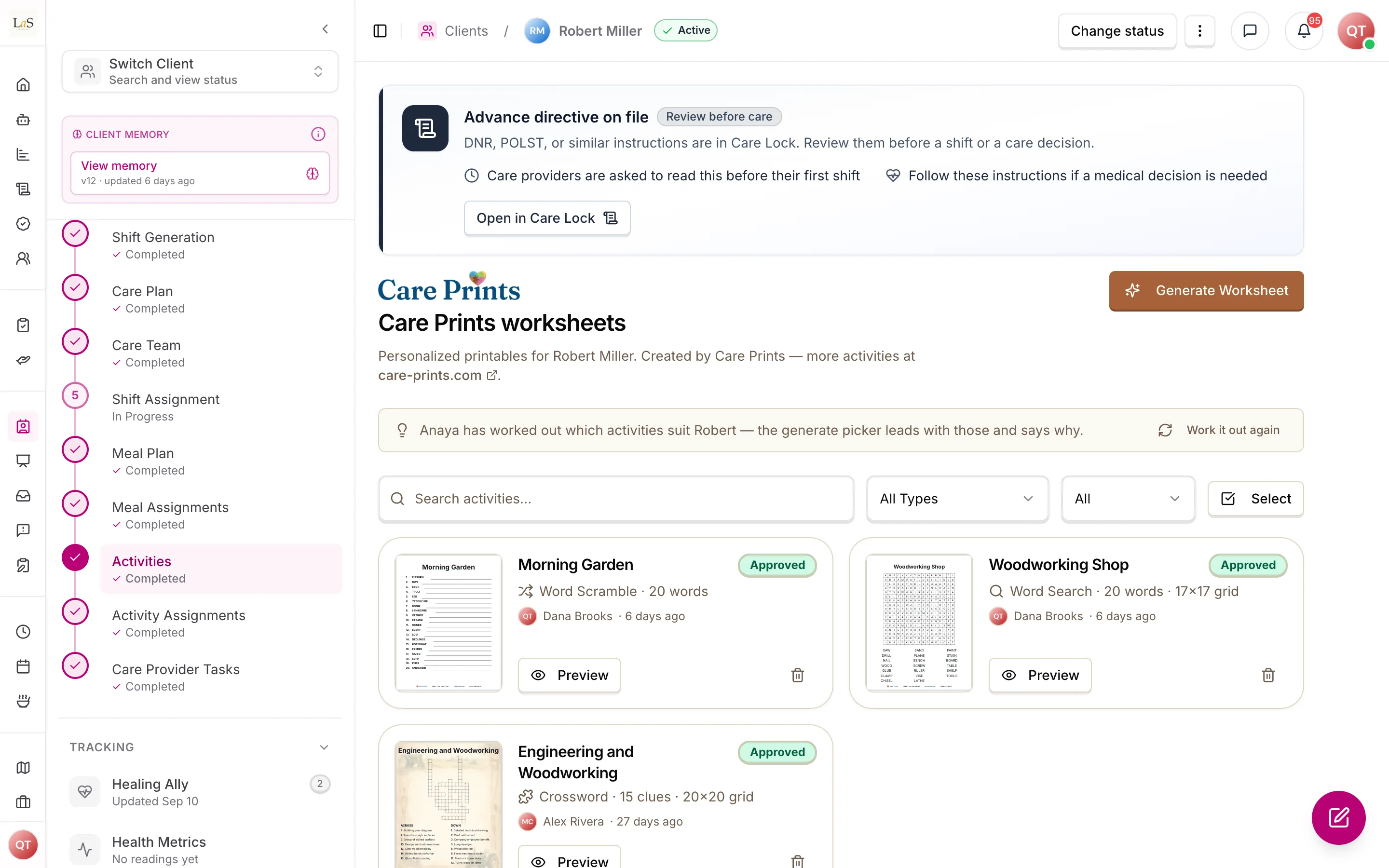
Planning and choosing
Approved activities are placed onto activity tasks in shifts, one shortlist per task, individually or via bulk scheduling. How the shortlist reads depends on its size:
- One activity is a fixed instruction. The care provider runs that activity.
- Two or more is an offer. The care provider runs one or more of them, as the day allows.
- No shortlist at all leaves the choice open. The care provider picks from everything approved for that client — so a holiday, a low-energy day, or a visitor doesn't leave the provider stuck with a plan made three weeks earlier.
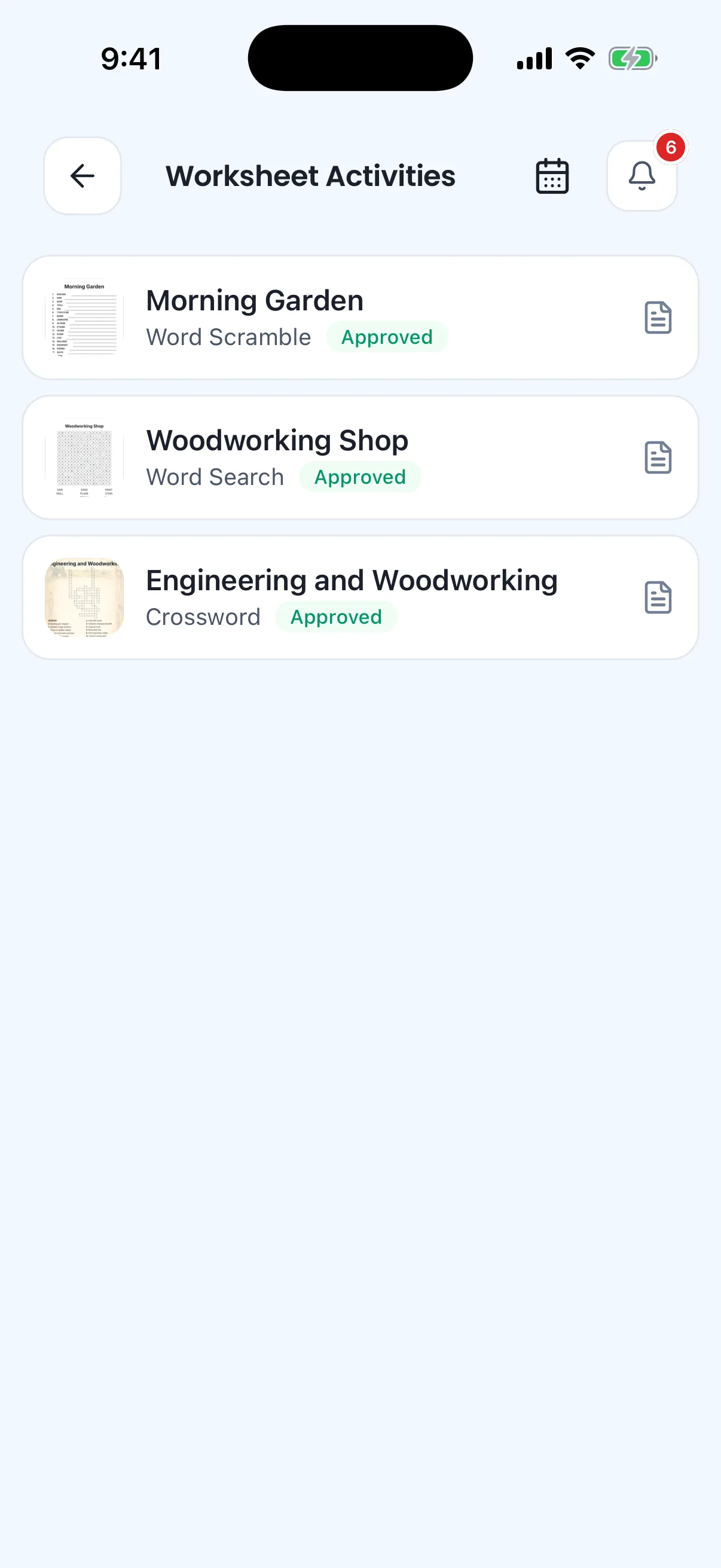
The approved worksheets, ready on the care provider's phone.
Whatever the care provider chooses is what the record shows. This is a deliberate difference from meals: MEAL-7 still gives a meal-preparation task exactly one meal, because a planned meal is bought and prepped in advance, while an activity depends on how the client is that morning.
Any activity can be exported as a printable handout for the care provider or family. The sheet's footer is Care Prints' own row, not the agency's document branding.
Product branding
The maker, the editor sheet, and the printed SVG/PDF are Care Prints surfaces. Official site: care-prints.com. Anaya's client sidebar and the rest of the dashboard stay Anaya Care.
Which activities suit a client
Choosing what to make used to be guesswork: every activity type was offered in one flat list, and nothing on screen said which of them this particular elder could actually do. So a client with advanced dementia and arthritic hands could be handed a crossword, and the first sign it was wrong came when a care provider tried to run it.
The platform now keeps, for each client, a verdict on every activity type it can make — Recommended, Could work, or Not a fit — each with one plain sentence saying why. It reads four care assessments: the Montessori Profile for what the person enjoys and how they take information in, the Allen Cognitive Level for how much they can hold at once, the Simplified Routine Task Inventory for what they can manage on a page, and the Routine Task Inventory for reading and writing — drafts and completed ones (ABLD-19). The Allen level is consulted only when the Simplified Routine Task Inventory records a physician-confirmed dementia; when it says no, or nothing is recorded, the profile and the inventories carry the judgement. These are the answers of the four library instruments, read question by question.
The verdicts appear in two places: as a panel on the client's client activity bank, and as the grouping of the choices when staff ask the AI to make activities — so the guidance is there at the moment the decision is made.
Two things this is deliberately not. It does not choose topics or write activities — that is still the AI generation described above, run by a person who decides what to ask for. And it never removes a choice: a type marked Not a fit is dimmed, not disabled, because the person who knows the client is the one at the keyboard.
Verdicts are refreshed on request, and automatically whenever one of those four assessments is saved, so they keep pace with the elder rather than freezing at intake.
Crafts, food crafts, games and Memory & Reading
Four activity types print from a Care Prints page layout: Care Crafter (a craft to make), Culinary Crafts (a no-heat food craft), Timeless Treasures (a group game) and Memory & Reading (a short story with questions about it). The AI writes all four. When asking for one, the care manager must choose its page layout from sketches of the page, and the layout cannot be changed once the sheet is made. Memory & Reading also asks how many questions follow the story: five unless changed, from 1 to 20 ().
A craft, food craft or game sheet with photos has a main photo of the finished result and a picture for each step. Like every picture, they are drawn after the sheet is made, when someone asks (). The steps are one series: each is drawn from the picture before it, so the same things, table and light carry through. That sets the order — the main photo first, then step 1, then step 2 — and the pictures panel says which picture to draw first when one is asked for out of turn. Draw all makes every missing picture in that order, shows how far it has got, and stops at the first one that fails (). A sheet cannot be sent for approval, approved or printed until every picture it needs is made (). A Text only layout needs no pictures. A new Memory & Reading sheet has one picture, the background its story is printed over. It is drawn on request too, and the sheet waits for it like any other picture. Older Memory & Reading sheets have no picture to make.
Crafts, food crafts and games are written within the limits of the client's care record. A food craft leaves out every recorded allergy and follows the recorded diet: food intolerances, dietary restrictions, special considerations, and the food textures the swallowing notes allow. A craft or a game leaves out any material or prop the client is allergic to. All three leave out things made from a recorded allergen too, such as shells for a shellfish allergy or balloons for a latex allergy, and the pictures do not show them. If the meal assessment says the client takes nothing by mouth, a craft or a game has no food or drink in it at all, and the run asks the care manager before it writes a food craft: make it a hands-on activity with no eating or tasting, or skip it. No food craft is written unless they choose the hands-on one ().
Rules
- ENG-1 — Every client activity belongs to exactly one client and can never be shared with or attached to another client's shifts.
- ENG-2 — Every client activity must be approved before it can be placed on a shift task or chosen by a care provider. An activity is written by AI and starts as Finalizing, and becomes Pending only when a person sends it for approval (). Approving client activity plans is inherent to the Representative role and cannot be removed by permission configuration (ACCESS-35).
- ENG-3 — AI activity generation takes exactly one activity type and produces one activity. Beyond an optional topic, a request carries the settings that particular type needs — a crossword's grid style, and with it either how many clues to write or which grid to fill; how a counting sheet's pictures should look; the page layout of a Care Crafter, Culinary Crafts, Timeless Treasures or Memory & Reading sheet, which must be chosen and cannot be changed once the sheet is made; how many questions follow a Memory & Reading story, from 1 to 20 and five unless changed. Making several means running it several times, choosing a type each time.
- ENG-4 — An activity task in a shift holds a shortlist of one or more approved activities, and records the one or more activities the care provider actually ran.
- ENG-5 — Deleting an activity removes it from every shortlist and selection. Deleting a client removes all of their client activities.
- ENG-6 — Client activities are visible only to logged-in users whose role permits it, and never cross agency boundaries.
- ENG-7 — A care manager may place one or more approved activities on an activity task. A shortlist of exactly one is a fixed instruction: the care provider runs that activity. Two or more is an offer: the care provider runs one or more of them, as the day allows. A shortlist is never a checklist — where several activities must all happen, they belong on separate activity tasks. (🚧 Spec only)
- ENG-8 — When an activity task carries no shortlist, the care provider on duty chooses freely — one or more — from the activities approved for that client. (🚧 Spec only)
- ENG-9 — The activities the care provider chose are the record of what was run. They are stored in the order chosen, with who chose them and when, and they are what the client calendar, the family view and shift reports show. (🚧 Spec only)
- ENG-10 — A care provider may only choose activities approved for that client (), and — where a shortlist exists — only from that shortlist. (🚧 Spec only)
- ENG-11 — Bulk scheduling offers approved activities on each activity task, rotating evenly so consecutive shifts don't repeat the same set, skipping cancelled shifts, leaving existing shortlists untouched unless overwriting was explicitly requested, and refusing to run when the client has no approved activities. (🚧 Spec only)
- ENG-12 — Every client has at most one activity-fit set: a verdict on every activity type the platform can make — recommended, could work, or not a fit — each with one plain-words reason. It is guidance a care manager may override, never a restriction: every type stays choosable (). (🚧 Spec only)
- ENG-13 — Verdicts are drawn from the Montessori Profile, the Allen Cognitive Level and both Routine Task Inventories, and from that client only (AI-4). The Allen Cognitive Level is read only when the Simplified Routine Task Inventory's Confirmed dementia is Yes; when it is No or not answered, the judgement rests on the Montessori Profile and the inventories — an unanswered question is never read as No (ABLD-15, extends CA-13). (🚧 Spec only)
- ENG-14 — A fit set records which revision of each of those four assessments it was built from (CA-15). When any has moved on, the set is shown as out of date rather than presented as current. Sets built before template-driven intake keep their record: the revisions carry the old version numbers. (🚧 Spec only)
- ENG-15 — Fit sets refresh both on request and automatically when one of those four assessments is saved; refreshes are debounced so a burst of saves produces at most one run. Auto-refresh is permitted here — and is not at odds with LIFE-5 — because a verdict set is inert: it changes no care direction, generates nothing, and never removes a choice. (🚧 Spec only)
- ENG-16 — A client with none of those four assessments on record gets no verdicts at all, and the product names the assessment that would produce them rather than showing guesses. (🚧 Spec only)
- ENG-17 — A verdict's reason is written in plain words and names the evidence behind it in everyday terms ("she reads short passages fine"), never a clinical label (PERSONA-12). (🚧 Spec only)
- ENG-18 — An activity whose sheet is made of pictures is produced in two parts. The run writes the activity and a plain description of the picture it starts from, and saves it — the pictures themselves are made afterwards, on request, one at a time. A care manager may reword any description before asking for its picture, may ask for any single picture again, and may drop a variation they do not want — each without regenerating the activity. A sheet always keeps at least one variation, because a sheet with a single picture has nothing to tell apart. How many variations there are, how many squares the sheet has, and how many squares each variation fills are the care manager's to set, and they are set while finalizing the sheet rather than when asking for it: they are what make a sheet easy or hard for a particular elder, the last of them is the puzzle's own answer, and none of them can be judged before there are pictures to judge.
- ENG-19 — Where a sheet's pictures are variations on one another, they are made from the first picture rather than described independently, so what the elder is asked to count differs in exactly the way it is meant to and nothing else drifts.
- ENG-20 — Arranging the pictures across the sheet is a step the care manager takes, not something that happens on its own each time a picture is made — it is the moment the sheet becomes a puzzle, and it can be run again to arrange the same pictures differently. Until it has been taken, a sheet may have every picture it needs and still print blank.
- ENG-21 — An activity still missing any of its pictures, or not yet arranged, cannot be approved or printed. The product names what is outstanding rather than offering a blank sheet — AI-8 and AI-9 applied to pictures.
- ENG-22 — An activity written by AI is Finalizing until a person sends it for approval. While it is finalizing it is not offered to anyone who approves, and it is not counted as awaiting them. This is AI-8 made literal: the run produces a draft, and a draft is not a thing to be approved or rejected until someone has been through it. Sending it for approval is refused while any picture is outstanding ().
- ENG-23 — A care manager may change what a generated activity says, not only how it looks: its title; for a crossword, its clues and its answers; and for a Memory & Reading sheet, its story, the heading over its questions, and the questions with their answers. Changing a crossword answer re-lays the grid, so the sheet always matches its own answer key. Changing a Memory & Reading sheet's words leaves its print layout, styling and background picture as they were. Two things are deliberately fixed: a newspaper-style crossword's answers, because its grid is a fixed pattern and refilling one is a generation run rather than an edit; and the placement of a counting sheet's pictures, which is its own step ().
- ENG-24 — No picture is drawn while an activity is being generated, the page's background picture included. The run writes a description of every picture the sheet needs and stops there; each one is drawn afterwards, on request, from a description a care manager may reword first. A generation run therefore never fails because a picture failed.
- ENG-25 — A Care Crafter, Culinary Crafts or Timeless Treasures sheet with photos has a main photo of the finished result and one picture per step, and the step pictures read as one series: each is drawn from the picture before it — the main photo for the first step, the step before for every other — so what is being made, the table and the light stay the same from step to step. The pictures are therefore made in order. A step is refused until the one before it exists, and the first step until the main photo does, and the product says which picture to draw first. Draw all makes every missing picture in that order and stops at the first one that fails. Drawing the main photo again leaves the steps as they are. A Text only sheet has no pictures.
- ENG-26 — Care Crafter, Culinary Crafts and Timeless Treasures sheets are written within the limits of the client's care record, read afresh for each run and never saved with the activity. A Culinary Crafts sheet leaves out every allergen recorded in the medical record or the Meal Assessment instrument, and follows the food intolerances, dietary restrictions and special considerations recorded there (ABLD-15), with food textures and piece sizes that suit the swallowing notes. A Care Crafter or Timeless Treasures sheet leaves out any material, prop or snack that contains a recorded allergen. All three sheets also leave out anything made from a recorded allergen, in what the client uses and in the pictures: no seashells or mother-of-pearl for a shellfish allergy, no balloons or rubber bands for a latex allergy, no nut shells or acorns for a nut allergy, no eggshells or egg cartons for an egg allergy, no flour, pasta or play dough for a wheat or gluten allergy, no fresh or dried flowers, grass, hay or pine cones for a pollen allergy, and no feathers or down for a feather allergy. Look-alikes that are not made from the allergen, such as paper flowers or plastic eggs, are fine. When the meal assessment says the client takes nothing by mouth, a Care Crafter or Timeless Treasures sheet has no food or drink in it at all — not as a material, prop, prize, reward or break — and no tasting; the care manager is not asked, because neither sheet needs food. For a Culinary Crafts sheet the run asks the care manager first: make it a hands-on activity with no eating or tasting, or skip it. Only a care manager's choice of the hands-on activity lets the sheet be written, and the sheet is then written with no eating or tasting in it. A sheet whose materials, steps, rules or pictures break one of these limits is not kept, and the AI writes it again.
Note: This page's rules were retired from the old Daily Living page: DAILY-12 – DAILY-14 → – ; the activity halves of DAILY-7 and DAILY-10 → , ; DAILY-27 → . The shared AI-run limit lives on as . IDs are never reused.
Who can do what
| Action | Roles allowed |
|---|---|
| Create, edit, delete client activities; run AI generation | Owner, Admin, Care Manager |
| See which activity types suit a client | Anyone who can view that client's activities |
| Refresh the activity-fit verdicts | Owner, Admin, Care Manager |
| Approve or reject an client activity | Owner, Admin, Representative (family) |
| Place a shortlist on shift tasks (single or bulk) | Owner, Admin, Care Manager |
| Choose which shortlisted activities to run on their own shift | Care Provider |
| Choose freely when a task has no shortlist | Care Provider |
| View activities for their assigned clients | Care Provider |
Decisions needed
- Are approval decisions final? Today an activity can be flipped between approved and rejected indefinitely, even after it has been scheduled into shifts. Options: lock the decision once made; allow changes only until the first shift attachment; keep decisions freely changeable.
- Should printable activity handouts open without logging in? An open link makes printing and sharing easy; requiring login keeps client activities private. Options: open link, login required, or expiring share links.
- May a care provider go beyond the shortlist? Today a shortlist is a hard boundary (). If a client asks for something else on the day, the provider cannot record it against that task. Options: keep the boundary; allow anything approved, marking off-shortlist choices; allow it only when the provider gives a reason.
How is this page?
Last updated on