Finance
Part of the Anaya Care Handbook — the source of truth for how the product must behave. When the product needs to change, change this document first, then make the system match it.
Release status — Finance is built and runs on staging, but is not yet released to customers: production shows it as coming soon (checked 2026-09-23).
What this covers
This page governs Finance: what an agency will pay its care providers and bill its clients for each , worked out from the hours care providers actually clocked and the hourly rates in force on the day they worked. It covers the pay and bill rates, the pay-period calendar, how clocked time becomes paid minutes and money, what a person must look at before a period is closed, closing a period and what happens when something changes after it, pay line items — bonuses, reimbursements, deductions, and refunds for essential-needs purchases a care provider paid for themselves — and the exports that carry the result into payroll and accounting. It also governs correcting a timesheet, because every figure on this page is priced from timesheets: a timesheet that is wrong or missing is money that is wrong or missing.
Finance works out billable totals and an estimate of pay. It does not issue invoices, run payroll, or move money; what it produces is a series of closed pay periods and the spreadsheets exported from them. Its bill rate is the agency's own, set here. It is not the Base Rates catalog, which prices the offer a family is made, and neither that catalog nor the care proposal is ever read in its place.
Key terms
- Pay period — a run of calendar days whose hours are paid and billed together: a week, two weeks, half a month, or a month. A period is open until someone closes it, which freezes every line in it for good.
- Rate version — one hourly rate, in whole cents, taking effect from a calendar date. A rate is never edited: a change is a new version, so a past period keeps the rate it was priced with.
- Per-client pay rate — what one care provider is paid for working for one particular client. Where none is in effect, the care provider's default pay rate — their pay for any client — applies instead.
- Bill rate — the hourly rate a client is billed for every hour worked for them, whoever works it. One per client, set in Finance.
- Adjustment — a line in the earliest open period carrying a change to a period that has already closed: what the changed thing is worth now, minus what was frozen for it. Adjustments are worked out by the system, never typed.
- Flag review — a person's record that they have looked at a flag — something in a period that needs a second look before it closes — optionally with a note. A review holds only while the facts it looked at are unchanged.
- Incomplete record — a timesheet that does not say which client it was for or which time zone it belongs to, so it cannot be dated on the client's calendar or priced.
- Line item — a pay entry that is not clocked hours: a bonus, a reimbursement, a deduction, or a wallet refund. Line items are paid, never billed to a client.
- Wallet refund — a line item repaying a care provider for an essential-needs purchase they paid for with their own money, created automatically when the request completes.
How it works
Rates
Finance prices hours with two kinds of rate, both hourly and both kept in exact cents. Pay belongs to the care provider: each has a default pay rate, and may have a per-client pay rate that replaces the default for one client only. Bill belongs to the client: one rate for every hour worked for them, whichever care provider works it.
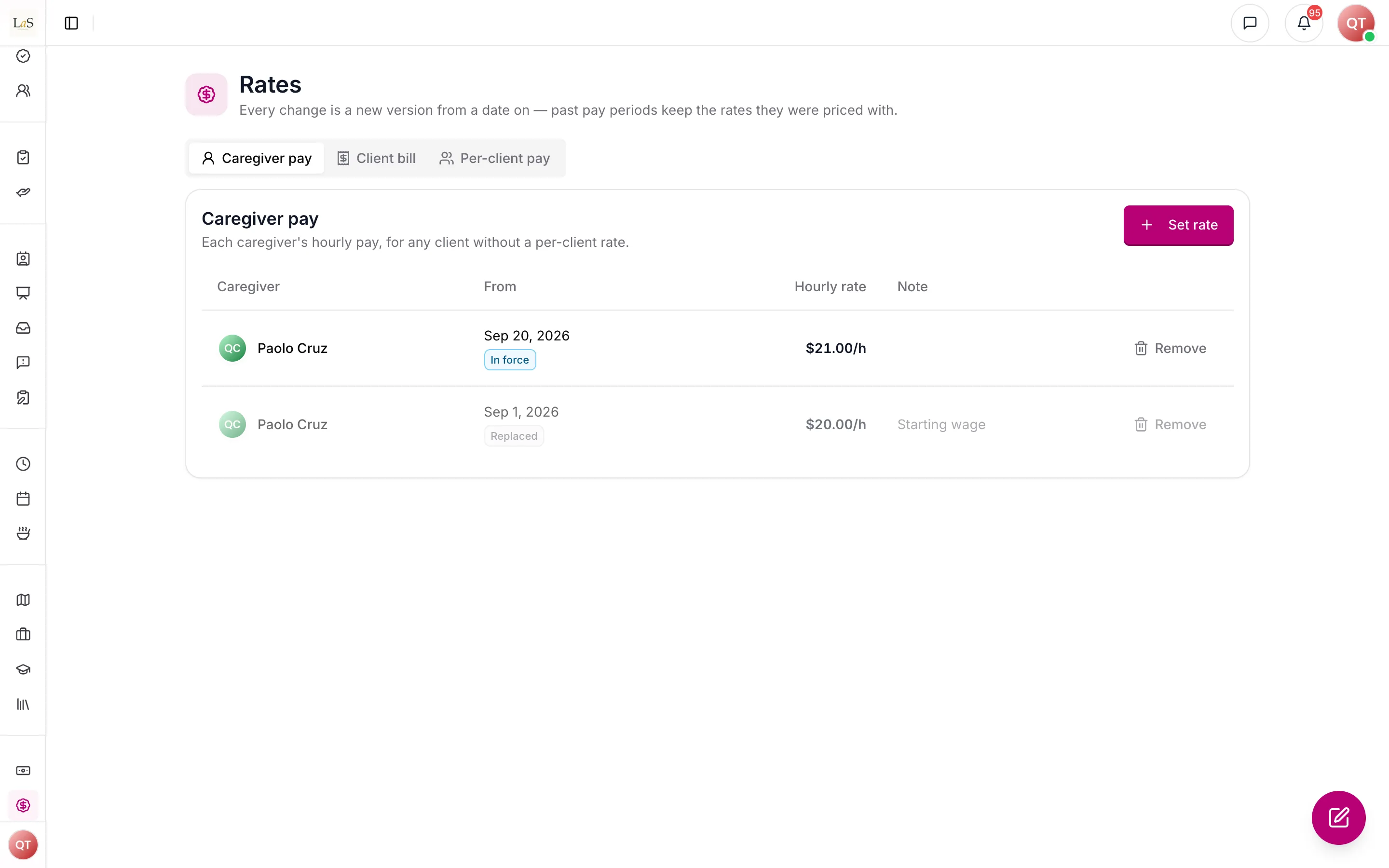
Every rate change is a new version; past pay periods keep the rates they were priced with.
Every rate is a version that takes effect from a date. Raising a care provider's pay from the 1st adds a new version from the 1st; it does not overwrite the old one, so the periods already priced at the old rate keep it and the history shows both. A per-client rate can also be cleared from a date, which puts that care provider back on their default for that client.
Rates are set on the Rates page, which shows every version and its history, and also where the person already is: a care provider's default pay on their profile; their pay for one client on their row of that client's care team, which shows the default, marked "(default)", when there is no per-client rate; and a client's bill rate on the client's service details. When a bill rate is set, the rate on the client's signed care proposal may be offered as a starting value. It is only a suggestion — the proposal is never read as the bill rate.
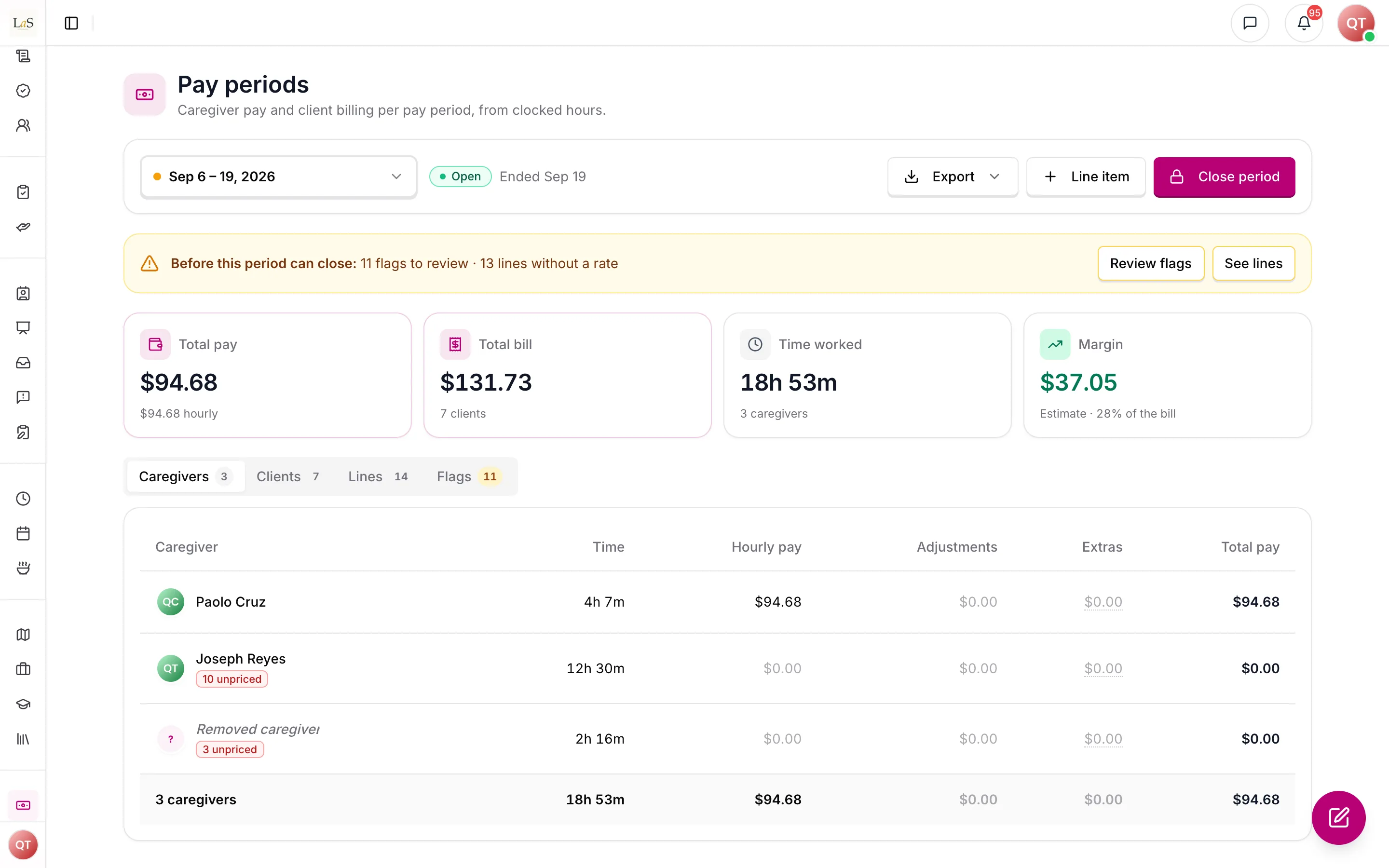
A timesheet with no pay rate or no bill rate in force on its date is unpriced. Unpriced is not zero: it is shown as missing, and it keeps the period from closing until someone sets the rate.
Hours
Hours come from clocked (see Scheduling & Shifts), and are paid to the care provider on the timesheet — after a handover, whoever actually worked that part of the visit. A timesheet is dated by the client's local date at its clock-in, and the whole timesheet belongs to that date: a visit from 10 p.m. to 6 a.m. is never split across midnight or across two periods. A timesheet still clocked in counts as no time at all until it is closed. Finance shows billable totals; it does not break a visit down by task.
Every timesheet records, when it is created, which client it was for, the client's time zone, and the shift's scheduled start and end. It carries those facts itself so that it can still be dated and priced after its shift is gone — and a shift can now go without taking its hours with it. Deleting a shift keeps its timesheets: any still open is closed, each is marked Shift deleted, and each goes on being paid and billed.
Pay periods and rounding
Each agency chooses how its pay periods are cut — weekly, every two weeks (the default), twice a month (the 1st to the 15th, then the 16th to the end of the month), or monthly — the date the first period starts, and the day its workweek starts (Sunday unless changed). The workweek is used for one thing only: counting a care provider's hours for the over-40 flag. A settings change never reaches back into a closed period; it takes effect from the day after the last closed one.
The agency also picks how worked time is rounded: to the exact minute, or to the nearest 5, 6 or 15 minutes. Rounding applies once, to each timesheet's total duration — never to the clock-in and clock-out separately — and halves round up. Money is then rounded to the cent once per line, so a period's totals are exact sums of its lines.
Flags
Anything a person should look at before the money is final is raised as a flag on the period — a clock-in well before the scheduled start, a clock-out the system made rather than the care provider, a timesheet still open or missing or added by hand, a care provider over 40 hours in a workweek, a very long timesheet, time clocked on a cancelled shift, a wallet refund, or deductions larger than someone's gross pay. Every flag must be either corrected — the data fixed so the flag no longer applies — or reviewed, with an optional note, before the period can close. A review is tied to the exact facts the flag looked at: change them, and the flag comes back for a fresh look.
Closing a period, and changes after it
Periods close oldest first, and a period can close only once it is over for every client. The person closing sees the period's lines, totals and any remaining blockers; when they close it, the system prices it again, and if anything moved since they looked, the close is refused and the page reloads with the new figures. What they saw is exactly what is frozen.
A closed period never reopens — but the work does not stop at the close. A timesheet is corrected the following week, a forgotten one is added, a raise is back-dated. Each such change lands in the earliest open period as an line: what the changed thing is worth now, minus what the closed period froze for it. If the change is undone before the next close, the difference is zero and no line appears.
Line items and wallet refunds
Pay is not only hours. Someone with close permission can add a bonus, a reimbursement, or a deduction for a care provider, each with a reason and a date. None of them is billed to the client. A deduction is allowed to exceed what the care provider earned in the period — it is flagged, and their net pay is shown below zero rather than quietly clamped.
The fourth kind, a , is never typed. When a care provider buys a client's essential needs and records on their phone that they paid themselves ("I paid myself"), the agency owes them that money. Once the request completes, Finance adds a refund line for them, for the recorded cost of those purchases, to be paid with their wages. It needs a receipt photo before it can be approved, which a care provider takes with the phone's camera. This is not permission to front the money — Anaya Wallet still says a care provider must never be asked to (). It makes the times they did visible, and repaid.
Correcting a timesheet
A care provider forgets to clock out; a phone dies at the door; a shift was worked and nobody clocked in at all. Staff with the timesheet-correction permission can correct a timesheet's clock-in or clock-out, giving a reason, or add the missing timesheet to a past shift. The times first recorded are never lost: they stay on the timesheet, shown struck through beside the corrected ones, and every change keeps who made it, when, and why. Times are typed and shown on the shift's clock — the client's — not the reader's: an admin in Manila correcting a Chicago shift types Chicago times. A correction to a timesheet in a closed period does not reopen it; it arrives in the open period as an adjustment.
Margin and exports
Each period shows its margin — what is billed, less everything paid — as an estimate for the agency's own use. Each period can also be downloaded as three spreadsheets: payroll, one row per care provider; billing, one row per client; and line detail, one row per line, for anyone who needs to check a figure against the timesheet behind it.
Rules
Implementation status — audited against
apps/backend/src/finance,apps/backend/src/shifts/services/timesheet-corrections.service.ts, andapps/web/app/(app)/(admin)/dashboard/financeon 2026-09-23. ✅ In code · ⚠️ Partial (built, but doesn't fully match the rule) · 🚧 Spec only (not yet built).
- FIN-1 — Every rate in Finance is an hourly rate stored exactly in whole cents, as a version that takes effect from a calendar date. A change adds a new version and never edits an old one, so every past period keeps the rate it was priced with; setting a rate on a date that already has a version replaces that version, and the history keeps the one it replaced. A care provider's pay for one client on one day is their per-client pay rate for that client if one is in effect, else their default pay rate, else nothing — and a line with no pay rate is unpriced (), never priced at zero. A per-client pay rate can be cleared from a date, after which the care provider is paid their default for that client again. Pay rates are set on the Rates page, which shows every version and its history, and inline where the person already is: the default on the care provider's profile, and the per-client rate on the care provider's row of that client's care team, which shows the default and says "(default)" when no per-client rate exists. (✅ In code —
resolvePayRateinfinance/engine/pricing.tsreads the per-client version, then the default, then returns nothing; a cleared per-client rate is a version with no amount. Versions live infinance_rate_versionsand are never edited in place) - FIN-2 — A client has one : the hourly rate billed for every hour worked for them, whichever care provider works it, versioned exactly like a pay rate (). It is set in Finance — on the Rates page or on the client's service details — and nowhere else decides it: the rate on the client's signed care proposal may be offered as a starting value, as a suggestion only, but neither the proposal nor Base Rates is ever read as a bill rate, and there is no fallback, so a client with no bill rate leaves their lines unpriced. Any rate version, pay or bill, can be removed, and every removal is recorded in the activity log (). (✅ In code —
resolveBillRateinfinance/engine/pricing.tshas no fallback; the proposal only pre-fills the field in the set-rate dialog) - FIN-3 — Each agency sets how its pay periods are cut — weekly, every two weeks (the default), twice a month (the 1st to the 15th, and the 16th to the end of the month), or monthly (calendar months) — the date the first period starts, and the day its workweek starts (Sunday by default), which is used only to count hours for the over-40 flag (). For twice-a-month and monthly periods, a first-period date that is not on one of those boundaries gives a short first period, and the calendar runs on its normal boundaries from there. A change to these settings never rewrites a closed period: until the first period closes a change redraws the whole calendar, and after that it takes effect from the day after the last closed period. (✅ In code —
finance/engine/calendar.ts; settings are kept as a history of dated versions infinance_settings, never edited in place) - FIN-4 — Hours come from clocked timesheets, and a timesheet's hours are paid to the care provider on that timesheet. A whole timesheet is dated by the client's local date at its clock-in and belongs entirely to that date and that period: it is never split at midnight. A timesheet still clocked in counts as 0 minutes until it is closed. Every timesheet records, at the moment it is created — at clock-in, or when added by hand () — which client it was for, the client's time zone, and the shift's scheduled start and end, so it can be dated and priced even after its shift is gone. Timesheets recorded before this existed are brought up to the same shape by a one-time data migration (147). Finance shows billable totals only, never a per-task breakdown of a visit. (✅ In code —
shifts/utils/timesheet-snapshot.util.tswrites the snapshot at clock-in and on a hand-added timesheet;timesheetLocalDateinfinance/engine/pricing.tsdates a timesheet in the client's zone, and an open timesheet prices at 0 minutes. Migration 147 is written; see Known gaps for its run status) - FIN-5 — Worked time is rounded by an agency setting: exact minutes, or the nearest 5, 6 or 15 minutes. The rounding applies to each timesheet's total duration — never to the clock-in and clock-out separately — and halves round up. With exact minutes, worked time is rounded half up to the whole minute; with an increment, the total is rounded straight from the exact clock times to the nearest increment, so no time is ever rounded twice. Under 15-minute rounding a visit of 3 hours 7½ minutes is paid as 3 hours 15 minutes. (✅ In code —
minutesRoundedinfinance/engine/pricing.ts, integer arithmetic only) - FIN-6 — Money is kept in whole cents. Each line is priced once — its rounded minutes times its hourly rate — and rounded half up to the cent at that one step, so every total is the exact sum of its lines and an adjustment is the difference between two rounded lines. A raise from $20 to $22 an hour, back-dated over a 247-minute visit, therefore adjusts pay by $8.24 ($90.57 less $82.33), not the $8.23 that 247 minutes at $2 an hour would come to. (✅ In code —
lineCentsinfinance/engine/pricing.ts) - FIN-7 — Deleting a shift must never delete the hours worked on it. When a shift or its schedule is deleted, its timesheets are kept: any still clocked in is closed, each is marked Shift deleted, and each goes on being paid and billed from what it recorded at creation (). A timesheet with no client or time zone — possible only for older records the migration in has not yet reached, or for one whose shift was deleted before this rule and whose client cannot be recovered — is an : it is dated on the care provider's own time zone, left unpriced, and flagged (). Reviewing that flag leaves the timesheet out of the period, shown as Left out, rather than blocking the close forever. (✅ In code — the timesheets are kept by
shifts/utils/preserve-timesheets.util.tsbefore every production shift and schedule delete, andtimesheet-write-guards.spec.tsfails the build on any timesheet delete outside test and QA tooling; a reviewed incomplete record is priced at zero and badged "Left out") - FIN-8 — Staff with the timesheet-correction permission may correct a timesheet's clock-in or clock-out, and must give a reason. The times first recorded are kept and shown struck through beside the corrected ones, and every change is kept on the timesheet — who made it, when, and why — and recorded in the activity log (). A corrected timesheet must be in order and not in the future; it can be at most 24 hours long, or the scheduled length plus 4 hours if that is longer; it must sit within 24 hours of the shift's scheduled window; and it must not overlap another timesheet of the same care provider. While a timesheet is still clocked in, only its clock-in can be corrected — its clock-out goes through the existing force clock-out. Add missing timesheet is only for a shift whose scheduled end has passed, that has a care provider, and that has no timesheet at all; a timesheet added by hand is always flagged (). Times are typed and shown on the shift's clock — the client's — not the reader's: an admin in Manila correcting a Chicago shift types Chicago times. A correction to a timesheet in a closed period changes nothing already closed; it is carried forward as an adjustment (). (✅ In code —
shifts/services/timesheet-corrections.service.tswith its limits inshifts/utils/timesheet-correction.util.ts; a write succeeds only if the times are still the ones the person loaded. The permission sits on the shifts routes and is not gated by the Finance module. The dashboard dialogs type and show times on the shift's clock, per B-70) - FIN-9 — Everything a person must look at before a period closes is raised as a flag: clocked in early, more than a set number of minutes before the scheduled start (an agency setting, 15 by default); clocked out by the system — automatically, forced, or by a cancellation or deletion, but not a handover, and a clock-out someone has since corrected counts as looked at; still clocked in; missing timesheet, a worked shift with no timesheet; added by hand; (); over 40 hours in a care provider's workweek, counted across all their clients; a single timesheet of 16 hours or more; a cancelled shift with clocked time; a (), which cannot be reviewed until it has a receipt photo; and deductions exceeding gross pay, stating both amounts. Every flag must be corrected or reviewed, optionally with a note, before the period can close. A review holds only while the facts it looked at are unchanged: change the underlying data and the flag reopens for a fresh look. (✅ In code —
finance/engine/flags.ts: each flag carries a fingerprint of exactly the facts it read, and a review counts only while the fingerprint matches. Over 40 hours is deliberately a flag only — no overtime pay is computed; see Decisions needed) - FIN-10 — Closing a pay period requires the close permission. Periods close strictly in order, oldest first, and a period can close only once it has ended in every time zone the agency's clients are in, every line in it is priced, and every flag in it is settled (). Closing freezes every line exactly as the person closing it saw it: if anything changed between what they reviewed and the close, the close is refused and the page reloads with the new figures. A closed period is never reopened. (✅ In code —
closeinfinance/services/finance-periods.service.ts. "Ended for every client" is measured against the westernmost time zone on Earth, which is never earlier than any client's; the close re-prices the period and compares it with what was reviewed, holds a lock while it writes, and freezes the lines intofinance_cutoff_lines, which are never updated) - FIN-11 — Anything that changes a closed period afterwards — a corrected or added timesheet, a back-dated rate, a line item — appears in the earliest open period as an line, computed as what the changed thing is worth now minus what was frozen for it. Reverting the change before the next close leaves no line at all. Adjustments are derived by the system, never typed by a person. (✅ In code — derived in
finance/engine/compute.tsrather than stored: per subject and closed period, the value now less everything already frozen for it) - FIN-12 — Staff with the close permission may add three kinds of pay — a bonus, a reimbursement, or a deduction — each with a reason and a date. Line items are pay only and are never billed to a client. Reimbursements are exported in their own column because they are not wages. A line item cannot be dated in a closed period. A deduction larger than the care provider's gross pay is allowed but flagged (), and net pay is never clamped at zero. are the fourth kind, and nobody adds one by hand: when a care provider records on the phone that they paid for an essential-needs purchase themselves ("I paid myself", ), a refund line for them, for the recorded cost of those purchases, is created once the request completes — one per request and care provider, however many times the completion is replayed. A purchase marked "I paid myself" must carry what was paid, or there would be nothing to refund; the phone asks for it and the platform refuses one without it. A wallet refund needs a receipt photo before it can be approved, and care providers photograph receipts with the camera; they cannot upload one from the gallery. (✅ In code —
finance/services/finance-line-items.service.ts; refunds are raised byfinance/listeners/essential-need-refund.listener.tswhen a request completes and re-checked at every close in case that event was lost, keyed on the request and the care provider so a replay adds nothing;EssentialNeedsService.purchaserefuses a caregiver-paid purchase with no positive cost) - FIN-13 — A period's margin is its total bill minus its total pay, where pay includes every line item — bonuses, reimbursements and wallet refunds, less deductions — and every adjustment. It is an estimate for the agency's own use, not an accounting figure. (✅ In code — totals in
finance/engine/compute.ts) - FIN-14 — Every pay period can be exported as three spreadsheets (CSV): payroll, one row per care provider — hours, regular pay, adjustments, bonus, reimbursement, wallet refunds, deductions, a net pay estimate, and the number of workweeks over 40 hours; billing, one row per client; and line detail, one row per line, with clock times in UTC beside a time-zone column, the originally recorded times where a timesheet was corrected, and its flags. Free text that a spreadsheet would run as a formula is neutralised. (✅ In code —
finance/engine/csv.ts) - FIN-15 — Finance is governed by four permissions: view (see pay periods, totals, flags, rates and the inline rate fields, and download the exports), rates (set and remove pay and bill rates), close (change pay-period settings, add and remove line items, review flags, and close a period), and timesheet correction (correct and add timesheets, ). Owners and SuperAdmins always hold all four; Admins hold all four by default; a custom role holds none until an Owner grants them, because Finance shows every care provider's pay. Agencies whose Admin role carries stored permission overrides receive the four through a data migration (084). Finance is coming soon in production — hidden in the sidebar, with its pages showing the module notice — and open on staging. (✅ In code —
finance:view,finance:ratesandfinance:closeon every/financeroute, all behind the Finance module gate;timesheets:manageon the shifts routes, outside it) - FIN-16 — Every change in Finance is recorded in the activity log: pay-period settings saved, a rate set or removed, a line item added or removed, flags reviewed, a period closed, and a timesheet corrected, added by hand, or kept after its shift was deleted. (✅ In code —
FINANCE_SETTINGS_UPDATED,FINANCE_RATE_SET/FINANCE_RATE_REMOVED,FINANCE_LINE_ITEM_ADDED/FINANCE_LINE_ITEM_REMOVED,FINANCE_FLAGS_REVIEWED,FINANCE_CUTOFF_CLOSED, andTIMESHEET_CORRECTED/TIMESHEET_ADDED/TIMESHEET_PRESERVEDactivity-log events carry the acting user and timestamp) - FIN-17 — Every Finance record — pay-period settings, rate versions, closed periods and their frozen lines, line items, and flag reviews — belongs to exactly one agency, and is never seen by, or priced into, another. (✅ In code — every finance collection carries the business, and every query names it explicitly, including the refund listener and other paths that run outside a signed-in request)
Who can do what
| Action | Who |
|---|---|
| See pay periods, totals, flags, rates and the inline rate fields; download the exports | Staff with the finance view permission — Owners and SuperAdmins always; Admins by default |
| Set or remove a pay rate or a bill rate | Staff with the finance rates permission — Owners and SuperAdmins always; Admins by default |
| Change pay-period settings; add or remove a bonus, reimbursement, or deduction; review flags; close a pay period | Staff with the finance close permission — Owners and SuperAdmins always; Admins by default |
| Correct a timesheet's clock times, or add a missing timesheet | Staff with the timesheet-correction permission — Owners and SuperAdmins always; Admins by default. It can be granted to a scheduler without any finance permission |
| Say a purchase was paid with their own money ("I paid myself") | The care provider recording the purchase on the mobile app (per ) |
| Grant any of the above to a custom role | Owner, and staff granted the role-configuration permission — a custom role holds none of them until granted |
Decisions needed
- Should the over-40 flag ever compute overtime pay? Today it is deliberately a flag only (): Finance counts each care provider's hours per workweek across all their clients, asks a person to look, and pays every hour at the same rate. The payroll export carries the number of weeks over 40 hours so a payroll provider can apply overtime itself. Overtime rules vary by state and by working arrangement, which is why nothing is computed yet. Options: keep it a flag and leave overtime to payroll; compute weekly overtime at a set multiple as its own line; model per-state rules as an agency setting.
- Should line items have their own permission? Adding a bonus, reimbursement, or deduction rides on the close permission today, with pay-period settings, flag reviews, and closing (, ). That keeps everything that finalises pay in one pair of hands, but it means nobody can enter a bonus without also being able to close the period. Options: keep line items with close; give them a separate permission, so a payroll clerk can enter them while someone else closes; or split deductions out on their own, since a deduction takes money from a care provider.
How is this page?
Last updated on