Care Proposals
Part of the Anaya Care Handbook — the source of truth for how the product must behave. When the product needs to change, change this document first, then make the system match it.
What this covers
A care proposal is the agency's priced offer of care for a prospective client. It bundles the client's information, its own assessment on the agency's , a written care plan, a service definition (type of care, the agency's service add-ons, weekly schedule), and a rate calculation (priced from the base rates and the chosen add-ons). The proposal moves through an internal review and approval workflow, is then emailed to the family's representative, and — once the representative signs and accepts it — is converted into a managed client, at which point the proposal enters service and its lifecycle ends.
The proposal's client information is the same shared intake shape used by the initial assessment and (later) the client record, so converting an initial assessment into a proposal — and the proposal into a client — carries it across without re-entry. The intake's answers are carried into the proposal's assessment, and the proposal's into the client's, as the Assessment Builder says (, ).
Template-driven intake — decided 2026-10-01, live since 2026-10-06. The proposal's assessment moved from the fixed Simplified Routine Task Inventory to the agency's proposal template, value-added services gave way to the agency's service add-ons, and the assessment-score uplift left the rate. , , , , , and were rewritten for it, and added.
Key terms
- Care proposal — the agency's complete, priced offer of care sent to a family for acceptance.
- Proposal template — the published template the agency chose at agency setup for its proposals; every new proposal starts its own assessment on that template's live edition (ABLD-35).
- Service add-on — a service the agency offers on top of care, with a description and an optional extra price per hour. The proposal keeps a copy of each one chosen, as it was then (ABLD-38).
- Care Circle — everyone involved in the client's care other than the client (defined in full on Clients); it replaces the old "family contacts" list on the proposal.
- Responsible party — the one Care Circle member (or the client themselves) who authorizes the care plan and is the default recipient of the emailed proposal; resolved, never invented.
- Proposal addressee — the people the proposal's cover letter is written to (the client, one or more Care Circle members, or both); the choice sets the cover-letter tone.
- Cover letter / care goal / care areas — the parts of the AI-generated care plan: an opening cover letter, a care-goal statement, and nine care-area lists. All eleven are editable and separately reviewable.
- Cover-letter tone — the voice of the cover letter, derived from the addressees: self-directed, collaborative, or surrogate-led. There is no manual tone picker.
- Representative — the portal login given to a Care Circle member so they can view the proposal, request changes, and sign to accept it. An account is created automatically for each addressed Care Circle member who has an email when the proposal is sent.
- Reviewer — an agency staff member assigned to check the proposal section by section before it can be approved.
- Flag — a reviewer's objection on one section of the proposal; every flag must be resolved before approval.
- Reviewer correction — a change a reviewer makes to the proposal themselves, in place, during their open round, instead of flagging it back to the author. Always carries a written note and takes a version snapshot.
- Review round — one full cycle of review. Resolved flags from an earlier round never block a later round. On screen, "Round" always means a review round.
- Revision — one time changes were requested, by reviewers or by the family. The proposal's status badge and its history count revisions: the history's first card is "Original proposal", then "Revision 1", "Revision 2"… Revisions and review rounds diverge once the family has asked for changes, which is why they carry different names.
- Version snapshot — a frozen copy of the proposal taken at each milestone, so reviewers can see exactly what changed since they last looked.
- Content diff — the section-by-section comparison of two version snapshots (or a review's snapshot against the latest), surfaced with "Changed" badges during review.
- Word document (DOCX) — the canonical, Word-editable proposal artifact; every PDF (view, preview, signing, email, archive) is a conversion of it.
- Signed copy — the accepted proposal's Word original and its signed PDF rendering, both stored permanently once accepted.
- In Service — the final status of a successful proposal, reached when care actually begins for the client.
How it works
The five sections
Every proposal holds the same five sections: client information (including the and a resolved ), the on the proposal template, the written care plan (a cover letter, a care goal, and nine care areas), the service definition (with its Add-ons), and the rate calculation. Every proposal gets its own assessment at creation — Not Started when created directly, or carrying the intake's answers when converted from an initial assessment (ABLD-36). A proposal is complete when the client's first and last name, birth date, city, and region are filled in, there is at least one Care Circle member with a name, email, and relationship together with a resolved responsible party, the assessment is Completed — every question the proposal template needs answered, and no answer Anaya suggested left to review — a service type is chosen, and at least one active hourly rate exists. An incomplete assessment is named as "Assessment section is incomplete", with how many questions are still needed and how many suggestions wait for review.
AI generation of the care plan
The proposal's care plan — its cover letter, care goal, and nine care areas — can be drafted by a durable AI run. The run writes into the existing proposal (it never creates a new one), only one generation is allowed in flight per proposal, and it is tenant-scoped. It never fabricates: it is grounded only in the proposal's own intake — the client, the Care Circle and addressees, the schedule, and the narrative, which it reads as background about the person and their home but never quotes or retells — the answers on its own assessment (drafts included), its chosen service add-ons, and the business knowledge base, with the care manager's additional instructions taking priority. When a high-value clinical fact (mobility, cognition, continence, a diagnosis, or who the proposal is addressed to) is missing or ambiguous, the run pauses and asks the care manager one source-cited, choice-based clarifying question, then folds the answer back in before finishing — there is no separate approve/reject review gate. The is derived automatically from the addressees: self-directed (addressed to the client), collaborative (client plus others), or surrogate-led (others only). Output is written to a Word document, from which every PDF is derived.
Lifecycle
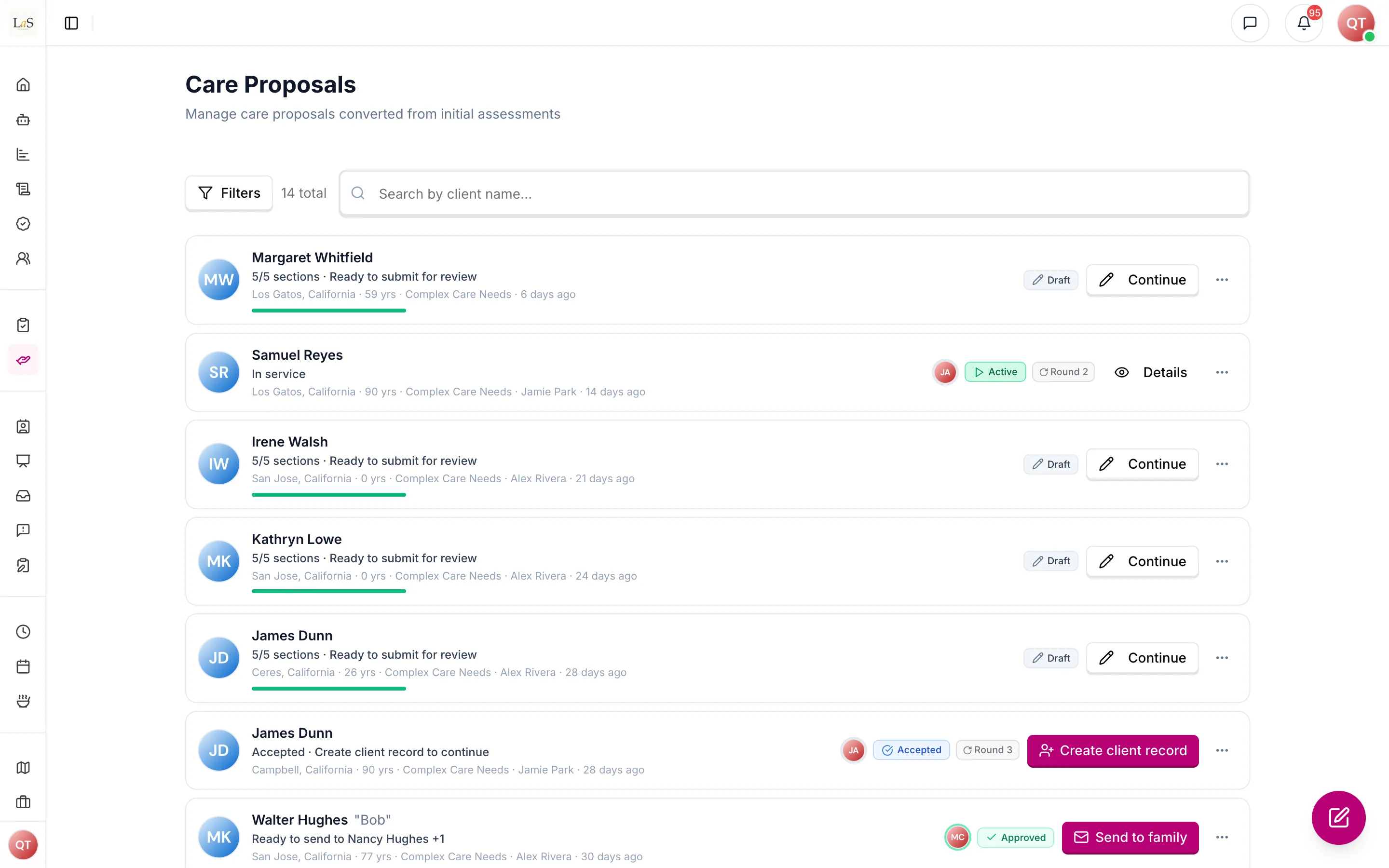
- Draft — being written by its author.
- Pending Approval — submitted to a named group of reviewers.
- Approved — passed internal review; ready to send to the family.
- Sent to Representative — emailed to the family contact for a decision.
- Revisions Needed — sent back for changes, either by internal reviewers or by the representative (the history records which).
- Representative Accepted — signed by the family; ready to create the client record.
- Declined — the representative turned the proposal down outright (terminal).
- In Service — care has started; the proposal is finished (terminal).
- Cancelled — abandoned at any earlier point (terminal).
Authors and editors move proposals along the main path (submit, withdraw, resubmit), and may cancel a proposal that has not been approved yet. Approvers decide review outcomes and may cancel at any point before the proposal ends. Representatives can only accept, request changes, or decline. Which moves a person may make is resolved by permission, in precedence: Care Proposals Approve (admin roles — the full forward path, withdraw, and cancel) outranks Care Proposals Manage (sequential moves only, no skipping steps, plus cancelling before approval) outranks Care Proposals Respond (a representative — accept, request changes, or decline, and only from Sent to Representative). Four moves can never be picked by hand: Approved and the internal Revisions Needed only happen by submitting a review round, Sent to Representative only happens by successfully emailing the proposal, and only happens by creating a client from an accepted proposal. The UI presents named actions (Submit for Approval, Send to family, Create Client Record, Accept, Request Changes, Decline…), never a raw status picker, and the proposal's header always leads with the next step — at Approved that is Send to family.
Internal review
The author submits the proposal naming one to twenty reviewers from their own agency. Reviewers go through the proposal section by section, approving or flagging each one — or, if they are authorized to approve, correcting it in place and marking it corrected with a note — and then submit the round: if any flag is still open the proposal goes to Revisions Needed, otherwise it is Approved. The author resolves each flag by recording what was changed, and once every flag is resolved may re-request review, which returns the proposal to Pending Approval with the same reviewers. Each review is stamped with the version snapshot the reviewer was looking at, so the reviewer can later see a section-by-section comparison of what changed since they flagged it. This content diff is a first-class part of review — "Changed" badges on every reviewable section, a show/hide-changes toggle that opens by default on a re-review, and diff viewers for the narrative, client information, assessment, care plan, schedule and rates let a reviewer compare their filed snapshot to the latest, or any two versions. On a re-review, Updates since last review lists each flag the author resolved with the note saying what they changed. The review outline counts progress over the proposal's reviewable sections ("5 of 17 sections reviewed").
Sending, signing, and conversion
Once approved, staff email the proposal to its addressed Care Circle members. Each addressee who has an email automatically gets a representative account and a personal link to view the proposal online, and the email can attach the PDF and/or the Word file. Every send, and whether each email was delivered and opened, is recorded on the proposal. If some addresses fail, the proposal still moves to Sent to Representative and the sender is told which addresses failed, so they can resend. The representative either signs the proposal electronically — which stores both the signed PDF and the canonical signed Word document permanently, and triggers a welcome email to the responsible party — or requests changes, sending it back to Revisions Needed for the team to revise and re-send — or declines the proposal outright, which ends it permanently (who, when, and an optional reason are recorded; the agency is notified). Declining is for a firm "no" (the family is not going ahead), unlike requesting changes, which keeps the proposal alive for another round. A declined proposal can never be revived; if the family later changes their mind, staff duplicate it into a fresh Draft and start the lifecycle again.
After acceptance, staff create the client from the proposal. This creates a new client record in Draft status carrying the proposal's client details — including its Care Circle, responsible party, and care-decision involvement, with no re-entry — a copy of the proposal's assessment (Completed when the proposal's was, otherwise a Draft; ABLD-37), and its service type, but no shifts and no caregiver assignments; scheduling and staffing happen afterwards in Care Plans and Scheduling. Every Care Circle member with an email is automatically provisioned portal access. Creating the client links the two records and moves the proposal to ; the client stays Draft until its first care plan is published, which is what makes it Active.
Changing the generated proposal by asking
Once Anaya has drafted the proposal, a care manager can change it by typing what they want in plain words beside the document — "the cover letter is too formal, warm it up", "shorten the mobility recommendations" — rather than editing every affected paragraph by hand. Each request revises the proposal as it currently stands, including any wording staff have already fixed themselves, and leaves alone whatever the request did not reach. Requests are answered one at a time, and every one is kept with the proposal along with what it changed — including requests that failed or were cancelled, so a request that changed nothing is never mistaken for one that was applied. An assigned reviewer may correct wording in place () but may not ask for a refinement: re-running generation on the document you are judging is not a review. See AI-34 – AI-38.
Rules
Implementation status — audited against
apps/backend/src/care-proposals,@anaya/shared/care-proposal-transitions.ts, the AI care-proposal agent (apps/backend/src/ai/agents/care-proposal), the DOCX/PDF services (apps/backend/src/docx,apps/backend/src/pdf), the platform activity log (apps/backend/src/platform-logs), and the shared intake/care-circle package on 2026-08-14. Rules rewritten on 2026-10-01 for template-driven intake were re-audited on 2026-10-06, when it shipped. ✅ In code · ⚠️ Partial (built, but doesn't fully match the rule) · 🚧 Spec only (not yet built).
- CP-1 — A care proposal can be created in three ways: directly by agency staff, by converting a completed initial assessment (which can be converted only once, and only when Completed), or by duplicating an existing proposal. All three start the proposal in Draft. (✅ In code)
- CP-2 — Every proposal belongs to exactly one agency. Staff can only ever see or act on proposals of their own agency, including resolving and un-resolving review flags. (✅ In code)
- CP-3 — Every proposal gets its own assessment at creation, on the agency's proposal template: Not Started for a directly created proposal, and a Draft copy of the original's answers for a duplicate — except a signature and any answer to a question its template asks fresh each time (Carry the last answer forward off), which are never copied (ABLD-29) — or, when the agency has chosen a different proposal template since the original was made, Not Started on the current one (ABLD-35). A converted proposal copies the intake without loss — client information (Care Circle, responsible party, addressees, care-decision involvement, benefits), service type, the chosen service add-ons as the intake kept them, the weekly schedule, the rate computation (copied as-is, nothing recomputed) and the narrative — and its assessment carries the intake's answers as ABLD-36 says: copied as a Draft on the same template, suggested by Anaya on a different one, never Completed by copying. Later edits to either side do not affect the other. (✅ In code)
- CP-4 — A proposal's status can only move along the lifecycle above, and only by a person whose permission allows that move. Moves resolve by precedence: Care Proposals Approve (full forward path, withdraw, cancel) > Care Proposals Manage (sequential moves, no skipping, and cancelling before approval) > Care Proposals Respond (a representative — accept, request changes, or decline). Any other status change must be refused. (✅ In code)
- CP-5 — Submitting for approval requires naming 1–20 reviewers, each an active member of the same agency who is authorized to review proposals. (✅ In code)
- CP-6 — Every status change except cancellation and decline requires the proposal to be complete (see "The five sections"). Cancellation and decline are always allowed regardless of completeness, as is withdrawing a submitted proposal back to Draft (see ). (✅ In code)
- CP-7 — Approved and the internal Revisions Needed can never be chosen by hand; they can only result from submitting a review round — including when the reviewer corrected the sections themselves (). (✅ In code)
- CP-8 — A review round cannot be submitted until at least one section has been reviewed, and a proposal cannot be approved while any flag in the current round is unresolved. (✅ In code)
- CP-9 — Only flagged sections can be resolved, and resolving always requires a written note saying what was changed. The author resolves flags they have addressed; a reviewer who corrects a section in place () resolves their own flag on that section at the same time, under the same note requirement. A reviewer can never resolve another person's flag. (✅ In code)
- CP-10 — Review can only be re-requested when the proposal is in Revisions Needed, the current round has at least one flag, and every flag has been resolved. Re-requesting returns the proposal to the same assigned reviewers unless new ones are named. (✅ In code)
- CP-11 — Each fresh submission for approval, and each fresh send to the representative after revisions, starts a new review round. Resends and withdrawals do not. Flags resolved in an earlier round never block a later round. (✅ In code)
- CP-12 — A reviewer can only edit or delete their own review comments. (✅ In code)
- CP-13 — A version snapshot must be taken at every milestone (submission, resubmission, approval, send, request for revisions, acceptance) and at every reviewer correction (), so the change a reviewer made in place is always diffable. A snapshot captures every reviewable surface, the guided narrative included. Every review records which snapshot the reviewer saw, and reviews cannot be filed before the first snapshot exists. (✅ In code — snapshot creation is awaited; if it fails, the history entry and the current status are rolled back together () so a proposal is never left in a reviewable status without a version stamp)
- CP-14 — Sent to Representative only happens as the result of successfully emailing an Approved, complete proposal with no unresolved flags. Every send — and every resend — must include at least one Care Circle member who has an email, the only recipient who can accept (, ); copies to other addresses may go alongside that person, never instead of them. A Responsible Party's email corrected while sending counts. A client who is their own Responsible Party has no email, so a Care Circle member with an email must be a recipient. A send without one is refused before any email goes out, and the proposal stays where it was. Every send and its delivery outcome is recorded on the proposal, and a send that fails for some recipients says which ones. (✅ In code — sending auto-moves an Approved proposal to Sent to Representative, and per-recipient delivery statuses are updated as they arrive; the Care Circle recipient rule is checked by the Send dialog and enforced by the API)
- CP-15 — Emailing the proposal automatically creates a representative account for each addressed Care Circle member who has an email. People who are not Care Circle members never get an account: they receive a copy of the link they cannot act on. (✅ In code)
- CP-16 — Only a representative whose email matches an addressed Care Circle member can accept the proposal, request changes, or decline it. The client cannot accept by link, even as their own Responsible Party: client records hold no email. Responding to proposals is inherent to the Representative role and cannot be removed by permission configuration (ACCESS-35). (✅ In code — email match enforced for accept, request-changes, and decline)
- CP-17 — Accepting a proposal always requires the representative's electronic signature. Both the signed PDF and the canonical signed Word document are stored permanently with the proposal, and the responsible party receives a welcome email. (✅ In code)
- CP-18 — The proposal document — both the PDF and the Word file — can only be downloaded once the proposal is Approved, Sent to Representative, Representative Accepted, or In Service. A preview is always available to staff authorized to view the proposal. (⚠️ Partial — the download status gate is enforced server-side, but the preview is only gated in the web app, not the backend)
- CP-19 — A client can only be created from a proposal that is complete and Representative Accepted, and only by staff authorized to do so. Creating the client is the only path to (there is no separate “Start Service” status action). The new client starts in Draft carrying the Care Circle, responsible party, and care-decision involvement (no re-entry), with a copy of the proposal's assessment (ABLD-37 — Completed when the proposal's was, otherwise a Draft) and portal access provisioned for Care Circle members with an email — but no shifts and no caregiver assignments. The proposal moves to and is linked to the client; the client stays Draft until its first care plan is published. If a client is already linked, re-calling create is idempotent and repairs the In Service transition. (✅ In code)
- CP-20 — , Cancelled, and Declined are terminal: a proposal in any of these statuses can never change status again. (✅ In code)
- CP-21 — Approver-level staff (Care Proposals Approve) can cancel a proposal from any non-terminal status. Staff with Care Proposals Manage — the care managers who author most proposals — can cancel one that has not been approved yet: from Draft, Pending Approval or Revisions Needed. From Approved on, cancelling needs an approver. The Cancel action is offered exactly when the server would accept it. (✅ In code — decided 2026-09-26; until then the rule said approvers only, while the product offered Cancel to care managers and then refused it)
- CP-22 — Authorship can only be transferred to someone in the proposal's own agency who is allowed to create and edit care proposals, and never to the current author. Eligibility follows that permission rather than a list of role names, so staff on a custom role that authors proposals are eligible on the same terms as an Admin. The list offered and the check enforced are the same rule, so a name that appears can always be transferred to. (✅ In code)
- CP-23 — Visibility: staff with full view rights see every proposal in their agency; staff with limited view rights see only proposals they authored or were assigned to review — including each proposal's assessment; representatives see only proposals addressed to their email. (⚠️ Partial — the scoped visibility filter exists and covers the proposal list, but not every endpoint applies it; see Known gaps)
- CP-24 — The author can withdraw a submitted proposal back to Draft at any time before the review round is decided, and submit it again later. (✅ In code — withdrawal uses the Pending Approval → Draft move and is exempt from the completeness check, so a proposal that became incomplete after submission can still be withdrawn for editing)
- CP-25 — When two people try to change a proposal's status at the same time, only the first change succeeds; the second is refused and must be retried against the new status. (✅ In code — status changes are written atomically with the expected current status as a precondition)
- CP-26 — Deleting a proposal also deletes its own assessment and its revisions, its version snapshots and its review records, and the migration archive entries kept for it; when a client is linked, that client's assessments go with the client. It either unlinks or (at the deleter's choice, offered only to someone who may also delete initial assessments) deletes the originating initial assessment. (✅ In code)
- CP-27 — A representative may decline a proposal that is Sent to Representative. Declining records who declined, when, and an optional reason, and moves the proposal to Declined — a terminal status. No signature is collected, no client is created, and the proposal can never change status again; to try again, staff duplicate it into a new Draft. The agency is notified when a proposal is declined. (✅ In code)
- CP-28 — AI generation writes the care plan (cover letter, care goal, and nine care areas) into the existing proposal — never a new one — with only one run in flight per proposal, tenant-scoped, and it never fabricates content. (✅ In code)
- CP-29 — Generation's human-in-the-loop is clarification-only: the run pauses and asks the care manager a single source-cited, choice-based question when a high-value clinical fact is unclear, and folds the answer back in before finishing. There is no approve/reject review gate. (✅ In code)
- CP-30 — Generation is grounded only in the proposal's own intake, the answers on its own assessment — drafts included, read as labelled context — its chosen service add-ons, and the business knowledge base (which fails soft), with the care manager's additional instructions taking priority. The intake includes the proposal's narrative (), which generation reads as background — it shapes which recommendations fit and how they are worded, and is never quoted, retold, or allowed to turn the proposal into a life story. (✅ In code)
- CP-31 — The Word document is the canonical proposal artifact; every PDF (view, preview, signing, email attachment, archived copy) is a conversion of it, and both the PDF and the Word file may be sent or downloaded. Its Services section lists the proposal's chosen service add-ons in their order — each one's name, its description (as bullets when it has more than one line) and "Additional $X.XX per hour" when priced — and is left out when none is chosen. It never prints the proposal's assessment answers, and never fixed service copy. (✅ In code)
- CP-32 — The proposal carries the producing business's own branding — accent colour, logo and footer — per RPT-26, so a family sees their agency's identity and never another agency's. (✅ In code)
- CP-32 — Client information is a (everyone but the client) with a resolved responsible party; the responsible party is never auto-invented, and completion is blocked without one. (✅ In code — see Clients for the model)
- CP-33 — The cover-letter tone is derived from the proposal's addressees — self-directed (client only), collaborative (client plus others), or surrogate-led (others only). There is no manual tone picker. The same tone governs every care-area recommendation: self-directed/collaborative uses "your caregiver will"; surrogate-led uses "The caregiver will" (or "can" for available support), never "your caregiver", and never the addressee's name in the third person. (✅ In code)
- CP-34 — The proposal rate is the matched city rate (else the state rate, else the global base rate), with overtime blended above 8 hours a day, a flat live-in rate at 16 hours or more, and each chosen service add-on's extra hourly price added on; no assessment score or answer changes it. Recalculating a draft proposal that carried the old score uplift drops it, while the figures stored on a proposal are never changed by the move to templates; the rate section is complete when at least one active hours bucket has a rate above zero. Which hour buckets the proposal's Hourly Rates Reference shows (its Show in PDF column, Included or Hidden) follows the weekly schedule: saving the schedule, or calculating rates, includes exactly the shift lengths the schedule uses, so a week of 3-, 5-, 7- and 8-hour shifts shows those four rows and no others. A row someone includes or hides by hand keeps that choice through later schedule changes and recalculations, and every other row keeps following the schedule. With no schedule yet, the 2-, 4-, 8- and 24-hour rows are shown. The initial assessment's rates follow the same rule and carry over as they are on convert (), and a proposal that has gone to the family is never changed. See Base Rates for the catalog. (✅ In code)
- CP-35 — A proposal's current status and its status history are one fact recorded two ways: the history is the ordered, user-visible record of every transition it has been through, oldest first, and the current status is always its newest entry. They can never disagree — a transition either records both or neither, and a rolled-back transition removes both. The proposal's own history is what the timeline shows and what review rounds are counted from; the platform activity log is a separate compliance record and is never read to build a proposal screen. (✅ In code)
- CP-36 — A reviewer who is authorized to approve proposals may correct a section in place instead of only flagging it — but only while their own review round is open: the proposal must be Pending Approval, the round must be the current one, and the reviewer must have started their review. Correcting happens in the review workspace itself; reviewers are never handed the author's editor. Every correction takes a version snapshot, is recorded against that section and on the review round, is written to the platform activity log, and requires a written note saying what was changed. A reviewer may never change the proposal's status by hand, and may never send, duplicate, delete, transfer, or commission an AI rewrite of the proposal — those stay closed to reviewers exactly as before. Outside an open round an assigned reviewer stays hands-off for the proposal's whole life. (✅ In code)
- CP-37 — Each care-area recommendation is one plain sentence of about 12–20 words, 28 at the most — long enough to name the action, the client-specific detail that makes it doable, and (when someone else must act on the output) who that is. Short enough to read at a glance. An item is finished when the caregiver knows what to do; restating a benefit ("to ensure dignity and comfort") is what pushes it past the budget. A short "so [who can act]" clause is allowed — "so they can be shared with her pharmacist" is a next step, not a benefit. A second short sentence is allowed only when a safety detail would otherwise be lost. Length is not thoroughness: three focused items beat one that tries to say everything. The cover letter and care goal keep their own, longer budgets. The 28-word ceiling is checked deterministically — an over-long item flags the care areas for a re-emit, naming which items to shorten. (✅ In code)
- CP-38 — Personal Care and Mobility are core areas: even when the functional answers on the proposal's assessment show the client managing on their own, the proposal still includes observe-and-maintain recommendations (respect independence, watch for changes, assist if asked). Only Memory Care and End of Life stay strictly gated on a documented need. When pets are in the home, light pet-related help belongs under Physical Health housekeeping. When a preferred language is known, the cover letter recommends a caregiver who speaks it, and Cognitive Support includes communicating in that language. Pets and the reason for seeking care are passed into generation as structured facts, not only as narrative. (✅ In code)
- CP-39 — The family never sees the agency's internal review. A representative is shown only the review rounds they took part in, numbered from 1 for them, and only the review entries written for the family — never an internal reviewer's comments, name or replies. Deciding a round's outcome still reads every entry. (✅ In code)
- CP-40 — A care proposal can't be created — directly or by converting an initial assessment — until the agency's setup is done (ACCESS-40): the request is refused with what is still missing. (✅ In code)
Who can do what
| Action | Who |
|---|---|
| Create a proposal (directly, by conversion, or by duplication) | Admin, Care Manager |
| Edit the proposal sections | Admin, Care Manager (the author and editors); assigned reviewers only in place, during their open round () |
| Set or override rates | Admin (Care Proposals Rates) |
| Choose the proposal's service add-ons, and fill and complete its assessment | Admin, Care Manager (Care Proposals Manage), while the proposal can be edited |
| Generate the care plan with AI | Admin, Care Manager (Care Proposals Manage) |
| Submit for approval / withdraw / resubmit | The author or any editor |
| Review sections (approve, flag, or correct in place) | Assigned reviewers with Care Proposals Review (Admin by default); correcting in place also needs Care Proposals Approve |
| Decide a review round (approve / send back) | Approvers: SuperAdmin, Owner, Admin |
| Resolve a flag (with a note) | The author — or the reviewer who raised it, when they correct the section themselves () |
| Email the proposal to the representative | Admin, Care Manager (Care Proposals Send) |
| Accept, request changes, or decline | The representative matching a listed contact |
| Create the client record (moves proposal to In Service) | Admin (Clients Manage) |
| Cancel | Approvers (SuperAdmin, Owner, Admin) at any point before the proposal ends; staff with Care Proposals Manage (e.g. care managers) until it is approved () |
| Delete | Admin |
| Transfer authorship | Admin (to anyone in the agency who can create and edit proposals, including custom roles) |
| See all proposals in the agency | SuperAdmin, Owner, Admin, Care Manager |
| See only proposals sent to them, and only the family's own review rounds () | Representative |
Decisions needed
- Must every proposal originate from an initial assessment? Today direct creation is fully supported, yet the product's own wording suggests proposals start from an assessment. Options: keep all three creation paths, or require a completed initial assessment before a proposal can exist.
- Should deleting a proposal delete its client? Today deleting a proposal also deletes the linked client, even one already receiving care. Options: block deletion once a client exists, unlink instead of delete, or keep the cascade.
- What is the representative's mobile journey? Representatives are onboarded as mobile users and the welcome email promotes the mobile app, but reviewing and accepting a proposal only works on the web. Options: build a mobile acceptance flow, or stop steering representatives toward the mobile app.
How is this page?
Last updated on